

- Local time
- 9:13 PM
- Messages
- 143
Hi,When i click the X3D folder on my pc i'm prompted to put in a
user name and password for network login which i've never had.
I've checked network and sharing settings and i can't see anything wrong.
This folder is to access a media server i've just got.
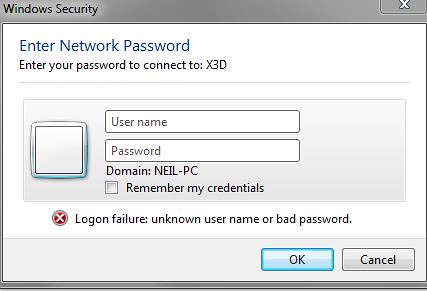
user name and password for network login which i've never had.
I've checked network and sharing settings and i can't see anything wrong.
This folder is to access a media server i've just got.

My Computer
- Computer type
- Laptop
- Computer Manufacturer/Model Number
- Samsung NP300E5A-A02DX
- OS
- Windows 7 home premium 64bit sp1
- CPU
- Intel Core i5
- Motherboard
- Manufacturer SAMSUNG ELECTRONICS CO., LTD
- Memory
- 8gb
- Graphics Card(s)
- Intel HD Graphics Family HD 3000
- Sound Card
- Realtek High Definition Audio
- Monitor(s) Displays
- Generic PnP Monitor on Intel HD Graphics Family
- Screen Resolution
- 1920x1080 pixels
- Hard Drives
- SAMSUNG HM641JI
- Keyboard
- Logitech K400 wireless
- Mouse
- Logitech M570 trackball wireless
- Internet Speed
- 75MB DL 16MB UL (Cooking with Gas)
- Antivirus
- Avast IS and MBAM Pro
- Browser
- Firefox