
Can't add a partition primary

Formatting

Before anything, if the disk is partly working, check the system files.
In the same elevated command prompt type sfc /scannow
Please note you must leave a space between sfc and /scannow
 

My Computer My Computer

Computer type
PC/Desktop
Computer Manufacturer/Model Number
custom build
OS
Windows
CPU
Intel i5 4670 3.4 GHz Haswell
Motherboard
Gigabyte H87M-D3H (Socket 0)
Memory
RAM 16GB Corsair Vengeance Pro (2x8) DDR 3
Graphics Card(s)
Nvidia GeForce GT-610
Sound Card
NVIDIA HD-Realtek HD-NVIDIA Virtual (WDM)-Intel Display
Monitor(s) Displays
Generic PnP Samsung / 46'' Samsung Smart TV
Screen Resolution
1366 x 768
Hard Drives
931 GB Western Digital SCSI Disk Device (SATA)
1862 GB Western Digital WD My Passport 3.0 USB Device (SATA)
931 GB Toshiba External USB 3.0 (SATA)
1862 GB Western Digital WD Elements 3.0 USB Device (SATA)
Keyboard
HID Keyboard Device
Mouse
Microsoft PS/2
Internet Speed
Down 40Mbps Up 2Mbps
Antivirus
Bitdefender TS 2015-Malwarebytes Premium-Combofix-Spybot-Oth
Browser
Chrome, Firefox, Tor and Explorer installed - Use only Chrom
Other Info
http://speccy.piriform.com/results/ssUhOLoEtnTDiiYPNg7nXgl
Did you google the error code ?
 

My Computer My Computer

Computer type
PC/Desktop
Computer Manufacturer/Model Number
Skylake Special #666
OS
Windows 10 Pro x64
CPU
Intel Core i7 6700K
Motherboard
Asus Sabertooth Z170 Mark 1
Memory
GSkill TridentZ RGB 16GB 3600 16-16-16-36
Graphics Card(s)
EVGA GTX 980 Ti SC x2
Sound Card
Realtek High Definition
Monitor(s) Displays
AOC G2460PG
Screen Resolution
1920 x 1080 144Hz
Hard Drives
Samsung 860 Pro 256GB, Seagate Barracuda 4TB x2
PSU
EVGA 1000 P2, EVGA White Custom Braided Cables
Case
Corsair Vengeance C70 Gunmetal Black
Cooling
Corsair H100i v2, Corsair ML120 x2, Thermal Grizzly Kryonaut
Keyboard
Logitech G910 Orion Spectrum
Mouse
Logitech G700s
Internet Speed
Verizon Fios Quantum Gateway 75/75
Antivirus
Windows Defender, Malwarebytes Free 3.8.3
Browser
Chrome
Other Info
Corsair SP120 x4, LG Blu-ray Drive, Durabrand HT-395 100 Watt Dolby Digital Amp, Corsair H2100 Wireless 7.1 Headset
format partition

I didn't Google anything. I have partitioned PCs using Aomei and formatted using elevated command prompt and/or Device Manager Storage. I don't recall if an error code was mentioned in that thread. As to using Bootrec.exe it's one of my old bookmarks I created when starting with this stuff and comes from Microsoft.

Please be more specific as to what you suppose I Googled and on which thread. Thanks.
 

My Computer My Computer

Computer type
PC/Desktop
Computer Manufacturer/Model Number
custom build
OS
Windows
CPU
Intel i5 4670 3.4 GHz Haswell
Motherboard
Gigabyte H87M-D3H (Socket 0)
Memory
RAM 16GB Corsair Vengeance Pro (2x8) DDR 3
Graphics Card(s)
Nvidia GeForce GT-610
Sound Card
NVIDIA HD-Realtek HD-NVIDIA Virtual (WDM)-Intel Display
Monitor(s) Displays
Generic PnP Samsung / 46'' Samsung Smart TV
Screen Resolution
1366 x 768
Hard Drives
931 GB Western Digital SCSI Disk Device (SATA)
1862 GB Western Digital WD My Passport 3.0 USB Device (SATA)
931 GB Toshiba External USB 3.0 (SATA)
1862 GB Western Digital WD Elements 3.0 USB Device (SATA)
Keyboard
HID Keyboard Device
Mouse
Microsoft PS/2
Internet Speed
Down 40Mbps Up 2Mbps
Antivirus
Bitdefender TS 2015-Malwarebytes Premium-Combofix-Spybot-Oth
Browser
Chrome, Firefox, Tor and Explorer installed - Use only Chrom
Other Info
http://speccy.piriform.com/results/ssUhOLoEtnTDiiYPNg7nXgl
I was talking to Anthony, you know, the person with the problem.

You need to get some sleep egalexandersson :sleepy:
 

My Computer My Computer

Computer type
PC/Desktop
Computer Manufacturer/Model Number
Skylake Special #666
OS
Windows 10 Pro x64
CPU
Intel Core i7 6700K
Motherboard
Asus Sabertooth Z170 Mark 1
Memory
GSkill TridentZ RGB 16GB 3600 16-16-16-36
Graphics Card(s)
EVGA GTX 980 Ti SC x2
Sound Card
Realtek High Definition
Monitor(s) Displays
AOC G2460PG
Screen Resolution
1920 x 1080 144Hz
Hard Drives
Samsung 860 Pro 256GB, Seagate Barracuda 4TB x2
PSU
EVGA 1000 P2, EVGA White Custom Braided Cables
Case
Corsair Vengeance C70 Gunmetal Black
Cooling
Corsair H100i v2, Corsair ML120 x2, Thermal Grizzly Kryonaut
Keyboard
Logitech G910 Orion Spectrum
Mouse
Logitech G700s
Internet Speed
Verizon Fios Quantum Gateway 75/75
Antivirus
Windows Defender, Malwarebytes Free 3.8.3
Browser
Chrome
Other Info
Corsair SP120 x4, LG Blu-ray Drive, Durabrand HT-395 100 Watt Dolby Digital Amp, Corsair H2100 Wireless 7.1 Headset
Thanks. I went to bed about 5 AM and woke at 11:30 AM (local time GMT-3) so I got some sleep.
Now that I'm awake and breakfasted, what was the question/problem?
 

My Computer My Computer

Computer type
PC/Desktop
Computer Manufacturer/Model Number
custom build
OS
Windows
CPU
Intel i5 4670 3.4 GHz Haswell
Motherboard
Gigabyte H87M-D3H (Socket 0)
Memory
RAM 16GB Corsair Vengeance Pro (2x8) DDR 3
Graphics Card(s)
Nvidia GeForce GT-610
Sound Card
NVIDIA HD-Realtek HD-NVIDIA Virtual (WDM)-Intel Display
Monitor(s) Displays
Generic PnP Samsung / 46'' Samsung Smart TV
Screen Resolution
1366 x 768
Hard Drives
931 GB Western Digital SCSI Disk Device (SATA)
1862 GB Western Digital WD My Passport 3.0 USB Device (SATA)
931 GB Toshiba External USB 3.0 (SATA)
1862 GB Western Digital WD Elements 3.0 USB Device (SATA)
Keyboard
HID Keyboard Device
Mouse
Microsoft PS/2
Internet Speed
Down 40Mbps Up 2Mbps
Antivirus
Bitdefender TS 2015-Malwarebytes Premium-Combofix-Spybot-Oth
Browser
Chrome, Firefox, Tor and Explorer installed - Use only Chrom
Other Info
http://speccy.piriform.com/results/ssUhOLoEtnTDiiYPNg7nXgl
I know you are new here but, what you do is READ the THREAD to find out what the problem is :)

It usually starts at the beginning of page 1
 

My Computer My Computer

Computer type
PC/Desktop
Computer Manufacturer/Model Number
Skylake Special #666
OS
Windows 10 Pro x64
CPU
Intel Core i7 6700K
Motherboard
Asus Sabertooth Z170 Mark 1
Memory
GSkill TridentZ RGB 16GB 3600 16-16-16-36
Graphics Card(s)
EVGA GTX 980 Ti SC x2
Sound Card
Realtek High Definition
Monitor(s) Displays
AOC G2460PG
Screen Resolution
1920 x 1080 144Hz
Hard Drives
Samsung 860 Pro 256GB, Seagate Barracuda 4TB x2
PSU
EVGA 1000 P2, EVGA White Custom Braided Cables
Case
Corsair Vengeance C70 Gunmetal Black
Cooling
Corsair H100i v2, Corsair ML120 x2, Thermal Grizzly Kryonaut
Keyboard
Logitech G910 Orion Spectrum
Mouse
Logitech G700s
Internet Speed
Verizon Fios Quantum Gateway 75/75
Antivirus
Windows Defender, Malwarebytes Free 3.8.3
Browser
Chrome
Other Info
Corsair SP120 x4, LG Blu-ray Drive, Durabrand HT-395 100 Watt Dolby Digital Amp, Corsair H2100 Wireless 7.1 Headset
Hello adram
Now, wasn't that an excellent suggestion?
Anthony has only one partition - C:
I suggest he use Aomei Partition Assistant, which is free, and create 2 or 3 partitions. There should be a system partition of about 100MB which, if I remember correctly, Aomei does automatically. The OS partition could be 50GB and label it C:
Then you can do a chkdsk c: /r
If the OS is corrupted you can download Combofix for free and run it. If your OS is extremely corrupted you may not be able to download anything.
As long as the BIOS works you can boot from a CD putting your optical drive as first boot option. A friend may supply you with repair disks.

Did I get it right AddRAM?
 

My Computer My Computer

Computer type
PC/Desktop
Computer Manufacturer/Model Number
custom build
OS
Windows
CPU
Intel i5 4670 3.4 GHz Haswell
Motherboard
Gigabyte H87M-D3H (Socket 0)
Memory
RAM 16GB Corsair Vengeance Pro (2x8) DDR 3
Graphics Card(s)
Nvidia GeForce GT-610
Sound Card
NVIDIA HD-Realtek HD-NVIDIA Virtual (WDM)-Intel Display
Monitor(s) Displays
Generic PnP Samsung / 46'' Samsung Smart TV
Screen Resolution
1366 x 768
Hard Drives
931 GB Western Digital SCSI Disk Device (SATA)
1862 GB Western Digital WD My Passport 3.0 USB Device (SATA)
931 GB Toshiba External USB 3.0 (SATA)
1862 GB Western Digital WD Elements 3.0 USB Device (SATA)
Keyboard
HID Keyboard Device
Mouse
Microsoft PS/2
Internet Speed
Down 40Mbps Up 2Mbps
Antivirus
Bitdefender TS 2015-Malwarebytes Premium-Combofix-Spybot-Oth
Browser
Chrome, Firefox, Tor and Explorer installed - Use only Chrom
Other Info
http://speccy.piriform.com/results/ssUhOLoEtnTDiiYPNg7nXgl
image.jpg
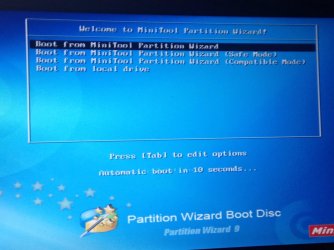
When i boot the wizard partition this pop up appears and when i try to select any of these nothing happens so what should i do? What is the problem
Note that the windows 7 installation opens correctly
 

My Computer My Computer

Computer type
PC/Desktop
Computer Manufacturer/Model Number
Hp
OS
Windows 7 ultimate x86
Did you install the Windows 7 and it's working OK? Or does the Windows 7 installation open up correctly but won't install?
 

My Computer My Computer

Computer type
PC/Desktop
Computer Manufacturer/Model Number
custom build
OS
Windows
CPU
Intel i5 4670 3.4 GHz Haswell
Motherboard
Gigabyte H87M-D3H (Socket 0)
Memory
RAM 16GB Corsair Vengeance Pro (2x8) DDR 3
Graphics Card(s)
Nvidia GeForce GT-610
Sound Card
NVIDIA HD-Realtek HD-NVIDIA Virtual (WDM)-Intel Display
Monitor(s) Displays
Generic PnP Samsung / 46'' Samsung Smart TV
Screen Resolution
1366 x 768
Hard Drives
931 GB Western Digital SCSI Disk Device (SATA)
1862 GB Western Digital WD My Passport 3.0 USB Device (SATA)
931 GB Toshiba External USB 3.0 (SATA)
1862 GB Western Digital WD Elements 3.0 USB Device (SATA)
Keyboard
HID Keyboard Device
Mouse
Microsoft PS/2
Internet Speed
Down 40Mbps Up 2Mbps
Antivirus
Bitdefender TS 2015-Malwarebytes Premium-Combofix-Spybot-Oth
Browser
Chrome, Firefox, Tor and Explorer installed - Use only Chrom
Other Info
http://speccy.piriform.com/results/ssUhOLoEtnTDiiYPNg7nXgl
Try this: EasyRecovery Professional - Download (use the free version unless there is a trial pro version) You can burn it as a bootable disk, but I don't know what kind of sorry state your PC is on. It might work.
 

My Computer My Computer

Computer type
PC/Desktop
Computer Manufacturer/Model Number
custom build
OS
Windows
CPU
Intel i5 4670 3.4 GHz Haswell
Motherboard
Gigabyte H87M-D3H (Socket 0)
Memory
RAM 16GB Corsair Vengeance Pro (2x8) DDR 3
Graphics Card(s)
Nvidia GeForce GT-610
Sound Card
NVIDIA HD-Realtek HD-NVIDIA Virtual (WDM)-Intel Display
Monitor(s) Displays
Generic PnP Samsung / 46'' Samsung Smart TV
Screen Resolution
1366 x 768
Hard Drives
931 GB Western Digital SCSI Disk Device (SATA)
1862 GB Western Digital WD My Passport 3.0 USB Device (SATA)
931 GB Toshiba External USB 3.0 (SATA)
1862 GB Western Digital WD Elements 3.0 USB Device (SATA)
Keyboard
HID Keyboard Device
Mouse
Microsoft PS/2
Internet Speed
Down 40Mbps Up 2Mbps
Antivirus
Bitdefender TS 2015-Malwarebytes Premium-Combofix-Spybot-Oth
Browser
Chrome, Firefox, Tor and Explorer installed - Use only Chrom
Other Info
http://speccy.piriform.com/results/ssUhOLoEtnTDiiYPNg7nXgl
The windows 7 installation open correctly but won't install
 

My Computer My Computer

Computer type
PC/Desktop
Computer Manufacturer/Model Number
Hp
OS
Windows 7 ultimate x86
View attachment 355134
When i boot the wizard partition this pop up appears and when i try to select any of these nothing happens so what should i do? What is the problem
Note that the windows 7 installation opens correctly
If you leave it, it should open the first option automatically when the timer gets to 0.

Is that happening?
 

My Computer My Computer

Computer type
PC/Desktop
Computer Manufacturer/Model Number
Golden Mk. I.4
OS
Windows 10 Pro x64 ; Xubuntu x64
CPU
Intel i7 860 @ 2.80 GHz O/C'ed to 4.0GHz
Motherboard
Gigabyte P55A-UD3R Rev.1. Award BIOS F13
Memory
16GB Corsair Vengance DDR3 @ 661 MHz Dual Channel (9-9-9-24)
Graphics Card(s)
EVGA NVidia GTX 560 1024MB
Sound Card
Realtek Integrated
Monitor(s) Displays
Dual Samsung SyncMaster 2494HS
Screen Resolution
1920*1080 and 1920*1080
Hard Drives
1*Samsung 840 EVO 120GB SSD;
1*OCZ Vertex 2 60GB SSD;
2*Samsung F3 SpinPoint 1TB in RAID0;
1*Samsung F1 SpinPoint 1TB;
2*Western Digital 1TB External USB 3.0
1*Western Digital 500GB External USB 3.0
1*Seagate 500GB External USB 2.0
PSU
Thermaltake ToughPower QFan 750W
Case
Thermaltake Element S VK60001W2Z
Cooling
Corsair H60 Water Cooling, 2*230mm and 2*80mm case fans
Keyboard
Logitech G110
Mouse
Logitech MX518
Last edited by a moderator:

My Computer My Computer

Computer type
PC/Desktop
Computer Manufacturer/Model Number
custom build
OS
Windows
CPU
Intel i5 4670 3.4 GHz Haswell
Motherboard
Gigabyte H87M-D3H (Socket 0)
Memory
RAM 16GB Corsair Vengeance Pro (2x8) DDR 3
Graphics Card(s)
Nvidia GeForce GT-610
Sound Card
NVIDIA HD-Realtek HD-NVIDIA Virtual (WDM)-Intel Display
Monitor(s) Displays
Generic PnP Samsung / 46'' Samsung Smart TV
Screen Resolution
1366 x 768
Hard Drives
931 GB Western Digital SCSI Disk Device (SATA)
1862 GB Western Digital WD My Passport 3.0 USB Device (SATA)
931 GB Toshiba External USB 3.0 (SATA)
1862 GB Western Digital WD Elements 3.0 USB Device (SATA)
Keyboard
HID Keyboard Device
Mouse
Microsoft PS/2
Internet Speed
Down 40Mbps Up 2Mbps
Antivirus
Bitdefender TS 2015-Malwarebytes Premium-Combofix-Spybot-Oth
Browser
Chrome, Firefox, Tor and Explorer installed - Use only Chrom
Other Info
http://speccy.piriform.com/results/ssUhOLoEtnTDiiYPNg7nXgl
As i told you previously my problem is creating a partition so i tried the wizard partition but I can't use it because whatever i do nothing happenes so the problem is my hdd or the wizard partition?
 

My Computer My Computer

Computer type
PC/Desktop
Computer Manufacturer/Model Number
Hp
OS
Windows 7 ultimate x86
Have you tried the Aomei Partition Asistant? It's free and you can download it here: AOMEI Partition Assistant Standard Edition - Free download and software reviews - CNET Download.com

If Aomei displays your partition, you can use it's Partiion Recovery Wizard. When partitions is (hopefully) recovered repair it. I think you need an elevated command (Start - Accesories - Right click Command Prompt (little black windows) - left click Run as administrator. Run the program installation windows and your elevated command prompt shows up.

In the command prompt type chkdsk c: /r (Mind you there has to be a space between c: and /r

This should repair all bad sectors. But just to confirm that system files can be verified, in that same elevated command prompt (or make another the same way) type sfc /scannow. Again, watch there is a space between sfc and /scannow.

So the hdd is not the problem. It's the wizard.

If your drive does NOT show up go to the Computer field in the start menu, or to the computer icon on your screen and give it a right click. On the menu choose Manage. And Computer Management will open up. Double click Disk Management (bottom left just below Storage) and let's hope your computer shows up.

If it doesn't there's a slim chance it could be in the Device Manager (it's just on top of Storage) and double click it. Then go to Disk Drives (3rd or 4th item top to bottom) and open it by clicking the + sign at it's left. If you have a HDD it should show there.

If it doesn't, go to View (at the very top of the page) and check "Show hidden devices". If no show I have a strong suspicion that the problem is your HDD.

What you can try, and this is a very wild guess from a novice, is to go to run msconfig. Click on the Services tab. Uncheck Shell Hardware Detection and also, uncheck WinHTTP Web Proxy Auto-Discovery Service.

That's as far as I'll go for the moment. Give it a try.
 

My Computer My Computer

Computer type
PC/Desktop
Computer Manufacturer/Model Number
custom build
OS
Windows
CPU
Intel i5 4670 3.4 GHz Haswell
Motherboard
Gigabyte H87M-D3H (Socket 0)
Memory
RAM 16GB Corsair Vengeance Pro (2x8) DDR 3
Graphics Card(s)
Nvidia GeForce GT-610
Sound Card
NVIDIA HD-Realtek HD-NVIDIA Virtual (WDM)-Intel Display
Monitor(s) Displays
Generic PnP Samsung / 46'' Samsung Smart TV
Screen Resolution
1366 x 768
Hard Drives
931 GB Western Digital SCSI Disk Device (SATA)
1862 GB Western Digital WD My Passport 3.0 USB Device (SATA)
931 GB Toshiba External USB 3.0 (SATA)
1862 GB Western Digital WD Elements 3.0 USB Device (SATA)
Keyboard
HID Keyboard Device
Mouse
Microsoft PS/2
Internet Speed
Down 40Mbps Up 2Mbps
Antivirus
Bitdefender TS 2015-Malwarebytes Premium-Combofix-Spybot-Oth
Browser
Chrome, Firefox, Tor and Explorer installed - Use only Chrom
Other Info
http://speccy.piriform.com/results/ssUhOLoEtnTDiiYPNg7nXgl

My Computer My Computer

Computer type
PC/Desktop
Computer Manufacturer/Model Number
custom build
OS
Windows
CPU
Intel i5 4670 3.4 GHz Haswell
Motherboard
Gigabyte H87M-D3H (Socket 0)
Memory
RAM 16GB Corsair Vengeance Pro (2x8) DDR 3
Graphics Card(s)
Nvidia GeForce GT-610
Sound Card
NVIDIA HD-Realtek HD-NVIDIA Virtual (WDM)-Intel Display
Monitor(s) Displays
Generic PnP Samsung / 46'' Samsung Smart TV
Screen Resolution
1366 x 768
Hard Drives
931 GB Western Digital SCSI Disk Device (SATA)
1862 GB Western Digital WD My Passport 3.0 USB Device (SATA)
931 GB Toshiba External USB 3.0 (SATA)
1862 GB Western Digital WD Elements 3.0 USB Device (SATA)
Keyboard
HID Keyboard Device
Mouse
Microsoft PS/2
Internet Speed
Down 40Mbps Up 2Mbps
Antivirus
Bitdefender TS 2015-Malwarebytes Premium-Combofix-Spybot-Oth
Browser
Chrome, Firefox, Tor and Explorer installed - Use only Chrom
Other Info
http://speccy.piriform.com/results/ssUhOLoEtnTDiiYPNg7nXgl
Thank you for your help but i have a question. My laptop doesn't start so i can only use a bootable software...and when i use the diagnosis tools to test the hdd the test failed after few seconds but when i test the memory the test is passed.
And when i try to use wizard partition tool as AddRam told me nothing happened (as shown in the photo previously) so this software is gonna solve my problem or should i change my hdd??
Thank you in advance
 

My Computer My Computer

Computer type
PC/Desktop
Computer Manufacturer/Model Number
Hp
OS
Windows 7 ultimate x86

My Computer My Computer

Computer type
PC/Desktop
Computer Manufacturer/Model Number
custom build
OS
Windows
CPU
Intel i5 4670 3.4 GHz Haswell
Motherboard
Gigabyte H87M-D3H (Socket 0)
Memory
RAM 16GB Corsair Vengeance Pro (2x8) DDR 3
Graphics Card(s)
Nvidia GeForce GT-610
Sound Card
NVIDIA HD-Realtek HD-NVIDIA Virtual (WDM)-Intel Display
Monitor(s) Displays
Generic PnP Samsung / 46'' Samsung Smart TV
Screen Resolution
1366 x 768
Hard Drives
931 GB Western Digital SCSI Disk Device (SATA)
1862 GB Western Digital WD My Passport 3.0 USB Device (SATA)
931 GB Toshiba External USB 3.0 (SATA)
1862 GB Western Digital WD Elements 3.0 USB Device (SATA)
Keyboard
HID Keyboard Device
Mouse
Microsoft PS/2
Internet Speed
Down 40Mbps Up 2Mbps
Antivirus
Bitdefender TS 2015-Malwarebytes Premium-Combofix-Spybot-Oth
Browser
Chrome, Firefox, Tor and Explorer installed - Use only Chrom
Other Info
http://speccy.piriform.com/results/ssUhOLoEtnTDiiYPNg7nXgl
Back
Top