Can't add to Open With for any file type

pjd

New member
Power User
Local time
11:40 PM
Messages
115
:( Can't add to Open With for any file type

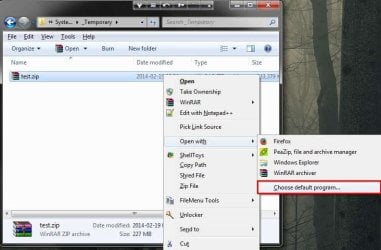
What the title says - see screen shots

Be aware that is NOT just an issue with ZIP files - its an issue with the Choose default program option on EVERY file type.


I tried the Remove & Restore Open With registry patches from here, and rebooted - didn't fix

I tried minimal Safe Boot - still exists

I tried the Default Programs Editor - same error message - NB: I've been using this for years, long before this problem showed up.

I tried sfc scannow and System Restore back to a few days ago - no luck.


I'm not sure what broke it - I don't use the Choose default program very often, so it could have been like this for a while, as in a few months, not more than six though.

Aside : If you're wondering why I have Firefox in the Open With for zips. I'm damned if I know, why would I wanna do that I ask myself. But I would have added Peazip as it's my secondary archiver.

pjd
 

Attachments
  • Capture0.jpg
    Capture0.jpg
    53.2 KB · Views: 1
  • Capture1.JPG
    Capture1.JPG
    22 KB · Views: 41
Last edited:

My Computer My Computer

At a glance

Win 7 Professional 64bitI5 650 @ 3.2GHz6GAMD Radeon R7 200 Series
Computer type
PC/Desktop
Computer Manufacturer/Model Number
generic - made to spec
OS
Win 7 Professional 64bit
CPU
I5 650 @ 3.2GHz
Motherboard
Gigabyte H55M-UD2H
Memory
6G
Graphics Card(s)
AMD Radeon R7 200 Series
Sound Card
whatever is on mobo
Monitor(s) Displays
1 x 24" Samsung
Screen Resolution
1920x1200
Hard Drives
Internal 1x256GB Toshiba SSD
Internal 1x2TB
External 2 slot USB 3.0 dock (various drives)
External 1 500GB USB 2.0 drive
PSU
850W Antech Modular
Case
Shiny Black Aluminium
Cooling
extra fans - sucker in front, blower at back - noisy & cool
Keyboard
Microsoft USB Dual Receiver Wireless Keyboard
Mouse
Microsoft USB Dual Receiver Wireless Mouse
Internet Speed
20/1Mbps down/up
Antivirus
MSE
Browser
Firefox and Chrome
Other Info
Hitachi USB 3.0 adapter
I did a restore from my oldest (Dec 14 2013) system backup (macrium) looks like the problem was there then. I installed a couple of new things on October, gut feeling says it was one of them that caused this problem.

The next thing I'm thinking of trying is an inline repair of windows

Does anyone think an inline repair will NOT fix this problem - I'm not confident, but that's a gut feeling too.

I might as well do a new windows install to freshly formatted drive rather wast time on an inline repair and then find I have to do a fresh install anyway - I've not done a fresh install since I got this box in mid 2009.

pjd
 

My Computer My Computer

At a glance

Win 7 Professional 64bitI5 650 @ 3.2GHz6GAMD Radeon R7 200 Series
Computer type
PC/Desktop
Computer Manufacturer/Model Number
generic - made to spec
OS
Win 7 Professional 64bit
CPU
I5 650 @ 3.2GHz
Motherboard
Gigabyte H55M-UD2H
Memory
6G
Graphics Card(s)
AMD Radeon R7 200 Series
Sound Card
whatever is on mobo
Monitor(s) Displays
1 x 24" Samsung
Screen Resolution
1920x1200
Hard Drives
Internal 1x256GB Toshiba SSD
Internal 1x2TB
External 2 slot USB 3.0 dock (various drives)
External 1 500GB USB 2.0 drive
PSU
850W Antech Modular
Case
Shiny Black Aluminium
Cooling
extra fans - sucker in front, blower at back - noisy & cool
Keyboard
Microsoft USB Dual Receiver Wireless Keyboard
Mouse
Microsoft USB Dual Receiver Wireless Mouse
Internet Speed
20/1Mbps down/up
Antivirus
MSE
Browser
Firefox and Chrome
Other Info
Hitachi USB 3.0 adapter
Did you try going to Control Panel\All Control Panel Items\Default Programs and see if you can set defaults?
 

My Computer My Computer

At a glance

Windows 7 Ultimate X64 SP1Intel i5-2550K, Differing ~4.4-4.8GHz No buil...16GB G.Skill Sniper 1866MHz @ 2133MHz 2x8GBASUS GTX650TIB-DC2OC-2GD5, (650TI Boost)
Computer type
PC/Desktop
Computer Manufacturer/Model Number
Home Built Desktop By DataTech
OS
Windows 7 Ultimate X64 SP1
CPU
Intel i5-2550K, Differing ~4.4-4.8GHz No built in GPU
Motherboard
ASUS P8Z68-V PRO/GEN3
Memory
16GB G.Skill Sniper 1866MHz @ 2133MHz 2x8GB
Graphics Card(s)
ASUS GTX650TIB-DC2OC-2GD5, (650TI Boost)
Sound Card
Onboard Realtek 5-1
Monitor(s) Displays
Samsung P2570HD
Screen Resolution
1920x1080
Hard Drives
Samsung 840 Pro 256GB SSD for OS, 500GB Seagate Constellation (Enterprise drive) for Data
PSU
Corsair HX650W
Case
Inwin Dragon Rider
Cooling
Hyper 212 EVO w/two Noctua fans, push-pull, @1300 RPM
Keyboard
E-Z Eyes, bright yellow keys with large characters
Mouse
steelseries SENSEI Laser Pro Gaming
Internet Speed
48-51Mbs Mbs down, 11 Mbs up Xfinity Cable
Antivirus
Norton Internet Security 2013
Browser
IE 10, Opera, Pale Moon if needed
Other Info
4 case fans, LG BluRay-RE, ASUS DVD-RW, Mr. Fusion power supply, 1.21 gigawatts.
Did you try going to Control Panel\All Control Panel Items\Default Programs and see if you can set defaults?
How do you add/delete items to/from the shell menu Open With sub menu from there ?

pjd
 
Last edited:

My Computer My Computer

At a glance

Win 7 Professional 64bitI5 650 @ 3.2GHz6GAMD Radeon R7 200 Series
Computer type
PC/Desktop
Computer Manufacturer/Model Number
generic - made to spec
OS
Win 7 Professional 64bit
CPU
I5 650 @ 3.2GHz
Motherboard
Gigabyte H55M-UD2H
Memory
6G
Graphics Card(s)
AMD Radeon R7 200 Series
Sound Card
whatever is on mobo
Monitor(s) Displays
1 x 24" Samsung
Screen Resolution
1920x1200
Hard Drives
Internal 1x256GB Toshiba SSD
Internal 1x2TB
External 2 slot USB 3.0 dock (various drives)
External 1 500GB USB 2.0 drive
PSU
850W Antech Modular
Case
Shiny Black Aluminium
Cooling
extra fans - sucker in front, blower at back - noisy & cool
Keyboard
Microsoft USB Dual Receiver Wireless Keyboard
Mouse
Microsoft USB Dual Receiver Wireless Mouse
Internet Speed
20/1Mbps down/up
Antivirus
MSE
Browser
Firefox and Chrome
Other Info
Hitachi USB 3.0 adapter
Sorry mate, I thought the impetus of the post was to be able to set files defaults?
 

My Computer My Computer

At a glance

Windows 7 Ultimate X64 SP1Intel i5-2550K, Differing ~4.4-4.8GHz No buil...16GB G.Skill Sniper 1866MHz @ 2133MHz 2x8GBASUS GTX650TIB-DC2OC-2GD5, (650TI Boost)
Computer type
PC/Desktop
Computer Manufacturer/Model Number
Home Built Desktop By DataTech
OS
Windows 7 Ultimate X64 SP1
CPU
Intel i5-2550K, Differing ~4.4-4.8GHz No built in GPU
Motherboard
ASUS P8Z68-V PRO/GEN3
Memory
16GB G.Skill Sniper 1866MHz @ 2133MHz 2x8GB
Graphics Card(s)
ASUS GTX650TIB-DC2OC-2GD5, (650TI Boost)
Sound Card
Onboard Realtek 5-1
Monitor(s) Displays
Samsung P2570HD
Screen Resolution
1920x1080
Hard Drives
Samsung 840 Pro 256GB SSD for OS, 500GB Seagate Constellation (Enterprise drive) for Data
PSU
Corsair HX650W
Case
Inwin Dragon Rider
Cooling
Hyper 212 EVO w/two Noctua fans, push-pull, @1300 RPM
Keyboard
E-Z Eyes, bright yellow keys with large characters
Mouse
steelseries SENSEI Laser Pro Gaming
Internet Speed
48-51Mbs Mbs down, 11 Mbs up Xfinity Cable
Antivirus
Norton Internet Security 2013
Browser
IE 10, Opera, Pale Moon if needed
Other Info
4 case fans, LG BluRay-RE, ASUS DVD-RW, Mr. Fusion power supply, 1.21 gigawatts.
@Britton30 - no worries mate - because thanks to you I found something else that's probably related

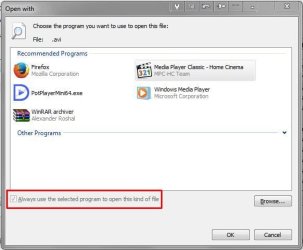
The... Always use the selected program to open this kind of file... is greyed out on all file types, see attachment

Maybe that will give someone a clue

If there's a way to safely remove all file association stuff that would definitely restore that check box, and the ability to add/remove items from the Open With menu then I would be OK with rebuilding them all.

There's a number of wonky associations I'd like to get rid of - like Firefox for zip's and WinRAR for avi's - I am sure I didn't create those and I'd be surprised if Firefox or WinRAR did

pjd
 

Attachments

  • Capture.JPG
    Capture.JPG
    26.6 KB · Views: 22

My Computer My Computer

At a glance

Win 7 Professional 64bitI5 650 @ 3.2GHz6GAMD Radeon R7 200 Series
Computer type
PC/Desktop
Computer Manufacturer/Model Number
generic - made to spec
OS
Win 7 Professional 64bit
CPU
I5 650 @ 3.2GHz
Motherboard
Gigabyte H55M-UD2H
Memory
6G
Graphics Card(s)
AMD Radeon R7 200 Series
Sound Card
whatever is on mobo
Monitor(s) Displays
1 x 24" Samsung
Screen Resolution
1920x1200
Hard Drives
Internal 1x256GB Toshiba SSD
Internal 1x2TB
External 2 slot USB 3.0 dock (various drives)
External 1 500GB USB 2.0 drive
PSU
850W Antech Modular
Case
Shiny Black Aluminium
Cooling
extra fans - sucker in front, blower at back - noisy & cool
Keyboard
Microsoft USB Dual Receiver Wireless Keyboard
Mouse
Microsoft USB Dual Receiver Wireless Mouse
Internet Speed
20/1Mbps down/up
Antivirus
MSE
Browser
Firefox and Chrome
Other Info
Hitachi USB 3.0 adapter

My Computer My Computer

At a glance

Windows 11 x64i5 2500K @ 3.3 GHz16 GB DDR 3 @ 1600MhzMSI 1050TI 4GB OC version
Computer type
PC/Desktop
Computer Manufacturer/Model Number
Custom Bulid/Self made
OS
Windows 11 x64
CPU
i5 2500K @ 3.3 GHz
Motherboard
ASUS P8 Z77 V pro
Memory
16 GB DDR 3 @ 1600Mhz
Graphics Card(s)
MSI 1050TI 4GB OC version
Sound Card
On Board (Realtek HD audio)
Monitor(s) Displays
Samsung 22" LCD
Screen Resolution
1920*1080
Hard Drives
Seagate 1 TB, WD 1TB, Seagate 2 TB ( I use a lot of space)
PSU
coolermaster 750 W
Case
Coolermaster HAF912
Cooling
Coolermaster hyper 212 EVO
Keyboard
Samsung
Mouse
Dell Wireless
Internet Speed
Wireless 50 Mbps
Antivirus
AVG 2016 Internet Security
Browser
Google Chrome
To resolve the greyed out button, you can try this.

Open regedit
Go to HKEY_CURRENT_USER\Software\Microsoft\Windows\CurrentVersion\Explorer\FileExts
Find your extension for which you are trying to change.
Delete the UserChoice key

The example I posted for .avi files has no User Choice key

The example I previously posted in post #1 was for .zip, did have one, pointing at vlc, I deleted it but the check box is still greyed out - and the Open With problem still exists


I tried the one for .zip, the - Always use the selected program to open this kind of file - check box is still greyed out and I still get the error when I try to add to anything to the Open With submenu

Fiddling around like this is making things worse - now I have to figure how to get anything but Windows to do anything with zips, I cant change the default to WinRAR, I can't add anything to open with - bottom line can't use WinRAR on zips any more. I tried restoring the registry to a couple of hours ago, did not do what I hoped

I'll try a System Restore


=========================================================================

Does anyone have any thoughts as to whether an inline repair of Windows will fix this

yes, no, maybe, dunno


pjd


pjd
 

My Computer My Computer

At a glance

Win 7 Professional 64bitI5 650 @ 3.2GHz6GAMD Radeon R7 200 Series
Computer type
PC/Desktop
Computer Manufacturer/Model Number
generic - made to spec
OS
Win 7 Professional 64bit
CPU
I5 650 @ 3.2GHz
Motherboard
Gigabyte H55M-UD2H
Memory
6G
Graphics Card(s)
AMD Radeon R7 200 Series
Sound Card
whatever is on mobo
Monitor(s) Displays
1 x 24" Samsung
Screen Resolution
1920x1200
Hard Drives
Internal 1x256GB Toshiba SSD
Internal 1x2TB
External 2 slot USB 3.0 dock (various drives)
External 1 500GB USB 2.0 drive
PSU
850W Antech Modular
Case
Shiny Black Aluminium
Cooling
extra fans - sucker in front, blower at back - noisy & cool
Keyboard
Microsoft USB Dual Receiver Wireless Keyboard
Mouse
Microsoft USB Dual Receiver Wireless Mouse
Internet Speed
20/1Mbps down/up
Antivirus
MSE
Browser
Firefox and Chrome
Other Info
Hitachi USB 3.0 adapter
To resolve the greyed out button, you can try this.

Open regedit
Go to HKEY_CURRENT_USER\Software\Microsoft\Windows\CurrentVersion\Explorer\FileExts
Find your extension for which you are trying to change.
Delete the UserChoice key

The example I posted for .avi files has no User Choice key

The example I previously posted in post #1 was for .zip, did have one, pointing at vlc, I deleted it but the check box is still greyed out - and the Open With problem still exists


I tried the one for .zip, the - Always use the selected program to open this kind of file - check box is still greyed out and I still get the error when I try to add to anything to the Open With submenu

pjd


My guess is that you have already done this, but not mentioned it; checked for malware or virus infection?
 

My Computer My Computer

At a glance

Windows 7 Professional x64Intel i5 quad processor16 GBRadeon HD 5770
Computer type
PC/Desktop
Computer Manufacturer/Model Number
Custom Built
OS
Windows 7 Professional x64
CPU
Intel i5 quad processor
Motherboard
DP67BG
Memory
16 GB
Graphics Card(s)
Radeon HD 5770
Sound Card
Realtek High Definition Audio
Monitor(s) Displays
Samsung SyncMaster
Screen Resolution
1920X1080
Hard Drives
WD 2TB (SATA Internal)
WD 1TB (USB External)
PSU
Corsair GS800
Case
Tower (Generic)
Cooling
3 Internal Fans
Keyboard
MS Wireless
Mouse
MS Optical Wired
Internet Speed
54 mbps
Antivirus
Emsisoft
Browser
IE-Version 9, Palemoon-Version 24.2.0
My guess is that you have already done this, but not mentioned it; checked for malware or virus infection?
I do full scans with MalwareBytes, Trend Micro, JRT and Adwclean every Sunday - any other suggestions are welcome. I run them hands off and just look at the logs, maybe I should run them by hand and see if there's a more aggressive setting I could use

I just discovered I can't do a System Restore - see attachment, tells me to turn off my AV - I did the Restore in minimal boot mode AFAIK there was no AV running :lol:

Maybe that will give someone a clue - bottom line that patch I did for zip has crippled WinRAR and so far I can't find a way to get it back as it was.

I saw something somewhere about registry items being locked because of ACL permissions - that sort of fits. If there's 'something' high up the food chain to do with associations, open with etc and it had the wrong ACL then it might generate this behaviour.

I'm more or less reconciled to the fact that I'm going to have to do a fresh install of everything. The problem has been on the system since before my oldest system image in December.

pjd
 

Attachments

  • Capture.JPG
    Capture.JPG
    31.4 KB · Views: 18

My Computer My Computer

At a glance

Win 7 Professional 64bitI5 650 @ 3.2GHz6GAMD Radeon R7 200 Series
Computer type
PC/Desktop
Computer Manufacturer/Model Number
generic - made to spec
OS
Win 7 Professional 64bit
CPU
I5 650 @ 3.2GHz
Motherboard
Gigabyte H55M-UD2H
Memory
6G
Graphics Card(s)
AMD Radeon R7 200 Series
Sound Card
whatever is on mobo
Monitor(s) Displays
1 x 24" Samsung
Screen Resolution
1920x1200
Hard Drives
Internal 1x256GB Toshiba SSD
Internal 1x2TB
External 2 slot USB 3.0 dock (various drives)
External 1 500GB USB 2.0 drive
PSU
850W Antech Modular
Case
Shiny Black Aluminium
Cooling
extra fans - sucker in front, blower at back - noisy & cool
Keyboard
Microsoft USB Dual Receiver Wireless Keyboard
Mouse
Microsoft USB Dual Receiver Wireless Mouse
Internet Speed
20/1Mbps down/up
Antivirus
MSE
Browser
Firefox and Chrome
Other Info
Hitachi USB 3.0 adapter
AdwCleaner:
http://general-changelog-team.fr/fr/downloads/finish/20-outils-de-xplode/2-adwcleaner

If you are using this as a normal run of the mill scan, stop it. I recommend it when someone has a really infected system. I have used it as well and it does foul up some User settings, Power Setting come to mind, can't recall the rest.

You said you ran sfc /scannow with no luck, did you get the message of No integrity Violations Found?
 

My Computer My Computer

At a glance

Windows 7 Ultimate X64 SP1Intel i5-2550K, Differing ~4.4-4.8GHz No buil...16GB G.Skill Sniper 1866MHz @ 2133MHz 2x8GBASUS GTX650TIB-DC2OC-2GD5, (650TI Boost)
Computer type
PC/Desktop
Computer Manufacturer/Model Number
Home Built Desktop By DataTech
OS
Windows 7 Ultimate X64 SP1
CPU
Intel i5-2550K, Differing ~4.4-4.8GHz No built in GPU
Motherboard
ASUS P8Z68-V PRO/GEN3
Memory
16GB G.Skill Sniper 1866MHz @ 2133MHz 2x8GB
Graphics Card(s)
ASUS GTX650TIB-DC2OC-2GD5, (650TI Boost)
Sound Card
Onboard Realtek 5-1
Monitor(s) Displays
Samsung P2570HD
Screen Resolution
1920x1080
Hard Drives
Samsung 840 Pro 256GB SSD for OS, 500GB Seagate Constellation (Enterprise drive) for Data
PSU
Corsair HX650W
Case
Inwin Dragon Rider
Cooling
Hyper 212 EVO w/two Noctua fans, push-pull, @1300 RPM
Keyboard
E-Z Eyes, bright yellow keys with large characters
Mouse
steelseries SENSEI Laser Pro Gaming
Internet Speed
48-51Mbs Mbs down, 11 Mbs up Xfinity Cable
Antivirus
Norton Internet Security 2013
Browser
IE 10, Opera, Pale Moon if needed
Other Info
4 case fans, LG BluRay-RE, ASUS DVD-RW, Mr. Fusion power supply, 1.21 gigawatts.
AdwCleaner:
http://general-changelog-team.fr/fr/downloads/finish/20-outils-de-xplode/2-adwcleaner

If you are using this as a normal run of the mill scan, stop it. I recommend it when someone has a really infected system. I have used it as well and it does foul up some User settings, Power Setting come to mind, can't recall the rest.

I don't have any of the four Sunday scans fix anything automatically. Anything they report I sort out manually via another scan. I should have mentioned this earlier, before I kick off the the four Sunday scans I run CCleaner's registry cleaner to take care of the easy stuff.

I'm aware of that Awb is aggressive, so I only compare this weeks log with last weeks to look for any significant changes - never seen anything. I've only ever used Awb to exterminate crap on machines (other peoples) that have become badly infested as a last resort before doing a reinstall - its achieved that on a couple of occasions.

I don't think its malware because I'm not seeing any other misbehaviours. If it is malware, then its odd that it would only infect something that many people don't even know about, let alone use - be akin to having the flu in your left thumb :lol:

You said you ran sfc /scannow with no luck, did you get the message of No integrity Violations Found?

Yep, ends with No integrity Violations Found, its never done anything else - I sometimes wonder whether it ever does anything else :)

=============================

New information

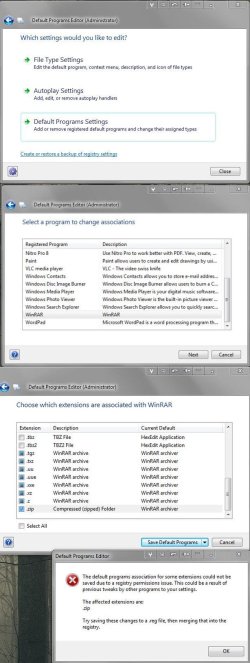
To try to return control over zip files to WinRAR, I just used the Default Programs Editor(DPE)->Default Programs Setting feature - don't think I've used that feature before. Results are in screen shot, seems to be the Permissions problem I read about at [H]ard|Forum yesterday - the solution there was the ACL Studio software - US$135 - I can just about buy a new computer for that :rolleyes:

I have DPE for its File Type Settings feature, it creates associations for things like Edit and Print, it's still working fine :confused:

@Britton30 - thanks for sticking with me on this. I like to try and figure out what the cause of a problem is, even if the eventual solution is to install a fresh Windows.

pjd
 

Attachments

  • panorama.jpg
    panorama.jpg
    120.5 KB · Views: 2
Last edited:

My Computer My Computer

At a glance

Win 7 Professional 64bitI5 650 @ 3.2GHz6GAMD Radeon R7 200 Series
Computer type
PC/Desktop
Computer Manufacturer/Model Number
generic - made to spec
OS
Win 7 Professional 64bit
CPU
I5 650 @ 3.2GHz
Motherboard
Gigabyte H55M-UD2H
Memory
6G
Graphics Card(s)
AMD Radeon R7 200 Series
Sound Card
whatever is on mobo
Monitor(s) Displays
1 x 24" Samsung
Screen Resolution
1920x1200
Hard Drives
Internal 1x256GB Toshiba SSD
Internal 1x2TB
External 2 slot USB 3.0 dock (various drives)
External 1 500GB USB 2.0 drive
PSU
850W Antech Modular
Case
Shiny Black Aluminium
Cooling
extra fans - sucker in front, blower at back - noisy & cool
Keyboard
Microsoft USB Dual Receiver Wireless Keyboard
Mouse
Microsoft USB Dual Receiver Wireless Mouse
Internet Speed
20/1Mbps down/up
Antivirus
MSE
Browser
Firefox and Chrome
Other Info
Hitachi USB 3.0 adapter
Well.....I don't know how to go from here. There may be some clues for you in one of these tutorials.

This one you can try the reg and zip extensions to see of they work. You can still associate Pea Zip and WinRAR with zip file too. Just to see if it will work.
http://www.sevenforums.com/tutorials/19449-default-file-type-associations-restore.html#post208633

This may be much of what you've already done, again maybe a memory jogger. http://www.sevenforums.com/tutorials/9154-default-programs-associate-file-type-protocol.html

Another approach is to unassociated some file types and go back to see if there's any help.
http://www.sevenforums.com/tutorials/178296-file-extension-type-unassociate.html

Still I'm not sure any will get you the context menu you want. Permissions drive me mad at times. I mentioned Adwcleaner since it may have done some silly things.

Since you're willing to do a fresh install (recommended) I think an inline repair may fix it all. http://www.sevenforums.com/tutorials/3413-repair-install.html#post31238

You've done well to keep the same install running for almost 5 years. :thumbsup:
 

My Computer My Computer

At a glance

Windows 7 Ultimate X64 SP1Intel i5-2550K, Differing ~4.4-4.8GHz No buil...16GB G.Skill Sniper 1866MHz @ 2133MHz 2x8GBASUS GTX650TIB-DC2OC-2GD5, (650TI Boost)
Computer type
PC/Desktop
Computer Manufacturer/Model Number
Home Built Desktop By DataTech
OS
Windows 7 Ultimate X64 SP1
CPU
Intel i5-2550K, Differing ~4.4-4.8GHz No built in GPU
Motherboard
ASUS P8Z68-V PRO/GEN3
Memory
16GB G.Skill Sniper 1866MHz @ 2133MHz 2x8GB
Graphics Card(s)
ASUS GTX650TIB-DC2OC-2GD5, (650TI Boost)
Sound Card
Onboard Realtek 5-1
Monitor(s) Displays
Samsung P2570HD
Screen Resolution
1920x1080
Hard Drives
Samsung 840 Pro 256GB SSD for OS, 500GB Seagate Constellation (Enterprise drive) for Data
PSU
Corsair HX650W
Case
Inwin Dragon Rider
Cooling
Hyper 212 EVO w/two Noctua fans, push-pull, @1300 RPM
Keyboard
E-Z Eyes, bright yellow keys with large characters
Mouse
steelseries SENSEI Laser Pro Gaming
Internet Speed
48-51Mbs Mbs down, 11 Mbs up Xfinity Cable
Antivirus
Norton Internet Security 2013
Browser
IE 10, Opera, Pale Moon if needed
Other Info
4 case fans, LG BluRay-RE, ASUS DVD-RW, Mr. Fusion power supply, 1.21 gigawatts.
Another approach is to unassociated some file types and go back to see if there's any help.
http://www.sevenforums.com/tutorials/178296-file-extension-type-unassociate.html
They look interesting - I'll give them a try.

Since you're willing to do a fresh install (recommended) I think an inline repair may fix it all. http://www.sevenforums.com/tutorials/3413-repair-install.html#post31238

You've done well to keep the same install running for almost 5 years. :thumbsup:
I was hoping it would last me at least 10 years :eek:

I'm pretty convinced now that its something to do with Permissions - until yesterday I hadn't realised that Registry Keys even had Permissions. Going to do some research on it - and I'll have a poke around in GPE. If it was data I would say - bah, give Everyone full control of Everything and be done with it :banghead:

pjd

Update 1: the FileTypesMan utility has enabled me to return control of zip files to WinRAR - yet another useful gadget from Mr Sofer's locker
 
Last edited:

My Computer My Computer

At a glance

Win 7 Professional 64bitI5 650 @ 3.2GHz6GAMD Radeon R7 200 Series
Computer type
PC/Desktop
Computer Manufacturer/Model Number
generic - made to spec
OS
Win 7 Professional 64bit
CPU
I5 650 @ 3.2GHz
Motherboard
Gigabyte H55M-UD2H
Memory
6G
Graphics Card(s)
AMD Radeon R7 200 Series
Sound Card
whatever is on mobo
Monitor(s) Displays
1 x 24" Samsung
Screen Resolution
1920x1200
Hard Drives
Internal 1x256GB Toshiba SSD
Internal 1x2TB
External 2 slot USB 3.0 dock (various drives)
External 1 500GB USB 2.0 drive
PSU
850W Antech Modular
Case
Shiny Black Aluminium
Cooling
extra fans - sucker in front, blower at back - noisy & cool
Keyboard
Microsoft USB Dual Receiver Wireless Keyboard
Mouse
Microsoft USB Dual Receiver Wireless Mouse
Internet Speed
20/1Mbps down/up
Antivirus
MSE
Browser
Firefox and Chrome
Other Info
Hitachi USB 3.0 adapter
Back
Top