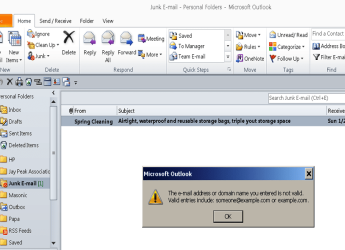
Solved Can't block sender in outlook 2010

Jay Downer

New member
Local time
6:52 AM
Messages
2
How do I delete this post??
 

Attachments

  • New Picture.png
    New Picture.png
    57.9 KB · Views: 9
Last edited:

My Computer My Computer

At a glance

win 7 SP-1
OS
win 7 SP-1
Hi Jay,

Welcome to sevenforums! :)

Are you use exchange user?
 

My Computer My Computer

At a glance

Windows 7
OS
Windows 7
Hi, I'm assuming your not using Exchange as Outlook is showing a "Personal Folder" and not a Exchange users folder

I'm not sure why it's not letting you add it to the block list through Outlook, But you could try this:


Change your Outlook View to have a Reading Pane, So you can see the contents of the email without opening it,
To do this, click on "View" - Reading Pane - Right
Then highlight the email, You should see a preview of the message on the right hand side,
More importantly - At the top of the email, you should be able to see the display name / email address it has come from,
Once you have discovered the senders email address, ( which is likely to be a relay through someone else's address).
You can manually add it to you're block list, OR create a rule to auto delete when you receive mail from that particular email address,
Hope this helps.

 

My Computer My Computer

At a glance

Windows 7 Home Premium 64 BitCore I7 1155 3.4GHZ8GB DDR 1600
Computer Manufacturer/Model Number
Cooler Master
OS
Windows 7 Home Premium 64 Bit
CPU
Core I7 1155 3.4GHZ
Memory
8GB DDR 1600
Hard Drives
64 GB SSD - OS
1TB - DATA
PSU
340 Watt Corsair
Case
Cooler Master
Cooling
Cooler Master
Hi braddersz,
I have changed the "View" in my junk folder, and am waiting for another "funny" one to come in.
Thanks....hope it works. I'll keep it open until proven...

Jay
 
Last edited:

My Computer My Computer

At a glance

win 7 SP-1
OS
win 7 SP-1
Back
Top