
Can't Boot After Removing SSD from PC with 2 Win 7 OS on separate Disk

General T

New member
Local time
1:33 AM
Messages
2
Hi,

My problem is as follows:

I installed Windows 7 onto an SSD and used this for about 7 months - everthing working well. I recently decided that I needed more storage space so I added on a WD 1TB internal HDD and put Windows 7 on this drive as well.

So now when I boot up I get a choice of 2 Windows 7 OS to choose from - one on the SSD and one on the new HDD. I decided that I didn't want to have the SSD drive anymore (too small) so I removed it from the computer - thinking (apparently naively) that the other HDD would work fine.

This was not the case. With the SSD removed I cannot boot up the computer - apparently the other Windows 7 OS on the HDD does not contain any bootmgr info to boot up with. It seems that only the SSD has the boot info?

I had to reinstall the SSD back into the computer in order to be able to boot to the other Windows 7 OS on the HDD.

So my question is - how do I remove the SSD and still be able to boot to the other internal HDD Windows 7 OS?

I have included a picture of my HDs from Computer Management (there are also 2 data drives on the system.

Appreciate any insight into this problem.

I also noted that in Device Manager it shows the WD 1TB as a SCSI HD - but its not?
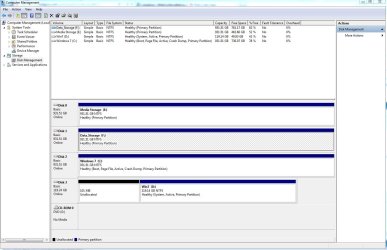
Disk Drives.JPG


Thanks
 

My Computer My Computer

At a glance

Win 7 Home 64 bitIntel i7 [email protected]12 GBATI Radeon HD 4800
Computer type
PC/Desktop
Computer Manufacturer/Model Number
Custom Build
OS
Win 7 Home 64 bit
CPU
Intel i7 [email protected]
Motherboard
Asus Rampage Extreme 3
Memory
12 GB
Graphics Card(s)
ATI Radeon HD 4800
Hard Drives
Crucial M4 CT128
WDC 1TB
WDC 1TB
WDC 1TB
Antivirus
McAffee
Browser
Win Internet Explorer 9

My Computer My Computer

At a glance

Windows 7 Ultimate 32-Bit & Windows 7 Ultimat...Intel Core i7 CPU 950 @ 3.07GHzOCZ 6GB (3 x 2GB) 240-Pin DDR3 SDRAM DDR3 160...ATI Radeon HD 5700 Series
Computer Manufacturer/Model Number
Custom Built
OS
Windows 7 Ultimate 32-Bit & Windows 7 Ultimate 64-Bit
CPU
Intel Core i7 CPU 950 @ 3.07GHz
Motherboard
ASUS P6T DELUXE V2
Memory
OCZ 6GB (3 x 2GB) 240-Pin DDR3 SDRAM DDR3 1600 OCZ3X1600R2
Graphics Card(s)
ATI Radeon HD 5700 Series
Sound Card
OnBoard
Hard Drives
WD6400AACS-00M3B0 (640GB SATA )
PSU
CORSAIR 850w
Case
NZXT LEXA
Cooling
Intel Stock Heatsink Fan
Keyboard
Microsoft Wireless Laser Keyboard 7000
Mouse
Microsoft Wireless Laser Mouse 7000
Mark C in screenshot active so it's a boot candidate (it is already so no action needed). Mark D (SSD) inactive. Be sure you have a win7 install dvd or system repair DVD!
So from http://www.sevenforums.com/tutorials/783-elevated-command-prompt.html

Code:
diskpart
select vol D
inactive
exit
Now disconnect SSD.

Now do a http://www.sevenforums.com/tutorials/681-startup-repair.html 3 times from dvd with reboots in between. this will put bootmgr on active partition and create the bootmenu.

Now you can reconnect SSD and use it for other things
 

My Computer My Computer

At a glance

Microsoft Windows 7 Home Premium 64-bits 7601...Intel(R) Core(TM) i3 CPU M 370 @ 2.40GHz4,00 GBATI Mobility Radeon HD 5400 Series
Computer type
Laptop
Computer Manufacturer/Model Number
ACER ASPIRE 5742G
OS
Microsoft Windows 7 Home Premium 64-bits 7601 Multiprocessor Free Service Pack 1
CPU
Intel(R) Core(TM) i3 CPU M 370 @ 2.40GHz
Motherboard
Acer Aspire 5742G
Memory
4,00 GB
Graphics Card(s)
ATI Mobility Radeon HD 5400 Series
Sound Card
(1) AMD High Definition Audio Device (2) Realtek High Defi
Screen Resolution
1366 x 768 x 32 bits (4294967296 colors) @ 60 Hz
Hard Drives
WDC WD5000BEVT-22ZAT0
This is a bit strange because it shows the C partition on the HDD as active. Try this with the SSD connected: http://www.sevenforums.com/tutorials/209885-bootmgr-move-c-easybcd.html It could very well be that it uses the bootmgr on the SSD for booting.

Btw: I think it is a BIG mistake to move the OS from a SSD to a spinner. Your system will be a lot slower. With proprer organization, your system should easily fit into 30GB - all my 6 systems that are on SSDs do. If you need to know how to do that, let's discuss.
 

My Computer My Computer

At a glance

Vista, Windows7, Mint Mate, Zorin, Windows 8from 1.6GHz Duo to i7
Computer Manufacturer/Model Number
HP, Dell, Gateway, Toshiba - 4 laptops and 2 desktops
OS
Vista, Windows7, Mint Mate, Zorin, Windows 8
CPU
from 1.6GHz Duo to i7
Monitor(s) Displays
2x HP w2207
Hard Drives
5x HDD, 7x SSD, 12x Externals
Keyboard
with trackball - no mices
Mouse
Trackball mice
Internet Speed
DSL 6000
Wow,

Thank you all for the quick responses. I will try your options.

WHS:

I do love the SSD...but I want to get a 500Gig version..I did fill it up with a lot of Adobe products...I know it is still a lot of space...


Thanks Again All
 

My Computer My Computer

At a glance

Win 7 Home 64 bitIntel i7 [email protected]12 GBATI Radeon HD 4800
Computer type
PC/Desktop
Computer Manufacturer/Model Number
Custom Build
OS
Win 7 Home 64 bit
CPU
Intel i7 [email protected]
Motherboard
Asus Rampage Extreme 3
Memory
12 GB
Graphics Card(s)
ATI Radeon HD 4800
Hard Drives
Crucial M4 CT128
WDC 1TB
WDC 1TB
WDC 1TB
Antivirus
McAffee
Browser
Win Internet Explorer 9
Why don't you move your Adobe stuff to the spinner and leave the OS on the SSD.
 

My Computer My Computer

At a glance

Vista, Windows7, Mint Mate, Zorin, Windows 8from 1.6GHz Duo to i7
Computer Manufacturer/Model Number
HP, Dell, Gateway, Toshiba - 4 laptops and 2 desktops
OS
Vista, Windows7, Mint Mate, Zorin, Windows 8
CPU
from 1.6GHz Duo to i7
Monitor(s) Displays
2x HP w2207
Hard Drives
5x HDD, 7x SSD, 12x Externals
Keyboard
with trackball - no mices
Mouse
Trackball mice
Internet Speed
DSL 6000
Back
Top