Hi,
I have windows 7 installed on two discs. I want to remove one of the disks, format it, and install it in another computer. The problem is that when I remove the disk, windows will not boot. I get the "DISK BOOT FAILURE, INSTALL SYSTEM DISK AND PRESS ENTER" message. Usually I can choose between the two installations and pick the one on the disk that I want to keep, but when I remove one, I only get the error message.
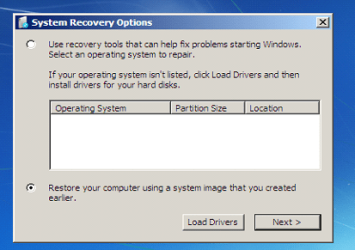
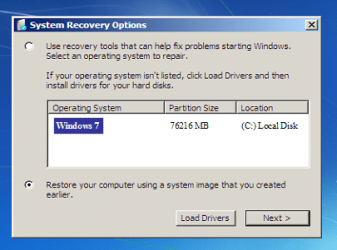
So I tried to do a repair with the windows installation disk, but I cannot select any windows installation drive. I pressed 'next' anyway and then repaired. But I still get the same message the next time I start the computer. When I insert the old hard drive again, the computer starts up normally.
I have also tried to use bootrec without any luck. I tried:
Bootrec.exe /FixBoot - I get "Element not found".
/RebuildBcd - The installer locates my Windows installation folder, but when I press "y" to fix it, i get "element not found" again.
/FixMbr, however, finishes with "Completed successfully". But I am still unable to boot windows.
So then I tried to do it manually in the command prompt by typing in:
bcdedit /export C:\BCD_Backup
but then I get another error saying "The store export operation has failed.The requested system device cannot be found".
Bootrec kinda messed up my boot entirely so I ended up not being able to boot windows at all
Do you guys have any idea of where I go from here?
Thank you,
Joachim
I have windows 7 installed on two discs. I want to remove one of the disks, format it, and install it in another computer. The problem is that when I remove the disk, windows will not boot. I get the "DISK BOOT FAILURE, INSTALL SYSTEM DISK AND PRESS ENTER" message. Usually I can choose between the two installations and pick the one on the disk that I want to keep, but when I remove one, I only get the error message.
So I tried to do a repair with the windows installation disk, but I cannot select any windows installation drive. I pressed 'next' anyway and then repaired. But I still get the same message the next time I start the computer. When I insert the old hard drive again, the computer starts up normally.
I have also tried to use bootrec without any luck. I tried:
Bootrec.exe /FixBoot - I get "Element not found".
/RebuildBcd - The installer locates my Windows installation folder, but when I press "y" to fix it, i get "element not found" again.
/FixMbr, however, finishes with "Completed successfully". But I am still unable to boot windows.
So then I tried to do it manually in the command prompt by typing in:
bcdedit /export C:\BCD_Backup
but then I get another error saying "The store export operation has failed.The requested system device cannot be found".
Bootrec kinda messed up my boot entirely so I ended up not being able to boot windows at all
Do you guys have any idea of where I go from here?
Thank you,
Joachim
My Computer
At a glance
Windows 7 Professional x64Intel Core i5 2500k4GBRadeon HD6850
- OS
- Windows 7 Professional x64
- CPU
- Intel Core i5 2500k
- Memory
- 4GB
- Graphics Card(s)
- Radeon HD6850
- Monitor(s) Displays
- 22"
- Hard Drives
- 1x 1000GB S-ATA
1x 250GB S-ATA
1x 300GB USB-Disk.
- PSU
- 500W