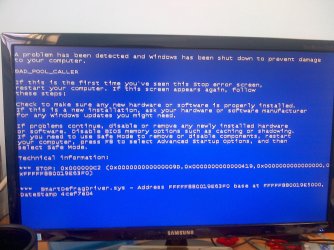
So after that I rebooted and only got the option to either Launch Startup Repair or try to Start Windows Normally. Trying to Start Windows Normally would just result in the BSoD above so I tried doing Startup Repair but it would not detect my Windows installation. Because of that I can't restore my system to the point before I ran the verifier.
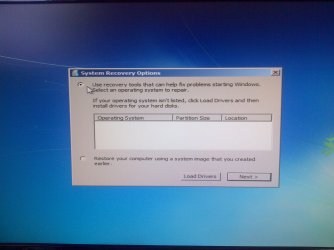
Did you try clicking Load Drivers? Does it detect the system then?
Can you boot into safe mode?
It looks as though Diver Verifier may have trashed your install, or at very least, your MBR. You might be looking at the very real possibility that your install is unrecoverable. I hope not.
There is no option to boot in safe mode. I'm still trying to figure out which driver I'm supposed to look for from the list, about 1/3 way down now...
Update: Tried inserting a boot USB for Windows 7 I made and used a while back. Got something like this Error: oxc000000f "An error occured while attmepting to read the boot configuration data File: \Boot\BCD"
Lovely...
Yep, and already kicking myself for not having one. I've looked up a bunch of solutions, all I could come up with was that my hard drive is being unresponsive or something. Any more ideas?
Ok so I attempted to use the PC Regedit thing and I got this:
Failed to start window, please mark the message below and contract [email protected] for technical support
Video is ATI Technologies Inc Unknown device 6818, using Xorg(ati) Server
As for the first solution, well you're gonna have to explain like I'm five.
1*Samsung 840 EVO 120GB SSD;
1*OCZ Vertex 2 60GB SSD;
2*Samsung F3 SpinPoint 1TB in RAID0;
1*Samsung F1 SpinPoint 1TB;
2*Western Digital 1TB External USB 3.0
1*Western Digital 500GB External USB 3.0
1*Seagate 500GB External USB 2.0
PSU
Thermaltake ToughPower QFan 750W
Case
Thermaltake Element S VK60001W2Z
Cooling
Corsair H60 Water Cooling, 2*230mm and 2*80mm case fans
unfortunately; this looks to be like that driver verifier did more harm than good. Which unfortunately happens more often than not. Did you remember to backup your important items like documents etc? I hope so because there is a distinct possibility that you may have to wipe the drive clean and do a clean install. Especially if it cant find the operating system when you try to do a repair install and it doesnt show your hard drive where you installed the o.s. at all.
My Computer
Computer type
PC/Desktop
Computer Manufacturer/Model Number
custom built
OS
Windows 7 ultimate 64-bit
CPU
Intel I7 2600K 3.4ghz
Motherboard
Asus Evo P8P67
Memory
Corsair 16gb ddr3 1600mhz
Graphics Card(s)
Nvidia Geforce gt 430
Sound Card
Sound Blaster Titanium x-fi pci express
Monitor(s) Displays
Dell E198WFP
Hard Drives
1 western digital 2TB drive.
PSU
Antec 1200 watt
Case
Inwin Dragon Rider
Cooling
6 case supplied cooling fans
Keyboard
logitech mk700
Mouse
logitech m705
Internet Speed
25-50mbps download; 10mbps upload(i think)
Antivirus
avg free 2014
Browser
mozilla firefox
Other Info
Also have a pretty bad speaker setup which is a klipsch promedia 5.1 surround speaker setup with huge subwoofer and lg blu ray player/writer. Also a hp officejet pro 8600 plus wireless all in one and a logitech s7500 webcam.
Say what????? Happens more often than not? What on earth are you talking about.....? Where did you get that from?
The underlying problem is the cause of the BSOD....not Driver Verifier.
The usual fix to reboot a computer that won't boot once DV is enabled, is to boot into Safe Mode, disable DV, then try boot as normal. Since the OP cant access Safe Mode at all, he should continue to explore SiW's suggestions.
1*Samsung 840 EVO 120GB SSD;
1*OCZ Vertex 2 60GB SSD;
2*Samsung F3 SpinPoint 1TB in RAID0;
1*Samsung F1 SpinPoint 1TB;
2*Western Digital 1TB External USB 3.0
1*Western Digital 500GB External USB 3.0
1*Seagate 500GB External USB 2.0
PSU
Thermaltake ToughPower QFan 750W
Case
Thermaltake Element S VK60001W2Z
Cooling
Corsair H60 Water Cooling, 2*230mm and 2*80mm case fans
This is some information which should not be passed, specially publicly. Because it is a bad information. Driver Verifier is one of the most important integrated tool that is used for troubleshooting. It is problematic to them who dont know how to use it. But that is universal. Like any other thing.
Driver Verifier does not do any harm. Never. If you have the knowledge about it, and have taken the prior preparation for it before enabling it.
Warning
Before enabling DV, make it sure that you have earlier System restore points made in your computer. You can check it easily by using CCleaner looking at Tools > System Restore.
If Driver Verifier causes boot failure, that is not the fault of Driver Verifier itself, but there is some driver in your system startup which should not be there.
Tip
If you fail to get on the Desktop because of DV, Boot into Advanced Boot Options > Safe mode. Disable DV there. Now boot normally again, and try following the instruction of enabling DV again.
@ Orkimedes, you have one more option, the point 2, the System Restore way. Hope you have at least one system restore point made earlier.
The culprit is a driver from IObit. You should not run it with startup. Free up the startup, when you can boot to windows. Windows does not need any other program to auto start with it, but the auto start programs often conflicts and causes various problems including BSODs.
Click on the Start button
Type “msconfig (without quotes), click the resulting link. It will open the System Configuration window.
Looks like everything is in one piece, thankfully. Disposed of Smart Defrag and other IOBit programs just in case. A big thanks to everyone that tried to help me out. One last question, if I continue to experience the hard hangs I had before should I start a new thread, or continue here?
1*Samsung 840 EVO 120GB SSD;
1*OCZ Vertex 2 60GB SSD;
2*Samsung F3 SpinPoint 1TB in RAID0;
1*Samsung F1 SpinPoint 1TB;
2*Western Digital 1TB External USB 3.0
1*Western Digital 500GB External USB 3.0
1*Seagate 500GB External USB 2.0
PSU
Thermaltake ToughPower QFan 750W
Case
Thermaltake Element S VK60001W2Z
Cooling
Corsair H60 Water Cooling, 2*230mm and 2*80mm case fans