
Cant boot from cd, or flash drive windows 7 installation after restart

nekonya

New member
Member
Local time
9:38 PM
Messages
71
Hello, im currently running Windows 7 Ultimate 32bit on my laptop.

I wanna install windows 7 home premium 64bit in clean install, i have 2 installation DVDs of win 7 home 64bit, one is older, another is lil newer build (more updates in it), but none of them want boot up after laptop restarts. I also did try make bootable flash drive following all the rules, it also wont boot up from flash drive. I checked BIOS settings, i managed to boot from DVD, USB in force, still no luck. Maybe its something wrong with the DVD? files on the installation disk looks like this:
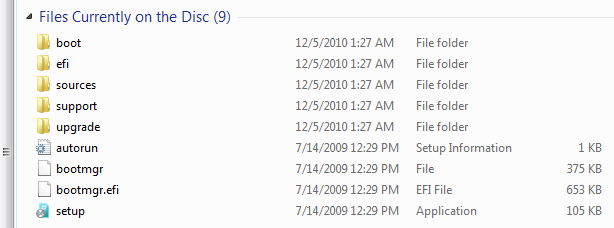
W6hOC.png


To bad i cant run setup.exe cause im running 32bit OS.

I wanna switch to 64bit cause im thinking my system will work faster in that way, maybe im wrong?

CPU: Intel T6600 Core 2 Duo 2.2Ghz
RAM: 3GB DDR2
Video: ATI Radeon HD 4570 512vram
320GB HDD
 

My Computer My Computer

At a glance

Windows 7 Home Premium 32bit
OS
Windows 7 Home Premium 32bit
1) I've run both 64 bit and 32 bit win7 on a 3 gb system similar to yours and have not experienced any speed increase in 64 bit. 64 bit windows lets you take advantage of memory greater than 4 gb in case you have it, thats all.

2) You said one dvd is a newer build so I presume these are home made dvds, perhaps with updates slipstreamed? Its possible theres something wrong with them. You can try using the original dvd to install 64 bit.
 

My Computer My Computer

At a glance

Windows 7 x64 pro/ Windows 7 x86 Pro/ XP SP3 x86
Computer Manufacturer/Model Number
Too many to describe...
OS
Windows 7 x64 pro/ Windows 7 x86 Pro/ XP SP3 x86
But i have heard that 64 bit its not only about more rams, but it also does like some better cache to rams of apps that u run, so it gives better performance?
take a look here, starting from 1:00 YouTube - 32 Bit vs 64 Bit
 

My Computer My Computer

At a glance

Windows 7 Home Premium 32bit
OS
Windows 7 Home Premium 32bit
With 3GB of RAM I would stay with the 32bit version.

64bit will help if you have at least 4GB of RAM.


Bill2 is right about the CD's. They are most likely bad or corrupt.

Mike
 

My Computer My Computer

At a glance

Windows7 Pro 64bit SP-1; Windows XP Pro 32bitIntel Core i7-870 Lynnfield 2.93GHz LGA 1156 ...8GB@1400MHz Crucial Ballistix DDR3-1600 4x2GBASUS ENGTX460 DirectCU/2DI/1GD5 1GB 256-bit G...
Computer Manufacturer/Model Number
Hopalong/ Godzilla
OS
Windows7 Pro 64bit SP-1; Windows XP Pro 32bit
CPU
Intel Core i7-870 Lynnfield 2.93GHz LGA 1156 95W Quad-Core
Motherboard
ASUS P7P55D-E PRO
Memory
8GB@1400MHz Crucial Ballistix DDR3-1600 4x2GB
Graphics Card(s)
ASUS ENGTX460 DirectCU/2DI/1GD5 1GB 256-bit GDDR5
Sound Card
VIA Onboard
Monitor(s) Displays
Asus VS248H-P 24"; Samsung SyncMaster 941BW 19"ws
Screen Resolution
1920x1080; 1440x900
Hard Drives
Samsung 830 120GB SSD
Intel 320 120GB SSD
Western Digital Caviar Black WD7501AALS 750GB 7200 RPM SATA 3.0Gb/s
Western Digital Caviar Black WD6401AALS 640GB 7200 RPM SATA 3.0Gb/s
PSU
COOLER MASTER Silent Pro RS850-AMBAJ3-US 850W Modular
Case
COOLER MASTER HAF 932 RC-932-KKN5-GP Black
Cooling
Scythe "Mugen-2 Rev.B" (2 ScytheKaze-Jyuni PWM fans)
Keyboard
Logitech K-320
Mouse
Kensington
Antivirus
Avast Inernet Suite
Browser
IE 9 ; Chrome
Oh, ty, then i might will just downgrade to home premium 32 bit anyway, i kinda feel like ultimate uses more ram or something... and i dont need any of ultimate features.
 

My Computer My Computer

At a glance

Windows 7 Home Premium 32bit
OS
Windows 7 Home Premium 32bit
Back
Top