Solved Can't boot from internal drive, and C: seems to be empty

Kotrab

New member
Local time
4:56 PM
Messages
7
Hi everyone. This is my first post. I'm running W7 on a HP laptop, and my machine suddenly refused to boot. I got the error message about incorrect shut down, tried to boot it in safe mode and all other modes offered, but couldn't get past a file called aswRvrt.sys.

I've been able to boot from an installation DVD and tried repairing startup, restoring to last working restore point, but no luck.

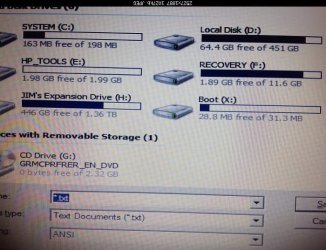
Also, I thought all my files were supposed to be on C drive ( which is still listed as the System drive), but now they're on another drive -- which has changed a couple of times (first it was called D: then later that changed to E: when I rebooted from the CD). The C drive now seems to have nothing on it when I run "dir" command at DOS prompt. It says

"Volume in drive C is SYSTEM
Volume Serial number is CC01-3478
Directory of C:\
File not found"

If I look at the list of drives using notepad Save As (running from DOS prompt), C drive does seems to have something invisible on it that shows up as taking up 35 MB of a total of 198 MB (which sounds like a very small C: drive to me).

Has my boot drive somehow been renamed as D:? Is that even possible? Can I just use "diskpart" to rename it, or will that wreck things even more?

Thanks for reading this far, and for offering any suggestions you may have.
 

My Computer My Computer

At a glance

Windows 7 Home Premium 32 bit
Computer type
Laptop
Computer Manufacturer/Model Number
HP Pavilion DV6-1327TX
OS
Windows 7 Home Premium 32 bit
Antivirus
Avast free
Browser
Chrome
A few questions to get started:

How many physical hard drives in this laptop? Just one?

When things were working right, did you have just one partition (C) on that internal hard drive?

I assume all of your personal files (pictures, video, etc) are also on C, not some other drive or partition?

Are your personal files backed up?

Have you made a set of recovery disks or does this laptop have a built-in recovery partition?

Have you attempted to run the hard drive manufacturer's disk tools?
 

My Computer My Computer

At a glance

Windows 7 Home Premium SP1, 64-bitIntel Skylake i5-6600K, not overclocked8 GB HyperX DDR4-2666 (2 x 4 GB)none; graphics are integrated on CPU
Computer type
PC/Desktop
Computer Manufacturer/Model Number
Ignatz Special; 4 speed manual gearbox; factory air conditioning; one of one
OS
Windows 7 Home Premium SP1, 64-bit
CPU
Intel Skylake i5-6600K, not overclocked
Motherboard
AsRock Z170M Extreme 4, micro ATX
Memory
8 GB HyperX DDR4-2666 (2 x 4 GB)
Graphics Card(s)
none; graphics are integrated on CPU
Sound Card
onboard: Realtek ALC1150; external: USB Behringer UF0-202
Monitor(s) Displays
Dell S2340M 23 inch IPS
Screen Resolution
1600 x 900
Hard Drives
System: Crucial MX100 series SSD, 128 GB;
Data: Samsung Spinpoint 103SJ, 1 TB;
Backup: WD Caviar Green WD30EZRX-00D8PB0, 3 TB
PSU
Rosewill SilentNight 500 watt fanless, semi-modular
Case
Antec Solo II
Cooling
Noctua NH-U12S; Noctua F12 intake, Noctua S12A exhaust
Keyboard
Microsoft 200 6JH-00001 USB
Mouse
Dell or Microsoft optical wired; USB
Antivirus
Microsoft Security Essentials and Malwarebytes Premium
Browser
Pale Moon
Other Info
All fans PWM; speeds at idle: CPU circa 500 rpm; intake circa 600 rpm; exhaust circa 600 rpm; CPU temps 27 idle and 47 C load in a warm room (27 C/81 F) when running Intel Extreme Tuning Utility stress test.
A few questions to get started:

How many physical hard drives in this laptop? Just one?

When things were working right, did you have just one partition (C) on that internal hard drive?

I assume all of your personal files (pictures, video, etc) are also on C, not some other drive or partition?

Are your personal files backed up?

Have you made a set of recovery disks or does this laptop have a built-in recovery partition?

Have you attempted to run the hard drive manufacturer's disk tools?


Hi ignatzatonic

Thanks for your questions.

There's only one physical hard drive. There was always a recovery partition, and I can still see one listed as F: drive. I've tried to attach a screenshot of what I see if I load notepad at DOS prompt and view Save As. Please let me know if hasn't uploaded properly ( I'm working from my ipad).

All my personal files were on C: drive but are now showing up as being on D: drive - but not always - the drive letter has changed at least once.

I have a Dropbox backup of my most important files, and have been able to back up less important files to an external USB drive from DOS prompt.

I thought I had made recovery discs, but can't seem to locate them now.

I'm not sure of the brand of my hard drive, so haven't tried any of their disc tools. How can I find this out, and do I download their disc tools or should they already be on the computer somewhere?

Is it possible I've been infected with some sort of malware that keeps reassigning drive letters or something like that?

(BTW: I'm in Australia so my replies may not be very prompt sometimes.)
 

Attachments

  • image.jpg
    image.jpg
    967.5 KB · Views: 3
Last edited:

My Computer My Computer

At a glance

Windows 7 Home Premium 32 bit
Computer type
Laptop
Computer Manufacturer/Model Number
HP Pavilion DV6-1327TX
OS
Windows 7 Home Premium 32 bit
Antivirus
Avast free
Browser
Chrome
Can you flip your picture around ?

Very odd your C partition is showing as MB and not GB :huh:

Or is Windows on D ?
 

My Computer My Computer

At a glance

Windows 10 Pro x64Intel Core i7 6700KGSkill TridentZ RGB 16GB 3600 16-16-16-36EVGA GTX 980 Ti SC x2
Computer type
PC/Desktop
Computer Manufacturer/Model Number
Skylake Special #666
OS
Windows 10 Pro x64
CPU
Intel Core i7 6700K
Motherboard
Asus Sabertooth Z170 Mark 1
Memory
GSkill TridentZ RGB 16GB 3600 16-16-16-36
Graphics Card(s)
EVGA GTX 980 Ti SC x2
Sound Card
Realtek High Definition
Monitor(s) Displays
AOC G2460PG
Screen Resolution
1920 x 1080 144Hz
Hard Drives
Samsung 860 Pro 256GB, Seagate Barracuda 4TB x2
PSU
EVGA 1000 P2, EVGA White Custom Braided Cables
Case
Corsair Vengeance C70 Gunmetal Black
Cooling
Corsair H100i v2, Corsair ML120 x2, Thermal Grizzly Kryonaut
Keyboard
Logitech G910 Orion Spectrum
Mouse
Logitech G700s
Internet Speed
Verizon Fios Quantum Gateway 75/75
Antivirus
Windows Defender, Malwarebytes Free 3.8.3
Browser
Chrome
Other Info
Corsair SP120 x4, LG Blu-ray Drive, Durabrand HT-395 100 Watt Dolby Digital Amp, Corsair H2100 Wireless 7.1 Headset
Flipping screenshot

I've tried flipping the screenshot but am still getting the hang of the upload function - see if this is better...
 

Attachments

  • image.jpg
    image.jpg
    56.5 KB · Views: 25

My Computer My Computer

At a glance

Windows 7 Home Premium 32 bit
Computer type
Laptop
Computer Manufacturer/Model Number
HP Pavilion DV6-1327TX
OS
Windows 7 Home Premium 32 bit
Antivirus
Avast free
Browser
Chrome
The partition listed as C: is only the System drive and should not have a letter. Your D: drive with 64 GB looks to be the one with the OS. Is D: the one with the OS?
 

My Computer My Computer

At a glance

Windows 7 Home Premium 32-Bit - Build 7600 SP1Intel Core i3-2120 3.30GhzKingston 4 GB DDR3 1333 mhzAMD Radeon HD6670
Computer type
PC/Desktop
Computer Manufacturer/Model Number
Custom Build
OS
Windows 7 Home Premium 32-Bit - Build 7600 SP1
CPU
Intel Core i3-2120 3.30Ghz
Motherboard
Asus P8Z68-V LX Intel Z68 Socket H2 ATX
Memory
Kingston 4 GB DDR3 1333 mhz
Graphics Card(s)
AMD Radeon HD6670
Sound Card
Sound Blaster Audigy SE 24-Bit
Monitor(s) Displays
Asus VE228
Screen Resolution
1440 X 900
Hard Drives
OCZ Vertex 3 120 GB Sata 3 SSD ==
Kingston SH103/S3 120 G Hyper X 120 GB SSD ==
Western Digital 500 GB Caviar Green 7200 RPM ==
PSU
Corsair CX600M == 600 Watt
Case
NZXT Apollo - Silver with Clear Side Panel
Cooling
Three 120 mm Fans
Keyboard
Microsoft Natural 4000
Mouse
Microsoft Custom Optical 3000
Internet Speed
AT&T Fiber Optic Wireless Network
Antivirus
Microsoft Security Essentials
Browser
Chrome
Other Info
120 mm Blue LED Fan -- Three Blue LED Lazer Light Sticks
Not sure WHY the drive letters may be scrambled, but, looking at that picture:

Windows must be on D, which presumably used to be C. I assume your data is on this same partition? Or do you knowingly keep your data on a different partition than Windows?

What is now C appears to be the "system reserved" partition that normally has no drive letter. Your boot files are likely in this partition.

F is the recovery partition. Was it always F?

HP Tools is familiar to me and includes HP proprietary stuff. Was it always E? You can likely Google what it contains.

I assume Jim's Expansion Drive is an external? Was it always H?

I don't have the slightest idea about the X partition. I assume it is part of your one and only internal drive? Has it always been there, as X?

Have you knowingly done any fiddling with system settings or attempting anything unusual for you in the time immediately prior to this issue?

Have you done anti-virus and anti-malware scans?

What is that X drive?
 

My Computer My Computer

At a glance

Windows 7 Home Premium SP1, 64-bitIntel Skylake i5-6600K, not overclocked8 GB HyperX DDR4-2666 (2 x 4 GB)none; graphics are integrated on CPU
Computer type
PC/Desktop
Computer Manufacturer/Model Number
Ignatz Special; 4 speed manual gearbox; factory air conditioning; one of one
OS
Windows 7 Home Premium SP1, 64-bit
CPU
Intel Skylake i5-6600K, not overclocked
Motherboard
AsRock Z170M Extreme 4, micro ATX
Memory
8 GB HyperX DDR4-2666 (2 x 4 GB)
Graphics Card(s)
none; graphics are integrated on CPU
Sound Card
onboard: Realtek ALC1150; external: USB Behringer UF0-202
Monitor(s) Displays
Dell S2340M 23 inch IPS
Screen Resolution
1600 x 900
Hard Drives
System: Crucial MX100 series SSD, 128 GB;
Data: Samsung Spinpoint 103SJ, 1 TB;
Backup: WD Caviar Green WD30EZRX-00D8PB0, 3 TB
PSU
Rosewill SilentNight 500 watt fanless, semi-modular
Case
Antec Solo II
Cooling
Noctua NH-U12S; Noctua F12 intake, Noctua S12A exhaust
Keyboard
Microsoft 200 6JH-00001 USB
Mouse
Dell or Microsoft optical wired; USB
Antivirus
Microsoft Security Essentials and Malwarebytes Premium
Browser
Pale Moon
Other Info
All fans PWM; speeds at idle: CPU circa 500 rpm; intake circa 600 rpm; exhaust circa 600 rpm; CPU temps 27 idle and 47 C load in a warm room (27 C/81 F) when running Intel Extreme Tuning Utility stress test.
The drive letters may not be the same in Recovery mode, so that can be ignored for now.

WOrk through the steps for Troubleshooting Windows 7 Failure to Start reporting back results as you go. It starts with disinfecting since it may not start or accept repairs until it is clean.
 
Thanks gregrocker, I'll work through the steps and report back.

bigmck: as far as I can tell drive D: contains the OS, but whether it's still a functional version of the OS I'm not sure. I don't know how to test that. Perhaps the troubleshooting sequence will help me work that out.
 

My Computer My Computer

At a glance

Windows 7 Home Premium 32 bit
Computer type
Laptop
Computer Manufacturer/Model Number
HP Pavilion DV6-1327TX
OS
Windows 7 Home Premium 32 bit
Antivirus
Avast free
Browser
Chrome
Sorry for the long delay in updating. I worked through the troubleshooting checklist, but found myself going round in circles after a while, running up against the same problems repeatedly. Eventually I decided that the only option was to reinstall Windows 7, which I did. The new installation has now been running for for than a week, and so far no problems, but I do have one last question.

I opted not to reformat the partition but to keep a copy of my original installation (renamed Windows.old) -- which made it so much easier to set up my new installation without having to resynchronise my whole Dropbox folder (58 GB) or dig into my external backup of files that weren't in Dropbox. I first ran scans of the whole system (including the Windows.old folder) using Malwarebytes, Avast, and the disk I made of Windows Defender Offline as part of the troubleshooting steps.

My question is: should this be enough to assure me that there isn't some residual malware that's going to pop up down the track?

Thanks again for helping!
 

My Computer My Computer

At a glance

Windows 7 Home Premium 32 bit
Computer type
Laptop
Computer Manufacturer/Model Number
HP Pavilion DV6-1327TX
OS
Windows 7 Home Premium 32 bit
Antivirus
Avast free
Browser
Chrome
I would probably be satisfed with MBAM, MSE, and SuperAntiSpyware full scans. When ready you can delete the windows.old folder (an entire unused OS) using Disk Cleanup.
 

My Computer My Computer

At a glance

Windows 7 Home Premium 32 bit
Computer type
Laptop
Computer Manufacturer/Model Number
HP Pavilion DV6-1327TX
OS
Windows 7 Home Premium 32 bit
Antivirus
Avast free
Browser
Chrome
Yes, as with MBAM decline the trial version during install. Then uncheck Start with Windows and Updater in Preferences, make sure it isn't checked in msconfig>Startup.

Then again if you are regularly infected then I would add MBAM REal Time Protection ($25 for life) to MSE which has stopped chronic infection every time its been done here.
 
Again, thanks for your very helpful advice. I'm currently in the middle of a SuperAntiSpyware scan, and hope it's relatively smooth sailing from here!
Jim
 

My Computer My Computer

At a glance

Windows 7 Home Premium 32 bit
Computer type
Laptop
Computer Manufacturer/Model Number
HP Pavilion DV6-1327TX
OS
Windows 7 Home Premium 32 bit
Antivirus
Avast free
Browser
Chrome
Back
Top