Can't boot. Is there anything else I can try?

Yippee38

New member
Member
Local time
9:55 PM
Messages
64
My wife's PC crashed a few days ago. It is stuck in a Startup Repair loop (can't repair). I've tried several things to fix it, but have been unsuccessful. Before I do a format and clean install, I just want to see if there's anything else I could try that I haven't yet. I was going to try to do a repair install, but learned that I could not if I cannot get to the desktop. In the thread about that, I already posted most of this stuff, but I thought I'd post it here since this is specifically about the errors. After going through the tutorial linked in that thread, I did find that she had several virii on her computer (I believe they were CF.trojan and DJ.trojan IIRC). Windows Defender Offline was able to clean remove those files.

She was going to play Skyrim, so she ran the Skyrim Nexus Mod Manager. It had an update. She downloaded and installed the update, then tried to run the game. When the game launched it started Steam and tried to download updates (there is a new update to Skyrim that came out a couple of days ago), and she walked away. When she came back it was on Startup Repair screen saying it could not repair the problem. The Error text from the Startup Repair screen is:
Code:
Problem signature
  Problem Event Name:           Startup Repair Offline
  Problem Signature01:           6.1.7600.16385
  Problem Signature02:           6.1.7600.16385
  Problem Signature03:           unknown
  Problem Signature04:           21200018
  Problem Signature05:           AutoFailover
  Problem Signature06:           24
  Problem Signature07:           Corrupt File
  OS Version:                        6.1.7601.201.0.256.1
  Locale ID:                          1033

In order to try to resolve the problem, I tried running Startup Repair four times with a reboot between eahc attempt.

I also did the following from command prompt:
Code:
c:\>bootrec.exe /fixmbr
The operation competed successfully.

c:\>bootrec.exe /fixboot
The operation competed successfully.

c:\>bootrec.exe /RebuildBcd
Scanning all disks for Windows installations.

Please wait, as this may take a while....

Successfully scanned Windows installations.
Total identified Windows installations:  0
The operation competed successfully.

Code:
c:\dskchk /f /r c: {SSD with just Windows and Program Files}
c:\dskchk /f /r d:  {mechanical drive with User directory on it}
c:\dskchk /f /r e:  {Games drive}
c:\dskchk /f /r f:   {swap file partition}

And finally,
Code:
c:\>sfc /SCANNOW /OFFBOOTDIR=C:\ /OFFWINDIR-C:\Windows\

Beginning system scan.  This process will take some time.

Windows Resource Protection could not perform the requested operation.

c:\Windows\System32>sc config trustedinstaller startup= auto
[SC] ChangeServiceConfig SUCCESS

c:\>sfc /SCANNOW /OFFBOOTDIR=C:\ /OFFWINDIR-C:\Windows\

Beginning system scan.  This process will take some time.

Windows Resource Protection could not perform the requested operation.

c:\Windows\winsxs>rename pending.xml pendingxml.backup

c:\>sfc /SCANNOW /OFFBOOTDIR=C:\ /OFFWINDIR-C:\Windows\

Beginning system scan.  This process will take some time.

Windows Resource Protection could not perform the requested operation.

At one point, I did all this and it gave me an error saying,
"C:\Windows\System32\CRYPTBASE.DLL is not designed to run on Windows or it contains errors.".....

I backed up the original cryptbase.dll, then copied it from x:\Windows\System32. I no longer get that error, but just keep getting the "Windows Resource Protection could not perform the requested operation." error.

I tried using a System Restore (there are 4 restore points available), but each time I get:
"System Restore failed while copying the registry from the restore point". I also tried manually copying the files in C:\Windows\System32\config\RegBack to C:\Windows\System32\config, but that didn't change anything.

Is there anything else I can try to recover from this problem?
 

My Computer My Computer

Computer type
PC/Desktop
OS
Windows 7 Home Premium 64-bit
CPU
Intel i7-4790K
Motherboard
GA-Z97X-Gaming 7
Memory
Kingston 8Gb + G.Skil 8Gb
Graphics Card(s)
EVGA GeForce GTX 980Ti (x2)
Sound Card
Asus Xonar DX
Monitor(s) Displays
Acer Predator XB271HU (x3)
Screen Resolution
7680x1440
PSU
EVGA SuperNOVA 1300 G2
Keyboard
Ducky Shine 3
Mouse
Corsair M45
Antivirus
ESET NOD32 Anitvirus

My Computer My Computer

Computer type
PC/Desktop
Computer Manufacturer/Model Number
Self Assembled
OS
Microsoft Windows 10 Pro Insider Preview 64-bit
CPU
Intel(R) Core(TM) i3-4130 CPU @ 3.40GHz
Motherboard
Gigabyte Technology Co., Ltd. B85M-D3H
Memory
Corsair Vengence 4GB x2 (8.00GB Dual-Channel DDR3 @ 798MHz)
Graphics Card(s)
2047MB GeForce GTS 450 (ZOTAC International)
Sound Card
Onboard (Realtek High Definition Audio)
Monitor(s) Displays
LG Flatron E2040T
Screen Resolution
1600x900
Hard Drives
Western Digital 1 TB
Seagate 500 GB
PSU
Corsair VS550
Case
Cooler Master K380
Cooling
Cooler Master Seidon 120V Plus
Keyboard
Logitech MK260r
Mouse
Logitech MK260r
Internet Speed
PMPL Broadband
Antivirus
Windows Defender + MBAM
Browser
Firefox
Other Info
Dell Studio 15" Laptop
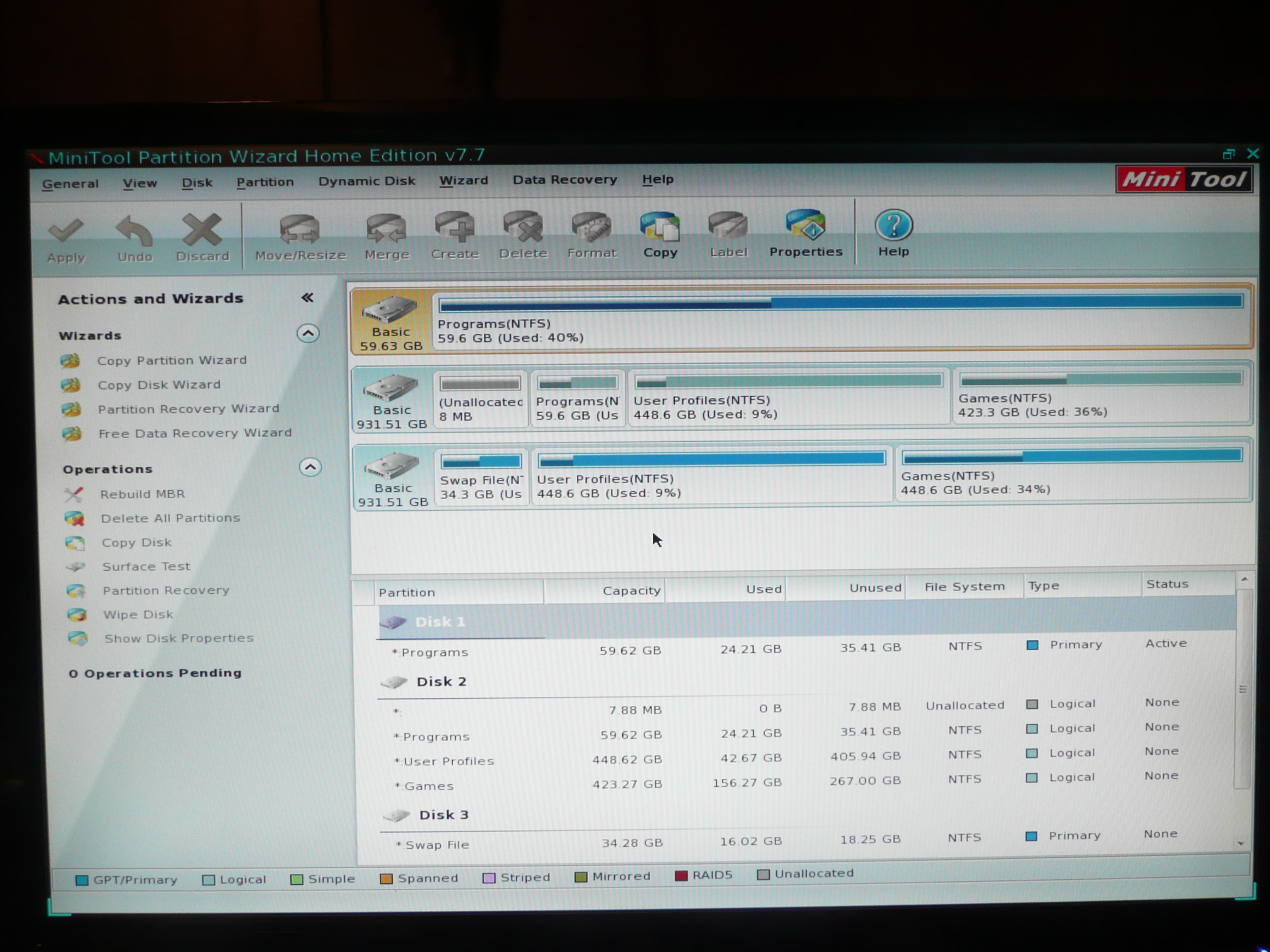
Ok. Here you go. I had to do two because all of the partitions would not show in the main section of the screen. The second image only adds the last two partitions of Disk 3.

BTW, Disk 1 is the SSD that is the bootable drive with the Windows, Program Files, Program Files (x86) directories on it. Disk 2 is the disk I'm using to back up the data. Disk 3 is the drive that has the User Profiles, Swap File, and Games partitions on it.

P1040015.JPG

P1040016.JPG
 

My Computer My Computer

Computer type
PC/Desktop
OS
Windows 7 Home Premium 64-bit
CPU
Intel i7-4790K
Motherboard
GA-Z97X-Gaming 7
Memory
Kingston 8Gb + G.Skil 8Gb
Graphics Card(s)
EVGA GeForce GTX 980Ti (x2)
Sound Card
Asus Xonar DX
Monitor(s) Displays
Acer Predator XB271HU (x3)
Screen Resolution
7680x1440
PSU
EVGA SuperNOVA 1300 G2
Keyboard
Ducky Shine 3
Mouse
Corsair M45
Antivirus
ESET NOD32 Anitvirus
Sorry you missed to upload the screenshots?
 

My Computer My Computer

Computer type
PC/Desktop
Computer Manufacturer/Model Number
Self Assembled
OS
Microsoft Windows 10 Pro Insider Preview 64-bit
CPU
Intel(R) Core(TM) i3-4130 CPU @ 3.40GHz
Motherboard
Gigabyte Technology Co., Ltd. B85M-D3H
Memory
Corsair Vengence 4GB x2 (8.00GB Dual-Channel DDR3 @ 798MHz)
Graphics Card(s)
2047MB GeForce GTS 450 (ZOTAC International)
Sound Card
Onboard (Realtek High Definition Audio)
Monitor(s) Displays
LG Flatron E2040T
Screen Resolution
1600x900
Hard Drives
Western Digital 1 TB
Seagate 500 GB
PSU
Corsair VS550
Case
Cooler Master K380
Cooling
Cooler Master Seidon 120V Plus
Keyboard
Logitech MK260r
Mouse
Logitech MK260r
Internet Speed
PMPL Broadband
Antivirus
Windows Defender + MBAM
Browser
Firefox
Other Info
Dell Studio 15" Laptop
I'm not sure I understand what you mean? I don't see any way to take a screenshot inside of Partition Wizard, so I took pictures of the screen. If you're not seeing them, I'll link them instead:
Screenshot 1
Screenshot 2

If that's not what you were asking for, please be more specific and I will get it to you. I will be out of town tomorrow and the next day though, so I won't be able to reply (other than maybe tomorrow morning) until Tuesday.
 

My Computer My Computer

Computer type
PC/Desktop
OS
Windows 7 Home Premium 64-bit
CPU
Intel i7-4790K
Motherboard
GA-Z97X-Gaming 7
Memory
Kingston 8Gb + G.Skil 8Gb
Graphics Card(s)
EVGA GeForce GTX 980Ti (x2)
Sound Card
Asus Xonar DX
Monitor(s) Displays
Acer Predator XB271HU (x3)
Screen Resolution
7680x1440
PSU
EVGA SuperNOVA 1300 G2
Keyboard
Ducky Shine 3
Mouse
Corsair M45
Antivirus
ESET NOD32 Anitvirus

My Computer My Computer

Computer type
PC/Desktop
Computer Manufacturer/Model Number
Self Assembled
OS
Microsoft Windows 10 Pro Insider Preview 64-bit
CPU
Intel(R) Core(TM) i3-4130 CPU @ 3.40GHz
Motherboard
Gigabyte Technology Co., Ltd. B85M-D3H
Memory
Corsair Vengence 4GB x2 (8.00GB Dual-Channel DDR3 @ 798MHz)
Graphics Card(s)
2047MB GeForce GTS 450 (ZOTAC International)
Sound Card
Onboard (Realtek High Definition Audio)
Monitor(s) Displays
LG Flatron E2040T
Screen Resolution
1600x900
Hard Drives
Western Digital 1 TB
Seagate 500 GB
PSU
Corsair VS550
Case
Cooler Master K380
Cooling
Cooler Master Seidon 120V Plus
Keyboard
Logitech MK260r
Mouse
Logitech MK260r
Internet Speed
PMPL Broadband
Antivirus
Windows Defender + MBAM
Browser
Firefox
Other Info
Dell Studio 15" Laptop
Ok. I rebuilt the MBR with Partition Wizard on Disk 1 and applied the change. I rebooted, and it went right back into Startup Recovery, "Could not repair".
 

My Computer My Computer

Computer type
PC/Desktop
OS
Windows 7 Home Premium 64-bit
CPU
Intel i7-4790K
Motherboard
GA-Z97X-Gaming 7
Memory
Kingston 8Gb + G.Skil 8Gb
Graphics Card(s)
EVGA GeForce GTX 980Ti (x2)
Sound Card
Asus Xonar DX
Monitor(s) Displays
Acer Predator XB271HU (x3)
Screen Resolution
7680x1440
PSU
EVGA SuperNOVA 1300 G2
Keyboard
Ducky Shine 3
Mouse
Corsair M45
Antivirus
ESET NOD32 Anitvirus
Open the computer. Unplug the sata and power from Disc2 and Disc3.

As far as I am seeing, there is only partition in disc1. However, mark it as active following either method 2 or method 3 of http://www.sevenforums.com/tutorials/71432-partition-mark-active.html

Then, run http://www.sevenforums.com/tutorials/681-startup-repair.html, for three seperate times, with restarts between every single run.

You may say that you have tried startup repair ... but do the earlier steps and then do it again ... it should work.
 

My Computer My Computer

Computer type
PC/Desktop
Computer Manufacturer/Model Number
Self Assembled
OS
Microsoft Windows 10 Pro Insider Preview 64-bit
CPU
Intel(R) Core(TM) i3-4130 CPU @ 3.40GHz
Motherboard
Gigabyte Technology Co., Ltd. B85M-D3H
Memory
Corsair Vengence 4GB x2 (8.00GB Dual-Channel DDR3 @ 798MHz)
Graphics Card(s)
2047MB GeForce GTS 450 (ZOTAC International)
Sound Card
Onboard (Realtek High Definition Audio)
Monitor(s) Displays
LG Flatron E2040T
Screen Resolution
1600x900
Hard Drives
Western Digital 1 TB
Seagate 500 GB
PSU
Corsair VS550
Case
Cooler Master K380
Cooling
Cooler Master Seidon 120V Plus
Keyboard
Logitech MK260r
Mouse
Logitech MK260r
Internet Speed
PMPL Broadband
Antivirus
Windows Defender + MBAM
Browser
Firefox
Other Info
Dell Studio 15" Laptop
Ok. Here's something weird. I used Partition Wizard to do this. I had to mark it inactive in order to mark it as active as it was already marked active. I did that and applied, rebooted, then marked it active and applied. Reboot, Startup Repair "Can't repair". Reboot, Startup Repair "Can't Repair". Reboot, Startup Repair "Can't repair." Rebooted again, and I'm still getting "Can't repair".

BTW, I did NOT plug Disk 3 back in before doing that. I then plugged disk 3 back in since it's got the user files on it, and I did the Startup Repair 3 times thing again. Same result; still getting Startup Repair "can't repair".
 

My Computer My Computer

Computer type
PC/Desktop
OS
Windows 7 Home Premium 64-bit
CPU
Intel i7-4790K
Motherboard
GA-Z97X-Gaming 7
Memory
Kingston 8Gb + G.Skil 8Gb
Graphics Card(s)
EVGA GeForce GTX 980Ti (x2)
Sound Card
Asus Xonar DX
Monitor(s) Displays
Acer Predator XB271HU (x3)
Screen Resolution
7680x1440
PSU
EVGA SuperNOVA 1300 G2
Keyboard
Ducky Shine 3
Mouse
Corsair M45
Antivirus
ESET NOD32 Anitvirus
Tell me one thing ... are you sure that you have installed windows in Disc1, the SSD?

In normal windows installation, there creates a 100 MB hidden partition for storing the bootloader, that is missing there. And, it's renamed to Program?

As all the repair options fails here, I'd suggest you to start afresh.
First, secure all important thing stored in Disc1 to another partition, following the http://www.sevenforums.com/tutorials/93347-copy-paste-windows-recovery-console.html

Then, do a http://www.sevenforums.com/tutorials/219487-clean-reinstall-factory-oem-windows-7-a.html

Edit: when installing, keep the other two HDDS disconnected.
 

My Computer My Computer

Computer type
PC/Desktop
Computer Manufacturer/Model Number
Self Assembled
OS
Microsoft Windows 10 Pro Insider Preview 64-bit
CPU
Intel(R) Core(TM) i3-4130 CPU @ 3.40GHz
Motherboard
Gigabyte Technology Co., Ltd. B85M-D3H
Memory
Corsair Vengence 4GB x2 (8.00GB Dual-Channel DDR3 @ 798MHz)
Graphics Card(s)
2047MB GeForce GTS 450 (ZOTAC International)
Sound Card
Onboard (Realtek High Definition Audio)
Monitor(s) Displays
LG Flatron E2040T
Screen Resolution
1600x900
Hard Drives
Western Digital 1 TB
Seagate 500 GB
PSU
Corsair VS550
Case
Cooler Master K380
Cooling
Cooler Master Seidon 120V Plus
Keyboard
Logitech MK260r
Mouse
Logitech MK260r
Internet Speed
PMPL Broadband
Antivirus
Windows Defender + MBAM
Browser
Firefox
Other Info
Dell Studio 15" Laptop
Yes. I'm sure. However, I thought it was strange that the 100mb partition was missing. I remember looking into whether or not I needed that when I did the install (which wasn't that long ago). And I remember seeing it after the install. Not sure how it could have disappeared since.

I will have to plug Disk 3 in before doing a fresh install in order to install with the User directory on that disk. I've never had any success moving them after the install. However, I will format the disk before I do the re-install.
 

My Computer My Computer

Computer type
PC/Desktop
OS
Windows 7 Home Premium 64-bit
CPU
Intel i7-4790K
Motherboard
GA-Z97X-Gaming 7
Memory
Kingston 8Gb + G.Skil 8Gb
Graphics Card(s)
EVGA GeForce GTX 980Ti (x2)
Sound Card
Asus Xonar DX
Monitor(s) Displays
Acer Predator XB271HU (x3)
Screen Resolution
7680x1440
PSU
EVGA SuperNOVA 1300 G2
Keyboard
Ducky Shine 3
Mouse
Corsair M45
Antivirus
ESET NOD32 Anitvirus
Please confirm that you unplugged all other HD's during 3 separate Startup Repairs with reboots on the Active partition. Your response is not clear.

There are other last-resort steps here for Troubleshooting Windows 7 Failure to Start.
You can even use PW CD to Resize C from the left by 200mb, create a Primary NTFS partition there marked Active, then run the 3 repairs to see if you can construct a System Reserved partition which might start it if the C drive boot files themselves are corrupt beyond repair.
 
Please confirm that you unplugged all other HD's during 3 separate Startup Repairs with reboots on the Active partition. Your response is not clear.

I'm sorry. My system has the Windows/Program Files on disk 1, but the User directory on disk 2. So I disconnected the 3rd drive, but not the 2nd. I assume, and maybe I'm wrong, that Windows 7 will look for the user directory and if it does not find it, it will not start. Either that, or it will create a new user directory on the C: drive, and that would just as bad as it not starting. Do you think it would do that?

There are other last-resort steps here for Troubleshooting Windows 7 Failure to Start.
You can even use PW CD to Resize C from the left by 200mb, create a Primary NTFS partition there marked Active, then run the 3 repairs to see if you can construct a System Reserved partition which might start it if the C drive boot files themselves are corrupt beyond repair.

I did go through that tutorial you linked (somebody suggested it on the other thread I posted about doing a repair install, and I did it based on that). None of that stuff helped.

I might try doing the repartition thing to see if it creates that System Reserved partition.
 

My Computer My Computer

Computer type
PC/Desktop
OS
Windows 7 Home Premium 64-bit
CPU
Intel i7-4790K
Motherboard
GA-Z97X-Gaming 7
Memory
Kingston 8Gb + G.Skil 8Gb
Graphics Card(s)
EVGA GeForce GTX 980Ti (x2)
Sound Card
Asus Xonar DX
Monitor(s) Displays
Acer Predator XB271HU (x3)
Screen Resolution
7680x1440
PSU
EVGA SuperNOVA 1300 G2
Keyboard
Ducky Shine 3
Mouse
Corsair M45
Antivirus
ESET NOD32 Anitvirus
If Win7 will not repair with the User directory HD connected then unplug it to see what happens during the same 3 separate Startup Repairs.
 
Last edited:
I tried adding the primary, active, NTFS partition before the existing C: drive partition. I then booted using the installation CD and it told me that it needed to repair windows (it was not Startup Repair, but a different window). I chose to "Repair and Reboot". That worked fine. I then rebooted using the same installation Cd and went to repair the install. It searched for the Windows location and found it, but identified the drive as E: rather than C:. I let it go, figuring I could fix the registry later. I got to Systerm Recovery Options and ran Startup Repair. It ran and appeared to do something. However, after rebooting and trying to go into System Repair Options again, it gave me this error message:
"The version of System Recovery Options is not compatible with the version of Windows you are trying to repair. Try using a recovery disk that is compatible with this version of Windows."

Her PC has Windows 7 Home Premium, 64-bit, SP1 and I'm using that disk to repair install. I tried using the stock Windows 7 Home Premium, 64-bit disk, but that gives the same message. Using your advice found in this thread I went back to Partition Wizard, made that new partition inactive, then active again, then rebuilt the MBR on that drive. Then I went back into the "Repair your computer" and I was able to go back to System Recovery Options, though when it located the Windows installation, it still said it was on the E: drive.

I ran Startup Repair and it again looked like it did something. Reboot and ran it again. This time it said it didn't find any problems. Did it again with the same results. Tried rebooting normally, and Startup Repair came up saying that it could not repair. However, when I went into the command prompt it was showing nothing in C: and all of the normal C: drive stuff in the E: drive. I did a bunch of searching, but have not found anything definitive on how I can correct the drive letter problem. I tried using DISKPART, but when it reboots, it goes back to what it was originally. I also tried Startup Repair three times, but it always comes up saying it didn't find a problem. When I reboot, same problem.

So how can I rename my drives? I think I am going to have to manually edit my registry on my E: drive to fix it, but I can't find anything showing how to do that.
 

My Computer My Computer

Computer type
PC/Desktop
OS
Windows 7 Home Premium 64-bit
CPU
Intel i7-4790K
Motherboard
GA-Z97X-Gaming 7
Memory
Kingston 8Gb + G.Skil 8Gb
Graphics Card(s)
EVGA GeForce GTX 980Ti (x2)
Sound Card
Asus Xonar DX
Monitor(s) Displays
Acer Predator XB271HU (x3)
Screen Resolution
7680x1440
PSU
EVGA SuperNOVA 1300 G2
Keyboard
Ducky Shine 3
Mouse
Corsair M45
Antivirus
ESET NOD32 Anitvirus
BTW, the option to change drive letters is grayed out for every partion in Partition Wizard.
 

My Computer My Computer

Computer type
PC/Desktop
OS
Windows 7 Home Premium 64-bit
CPU
Intel i7-4790K
Motherboard
GA-Z97X-Gaming 7
Memory
Kingston 8Gb + G.Skil 8Gb
Graphics Card(s)
EVGA GeForce GTX 980Ti (x2)
Sound Card
Asus Xonar DX
Monitor(s) Displays
Acer Predator XB271HU (x3)
Screen Resolution
7680x1440
PSU
EVGA SuperNOVA 1300 G2
Keyboard
Ducky Shine 3
Mouse
Corsair M45
Antivirus
ESET NOD32 Anitvirus
I followed the directions found on this page, using the information found here. My Administrator account has full permissions, but for some reason, the changes to keep. When I reboot, the drive letters go back to what they were before.
 

My Computer My Computer

Computer type
PC/Desktop
OS
Windows 7 Home Premium 64-bit
CPU
Intel i7-4790K
Motherboard
GA-Z97X-Gaming 7
Memory
Kingston 8Gb + G.Skil 8Gb
Graphics Card(s)
EVGA GeForce GTX 980Ti (x2)
Sound Card
Asus Xonar DX
Monitor(s) Displays
Acer Predator XB271HU (x3)
Screen Resolution
7680x1440
PSU
EVGA SuperNOVA 1300 G2
Keyboard
Ducky Shine 3
Mouse
Corsair M45
Antivirus
ESET NOD32 Anitvirus
Did you mark the SysReserved partition you created Active before running the 3 Repairs? It wont' work otherwise. Drive letters often appear differently in WinRe. You should be asking us as you go if you want best results, rather than wasting all that time and trouble chasing your tail.

Everything that can possibly be done to start Win7 is in Troubleshooting Windows 7 Failure to Start
 
Did you mark the SysReserved partition you created Active before running the 3 Repairs? It wont' work otherwise. Drive letters often appear differently in WinRe.

Everything that can possibly be done to start Win7 is in Troubleshooting Windows 7 Failure to Start

Yes. The SysReserved partition is marked active. It is NOT marked as a "system" partition though.
 

My Computer My Computer

Computer type
PC/Desktop
OS
Windows 7 Home Premium 64-bit
CPU
Intel i7-4790K
Motherboard
GA-Z97X-Gaming 7
Memory
Kingston 8Gb + G.Skil 8Gb
Graphics Card(s)
EVGA GeForce GTX 980Ti (x2)
Sound Card
Asus Xonar DX
Monitor(s) Displays
Acer Predator XB271HU (x3)
Screen Resolution
7680x1440
PSU
EVGA SuperNOVA 1300 G2
Keyboard
Ducky Shine 3
Mouse
Corsair M45
Antivirus
ESET NOD32 Anitvirus
It won't have the System flag until the System boot files are written there and its made bootable, which takes up to 3 separate Startup Repairs once it's marked Active.
 
Back
Top