Solved can't boot to ANY boot disc

harleynut97

New member
Member
VIP
Local time
4:59 AM
Messages
121
I hope this is in the proper forum. Originally I thought I had an issue with Macrium Reflect because I could not get their windows PE rescue disc to boot properly from the cd. But I'm pretty certain that is not their software or recovery disc, but rather a bigger problem.

-I have ruled out and done the following
1) The bios are set properly to boot to CD as first priority
2) The dvd opticle drive works, I can explore files, play music, burn to the disc.
3) I have attempted boot to disc numerious times and I know that I am clicking fast enough and at the right times upon getting the press any key prompt.
4) I have attempted using 4 different type boot discs... macrium windows PE boot, Acronis windows PE boot disc, the factory restore boot disc that came with my computer and the actual Windows 7 discs. NONE of these boot properly and exhibit the exact same behavior as noted below.
5) I have had no problems at all with my computer up to this point


The problem.... When trying to boot to disc, No matter what type of boot discit is, this is what occurs....
-I put the disc in, the optical light flashes and starts
-In all atttempts I get the "press any key to boot to CD message
-As soon as I press any key ( have tried a single press, multiple taps), thats when everything stops and it just directly loads windows.... All booting from the actual CD ceases
-There is no lights or spinning from the optical drive after pressing the key when prompted.

Any help would be so very much appreciated. Right now as it stands, if something goes wrong, I can't repair, recover and I could lose everything without the ability to have these windows boot discs perform as they should.

If any moderators feel this should be moved to a more appropriate forum, please do so
 

My Computer My Computer

Computer type
PC/Desktop
Computer Manufacturer/Model Number
SYX SG-103
OS
Windows 7 home premium 64 bit sp1
CPU
Intel Core I7-2600 3.4 Ghz 1155 8M 95W CPU
Motherboard
MSI P67A-C43 (B3) ATX
Memory
16 gb DD3 1333MHZ
Graphics Card(s)
Nvidea Gforce GTX 550Ti
Sound Card
Realtek ALC892 integrated
Monitor(s) Displays
acer 23"
Screen Resolution
1920 x 1080
Hard Drives
Hitachi 1 TB 3.5" SATA 3G 7200rpm
Seagate ST32000641AS baracuda XT , 2 TB 3.5" 7200 rpm
Western digital My Book 1 tb USB2 external
Western digital My Book 3 tb USB3 external
PSU
500 Watt 80 plus
Case
Cooler Master Elite 310 RC-310-BWN1-GP
Keyboard
Logitech MK 200 Keybard
Mouse
Logitech MK200 mouse
Other Info
24x DVDRW Dual Layer SATA optical drive
In the absence of any other ideas I think you may have to assume there is either a problem with the optical drive or it needs a firmware update.

To eliminate the drive from your troubleshooting steps do you have another DVD drive you can try?

You might also want to recheck your BIOS settings and reset it to the default settings if you think that might help.

On the other hand you could configure the BIOS to disable every boot device except your DVD drive temporarily. That way your computer will have to boot to the DVD drive.

You might aldso want to create a bootable USB drive as insurance as this tutorial explains:

http://www.sevenforums.com/tutorials/218920-macrium-reflect-create-bootable-rescue-usb-drive.html
 

My Computer My Computer

Computer Manufacturer/Model Number
HP Pavilion Elite 495UK
OS
Windows 7 Ultimate SP1 64-Bit
CPU
Intel Core i7 870 @ 2.93GHz
Motherboard
MSI 2A9C (CPU1)
Memory
8Gb Dual-Channel DDR3 @ 664MHz
Graphics Card(s)
nVidia GeForce GTX 460 1024MB dedicated RAM
Sound Card
Realtek HD Audio
Monitor(s) Displays
HP2310i
Screen Resolution
1920 x 1080
Hard Drives
1x1954GB Hitachi HDS22020ALA 330 (RAID), 1x1954GB Hitachi External for backup and storage
PSU
460W
Case
HP Elite
Cooling
Air cooled
Keyboard
Logitech K750 solar-powered keyboard
Mouse
Logitech Wireless M180 mouse
Internet Speed
2Mb
Other Info
Pure Avanti Flow Internet Radio with iPod Dock, 64Gb iPod, HP USB Speakers, Sony MDR-V500 Headphones, Sony Vaio F-Series Laptop
Cables

This is a new problem correct? I mean you have previously booted from the rom deck, right? If the answer is yes to both of those questions. Open up the case and reseat the cables.
 

My Computer My Computer

Computer Manufacturer/Model Number
BGC (Bob's Garage Crew)
OS
win 7 X64 Ultimate SP1
CPU
I3770K
Motherboard
Asus P8Z77-V Deluxe
Memory
G Skill F3-14900CL9-4GBXL x 4
Graphics Card(s)
NVIDIA GeForce GTX670 + Intel 4000
Sound Card
Realtek HD 5.1 (MOB)
Monitor(s) Displays
Asus VW224T (1)
Screen Resolution
1920 x 1080
Hard Drives
SATA Corsair Force GT 2.5" 180GB (System) Sata 3
OCZ Vertex3 120GB
OCZ Vertex 2 120GB 2.5" SATA II
ST31000524AS 1000.2GB
WD15EARS (External)
PSU
CoolerMaster 1000 Watt
Case
CoolerMaster HAF X
Cooling
CPU -- CoolerMaster 520N
Keyboard
MS Wireless 3000 V2
Mouse
MS Wireless 3000 V2
Internet Speed
Cable
Antivirus
Norton Internet Security
Browser
IE9
Other Info
AMI Bios 1805
OC'd 3%
Seavixen and Hammerhead, First off it sure can't hurt for me to open the box and reseat the cables to the optical drive, so I will definitely do that. Prior to this, I have NEVER needed or attempted to use any type of boot disc.

But I need to add something to this mystery.....
-While I cannot boot to disc using the Macrium or Aconis WindowsPE discs, OR, my factory recovery disc OR my actual windows 7 program disc.....

-It seems it DOES boot to the cd when using Linix recovery discs With the linux bootables the following occurs
-Acronis linix boot disc... It opens the special screen that allows you to pick to open Acronis ...but I cannot make the selection because I have no ability to use my USB keyboard or mouse. Someone mentioned on a previous post/thread that I need to load USB drivers when using this linix disc.

-The macrium linix recovory disc does boot to the special screens, but I have not had a chance to do anything yet with them, just confirm that it is booting into the special screen.

But right now what concerns me most is that my factory default recovery and my windows 7 disc will not boot correctly.

Any thoughts about why a linix disc would boot in some capacity, and all my other windows discs will not?

I am going to check on a firmware update for my existing optical drive, I worry a bit about reseting the bios, because I have no clue what would be changing and how it could affect other hardware and programs on my computer. Based on the fact I do not have any kind of backups or anyway to even repair windows using their disc, It really makes me want to make this option a last resort.
 

My Computer My Computer

Computer type
PC/Desktop
Computer Manufacturer/Model Number
SYX SG-103
OS
Windows 7 home premium 64 bit sp1
CPU
Intel Core I7-2600 3.4 Ghz 1155 8M 95W CPU
Motherboard
MSI P67A-C43 (B3) ATX
Memory
16 gb DD3 1333MHZ
Graphics Card(s)
Nvidea Gforce GTX 550Ti
Sound Card
Realtek ALC892 integrated
Monitor(s) Displays
acer 23"
Screen Resolution
1920 x 1080
Hard Drives
Hitachi 1 TB 3.5" SATA 3G 7200rpm
Seagate ST32000641AS baracuda XT , 2 TB 3.5" 7200 rpm
Western digital My Book 1 tb USB2 external
Western digital My Book 3 tb USB3 external
PSU
500 Watt 80 plus
Case
Cooler Master Elite 310 RC-310-BWN1-GP
Keyboard
Logitech MK 200 Keybard
Mouse
Logitech MK200 mouse
Other Info
24x DVDRW Dual Layer SATA optical drive
Rom Deck

I am thinking the same problem you have with a linux boot is affecting a Win PE boot. When you get the message "hit any key to boot from the CD" If you don't put in some key input the system will proceed to boot from the Hard drive.

You need to open the bios and check all the available setting for USB. I looked at your manual but the one I have isn't very detailed so I don't know what you have available. Call them up and try some different settings.

Good possibility that there is no problem with the rom deck.

If there is a setting for legacy usb devices, make sure it is ticked or set to yes or what ever turns it on.
 
Last edited:

My Computer My Computer

Computer Manufacturer/Model Number
BGC (Bob's Garage Crew)
OS
win 7 X64 Ultimate SP1
CPU
I3770K
Motherboard
Asus P8Z77-V Deluxe
Memory
G Skill F3-14900CL9-4GBXL x 4
Graphics Card(s)
NVIDIA GeForce GTX670 + Intel 4000
Sound Card
Realtek HD 5.1 (MOB)
Monitor(s) Displays
Asus VW224T (1)
Screen Resolution
1920 x 1080
Hard Drives
SATA Corsair Force GT 2.5" 180GB (System) Sata 3
OCZ Vertex3 120GB
OCZ Vertex 2 120GB 2.5" SATA II
ST31000524AS 1000.2GB
WD15EARS (External)
PSU
CoolerMaster 1000 Watt
Case
CoolerMaster HAF X
Cooling
CPU -- CoolerMaster 520N
Keyboard
MS Wireless 3000 V2
Mouse
MS Wireless 3000 V2
Internet Speed
Cable
Antivirus
Norton Internet Security
Browser
IE9
Other Info
AMI Bios 1805
OC'd 3%
Hammer head and others let me fill you in on some new details...

1) Yesterday I did go in and change the legacy setting and enabled it.... HOWEVER... after doing that, windows would not boot at all (I'm refering to regular windows, not the rescue discs) I couldn't even get back into the bios to reset it back until I unplugged every usb device, than I was able to get into the bios and disable the legacy setting and I was then able to open windows. So unfortunately for me, that is not going to be an option. The support people told me they get numerous calls that are resolved by making sure that setting is disabled.

2) I've had my computer open today and have done the following.

-all external harddrives and anything USB was unplugged before doing the following

-swapped out the sata cable from the optical drive to rule out a bad cable / also switched ports... still wouldnt boot
to disc

-unplugged completely my 2nd internal drive (not my c:drive) - still wouldn't boot to disc. This rules out a problem caused by my second internal drive.

-IMPORTANT... when we unplugged both the c drive and 2nd internal drive.... it DID boot to disc using the factory recovery disc we trying.

-Again let me emphasize that any linix based recovery disc whether it is macrium windows PE or acronis windows PE does boot as it is supposed to.
*in the case of the macrium it is not recognizing my drive that has the image. It is a 3 tb (which I think is my problem. It is also USB3. I did do what WHS suggested and plugged the drive into a usb2 port when using the recovory disc, but it still did not recognize the external drive. ( I am using the free version and that might be why.

*With regard to the acronis linix disc... it opens but I can't select the option because of no keyboard or mouse control as noted above.

Right now my computer tech says I should send it in for repair, but I can't even consider that at this stage without a lot more troubleshooting.. I would lose all my data because I have no images currently that I can rely on or even access.

Here are some additional thoughts...
- could the fact that I have 2 of these image programs loaded at the same time be causing any problems?
- Are there any known viruses that specifically cause your system not to be able to boot using a rescue disc.
- My computer is working fine with no issues besides this major issue of not being able to boot using the windows rescue cds.

Sorry for this long post, but I continue to get on my virtual knees and plead for any help or advice you can offer - Carl
 

My Computer My Computer

Computer type
PC/Desktop
Computer Manufacturer/Model Number
SYX SG-103
OS
Windows 7 home premium 64 bit sp1
CPU
Intel Core I7-2600 3.4 Ghz 1155 8M 95W CPU
Motherboard
MSI P67A-C43 (B3) ATX
Memory
16 gb DD3 1333MHZ
Graphics Card(s)
Nvidea Gforce GTX 550Ti
Sound Card
Realtek ALC892 integrated
Monitor(s) Displays
acer 23"
Screen Resolution
1920 x 1080
Hard Drives
Hitachi 1 TB 3.5" SATA 3G 7200rpm
Seagate ST32000641AS baracuda XT , 2 TB 3.5" 7200 rpm
Western digital My Book 1 tb USB2 external
Western digital My Book 3 tb USB3 external
PSU
500 Watt 80 plus
Case
Cooler Master Elite 310 RC-310-BWN1-GP
Keyboard
Logitech MK 200 Keybard
Mouse
Logitech MK200 mouse
Other Info
24x DVDRW Dual Layer SATA optical drive
OK, now you do not want to send your computer for repairs since you may lose all data on your hard drive/s.

I shall not put my head into resolving your problem - I shall leave it to other better heads :) - but rather advise that you try to copy all data from your hard drives by accessing them from another OS.
http://www.sevenforums.com/software/198909-lucid-puppy-way-recover-files-non-bootable-computer.html

I have mentioned the source for that thread too and you may go through that source too in creating/using the Lucid Puppy drive. Check if you can copy all data to another external drive.
 

My Computer My Computer

OS
Windows 7 Home Premium 32 bit
USB

For the time being make sure your mouse and keyboard are not plugged into the USB 3.0 ports. The controller maynot be active during boot. Also you could try moving the mouse and keyboard to different ports to see if that makes a difference.
 

My Computer My Computer

Computer Manufacturer/Model Number
BGC (Bob's Garage Crew)
OS
win 7 X64 Ultimate SP1
CPU
I3770K
Motherboard
Asus P8Z77-V Deluxe
Memory
G Skill F3-14900CL9-4GBXL x 4
Graphics Card(s)
NVIDIA GeForce GTX670 + Intel 4000
Sound Card
Realtek HD 5.1 (MOB)
Monitor(s) Displays
Asus VW224T (1)
Screen Resolution
1920 x 1080
Hard Drives
SATA Corsair Force GT 2.5" 180GB (System) Sata 3
OCZ Vertex3 120GB
OCZ Vertex 2 120GB 2.5" SATA II
ST31000524AS 1000.2GB
WD15EARS (External)
PSU
CoolerMaster 1000 Watt
Case
CoolerMaster HAF X
Cooling
CPU -- CoolerMaster 520N
Keyboard
MS Wireless 3000 V2
Mouse
MS Wireless 3000 V2
Internet Speed
Cable
Antivirus
Norton Internet Security
Browser
IE9
Other Info
AMI Bios 1805
OC'd 3%
This may be a dumb question, but have you downloaded and installed the latest chipset drivers from the motherboard's site? The USB keyboard and Mouse should work. USB 3.0 will not work unless you have the drivers on the winPE disk. Linux shoud support USB 2.0. You can copy/ paste your data from the recovery console. try going to the Device Manager in Windows and see if there are any yellow triangles or exclamation marks by any of the items listed, particularly the USB devices.
 

My Computers My Computers

System One System Two

  • Computer type
    PC/Desktop
    Computer Manufacturer/Model Number
    ALWAYS UNDER CONSTRUCTION
    OS
    Windows 11 Pro
    CPU
    Ryzen 9 5900X
    Motherboard
    Asus X570 Crosshair Viii Hero
    Memory
    32GB G Skill DDR4-3600
    Graphics Card(s)
    EVGA RTX 3080 FTW 3 Ultra
    Sound Card
    On Board/Sennheiser PC37X Headset
    Monitor(s) Displays
    3 X Asus 27"
    Screen Resolution
    2560x1440
    Hard Drives
    2 X 1 TB NVME drives
    PSU
    EVGA 850
    Case
    Phanteks Eclipse P400A
    Cooling
    EVGA 280 AIO
    Keyboard
    Logitech G510s/ Logitech G13
    Mouse
    Logitech G502
    Internet Speed
    24/1
    Antivirus
    ESET/MBAM Pro/SAS Pro
    Browser
    Chrome/ Firefox/ Edge
  • Computer type
    Laptop
    System Manufacturer/Model Number
    Dell 16 Plus
    OS
    Windows 11 Pro
    CPU
    Intel Ultra 9 288V
    Memory
    32 GB LPDDR5X 8533
    Monitor(s) Displays
    16" Mini-LED HDR600 Touch 90 Hz
    Screen Resolution
    2560X1600
    Hard Drives
    1 TB NVME
Essenbe, I have not as of yet downloaded any chipset drivers for the motherboard. Do you know how to find out what drivers are currrently in the system? I also checked device manager...every catagory, but there are no explantion points or warnings. Hammerhead, I did change the usb port for the keyboard, but have not yet done that for the mouse. Neither keyboard or mouse is attached to any type of usb 3 port. Only my external 3 TB harddrive uses one of those ports.
 

My Computer My Computer

Computer type
PC/Desktop
Computer Manufacturer/Model Number
SYX SG-103
OS
Windows 7 home premium 64 bit sp1
CPU
Intel Core I7-2600 3.4 Ghz 1155 8M 95W CPU
Motherboard
MSI P67A-C43 (B3) ATX
Memory
16 gb DD3 1333MHZ
Graphics Card(s)
Nvidea Gforce GTX 550Ti
Sound Card
Realtek ALC892 integrated
Monitor(s) Displays
acer 23"
Screen Resolution
1920 x 1080
Hard Drives
Hitachi 1 TB 3.5" SATA 3G 7200rpm
Seagate ST32000641AS baracuda XT , 2 TB 3.5" 7200 rpm
Western digital My Book 1 tb USB2 external
Western digital My Book 3 tb USB3 external
PSU
500 Watt 80 plus
Case
Cooler Master Elite 310 RC-310-BWN1-GP
Keyboard
Logitech MK 200 Keybard
Mouse
Logitech MK200 mouse
Other Info
24x DVDRW Dual Layer SATA optical drive
Finally an answer!

Well finally some good news regarding what started this post. I was finding it impossible to boot to cd no matter what types of recovery discs I used... refer to the 1st post and I list them. I spoke with 4 different techs where I bought the computer, none of them could figure out why I couldn't boot to disc.

Hours of troubleshooting later here is how it was finally resolved. I am now able to boot to any type of recovery cd providing I do the following.

1) unplug all my USB devices except keyboard and mouse
2) go into bios and ENABLE legacy USB, save and exit
3) insert recovery disc... reboot and press any key at the prompt
4) wala.... finally a boot to CD occurs properly
5) in the case of linux recovery discs for acronis... once it actually boots to their start page (within the recovery cd environment, I am able to then plug in my external drive, I can than continue on and then see the image on the external drive.
*whether it can be successfully recovered remains to be seen, but at least I can now access it.
6) After escaping out and removing the recovery disc, I can reboot... go back into bios and DISABLE the legacy USB setting.
7) Rehook up all my extraneous USB devices and carry on

The shame of all this is someone at this forum did recommend the enable USB legacy, and I did try it, but I got a catostrophic crash, and couldn't even enter into the bios to fix it. That is why I had ruled out using that advice. HOWEVER, when that all occurred, all my USB devices were connected to the computer, I made the change in the bios... and then it was instant black screen upon save and reboot.

So I guess I'll mark this solved, but I still have no clue as to why I can't boot to CD if USB legacy is disabled, and I have NO idea why it would be required to have it enabled in order to do something as important as being able to boot to an emergency recovery CD or even the Windows 7 install disc.

So thanks to everyone who tried to help! - Carl
 

My Computer My Computer

Computer type
PC/Desktop
Computer Manufacturer/Model Number
SYX SG-103
OS
Windows 7 home premium 64 bit sp1
CPU
Intel Core I7-2600 3.4 Ghz 1155 8M 95W CPU
Motherboard
MSI P67A-C43 (B3) ATX
Memory
16 gb DD3 1333MHZ
Graphics Card(s)
Nvidea Gforce GTX 550Ti
Sound Card
Realtek ALC892 integrated
Monitor(s) Displays
acer 23"
Screen Resolution
1920 x 1080
Hard Drives
Hitachi 1 TB 3.5" SATA 3G 7200rpm
Seagate ST32000641AS baracuda XT , 2 TB 3.5" 7200 rpm
Western digital My Book 1 tb USB2 external
Western digital My Book 3 tb USB3 external
PSU
500 Watt 80 plus
Case
Cooler Master Elite 310 RC-310-BWN1-GP
Keyboard
Logitech MK 200 Keybard
Mouse
Logitech MK200 mouse
Other Info
24x DVDRW Dual Layer SATA optical drive
USB

OK you are making progress. I don't know what all you have plugged into the USB but I would remove them one at at a time until I determined which one is the culprit. I gonna guess it is your external 2TB disk. I think I was probably the one who suggested enable legacy USB. It should boot with legacy enabled. Which brings me to a suggestion made by Essenbe in an earlier post. You need to see if you can find some updated chip set drivers. If you can't find them post back and we will look together. Updated chipset drivers may cure the problem.


Well finally some good news regarding what started this post. I was finding it impossible to boot to cd no matter what types of recovery discs I used... refer to the 1st post and I list them. I spoke with 4 different techs where I bought the computer, none of them could figure out why I couldn't boot to disc.

Hours of troubleshooting later here is how it was finally resolved. I am now able to boot to any type of recovery cd providing I do the following.

1) unplug all my USB devices except keyboard and mouse
2) go into bios and ENABLE legacy USB, save and exit
3) insert recovery disc... reboot and press any key at the prompt
4) wala.... finally a boot to CD occurs properly
5) in the case of linux recovery discs for acronis... once it actually boots to their start page (within the recovery cd environment, I am able to then plug in my external drive, I can than continue on and then see the image on the external drive.
*whether it can be successfully recovered remains to be seen, but at least I can now access it.
6) After escaping out and removing the recovery disc, I can reboot... go back into bios and DISABLE the legacy USB setting.
7) Rehook up all my extraneous USB devices and carry on

The shame of all this is someone at this forum did recommend the enable USB legacy, and I did try it, but I got a catostrophic crash, and couldn't even enter into the bios to fix it. That is why I had ruled out using that advice. HOWEVER, when that all occurred, all my USB devices were connected to the computer, I made the change in the bios... and then it was instant black screen upon save and reboot.

So I guess I'll mark this solved, but I still have no clue as to why I can't boot to CD if USB legacy is disabled, and I have NO idea why it would be required to have it enabled in order to do something as important as being able to boot to an emergency recovery CD or even the Windows 7 install disc.

So thanks to everyone who tried to help! - Carl
 

My Computer My Computer

Computer Manufacturer/Model Number
BGC (Bob's Garage Crew)
OS
win 7 X64 Ultimate SP1
CPU
I3770K
Motherboard
Asus P8Z77-V Deluxe
Memory
G Skill F3-14900CL9-4GBXL x 4
Graphics Card(s)
NVIDIA GeForce GTX670 + Intel 4000
Sound Card
Realtek HD 5.1 (MOB)
Monitor(s) Displays
Asus VW224T (1)
Screen Resolution
1920 x 1080
Hard Drives
SATA Corsair Force GT 2.5" 180GB (System) Sata 3
OCZ Vertex3 120GB
OCZ Vertex 2 120GB 2.5" SATA II
ST31000524AS 1000.2GB
WD15EARS (External)
PSU
CoolerMaster 1000 Watt
Case
CoolerMaster HAF X
Cooling
CPU -- CoolerMaster 520N
Keyboard
MS Wireless 3000 V2
Mouse
MS Wireless 3000 V2
Internet Speed
Cable
Antivirus
Norton Internet Security
Browser
IE9
Other Info
AMI Bios 1805
OC'd 3%
Hey Hammerhead, I have some business I need to take care of over the next couple days, so I really can't do much troubleshooting until after that. I will try and first start trying installing usb cables one at a time as you suggested and see if I can determine any try to narrow down, what device might me causing the problem. These are the USB devices I have attached on a consistent basis:
-USB Keyboard , Mouse .... both corded Logitech that came with computer
-3 TB USB3 external drive (plugged into usb3 port)
-1 TB USB2 external drive
-wacom graphic pen/tablet
-m-audio USB device to hook up midi keyboard
-Some cheap USB multi photo card reader
-USB belkin network adaptor
-A firewire cord that I occasionally plug into a video camera
-A mini hdmi cord that goes from my graphics card to a regular TV

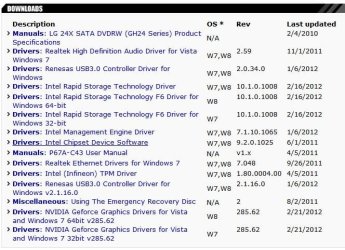
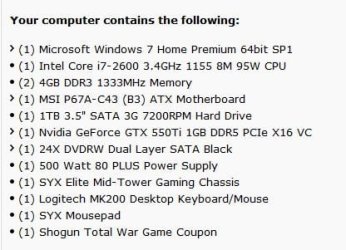
When talking to my computer manufacturer (SYX) I asked them about the chipset drivers... I know nothing about them, but this is what they told me... the chipset drivers listed on the attached image, are the only ones which the manufacturer has sent them. I have no idea if they are up to date or how to go about even telling what should be in there. I would ABSOLUTELY have to make sure first, since the unit is still under warranty, if I would void my warranty by updating the drivers.

But honestly I would never attempt it on my own.... I have had awful luck in the past updating drivers in general, and these critical drivers make me realize there is certain things I just shouldn't do on my own..... so after looking at what they say on attachments below, give me your thoughts. A final thought on the drivers ... where can I find what chipset drivers are truly on my computer so that I can make a screencapture?. The list below comes from a support website,they could be what came when the machine shipped from the factory, but I would want to make absolutely sure what chipset drivers are actually on my machine.

equipment_computer.JPG

drivers_todate.JPG
 

My Computer My Computer

Computer type
PC/Desktop
Computer Manufacturer/Model Number
SYX SG-103
OS
Windows 7 home premium 64 bit sp1
CPU
Intel Core I7-2600 3.4 Ghz 1155 8M 95W CPU
Motherboard
MSI P67A-C43 (B3) ATX
Memory
16 gb DD3 1333MHZ
Graphics Card(s)
Nvidea Gforce GTX 550Ti
Sound Card
Realtek ALC892 integrated
Monitor(s) Displays
acer 23"
Screen Resolution
1920 x 1080
Hard Drives
Hitachi 1 TB 3.5" SATA 3G 7200rpm
Seagate ST32000641AS baracuda XT , 2 TB 3.5" 7200 rpm
Western digital My Book 1 tb USB2 external
Western digital My Book 3 tb USB3 external
PSU
500 Watt 80 plus
Case
Cooler Master Elite 310 RC-310-BWN1-GP
Keyboard
Logitech MK 200 Keybard
Mouse
Logitech MK200 mouse
Other Info
24x DVDRW Dual Layer SATA optical drive
Okay

When you get back check this site out. Confirm to me that I have found the correct board in your rig.

MSI Global ? Mainboard - P67A-C43 (B3)

In the down load section I see chipset drivers that are higher (newer) in the rev number. IE: Your post shows 9.2.0.1025 at present. Available is 9.2.0.1030 (if I haven't made any typos)
But there are other drivers available there also.

I understand your hesitancy to proceed. The only conslation I can offer is we will help provide info. For one thing you now have the ability with some "finagling" to write a Image back to your disk.

So what you do is make an image of your system and put it some where available when you boot from Win PE. (NOT ON THE OS DISK) Boot to Win PE and see what disk are available before you select a location. Now with a new Image and new restore point you can bring your system back to its present state. If you decide to tackle it yourself post back and we will help you.
 

My Computer My Computer

Computer Manufacturer/Model Number
BGC (Bob's Garage Crew)
OS
win 7 X64 Ultimate SP1
CPU
I3770K
Motherboard
Asus P8Z77-V Deluxe
Memory
G Skill F3-14900CL9-4GBXL x 4
Graphics Card(s)
NVIDIA GeForce GTX670 + Intel 4000
Sound Card
Realtek HD 5.1 (MOB)
Monitor(s) Displays
Asus VW224T (1)
Screen Resolution
1920 x 1080
Hard Drives
SATA Corsair Force GT 2.5" 180GB (System) Sata 3
OCZ Vertex3 120GB
OCZ Vertex 2 120GB 2.5" SATA II
ST31000524AS 1000.2GB
WD15EARS (External)
PSU
CoolerMaster 1000 Watt
Case
CoolerMaster HAF X
Cooling
CPU -- CoolerMaster 520N
Keyboard
MS Wireless 3000 V2
Mouse
MS Wireless 3000 V2
Internet Speed
Cable
Antivirus
Norton Internet Security
Browser
IE9
Other Info
AMI Bios 1805
OC'd 3%
The saga continues..... again....

Hammerhead, I called my PC support and discussed what you mentioned... so they checked and said there was a new update done on 3/13/12 ... but the one he had me do was different... here is the link to what he had me download and install

MSI Global ? Mainboard - P67A-C43 (B3) take note of the first file you see .. its called Intel management engine driver for 6x series. It says system and chipset drivers in the description.

So before doing the update... I determined the USB3 drive, plugged into the USB3 port that was causing the blackscreen upon restart. (remember USB legacy is enabled). Everytime I unplugged the usb3 drive I was able to boot properly... so I created a system restore point, and unplugged all external drives.

Than we did the update, . So after the update we shutdown, plug back in the USB3 drive and then all of a sudden (while usb 3 is plugged in) it boots and doesn't Black screen.... yippee right? Not so fast....

So I shut down and hook up the USB 2 drive along with the usb 3 drive.... restart.... Instant black screen again. As soon as I take out the USB 2 drive.. reboot ... no blackscreen. So somehow after this update... it completely reversed the problem I was having with the 2 drives.. now the USB 2 drive is causing the black screens

So as it stands right now...

CurrentState.... after motherboard drivers update
With USB legacy enabled, trying different combinations of hookups during troubleshooting this is what occurs:

-If Only USB 3 drive plugged into USB 3 port - Windows boots fine
-If Only USB 2 drive plugged into USB2 port - Windows boots fine
-If BOTH USB 3 drive and USB 2 drive are Plugged in to USB 2 ports - Windows boots fine
-USB 3 drive plugged into USB 3 port and USB 2 drive plugged into USB2 port - BLACK SCREEN
 

My Computer My Computer

Computer type
PC/Desktop
Computer Manufacturer/Model Number
SYX SG-103
OS
Windows 7 home premium 64 bit sp1
CPU
Intel Core I7-2600 3.4 Ghz 1155 8M 95W CPU
Motherboard
MSI P67A-C43 (B3) ATX
Memory
16 gb DD3 1333MHZ
Graphics Card(s)
Nvidea Gforce GTX 550Ti
Sound Card
Realtek ALC892 integrated
Monitor(s) Displays
acer 23"
Screen Resolution
1920 x 1080
Hard Drives
Hitachi 1 TB 3.5" SATA 3G 7200rpm
Seagate ST32000641AS baracuda XT , 2 TB 3.5" 7200 rpm
Western digital My Book 1 tb USB2 external
Western digital My Book 3 tb USB3 external
PSU
500 Watt 80 plus
Case
Cooler Master Elite 310 RC-310-BWN1-GP
Keyboard
Logitech MK 200 Keybard
Mouse
Logitech MK200 mouse
Other Info
24x DVDRW Dual Layer SATA optical drive
Unusal

I am interested in what the reply from your support will be to the results. I am sure I am not as familiar with their hardware as they are but I would have selected the second file down in the link you posted. (SandyBridge)
 

My Computer My Computer

Computer Manufacturer/Model Number
BGC (Bob's Garage Crew)
OS
win 7 X64 Ultimate SP1
CPU
I3770K
Motherboard
Asus P8Z77-V Deluxe
Memory
G Skill F3-14900CL9-4GBXL x 4
Graphics Card(s)
NVIDIA GeForce GTX670 + Intel 4000
Sound Card
Realtek HD 5.1 (MOB)
Monitor(s) Displays
Asus VW224T (1)
Screen Resolution
1920 x 1080
Hard Drives
SATA Corsair Force GT 2.5" 180GB (System) Sata 3
OCZ Vertex3 120GB
OCZ Vertex 2 120GB 2.5" SATA II
ST31000524AS 1000.2GB
WD15EARS (External)
PSU
CoolerMaster 1000 Watt
Case
CoolerMaster HAF X
Cooling
CPU -- CoolerMaster 520N
Keyboard
MS Wireless 3000 V2
Mouse
MS Wireless 3000 V2
Internet Speed
Cable
Antivirus
Norton Internet Security
Browser
IE9
Other Info
AMI Bios 1805
OC'd 3%
Chipset Drivers

I'll post a clip from one of your earlier posts.

View attachment 203139

If the chipset drivers you had loaded orginally matches the underlined file in this clip. The sandybridge drivers (second file down) in the link your posted from your support is a natural progression. I mean 9.2.0.1025 to 9.2.0.1030.

Just an observation.
 
Last edited:

My Computer My Computer

Computer Manufacturer/Model Number
BGC (Bob's Garage Crew)
OS
win 7 X64 Ultimate SP1
CPU
I3770K
Motherboard
Asus P8Z77-V Deluxe
Memory
G Skill F3-14900CL9-4GBXL x 4
Graphics Card(s)
NVIDIA GeForce GTX670 + Intel 4000
Sound Card
Realtek HD 5.1 (MOB)
Monitor(s) Displays
Asus VW224T (1)
Screen Resolution
1920 x 1080
Hard Drives
SATA Corsair Force GT 2.5" 180GB (System) Sata 3
OCZ Vertex3 120GB
OCZ Vertex 2 120GB 2.5" SATA II
ST31000524AS 1000.2GB
WD15EARS (External)
PSU
CoolerMaster 1000 Watt
Case
CoolerMaster HAF X
Cooling
CPU -- CoolerMaster 520N
Keyboard
MS Wireless 3000 V2
Mouse
MS Wireless 3000 V2
Internet Speed
Cable
Antivirus
Norton Internet Security
Browser
IE9
Other Info
AMI Bios 1805
OC'd 3%
Let me clarify something.... We did the download yesterday of the 1st item in that link .. intel management engine driver. I am thinking that download may have had a combination of motherboard updates ... including hopefully... the sandy bridge driver among other things. If you look carefully by going to the link... looking at that first download that I installed yesterday... It shows "type" and it says..... system & chipset drivers

But I would like to confirm what chipset driver is actually on my computer.... How do I do that ? How can I explore my hardrive or device manager settings and see specifically what is the chipset driver that is on my computer after I did this installation?

From what I found out from my computer person, that list only represents what they have been given as the most recent drivers for your computer... it doesn't mean that they have been installed on your computer. Thats why I want to find a way of determining what chipset is now running on my system after this install.

From the Western Digital Forums I have been looking at, it is appearing to me that the real problem I am having is due more to issues around the harddrvies... there are a lot of complaints from people about system freezes, almost all the "fixes" or workarounds the first option is to
-disable USB legacy
There is also other recommendations such as
-Disable USB boot and some people have talked about a WD SES driver that causes some problems.
 

My Computer My Computer

Computer type
PC/Desktop
Computer Manufacturer/Model Number
SYX SG-103
OS
Windows 7 home premium 64 bit sp1
CPU
Intel Core I7-2600 3.4 Ghz 1155 8M 95W CPU
Motherboard
MSI P67A-C43 (B3) ATX
Memory
16 gb DD3 1333MHZ
Graphics Card(s)
Nvidea Gforce GTX 550Ti
Sound Card
Realtek ALC892 integrated
Monitor(s) Displays
acer 23"
Screen Resolution
1920 x 1080
Hard Drives
Hitachi 1 TB 3.5" SATA 3G 7200rpm
Seagate ST32000641AS baracuda XT , 2 TB 3.5" 7200 rpm
Western digital My Book 1 tb USB2 external
Western digital My Book 3 tb USB3 external
PSU
500 Watt 80 plus
Case
Cooler Master Elite 310 RC-310-BWN1-GP
Keyboard
Logitech MK 200 Keybard
Mouse
Logitech MK200 mouse
Other Info
24x DVDRW Dual Layer SATA optical drive
Answers

I would agree with you that maybe a probelm with disks. I am just not familiar with WD's trouble shooting forum. But I wouldn't advise ignoring it.

As for the driver ver for your USB they can be found in device manager looking at the hubs etc. The ver number probably will not match the ver number of the file you loaded because it was a package not just an indivual driver (multiple driver installed) Maybe some one could help us out.
 

My Computer My Computer

Computer Manufacturer/Model Number
BGC (Bob's Garage Crew)
OS
win 7 X64 Ultimate SP1
CPU
I3770K
Motherboard
Asus P8Z77-V Deluxe
Memory
G Skill F3-14900CL9-4GBXL x 4
Graphics Card(s)
NVIDIA GeForce GTX670 + Intel 4000
Sound Card
Realtek HD 5.1 (MOB)
Monitor(s) Displays
Asus VW224T (1)
Screen Resolution
1920 x 1080
Hard Drives
SATA Corsair Force GT 2.5" 180GB (System) Sata 3
OCZ Vertex3 120GB
OCZ Vertex 2 120GB 2.5" SATA II
ST31000524AS 1000.2GB
WD15EARS (External)
PSU
CoolerMaster 1000 Watt
Case
CoolerMaster HAF X
Cooling
CPU -- CoolerMaster 520N
Keyboard
MS Wireless 3000 V2
Mouse
MS Wireless 3000 V2
Internet Speed
Cable
Antivirus
Norton Internet Security
Browser
IE9
Other Info
AMI Bios 1805
OC'd 3%
In the link to your motherboard drivers the first link is for the Intel Management Engine, the second link is for the Chipset Drivers. Chipset drivers usually contain the USB drivers, among a lot of other things.
 

My Computers My Computers

System One System Two

  • Computer type
    PC/Desktop
    Computer Manufacturer/Model Number
    ALWAYS UNDER CONSTRUCTION
    OS
    Windows 11 Pro
    CPU
    Ryzen 9 5900X
    Motherboard
    Asus X570 Crosshair Viii Hero
    Memory
    32GB G Skill DDR4-3600
    Graphics Card(s)
    EVGA RTX 3080 FTW 3 Ultra
    Sound Card
    On Board/Sennheiser PC37X Headset
    Monitor(s) Displays
    3 X Asus 27"
    Screen Resolution
    2560x1440
    Hard Drives
    2 X 1 TB NVME drives
    PSU
    EVGA 850
    Case
    Phanteks Eclipse P400A
    Cooling
    EVGA 280 AIO
    Keyboard
    Logitech G510s/ Logitech G13
    Mouse
    Logitech G502
    Internet Speed
    24/1
    Antivirus
    ESET/MBAM Pro/SAS Pro
    Browser
    Chrome/ Firefox/ Edge
  • Computer type
    Laptop
    System Manufacturer/Model Number
    Dell 16 Plus
    OS
    Windows 11 Pro
    CPU
    Intel Ultra 9 288V
    Memory
    32 GB LPDDR5X 8533
    Monitor(s) Displays
    16" Mini-LED HDR600 Touch 90 Hz
    Screen Resolution
    2560X1600
    Hard Drives
    1 TB NVME
Back
Top