Solved Can't change .bat file icon on taskbar

Harry B

New member
Local time
10:30 AM
Messages
20
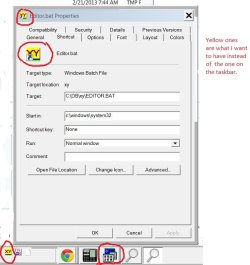
I have Googled a lot, but found no answer: when I launch a .bat file to run a 16 bit DOS-based program (XyWrite) on my 32 bit Win 7, I see on the taskbar the blue and white icon that is attached here (bottom image). I have a yellow custom icon that I want to use, and I have Resource Hacker and AdSevenIconChanger to make the substitution, but to use them, I need to find the Win7-supplied icon that's to be replaced. But I can't find it. It's not in imageres or shell32.

I also have an .exe version of the shortcut, which also results in the same unlocateable blue-and-white icon. I use a .bat file to launch XyWrite because that at least allows me to get the right icon on the desktop and in Quick Launch--per screen shot below.

Maybe I could determine the mystery icon's location by doing something with the icon cache?

Or, here's a wild thought--is there a way to search the web for an image as such? I mean: could I upload the mystery icon to Google or somewhere and have Google use that image to search Google images?
 

Attachments

  • image0002.jpg
    image0002.jpg
    1.5 KB · Views: 79
  • image0004.jpg
    image0004.jpg
    48.8 KB · Views: 10
Last edited:

My Computer My Computer

Computer type
Laptop
Computer Manufacturer/Model Number
Lenovo x2306
OS
Win 7 32
CPU
i5-3360
Memory
8 gig (only 2 addressable w. 32 bit OS)
Monitor(s) Displays
2 external Samsung 15" via Matrox DualHead2Go analog
Screen Resolution
2560 x 1080 (i.e., stretched version of 1280 x 1080)
Hard Drives
Hitachi HTS725050A 7E630 ATA
Cooling
internal std fan plus external Cool Master Pad
Keyboard
Das Keyboard (USB)
Mouse
Microsoft Explorer Wireless Mouse
Internet Speed
50 Mbps
Antivirus
Norton
Browser
Chrome
Other Info
Use a cheap TrendMicro KVM machine to switch keyboard, mouse, and monitor between this machine and old Macbook Pro 13". Also, this Lenovo dual boots between W7 64 and W7 32.
My God! Google does have the ability to search by image. Apparently, this icon is in grpconv.exe--whatever that is!
 

My Computer My Computer

Computer type
Laptop
Computer Manufacturer/Model Number
Lenovo x2306
OS
Win 7 32
CPU
i5-3360
Memory
8 gig (only 2 addressable w. 32 bit OS)
Monitor(s) Displays
2 external Samsung 15" via Matrox DualHead2Go analog
Screen Resolution
2560 x 1080 (i.e., stretched version of 1280 x 1080)
Hard Drives
Hitachi HTS725050A 7E630 ATA
Cooling
internal std fan plus external Cool Master Pad
Keyboard
Das Keyboard (USB)
Mouse
Microsoft Explorer Wireless Mouse
Internet Speed
50 Mbps
Antivirus
Norton
Browser
Chrome
Other Info
Use a cheap TrendMicro KVM machine to switch keyboard, mouse, and monitor between this machine and old Macbook Pro 13". Also, this Lenovo dual boots between W7 64 and W7 32.
Unfortunately, knowing that it's connected with grpconv.exe doesn't seem to help.

Any ideas?
 

My Computer My Computer

Computer type
Laptop
Computer Manufacturer/Model Number
Lenovo x2306
OS
Win 7 32
CPU
i5-3360
Memory
8 gig (only 2 addressable w. 32 bit OS)
Monitor(s) Displays
2 external Samsung 15" via Matrox DualHead2Go analog
Screen Resolution
2560 x 1080 (i.e., stretched version of 1280 x 1080)
Hard Drives
Hitachi HTS725050A 7E630 ATA
Cooling
internal std fan plus external Cool Master Pad
Keyboard
Das Keyboard (USB)
Mouse
Microsoft Explorer Wireless Mouse
Internet Speed
50 Mbps
Antivirus
Norton
Browser
Chrome
Other Info
Use a cheap TrendMicro KVM machine to switch keyboard, mouse, and monitor between this machine and old Macbook Pro 13". Also, this Lenovo dual boots between W7 64 and W7 32.
Easiest way is to create a shortcut for your .bat file and pin that instead. A shortcut let's you change the icon to what you want to.

Kari
 

My Computer My Computer

Computer type
Laptop
Computer Manufacturer/Model Number
HP ENVY 17-1150eg
OS
Windows 10 Pro x64 EN-GB
CPU
1.6 GHz Intel Core i7-720QM Processor
Memory
6 GB
Graphics Card(s)
ATI Mobility Radeon HD 5850 Graphics
Sound Card
Beats sound system with integrated subwoofer
Monitor(s) Displays
17" laptop display, 22" LED and 32" Full HD TV through HDMI
Screen Resolution
1600*900 (1), 1920*1080 (2&3)
Hard Drives
Internal: 2 x 500 GB SATA Hard Disk Drive 7200 rpm
External: 2TB for backups, 3TB USB3 network drive for media
Cooling
As Envy runs a bit warm, I have it on a Cooler Master pad
Keyboard
Logitech diNovo Media Desktop Laser (bluetooth)
Mouse
Logitech Performance Mouse MX
Internet Speed
50/10 Mbps VDSL
Antivirus
Windows Defender 4.3.9431.0
Browser
Maxthon 3.5.2., IE11
Kari (and are you the Kari from the XyWrite list?):

1. I don't see an option to pin when I right click on the desktop shortcut for the .bat file.

2. My concern is the icon that appears in the taskbar when the program is run (though maybe if I could get the .bat file with the correct icon pinned to the taskbar, it would stay with the right icon when that program was launched).

3. I was able to drag and drop the .bat file to the Start menu, but when I launch it, I get the grpconvert.exe icon I showed. I even made a toolbar with the yellow .bat file icon and when it launched, it also showed the undesired icon.
 

My Computer My Computer

Computer type
Laptop
Computer Manufacturer/Model Number
Lenovo x2306
OS
Win 7 32
CPU
i5-3360
Memory
8 gig (only 2 addressable w. 32 bit OS)
Monitor(s) Displays
2 external Samsung 15" via Matrox DualHead2Go analog
Screen Resolution
2560 x 1080 (i.e., stretched version of 1280 x 1080)
Hard Drives
Hitachi HTS725050A 7E630 ATA
Cooling
internal std fan plus external Cool Master Pad
Keyboard
Das Keyboard (USB)
Mouse
Microsoft Explorer Wireless Mouse
Internet Speed
50 Mbps
Antivirus
Norton
Browser
Chrome
Other Info
Use a cheap TrendMicro KVM machine to switch keyboard, mouse, and monitor between this machine and old Macbook Pro 13". Also, this Lenovo dual boots between W7 64 and W7 32.

My Computer My Computer

Computer type
Laptop
Computer Manufacturer/Model Number
HP ENVY 17-1150eg
OS
Windows 10 Pro x64 EN-GB
CPU
1.6 GHz Intel Core i7-720QM Processor
Memory
6 GB
Graphics Card(s)
ATI Mobility Radeon HD 5850 Graphics
Sound Card
Beats sound system with integrated subwoofer
Monitor(s) Displays
17" laptop display, 22" LED and 32" Full HD TV through HDMI
Screen Resolution
1600*900 (1), 1920*1080 (2&3)
Hard Drives
Internal: 2 x 500 GB SATA Hard Disk Drive 7200 rpm
External: 2TB for backups, 3TB USB3 network drive for media
Cooling
As Envy runs a bit warm, I have it on a Cooler Master pad
Keyboard
Logitech diNovo Media Desktop Laser (bluetooth)
Mouse
Logitech Performance Mouse MX
Internet Speed
50/10 Mbps VDSL
Antivirus
Windows Defender 4.3.9431.0
Browser
Maxthon 3.5.2., IE11
Was typing faster than thinking... Tested, did not work.

One sip whisky and I got it! This works:
  • Create shortcut to your batch file
  • Open shortcut Properties
  • Edit the Target, change it to:
    Code:
    %windir%\System32\cmd.exe /C "Drive:\Folder\Your batchfile.bat"
Works now. You can pin the shortcut, and it will show the icon you selected for this shortcut. Even when not pinned it will show your chosen icon when run.

Kari
 

My Computer My Computer

Computer type
Laptop
Computer Manufacturer/Model Number
HP ENVY 17-1150eg
OS
Windows 10 Pro x64 EN-GB
CPU
1.6 GHz Intel Core i7-720QM Processor
Memory
6 GB
Graphics Card(s)
ATI Mobility Radeon HD 5850 Graphics
Sound Card
Beats sound system with integrated subwoofer
Monitor(s) Displays
17" laptop display, 22" LED and 32" Full HD TV through HDMI
Screen Resolution
1600*900 (1), 1920*1080 (2&3)
Hard Drives
Internal: 2 x 500 GB SATA Hard Disk Drive 7200 rpm
External: 2TB for backups, 3TB USB3 network drive for media
Cooling
As Envy runs a bit warm, I have it on a Cooler Master pad
Keyboard
Logitech diNovo Media Desktop Laser (bluetooth)
Mouse
Logitech Performance Mouse MX
Internet Speed
50/10 Mbps VDSL
Antivirus
Windows Defender 4.3.9431.0
Browser
Maxthon 3.5.2., IE11
Kari,

A Finnish namesake is on the XyWrite forum list.

Anyway, so near, yet so far. Yes. I've got the icon pinned to the taskbar. BUT, it is only a launcher. If I click on it, I get the mystery icon on the taskbar, too. That's not too bad, but if I take the active focus away from the XyWrite program it launched (say, by hitting the Desktop icon), and then click on the pinned yellow icon again, it opens another iteration of XyWrite rather than switching the active focus back to the one opened before.

I might be able to use AutoHotkey to make a macro to only shift the active focus when I hit that button, but that would be a struggle.

Any better idea?
 

My Computer My Computer

Computer type
Laptop
Computer Manufacturer/Model Number
Lenovo x2306
OS
Win 7 32
CPU
i5-3360
Memory
8 gig (only 2 addressable w. 32 bit OS)
Monitor(s) Displays
2 external Samsung 15" via Matrox DualHead2Go analog
Screen Resolution
2560 x 1080 (i.e., stretched version of 1280 x 1080)
Hard Drives
Hitachi HTS725050A 7E630 ATA
Cooling
internal std fan plus external Cool Master Pad
Keyboard
Das Keyboard (USB)
Mouse
Microsoft Explorer Wireless Mouse
Internet Speed
50 Mbps
Antivirus
Norton
Browser
Chrome
Other Info
Use a cheap TrendMicro KVM machine to switch keyboard, mouse, and monitor between this machine and old Macbook Pro 13". Also, this Lenovo dual boots between W7 64 and W7 32.
Say hello to Kari!

Been testing this a bit more.

OK, shortcut works and can be pinned. When launched, it really causes the batch file icon to stay on Taskbar apparently because the batch itself is not closed until the apps it launches are closed.

I seem not to be able to find a solution for this. A workaround, yes: The second icon, batch icon, can be manually dismissed by simply closing the command prompt windows it belongs to. The apps it launched will still remain open.

Could you please post your batch file here, I will have a look and try to find a working solution for you.

Kari
 

My Computer My Computer

Computer type
Laptop
Computer Manufacturer/Model Number
HP ENVY 17-1150eg
OS
Windows 10 Pro x64 EN-GB
CPU
1.6 GHz Intel Core i7-720QM Processor
Memory
6 GB
Graphics Card(s)
ATI Mobility Radeon HD 5850 Graphics
Sound Card
Beats sound system with integrated subwoofer
Monitor(s) Displays
17" laptop display, 22" LED and 32" Full HD TV through HDMI
Screen Resolution
1600*900 (1), 1920*1080 (2&3)
Hard Drives
Internal: 2 x 500 GB SATA Hard Disk Drive 7200 rpm
External: 2TB for backups, 3TB USB3 network drive for media
Cooling
As Envy runs a bit warm, I have it on a Cooler Master pad
Keyboard
Logitech diNovo Media Desktop Laser (bluetooth)
Mouse
Logitech Performance Mouse MX
Internet Speed
50/10 Mbps VDSL
Antivirus
Windows Defender 4.3.9431.0
Browser
Maxthon 3.5.2., IE11
I don't think the batch file is open. The two relevant icons are the yellow (desired) one, which is pinned and serves only as a launcher of the batch file, and the grpconv.exe icon, which is the icon showing for the instance of the program that is running. With the program running and the 2 icons on the taskbar, I killed the cmd.exe process in Task Manager, but there was no change in the icons on the taskbar.

The .bat file is nothing but:

@echo off
c:\db\xy\Editor.exe

Incidentally, in the path, "db" is an alias to Dropbox, if that matters.
 

My Computer My Computer

Computer type
Laptop
Computer Manufacturer/Model Number
Lenovo x2306
OS
Win 7 32
CPU
i5-3360
Memory
8 gig (only 2 addressable w. 32 bit OS)
Monitor(s) Displays
2 external Samsung 15" via Matrox DualHead2Go analog
Screen Resolution
2560 x 1080 (i.e., stretched version of 1280 x 1080)
Hard Drives
Hitachi HTS725050A 7E630 ATA
Cooling
internal std fan plus external Cool Master Pad
Keyboard
Das Keyboard (USB)
Mouse
Microsoft Explorer Wireless Mouse
Internet Speed
50 Mbps
Antivirus
Norton
Browser
Chrome
Other Info
Use a cheap TrendMicro KVM machine to switch keyboard, mouse, and monitor between this machine and old Macbook Pro 13". Also, this Lenovo dual boots between W7 64 and W7 32.
So is this Editor.exe a file on Dropbox cloud or locally stored on your PC?
 

My Computer My Computer

Computer type
Laptop
Computer Manufacturer/Model Number
HP ENVY 17-1150eg
OS
Windows 10 Pro x64 EN-GB
CPU
1.6 GHz Intel Core i7-720QM Processor
Memory
6 GB
Graphics Card(s)
ATI Mobility Radeon HD 5850 Graphics
Sound Card
Beats sound system with integrated subwoofer
Monitor(s) Displays
17" laptop display, 22" LED and 32" Full HD TV through HDMI
Screen Resolution
1600*900 (1), 1920*1080 (2&3)
Hard Drives
Internal: 2 x 500 GB SATA Hard Disk Drive 7200 rpm
External: 2TB for backups, 3TB USB3 network drive for media
Cooling
As Envy runs a bit warm, I have it on a Cooler Master pad
Keyboard
Logitech diNovo Media Desktop Laser (bluetooth)
Mouse
Logitech Performance Mouse MX
Internet Speed
50/10 Mbps VDSL
Antivirus
Windows Defender 4.3.9431.0
Browser
Maxthon 3.5.2., IE11
Thinking more about it, the right way to do his is to change the icon for grpconv.exe. I can open grpconv.exe in Resource Hacker, but I am unable to save the file (or the results -- don't really understand the Resource Hacker interface).
 

My Computer My Computer

Computer type
Laptop
Computer Manufacturer/Model Number
Lenovo x2306
OS
Win 7 32
CPU
i5-3360
Memory
8 gig (only 2 addressable w. 32 bit OS)
Monitor(s) Displays
2 external Samsung 15" via Matrox DualHead2Go analog
Screen Resolution
2560 x 1080 (i.e., stretched version of 1280 x 1080)
Hard Drives
Hitachi HTS725050A 7E630 ATA
Cooling
internal std fan plus external Cool Master Pad
Keyboard
Das Keyboard (USB)
Mouse
Microsoft Explorer Wireless Mouse
Internet Speed
50 Mbps
Antivirus
Norton
Browser
Chrome
Other Info
Use a cheap TrendMicro KVM machine to switch keyboard, mouse, and monitor between this machine and old Macbook Pro 13". Also, this Lenovo dual boots between W7 64 and W7 32.
Typo. Should be: "the right way to do this . . ."
 

My Computer My Computer

Computer type
Laptop
Computer Manufacturer/Model Number
Lenovo x2306
OS
Win 7 32
CPU
i5-3360
Memory
8 gig (only 2 addressable w. 32 bit OS)
Monitor(s) Displays
2 external Samsung 15" via Matrox DualHead2Go analog
Screen Resolution
2560 x 1080 (i.e., stretched version of 1280 x 1080)
Hard Drives
Hitachi HTS725050A 7E630 ATA
Cooling
internal std fan plus external Cool Master Pad
Keyboard
Das Keyboard (USB)
Mouse
Microsoft Explorer Wireless Mouse
Internet Speed
50 Mbps
Antivirus
Norton
Browser
Chrome
Other Info
Use a cheap TrendMicro KVM machine to switch keyboard, mouse, and monitor between this machine and old Macbook Pro 13". Also, this Lenovo dual boots between W7 64 and W7 32.
I do not understand this with grpconv.exe. It's a pre-historic tool from a few years before stone age, meant to convert Windows Neanderthal 3 Program Groups to work with more modern Program Folders system used on Windows since the end of the stone age.

As your program is quite old, it most probably is so called portable program; everything it need is on its own folder, no data stored on AppData or ProgramData. This should mean that it should also work without grpconv.exe.

What happens if you go to C:\db\xy\ using Windows Explorer and simply double click Editor.exe?

Kari
 

My Computer My Computer

Computer type
Laptop
Computer Manufacturer/Model Number
HP ENVY 17-1150eg
OS
Windows 10 Pro x64 EN-GB
CPU
1.6 GHz Intel Core i7-720QM Processor
Memory
6 GB
Graphics Card(s)
ATI Mobility Radeon HD 5850 Graphics
Sound Card
Beats sound system with integrated subwoofer
Monitor(s) Displays
17" laptop display, 22" LED and 32" Full HD TV through HDMI
Screen Resolution
1600*900 (1), 1920*1080 (2&3)
Hard Drives
Internal: 2 x 500 GB SATA Hard Disk Drive 7200 rpm
External: 2TB for backups, 3TB USB3 network drive for media
Cooling
As Envy runs a bit warm, I have it on a Cooler Master pad
Keyboard
Logitech diNovo Media Desktop Laser (bluetooth)
Mouse
Logitech Performance Mouse MX
Internet Speed
50/10 Mbps VDSL
Antivirus
Windows Defender 4.3.9431.0
Browser
Maxthon 3.5.2., IE11
Same bad icon appears in the taskbar.

I just spent some time using Resource Hacker to, I thought, change that icon in grpconv.exe, but even though I got all the necessary permissions, and Resource Hacker shows it as changed, it isn't changed. I even tried changing some files in windows\winsxs that seemed to be grpconv related and had the bad icon.
 

My Computer My Computer

Computer type
Laptop
Computer Manufacturer/Model Number
Lenovo x2306
OS
Win 7 32
CPU
i5-3360
Memory
8 gig (only 2 addressable w. 32 bit OS)
Monitor(s) Displays
2 external Samsung 15" via Matrox DualHead2Go analog
Screen Resolution
2560 x 1080 (i.e., stretched version of 1280 x 1080)
Hard Drives
Hitachi HTS725050A 7E630 ATA
Cooling
internal std fan plus external Cool Master Pad
Keyboard
Das Keyboard (USB)
Mouse
Microsoft Explorer Wireless Mouse
Internet Speed
50 Mbps
Antivirus
Norton
Browser
Chrome
Other Info
Use a cheap TrendMicro KVM machine to switch keyboard, mouse, and monitor between this machine and old Macbook Pro 13". Also, this Lenovo dual boots between W7 64 and W7 32.
If I launch XyWrite (Editor.exe) from Windows Explorer, I see the same wrong icon.
 

My Computer My Computer

Computer type
Laptop
Computer Manufacturer/Model Number
Lenovo x2306
OS
Win 7 32
CPU
i5-3360
Memory
8 gig (only 2 addressable w. 32 bit OS)
Monitor(s) Displays
2 external Samsung 15" via Matrox DualHead2Go analog
Screen Resolution
2560 x 1080 (i.e., stretched version of 1280 x 1080)
Hard Drives
Hitachi HTS725050A 7E630 ATA
Cooling
internal std fan plus external Cool Master Pad
Keyboard
Das Keyboard (USB)
Mouse
Microsoft Explorer Wireless Mouse
Internet Speed
50 Mbps
Antivirus
Norton
Browser
Chrome
Other Info
Use a cheap TrendMicro KVM machine to switch keyboard, mouse, and monitor between this machine and old Macbook Pro 13". Also, this Lenovo dual boots between W7 64 and W7 32.
I also see the offending icon if I launch from the command prompt (cmd.exe).
 

My Computer My Computer

Computer type
Laptop
Computer Manufacturer/Model Number
Lenovo x2306
OS
Win 7 32
CPU
i5-3360
Memory
8 gig (only 2 addressable w. 32 bit OS)
Monitor(s) Displays
2 external Samsung 15" via Matrox DualHead2Go analog
Screen Resolution
2560 x 1080 (i.e., stretched version of 1280 x 1080)
Hard Drives
Hitachi HTS725050A 7E630 ATA
Cooling
internal std fan plus external Cool Master Pad
Keyboard
Das Keyboard (USB)
Mouse
Microsoft Explorer Wireless Mouse
Internet Speed
50 Mbps
Antivirus
Norton
Browser
Chrome
Other Info
Use a cheap TrendMicro KVM machine to switch keyboard, mouse, and monitor between this machine and old Macbook Pro 13". Also, this Lenovo dual boots between W7 64 and W7 32.

My Computer My Computer

Computer type
Laptop
Computer Manufacturer/Model Number
Sager NP9170
OS
Win 7 Pro x64 / Win 10 Pro
CPU
Intel(R) Core(TM) i7-3630QM CPU @ 2.40GHz
Motherboard
CLEVO P170EM
Memory
12 GB
Graphics Card(s)
(1) Intel(R) HD Graphics 4000 (2) NVIDIA GeForce GTX 675M
Sound Card
(1) Realtek High Definition Audio (2) Intel(R) Display Aud
Monitor(s) Displays
17.3
Screen Resolution
1920x1080
Hard Drives
(1) Samsung 860 EVO 500GB(OS) (1) Samsung 860 EVO 500GB(Data)
Keyboard
Backlite
Antivirus
MSE, Malwarebytes Pro
Browser
Firefox
Other Info
DESKTOP: Custom-built.
OS: Win 10 Pro x64.
CASE: Rosewill R5.
CPU: Intel I5 4670K CPU @ 3.40GHz.
CPU COOLER: Cool Master Hyper 212 EVO.
MOTHERBOARD: Asus Z87-A.
MEMORY: Kingston HyperX 2x4 GB.
GPU: Nvidia Geforce 650 TI.
PSU: Corsair TX750.
DRIVES: (1) Samsung 840 120 GB SSD (2) Western Digital blue 500 GB 7200 RPM.
Thanks very much. I'll be doing that from now on, when I test. So far no solution (unless my failure to re-set the icon cache meant I didn't see some earlier successes--but I doubt that).
 

My Computer My Computer

Computer type
Laptop
Computer Manufacturer/Model Number
Lenovo x2306
OS
Win 7 32
CPU
i5-3360
Memory
8 gig (only 2 addressable w. 32 bit OS)
Monitor(s) Displays
2 external Samsung 15" via Matrox DualHead2Go analog
Screen Resolution
2560 x 1080 (i.e., stretched version of 1280 x 1080)
Hard Drives
Hitachi HTS725050A 7E630 ATA
Cooling
internal std fan plus external Cool Master Pad
Keyboard
Das Keyboard (USB)
Mouse
Microsoft Explorer Wireless Mouse
Internet Speed
50 Mbps
Antivirus
Norton
Browser
Chrome
Other Info
Use a cheap TrendMicro KVM machine to switch keyboard, mouse, and monitor between this machine and old Macbook Pro 13". Also, this Lenovo dual boots between W7 64 and W7 32.
So is this Editor.exe a file on Dropbox cloud or locally stored on your PC?

Sorry, I didn't see this question. It's local. If it's worth trying (and I strongly suspect it isn't) I could try the same thing out of the dropbox (local) folder.

Anyway, the problem remains, and it is getting more irritating, not less (to my surprise).
 

My Computer My Computer

Computer type
Laptop
Computer Manufacturer/Model Number
Lenovo x2306
OS
Win 7 32
CPU
i5-3360
Memory
8 gig (only 2 addressable w. 32 bit OS)
Monitor(s) Displays
2 external Samsung 15" via Matrox DualHead2Go analog
Screen Resolution
2560 x 1080 (i.e., stretched version of 1280 x 1080)
Hard Drives
Hitachi HTS725050A 7E630 ATA
Cooling
internal std fan plus external Cool Master Pad
Keyboard
Das Keyboard (USB)
Mouse
Microsoft Explorer Wireless Mouse
Internet Speed
50 Mbps
Antivirus
Norton
Browser
Chrome
Other Info
Use a cheap TrendMicro KVM machine to switch keyboard, mouse, and monitor between this machine and old Macbook Pro 13". Also, this Lenovo dual boots between W7 64 and W7 32.
Back
Top