Solved Can't change .bat file icon on taskbar

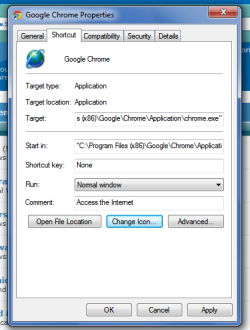
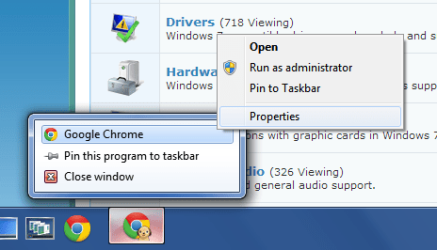
What you need to do is run the program then right click to open the jump list. Right click on the program name at the top and click on properties.
untitled.PNG
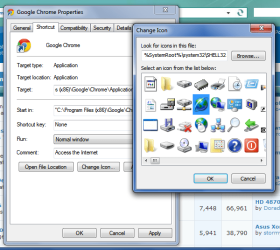
Click "Change Icon...", select the icon you want, and hit OK.
untitled2.PNG
untitled3.PNG
hit OK to exit out of properties.
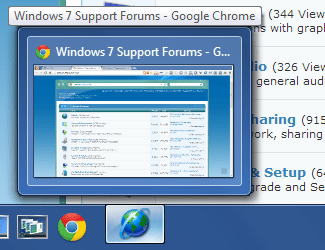
Log off and back on, or reboot for change to take effect.
untitled4.PNG
This should work for any program.
 

My Computer My Computer

OS
Windows 7 Home Premium (64-bit) Service Pack 1
Right clicking on the icon in the taskbar produces no such context-menu. I can get one of two menus--one with the name of the program (which, when right-clicked on gives no properties but a menu from one of the programs that assists the program I'm running--I know that's complicated.)

Big progress--the mystery icon is probably coming from NTVDM.EXE. I'm trying to use Resource Hacker to change it, but it won't let me save a different NTVDM.EXE. I'm going to try to save under a different name then overwrite NTVDM.EXE
 

My Computer My Computer

Computer type
Laptop
Computer Manufacturer/Model Number
Lenovo x2306
OS
Win 7 32
CPU
i5-3360
Memory
8 gig (only 2 addressable w. 32 bit OS)
Monitor(s) Displays
2 external Samsung 15" via Matrox DualHead2Go analog
Screen Resolution
2560 x 1080 (i.e., stretched version of 1280 x 1080)
Hard Drives
Hitachi HTS725050A 7E630 ATA
Cooling
internal std fan plus external Cool Master Pad
Keyboard
Das Keyboard (USB)
Mouse
Microsoft Explorer Wireless Mouse
Internet Speed
50 Mbps
Antivirus
Norton
Browser
Chrome
Other Info
Use a cheap TrendMicro KVM machine to switch keyboard, mouse, and monitor between this machine and old Macbook Pro 13". Also, this Lenovo dual boots between W7 64 and W7 32.
I'm real close now. Only need help with one thing: how do I overwrite NTVDM.EXE? I get access denied, even when I run it as administrator--even when I dual boot into my 64 bit Windows 7 and try to change the 32-bit NTVDM.EXE file from within the 64! I've fiddled with permissions and ownership, neither of which I really understand, but no luck.

I can't change the file when launched in SAFE MODE, using CMD.EXE or otherwise.

How do I copy NEWNTVDM.EXE over NTVDM.EXE?
 

My Computer My Computer

Computer type
Laptop
Computer Manufacturer/Model Number
Lenovo x2306
OS
Win 7 32
CPU
i5-3360
Memory
8 gig (only 2 addressable w. 32 bit OS)
Monitor(s) Displays
2 external Samsung 15" via Matrox DualHead2Go analog
Screen Resolution
2560 x 1080 (i.e., stretched version of 1280 x 1080)
Hard Drives
Hitachi HTS725050A 7E630 ATA
Cooling
internal std fan plus external Cool Master Pad
Keyboard
Das Keyboard (USB)
Mouse
Microsoft Explorer Wireless Mouse
Internet Speed
50 Mbps
Antivirus
Norton
Browser
Chrome
Other Info
Use a cheap TrendMicro KVM machine to switch keyboard, mouse, and monitor between this machine and old Macbook Pro 13". Also, this Lenovo dual boots between W7 64 and W7 32.
I'm real close now. Only need help with one thing: how do I overwrite NTVDM.EXE? I get access denied, even when I run it as administrator--even when I dual boot into my 64 bit Windows 7 and try to change the 32-bit NTVDM.EXE file from within the 64! I've fiddled with permissions and ownership, neither of which I really understand, but no luck.

I can't change the file when launched in SAFE MODE, using CMD.EXE or otherwise.

How do I copy NEWNTVDM.EXE over NTVDM.EXE?

Have you tried taking ownership and setting your permissions to full control for both the file and the folder it's in?
How to Take Ownership of a Item in Vista and Windows 7
 

My Computer My Computer

OS
Windows 7 Home Premium (64-bit) Service Pack 1
Didn't try doing that for the folder. Will do, thanks!
 

My Computer My Computer

Computer type
Laptop
Computer Manufacturer/Model Number
Lenovo x2306
OS
Win 7 32
CPU
i5-3360
Memory
8 gig (only 2 addressable w. 32 bit OS)
Monitor(s) Displays
2 external Samsung 15" via Matrox DualHead2Go analog
Screen Resolution
2560 x 1080 (i.e., stretched version of 1280 x 1080)
Hard Drives
Hitachi HTS725050A 7E630 ATA
Cooling
internal std fan plus external Cool Master Pad
Keyboard
Das Keyboard (USB)
Mouse
Microsoft Explorer Wireless Mouse
Internet Speed
50 Mbps
Antivirus
Norton
Browser
Chrome
Other Info
Use a cheap TrendMicro KVM machine to switch keyboard, mouse, and monitor between this machine and old Macbook Pro 13". Also, this Lenovo dual boots between W7 64 and W7 32.
Okay problem solved at last! Here's what may be worth noting: old DOS programs that use NTVDM.EXE get the icon for that, not for the preogram. One can change the icon for ntvdm.exe using Resource Hacker, provided one "takes ownership" of the System32 folder and of NTVDM.EXE and sets the permissions to full control. It successful, after logging of an logging back one will even see the new icon in Explorer when one goes to look at NTVDM.EXE in the System32 folder.

My thanks to Kari, Bongo, and Imold, who each provided a step in the right direction.
 

My Computer My Computer

Computer type
Laptop
Computer Manufacturer/Model Number
Lenovo x2306
OS
Win 7 32
CPU
i5-3360
Memory
8 gig (only 2 addressable w. 32 bit OS)
Monitor(s) Displays
2 external Samsung 15" via Matrox DualHead2Go analog
Screen Resolution
2560 x 1080 (i.e., stretched version of 1280 x 1080)
Hard Drives
Hitachi HTS725050A 7E630 ATA
Cooling
internal std fan plus external Cool Master Pad
Keyboard
Das Keyboard (USB)
Mouse
Microsoft Explorer Wireless Mouse
Internet Speed
50 Mbps
Antivirus
Norton
Browser
Chrome
Other Info
Use a cheap TrendMicro KVM machine to switch keyboard, mouse, and monitor between this machine and old Macbook Pro 13". Also, this Lenovo dual boots between W7 64 and W7 32.
in the registry there is the following entry:Computer\HKEY_LOCAL_MACHINE|SOFTWARE\Classes\Applications\NTVDM.exe. There are two values 1) Default 2)UseExecutableForTaskbarGroupIcon. Both values are empty.
I did a search on the latter and found the following:

Causes the taskbar to use the default icon of this executable if there is no pinnable shortcut for this application, and instead of the icon of the window that was first encountered.

I'm thinking maybe this registry key can be modified so that it uses the icon of the shortcut. Does anybody have any ideas on what to modify the value to?
 

My Computer My Computer

Computer type
Laptop
Computer Manufacturer/Model Number
Dell Latitude D820
OS
Windows 7 Pro 32 bit
Yes, I'd love to know what to set that to. I'm going to try to set it to 0 (false).
 

My Computer My Computer

Computer type
Laptop
Computer Manufacturer/Model Number
Lenovo x2306
OS
Win 7 32
CPU
i5-3360
Memory
8 gig (only 2 addressable w. 32 bit OS)
Monitor(s) Displays
2 external Samsung 15" via Matrox DualHead2Go analog
Screen Resolution
2560 x 1080 (i.e., stretched version of 1280 x 1080)
Hard Drives
Hitachi HTS725050A 7E630 ATA
Cooling
internal std fan plus external Cool Master Pad
Keyboard
Das Keyboard (USB)
Mouse
Microsoft Explorer Wireless Mouse
Internet Speed
50 Mbps
Antivirus
Norton
Browser
Chrome
Other Info
Use a cheap TrendMicro KVM machine to switch keyboard, mouse, and monitor between this machine and old Macbook Pro 13". Also, this Lenovo dual boots between W7 64 and W7 32.
I think it would be a string as it is of type REG_SZ.
 

My Computer My Computer

Computer type
Laptop
Computer Manufacturer/Model Number
Dell Latitude D820
OS
Windows 7 Pro 32 bit
I played around with it, even adding a new key under NTVDM.EXE: DefaultIcon, with the location of the icon I want, but doesn't seem to do anything.
 

My Computer My Computer

Computer type
Laptop
Computer Manufacturer/Model Number
Lenovo x2306
OS
Win 7 32
CPU
i5-3360
Memory
8 gig (only 2 addressable w. 32 bit OS)
Monitor(s) Displays
2 external Samsung 15" via Matrox DualHead2Go analog
Screen Resolution
2560 x 1080 (i.e., stretched version of 1280 x 1080)
Hard Drives
Hitachi HTS725050A 7E630 ATA
Cooling
internal std fan plus external Cool Master Pad
Keyboard
Das Keyboard (USB)
Mouse
Microsoft Explorer Wireless Mouse
Internet Speed
50 Mbps
Antivirus
Norton
Browser
Chrome
Other Info
Use a cheap TrendMicro KVM machine to switch keyboard, mouse, and monitor between this machine and old Macbook Pro 13". Also, this Lenovo dual boots between W7 64 and W7 32.
Another idea I played around with was to copy NTVDM.EXE into another folder and modify the icon. Then change the PATH environment variable in a .bat file to include the new folder. I couldn't get this to work either.
 

My Computer My Computer

Computer type
Laptop
Computer Manufacturer/Model Number
Dell Latitude D820
OS
Windows 7 Pro 32 bit
Just out of curiosity, where did you find grpcnvrt.exe? It doesn't show up anywhere in my Windows 7 system folders, although ntvdm.exe does.
 

My Computer My Computer

Computer type
Laptop
OS
Windows 7 Starter 32bit
Back
Top