Can't change my desktop background

alexaa7x

New member
Local time
10:56 AM
Messages
2
So, for a month or so now I've been trying and trying to change my desktop background. After a few days I gave up and just recently went back to trying to fix it.

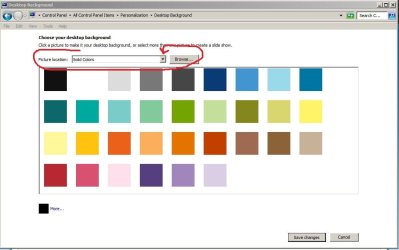
I found out that I can only change my background from the control panel to solid colors but not anything else.
When I go into a browser (I use chrome but have also tried this in IE) and right click, it gives me the option to use the picture as my background but when I click it, it comes up and says "access denied" . I've tried everything I can think of, updating, checked for viruses, restarted, everything! Any idea what it could be?
 

My Computer My Computer

OS
Windows 7 premium

My Computer My Computer

Computer type
PC/Desktop
Computer Manufacturer/Model Number
Self assembled
OS
Windows 10 Home 64Bit
CPU
Intel Core i5 10400 @ 2.90GHz
Motherboard
Intel Corporation DG41WV (PROCESSOR)
Memory
8.00GB Single-Channel Unknown @ 1329MHz (16-20-20-38)
Sound Card
Realtek High Definition Audio
Monitor(s) Displays
DELL E170S
Screen Resolution
1280x1024 pixels
Hard Drives
931GB TOSHIBA DT01ACA100 (SATA)
238GB TEAM TM8PS7256G (SATA SSD)
Case
Nothing Fancy
Cooling
Fans
Keyboard
A4 Tech Co LTD
Mouse
A4 Tech Co Ltd/Logitech
Internet Speed
25 Mbps
That didn't help. There was nothing to delete so the tips in that thread didn't help me :( so frustrating!
 

My Computer My Computer

OS
Windows 7 premium
"I found out that I can only change my background from the control panel to solid colors but not anything else."

does your control panel look like the attached jpeg?--if so--try clicking the indicated triangle--it should give you a flyout menu with other choices

for images that you locate via a 'browser'--download them first--put it somewhere easy to find--then proceed from there
 

Attachments

  • Capture.JPG
    Capture.JPG
    49.9 KB · Views: 228

My Computer My Computer

Computer Manufacturer/Model Number
SALEON model 2.2b
OS
win7 ultimate 32bit
CPU
core2 Extreme QX6850-OCd to 3.15 GHz
Motherboard
ASUS P5G41-M LE
Memory
4 GB
Graphics Card(s)
NVidia 8600 GT
Monitor(s) Displays
23" acer
Hard Drives
one SATA 250GB partitioned equally in half
one SATA 160GB-internal storage
PSU
500W Thermaltake
Case
mini tower
Perform the following.

a. Press theWindows Logo Key+R to open the Run box.


b.Copy and paste the following path into the box, then pressOK:

%USERPROFILE%\AppData\Roaming\Microsoft\Windows\Themes\


c. Delete theTranscodedWallpaper.jpg file, and then try tochange your theme again.

Iam a microsoft Engineer, this has happen to me. let me know if this works.
 

My Computer My Computer

OS
windows 7 32 bit
Thank you so much AbluMarlin! I signed up just because I wanted you to know that it worked and it was by far the EASIEST step to do (some blogs require creating admin account and deleting old one - which worked but I want the same desktop icons)!

I know that a virus I had affected my laptop so I wasn't able to change my background. I'm glad I finally decided to figure it out :)

Also, just to note, When I got to the folder "themes" I did not see any files. I had to unhide, hide, and then unhide again (odd I know) and then saw 2 files! I deleted the TranscodedWallpaper.jpg (which happened to be a picture of my last wallpaper), changed my theme and it worked instantly! =D If you don't mind, could you explain why that .jpg file needed to be deleted? Thank you so much!!
 

My Computer My Computer

OS
Windows 7 Ultimate x64
Perform the following.

a. Press theWindows Logo Key+R to open the Run box.


b.Copy and paste the following path into the box, then pressOK:

%USERPROFILE%\AppData\Roaming\Microsoft\Windows\Themes\


c. Delete theTranscodedWallpaper.jpg file, and then try tochange your theme again.

Iam a microsoft Engineer, this has happen to me. let me know if this works.
My computer shows the file %USERPROFILE%\AppData\Roaming\Microsoft\Windows\Themes\
BUT it's empty already. There is no TranscodedWallpaper.jpg file in it.
However, when trying to change the desktop background, it just doesn't change to anything at all. No solid colors. No pictures from the files I've saved them to. Nothing! It's stuck on stupid (lol) with the same doggone pic I've had for months. Can't tell you how sick I am of this pic - was set up by my daughter and I could just bop her one. *chuckle* HELP! I've tried all the ideas above and all the references links. No luck so far.
Windows 7 - 64 bit
Home Edition
 

My Computer My Computer

OS
Windows 7 64 bit
Welcome to Seven Forums shortnana47. Since we don't know what you have tried yet, we sill suggest the usual suspects. 1st, run the System File Checker

http://www.sevenforums.com/tutorials/1538-sfc-scannow-command-system-file-checker.html

If no errors (or fix), can you run the Window Experience Index (WEI) assessment ok?

http://www.sevenforums.com/tutorials/263-windows-experience-index-update-refresh-score.html

You can usually set a wallpaper with Irfanview, but this doesn't correct the underlying problem. Irfanview is a great free program, with many uses, even if you don't use it to set the wallpaper. To set wallpaper with Irfanview. Download and install, open the desired wallpaper with the program.

Options> Set as wallpaper> Centered

Let us know the results of the SFC and WEI. A Guy
 

My Computer My Computer

Computer type
PC/Desktop
OS
Windows 10 Home x64
CPU
INTEL Core i5-750 Quad-Core 3.37GHz
Motherboard
ASUS P7P55D
Memory
HyperX Fury Black Series 8GB (2 x 4GB) 1866Mhz
Graphics Card(s)
EVGA GeForce GTX 750 Superclocked 1GB 128-Bit GDDR5
Monitor(s) Displays
LG 32MA68HY 32" IPS
Screen Resolution
1920 x 1080
Hard Drives
Samsung 840 Evo 120GB, SEAGATE 500GB Barracuda® 7200.12, SATA 3 Gb/s, 7200 RPM, 16MB cache
PSU
ANTEC TruePower New TP-550, 80 PLUS, 550W
Case
ANTEC Three Hundred Illusion
Cooling
COOLER MASTER Hyper 212 Plus, 4 x 120mm 1 x 140mm Noctua's
Internet Speed
85 + Mbps
Antivirus
Avast
Browser
Vivaldi
The SFC says: Windows Resource Protection found corrupt files but was unable to fix some of them.
(This was after 2 SFC scans)
It refers to a CBS.log but denies access for the report to let me know which files are corrupted.

I will run the WEI and come back to this forum thread.
~Carolyn
 

My Computer My Computer

OS
Windows 7 64 bit
WEI shows following subscores:
Processor 5.7
Memory (RAM) 5.7
Graphics 4.1
Gaming Graphics 3.4
Primary hard disk 5.7

For an overall Base Score of 3.4
 

My Computer My Computer

OS
Windows 7 64 bit

My Computer My Computer

Computer type
Laptop
Computer Manufacturer/Model Number
Toshiba P775-S7100
OS
Windows 7 Professional SP1 64-bit
CPU
Intel Core i5-2450M @2.5 GHz
Memory
6 GB DDR3 1333MHz
Graphics Card(s)
Intel HD 3000
Monitor(s) Displays
Built-in 17.3" LED; 22" Insignia NS-L22Q-10A
Screen Resolution
1600x900; 1360x768
Hard Drives
750 GB Hitachi
1TB Seagate FreeAgent External
Internet Speed
Verizon DSL Speed(Down/Up): 3360 Kbps / 800 Kbps
Antivirus
MSE and MBAM Pro
Browser
IE10
In the cases 2 and 3, SFC stores the results in the CBS.log which you find in C:\Windows\Logs\CBS\CBS.log. This is a massive file of approximately 5MB and if you care to see it all, you must send CBS.log to one of your own folders from where you can double click on it. It will then open with Notepad. Note: You cannot open it inside the CBS folder. You will get an Access denied message.

http://www.sevenforums.com/performance-maintenance/56234-make-cbs-log-useable.html

A Guy
 

My Computer My Computer

Computer type
PC/Desktop
OS
Windows 10 Home x64
CPU
INTEL Core i5-750 Quad-Core 3.37GHz
Motherboard
ASUS P7P55D
Memory
HyperX Fury Black Series 8GB (2 x 4GB) 1866Mhz
Graphics Card(s)
EVGA GeForce GTX 750 Superclocked 1GB 128-Bit GDDR5
Monitor(s) Displays
LG 32MA68HY 32" IPS
Screen Resolution
1920 x 1080
Hard Drives
Samsung 840 Evo 120GB, SEAGATE 500GB Barracuda® 7200.12, SATA 3 Gb/s, 7200 RPM, 16MB cache
PSU
ANTEC TruePower New TP-550, 80 PLUS, 550W
Case
ANTEC Three Hundred Illusion
Cooling
COOLER MASTER Hyper 212 Plus, 4 x 120mm 1 x 140mm Noctua's
Internet Speed
85 + Mbps
Antivirus
Avast
Browser
Vivaldi
After all is said and done, I still can't change the desktop picture BUT currently it's just gray and that suits me just fine. MUCH better than the pic my daughter had stuck on there. LOL Thanks for trying folks but I'm just not up to taking it apart and redoing anything.
 

My Computer My Computer

OS
Windows 7 64 bit
Thanks AbluMarlin, it worked for me too.
 

My Computer My Computer

OS
Windows 7 Professional - 32bits
Perform the following.

a. Press theWindows Logo Key+R to open the Run box.


b.Copy and paste the following path into the box, then pressOK:

%USERPROFILE%\AppData\Roaming\Microsoft\Windows\Themes\


c. Delete theTranscodedWallpaper.jpg file, and then try tochange your theme again.

Iam a microsoft Engineer, this has happen to me. let me know if this works.


I have the exact same problem, but in windows 8. I deleted the TranscodedWallpaper.jpg but it didn't help. As i can see your solution worked great for windows 7. Do you know what i have to do in windows 8? thanks
 

My Computer My Computer

OS
windows 8
Perform the following.

a. Press theWindows Logo Key+R to open the Run box.


b.Copy and paste the following path into the box, then pressOK:

%USERPROFILE%\AppData\Roaming\Microsoft\Windows\Themes\


c. Delete theTranscodedWallpaper.jpg file, and then try tochange your theme again.

Iam a microsoft Engineer, this has happen to me. let me know if this works.


Just tried this and it worked for me. Many thanks and keep up the good work
 

My Computer My Computer

Computer type
Laptop
Computer Manufacturer/Model Number
Samsung RV511
OS
win 7 home premium 64 bit
CPU
Intel core i5 M480 2.67ghz
Memory
8GB Ram
Graphics Card(s)
Nvidia Geforce 315m
Sound Card
RTKVHD64.SYS
Monitor(s) Displays
Generic PNP Monitor
Screen Resolution
1366x768 (32bit) 60ghz
Hard Drives
500GB
Cooling
Laptop cooler
Internet Speed
3mb
Antivirus
Kaspersky internet security 2013 - 3 users
Browser
Google Chrome
THX! Works fine for me!

Perform the following.

a. Press theWindows Logo Key+R to open the Run box.

b.Copy and paste the following path into the box, then pressOK:
%USERPROFILE%\AppData\Roaming\Microsoft\Windows\Themes\

c. Delete theTranscodedWallpaper.jpg file, and then try tochange your theme again.

Iam a microsoft Engineer, this has happen to me. let me know if this works.

THX! Works fine for me!

Messed up my wallpapers by deleting the wallpapers origin account, accidently deleted pics from over 20 years 8[, managed to recover most of them. But got me 3 days of hard file work, tons of copying and file swaping... and all of a sudden, desktop was gone and can't be changed anymore. Yeah! most common reason for an issue: dipshit in front of monitor XD
 

My Computer My Computer

Computer type
PC/Desktop
Computer Manufacturer/Model Number
Custom build
OS
Windows 7 Ultimate x64
CPU
Intel Core2 Quad Q6600
Motherboard
Asus P5Q
Memory
4 x Corsair XMS2 DHX CM2X2048-6400C4DHX à 2 GB
Graphics Card(s)
EVGA GeForce GTX980 SC 4GB DDR5
Sound Card
Realtek ALC1200 onboard
Monitor(s) Displays
Samsung SyncMaster XL2370
Screen Resolution
1920 x 1080 px
Hard Drives
1 x Samsung SSD 850 PRO à 256GB
2 x WesternDigital WD50EZRX à 5TB
PSU
beQuite! Dark Power PRO 10
Case
beQuite! Silent Base 800 Window
Cooling
Watercooling custombuild
Keyboard
MadCatz S.T.R.I.K.E.7 Keyboard
Mouse
MadCatz R.A.T.9 Mouse
Antivirus
F-Secure Anti-Virus
Browser
Google Chrome
Back
Top