Can't change setting System Properties > network ID setting

kyle010

New member
Local time
10:19 AM
Messages
8
I'm trying to set up a Synology NAS for my home network, however I can only access via the Synology utility and through a browser using the internal IP address. It does not otherwise appear on my network; I can't ping it, map drives to it by any method, etc.

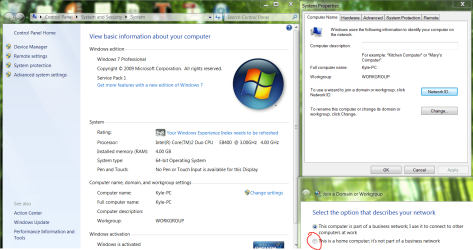
Googling suggests that this problem can be linked the setting in system > computer name, domain and workgroup settings> change settings > Network ID; and ensuring it is set to 'This is a home network'. However my computer is stuck on 'this computer is part of a business network'; if I change the setting, it asks for a restart and immediately reverts to 'business'. Does anyone know what might be causing this? Any way to force the setting?
My network itself is set to 'home'.

Other potential solutions to the NAS problem are also welcome, as that's what the real issue is, although I feel I've hunted most of the low hanging fruit already.

Thanks!
-Kyle
 

My Computer

Computer type
PC/Desktop
OS
Alberta
If this machine ever belonged to a Domain then it would say that. The problem is that once you are part of a Domain you will be locked out of changing the location settings.

Domain Network: For domain networks in large corporate environments. This type of network is controlled by a network administrator and can’t be changed.

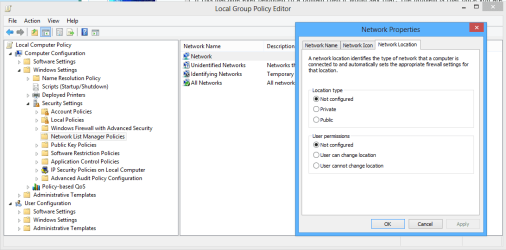
You may be able to change this by going to Winkey + R to open Run prompt and type gpedit.msc

Navigate to: Computer Configuration | Windows Settings | Security Setting | Network List Manager Policies > Network Location tab, you may be able to change the location here but it may still be locked down by the Domain group policy.
 

Attachments

  • Change network location gpedit.PNG
    Change network location gpedit.PNG
    24 KB · Views: 13

My Computer

Computer type
PC/Desktop
Computer Manufacturer/Model Number
Home built
OS
Windows 7 Ult, Windows 8.1 Pro,
CPU
Q9650-4.275GHz, E8600 4.5GHz, E6750-3.8GHz
Motherboard
Evga 780i FTW
Memory
G.Skill PC2 9600 1200Mhz 5 5 5 15 2T
Graphics Card(s)
GTX480
Sound Card
Asus Xonar D2
Monitor(s) Displays
HannsG
Screen Resolution
1680X1050
Hard Drives
GSkill Phoenix Pro 120GB SSD
PSU
ThermalTake Toughpower 1000Watt modular
Case
ThermalTake XaserV
Cooling
Xigmatek S1283
Keyboard
Logitech G15
Mouse
Logitech G9
Internet Speed
T1
The computer has never been on a domain.
I was able to set the location in gpedit to 'private' as you suggested, but it hasn't addressed the original issue; the system properties network ID option still keeps reverting to business network whenever I change it to 'home computer'.
Additional information, I'm also unable to access the NAS from my laptop, and there I can't even access the network ID setting OR gpedit.msc, although this could be due to the HP windows (7 premium) install.
 

Attachments

  • network.PNG
    network.PNG
    140.4 KB · Views: 15

My Computer

Computer type
PC/Desktop
OS
Alberta
The computer has never been on a domain.
I was able to set the location in gpedit to 'private' as you suggested, but it hasn't addressed the original issue; the system properties network ID option still keeps reverting to business network whenever I change it to 'home computer'.
Additional information, I'm also unable to access the NAS from my laptop, and there I can't even access the network ID setting OR gpedit.msc, although this could be due to the HP windows (7 premium) install.

Yes Home Premium doesn't have the group policy.

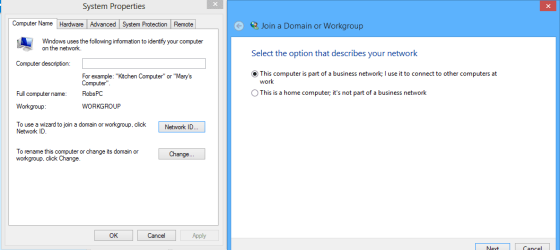
I think you are confused about the network ID having something to do with the can't access NAS box problem, this problem isn't the reason why you can't into the box, the reason why I say this is because I tested this Network ID problem and on my machine it says the exact same thing, no reason for me to change this and this settings causes me no problems at all, see picture.

For the NAS, try adjusting the sharing settings on the NAS box, these NAS boxes are formatted differently depending on who makes them so I can't give exact directions here.

There may be some registry adjustments that will get you into the NAS from the laptop, is the other machine having problems getting into the NAS?
 

Attachments

  • NETWORK ID SAME FOR ME.PNG
    NETWORK ID SAME FOR ME.PNG
    13.8 KB · Views: 4

My Computer

Computer type
PC/Desktop
Computer Manufacturer/Model Number
Home built
OS
Windows 7 Ult, Windows 8.1 Pro,
CPU
Q9650-4.275GHz, E8600 4.5GHz, E6750-3.8GHz
Motherboard
Evga 780i FTW
Memory
G.Skill PC2 9600 1200Mhz 5 5 5 15 2T
Graphics Card(s)
GTX480
Sound Card
Asus Xonar D2
Monitor(s) Displays
HannsG
Screen Resolution
1680X1050
Hard Drives
GSkill Phoenix Pro 120GB SSD
PSU
ThermalTake Toughpower 1000Watt modular
Case
ThermalTake XaserV
Cooling
Xigmatek S1283
Keyboard
Logitech G15
Mouse
Logitech G9
Internet Speed
T1
Correct; I'm unable to find the NAS on either machine, and I'm quite unsure as to the source of the problem.
Trying to change the network policy stemmed from this thread, and a couple other similar ones: Synology Inc. Online Community Forum - NEW NAS Experience -View topic - New Windows 8 system doesn't see DS

That's not relevant though if the network ID isn't causing my problems to begin with. I'm no network wizard though, so I'm just trying to chase down everything I can.

The NAS is a Synology DS212J, connected via a cisco DPC3825 router/modem. I also tried using a Linksys E3000 router (although with no internet connection) but that didn't help.
I have one desktop and one laptop, neither of which are able to interact with the NAS in any way as far as I can tell, except via the NAS utility ("Synology Assistant") or by typing in the internal IP address into a browser.

All devices are on the same Workgroup ("WORKGROUP"), the computers are in the same homegroup, the NAS is, as far as I can tell, setup correctly (including enabling windows file service).

I can't ping the NAS from either computer, it doesn't show up in windows explorer, I can't type in its address, etc. Basically the computers are unable to communicate with the NAS, and I have no idea why.
Any ideas?
 

My Computer

Computer type
PC/Desktop
OS
Alberta
Correct; I'm unable to find the NAS on either machine, and I'm quite unsure as to the source of the problem.
Trying to change the network policy stemmed from this thread, and a couple other similar ones: Synology Inc. Online Community Forum - NEW NAS Experience -View topic - New Windows 8 system doesn't see DS

That's not relevant though if the network ID isn't causing my problems to begin with. I'm no network wizard though, so I'm just trying to chase down everything I can.

The NAS is a Synology DS212J, connected via a cisco DPC3825 router/modem. I also tried using a Linksys E3000 router (although with no internet connection) but that didn't help.
I have one desktop and one laptop, neither of which are able to interact with the NAS in any way as far as I can tell, except via the NAS utility ("Synology Assistant") or by typing in the internal IP address into a browser.

All devices are on the same Workgroup ("WORKGROUP"), the computers are in the same homegroup, the NAS is, as far as I can tell, setup correctly (including enabling windows file service).

I can't ping the NAS from either computer, it doesn't show up in windows explorer, I can't type in its address, etc. Basically the computers are unable to communicate with the NAS, and I have no idea why.
Any ideas?


So one machine is Windows 8 Pro and the other is Win7 Home Premium?

Have you tried adjusting the Lanman server settings on the 8 pro machine?

The Lanman server settings in the link below are typically used to gain access to older Windows servers "Windows Server 08 or before that" or to gain access into certain LAN boxes.

For the Home Premium machine it may require registry adjustments by way of creating a key for Lanman server but we need to see if these settings work on the Win8 machine first. :)

Solved W2K3 Server can access W8 W8 computer cant see W2K server
 

My Computer

Computer type
PC/Desktop
Computer Manufacturer/Model Number
Home built
OS
Windows 7 Ult, Windows 8.1 Pro,
CPU
Q9650-4.275GHz, E8600 4.5GHz, E6750-3.8GHz
Motherboard
Evga 780i FTW
Memory
G.Skill PC2 9600 1200Mhz 5 5 5 15 2T
Graphics Card(s)
GTX480
Sound Card
Asus Xonar D2
Monitor(s) Displays
HannsG
Screen Resolution
1680X1050
Hard Drives
GSkill Phoenix Pro 120GB SSD
PSU
ThermalTake Toughpower 1000Watt modular
Case
ThermalTake XaserV
Cooling
Xigmatek S1283
Keyboard
Logitech G15
Mouse
Logitech G9
Internet Speed
T1
No, sorry for the confusion.
The desktop is windows 7 pro, the laptop is windows 7 premium. (The screenshot above is from the desktop).
 

My Computer

Computer type
PC/Desktop
OS
Alberta

My Computer

Computer type
PC/Desktop
Computer Manufacturer/Model Number
Home built
OS
Windows 7 Ult, Windows 8.1 Pro,
CPU
Q9650-4.275GHz, E8600 4.5GHz, E6750-3.8GHz
Motherboard
Evga 780i FTW
Memory
G.Skill PC2 9600 1200Mhz 5 5 5 15 2T
Graphics Card(s)
GTX480
Sound Card
Asus Xonar D2
Monitor(s) Displays
HannsG
Screen Resolution
1680X1050
Hard Drives
GSkill Phoenix Pro 120GB SSD
PSU
ThermalTake Toughpower 1000Watt modular
Case
ThermalTake XaserV
Cooling
Xigmatek S1283
Keyboard
Logitech G15
Mouse
Logitech G9
Internet Speed
T1
Progress!
I'm still unable to actually access it, but the NAS is now visible on the network to the Pro machine after following the instructions in that link.

The network location as seen in the network and sharing center is already set to home.
 

Attachments

  • network2.PNG
    network2.PNG
    69.8 KB · Views: 8

My Computer

Computer type
PC/Desktop
OS
Alberta
Progress!
I'm still unable to actually access it, but the NAS is now visible on the network to the Pro machine after following the instructions in that link.

The network location as seen in the network and sharing center is already set to home.

That's good, we are getting somewhere.

At this point you should be able to right click the NAS drive and open properties, there should be some share settings which are similar to the Windows share settings. I'm not even sure which type of NAS you are using so can only guess here, you should make sure that read/write or full access permissions are set up correctly, similar to the picture below.

For the win 7 Home Premium machine there are some registry settings that you need to change.

You should back up your registry before hand.

There needs to be a DWORD named LmCompatibilityLevel set to value of 1(one) at
HKLM\SYSTEM\CurrentControlSet\Control\Lsa

1. Just type regedit in the run box to open regedit and navigate to the following key:
HKLM\SYSTEM\CurrentControlSet\Control\Lsa then choose to create DWORD named LmCompatibilityLevel then set the value to 1. Save settings etc.

2. Search for the following location:

HKEY_LOCAL_MACHINE\SYSTEM\CurrentControlSet\services\LanmanServer\Parameters\

Double click on ‘restrictnullsessaccess’ and change the value data to 0.
 
Last edited:

My Computer

Computer type
PC/Desktop
Computer Manufacturer/Model Number
Home built
OS
Windows 7 Ult, Windows 8.1 Pro,
CPU
Q9650-4.275GHz, E8600 4.5GHz, E6750-3.8GHz
Motherboard
Evga 780i FTW
Memory
G.Skill PC2 9600 1200Mhz 5 5 5 15 2T
Graphics Card(s)
GTX480
Sound Card
Asus Xonar D2
Monitor(s) Displays
HannsG
Screen Resolution
1680X1050
Hard Drives
GSkill Phoenix Pro 120GB SSD
PSU
ThermalTake Toughpower 1000Watt modular
Case
ThermalTake XaserV
Cooling
Xigmatek S1283
Keyboard
Logitech G15
Mouse
Logitech G9
Internet Speed
T1
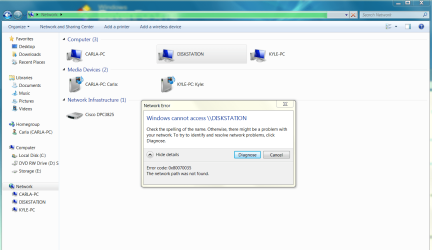
Right clicking from windows explorer doesn't get me anywhere; just the same error shown in the previous screen shot.
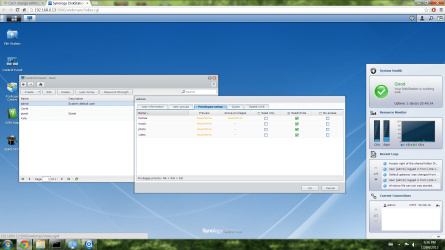
I can access the NAS by typing the IP into a browser which will let me adjust the share settings; I believe I already have the permissions set up correctly if this is what you're talking about; please see the image. (note that both named users have the same permissions as the admin)
 

Attachments

  • network3.png
    network3.png
    383.9 KB · Views: 6

My Computer

Computer type
PC/Desktop
OS
Alberta
Are you running any type of third party anti virus software on these machines?

Have you checked for this NAS device in the Windows firewall settings so you could allow for access through the Windows firewall? :)

The share settings look good, have you tried using the IP then the folder name to map the drive, example, //192.168.x.xx/music, then map to all the NAS folders this way.
 
Last edited:

My Computer

Computer type
PC/Desktop
Computer Manufacturer/Model Number
Home built
OS
Windows 7 Ult, Windows 8.1 Pro,
CPU
Q9650-4.275GHz, E8600 4.5GHz, E6750-3.8GHz
Motherboard
Evga 780i FTW
Memory
G.Skill PC2 9600 1200Mhz 5 5 5 15 2T
Graphics Card(s)
GTX480
Sound Card
Asus Xonar D2
Monitor(s) Displays
HannsG
Screen Resolution
1680X1050
Hard Drives
GSkill Phoenix Pro 120GB SSD
PSU
ThermalTake Toughpower 1000Watt modular
Case
ThermalTake XaserV
Cooling
Xigmatek S1283
Keyboard
Logitech G15
Mouse
Logitech G9
Internet Speed
T1
No 3rd party anti virus, only MS Security Essentials.
I'm not very familiar with configuring the windows firewall, and I couldn't find anything relating to Synology, but I created an inbound and outbound rule that should allow all connections from the NAS's IP address, and that didn't help.
 

My Computer

Computer type
PC/Desktop
OS
Alberta
have you tried using the IP then the folder name to map the drive, example, //192.168.x.xx/music, then map to all the NAS folders this way.[/B][/I]

No good, I get a 'Windows cannot access' error
 

My Computer

Computer type
PC/Desktop
OS
Alberta
Back
Top