Can't change sound Default Format

Igorek83

New member
Local time
3:17 AM
Messages
7
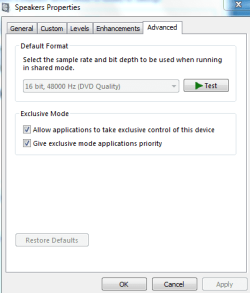
Can anyone tell me what could be the reason I can't change the Default Format in the Advanced Speaker Properties?
CaptureSound.PNG
 
Last edited:

My Computer

OS
Windows 7 Ultimate x86
Sound Card
Realtek AC'97 driver ver. 6.0.1.6305
Maybe because it's already on its default format.
 

My Computer

Computer Manufacturer/Model Number
HP Pavilon Slimline
OS
Windows 7 Ultimate 64 bits
CPU
Dual Core Intel Core 2 Duo E7500
Motherboard
MSI MS-7525 (Boston)
Memory
2x[2048 MB DDR2-SDRAM (PC2-6400 / 800 MHz), 2 Gb]; Total:4Gb
Graphics Card(s)
Intel(R) G33/G31 Express Chipset Family (256 MB)
Sound Card
Realtek ALC662 @ Intel 82801GB ICH7 - HD Audio Controller
Monitor(s) Displays
HP 2009m 20'' LCD
Screen Resolution
1600x900
Hard Drives
SAMSUNG HD642JJ (596 GB)
Can anyone tell me what could be the reason I can't change the Default Format in the Advanced Speaker Properties?


What happens if you deselect the two exclusive mode boxes? Don't forget to select "Apply" afterwards.

Also, what do you have selected under the Speaker Configuration setup.. Stereo, 2.1, 5.1?...etc.

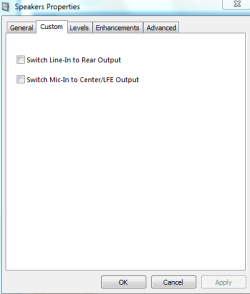
Curious, what is under the "Custom" tab?

Ap
 

My Computer

Computer Manufacturer/Model Number
Assembled in my workshop
OS
Windows 7 Home Premium
CPU
Intel Core 2 Duo @ 3.00gHz
Motherboard
Gigabyte GA-P35-S3G
Memory
4 GB
Graphics Card(s)
ATI Radeon HD 2600 XT
Sound Card
RME 24/96 Card, Realtek Internal Audio PreSonus FireStudio
Monitor(s) Displays
Acer 1917 (x2)
Screen Resolution
1280 x 1024 on both monitors
Hard Drives
Three 250GB Seagate SATA Barracuda 7200rpm
PSU
Rosewill 500-watt
Case
Rosewill mid-tower
Cooling
Noctua NH-U9B (CPU), PwrSupply fan + single large case Fan
Keyboard
Macally w/2/USB ports.
Mouse
Trackman Wheel
Other Info
Event 20/20 bas studio monitors, Yamaha sub.
Rackmount Korg/Roland/Yamaha synthesizers,
Cubase MIDI/audio recording. Sony Soundforge audio/mastering software. CD Architect Mastering. RME & Presonus audio interfaces.
Already tried to check/uncheck everything (with apply).. nothing happens.
Configuration under stereo.
Tried to reinstalling deferent drivers - no change.
Maybe it's because this is the only supported format for this card (on board)?
Under Custom:
CaptureCustom.PNG
 

My Computer

OS
Windows 7 Ultimate x86
Sound Card
Realtek AC'97 driver ver. 6.0.1.6305
Under Device Manager, what does it list as the audio device?

The older Realtek audio device I'm using lists six different settings.
Not sure that it makes much difference for general listening.

Ap
 

My Computer

Computer Manufacturer/Model Number
Assembled in my workshop
OS
Windows 7 Home Premium
CPU
Intel Core 2 Duo @ 3.00gHz
Motherboard
Gigabyte GA-P35-S3G
Memory
4 GB
Graphics Card(s)
ATI Radeon HD 2600 XT
Sound Card
RME 24/96 Card, Realtek Internal Audio PreSonus FireStudio
Monitor(s) Displays
Acer 1917 (x2)
Screen Resolution
1280 x 1024 on both monitors
Hard Drives
Three 250GB Seagate SATA Barracuda 7200rpm
PSU
Rosewill 500-watt
Case
Rosewill mid-tower
Cooling
Noctua NH-U9B (CPU), PwrSupply fan + single large case Fan
Keyboard
Macally w/2/USB ports.
Mouse
Trackman Wheel
Other Info
Event 20/20 bas studio monitors, Yamaha sub.
Rackmount Korg/Roland/Yamaha synthesizers,
Cubase MIDI/audio recording. Sony Soundforge audio/mastering software. CD Architect Mastering. RME & Presonus audio interfaces.
Realtek AC'97 Audio for VIA (R) Audio Controller.

I'm guessing it's probably the only format available because it's an old board (2006 - k8m890) and because i installed an virtual audio driver and there i had the option to change the default format.

Thanks for the help.
 

My Computer

OS
Windows 7 Ultimate x86
Sound Card
Realtek AC'97 driver ver. 6.0.1.6305
Realtek AC'97 Audio for VIA (R) Audio Controller.

I'm guessing it's probably the only format available because it's an old board (2006 - k8m890) and because i installed an virtual audio driver and there i had the option to change the default format.

Thanks for the help.

Right, you're running in AC'97 mode, AC'97 default output is 16-bit 48,000kHz.
I'm sure you need to be running in HD mode (not available on your mainboard audfio) to see all the options.

Ap
 

My Computer

Computer Manufacturer/Model Number
Assembled in my workshop
OS
Windows 7 Home Premium
CPU
Intel Core 2 Duo @ 3.00gHz
Motherboard
Gigabyte GA-P35-S3G
Memory
4 GB
Graphics Card(s)
ATI Radeon HD 2600 XT
Sound Card
RME 24/96 Card, Realtek Internal Audio PreSonus FireStudio
Monitor(s) Displays
Acer 1917 (x2)
Screen Resolution
1280 x 1024 on both monitors
Hard Drives
Three 250GB Seagate SATA Barracuda 7200rpm
PSU
Rosewill 500-watt
Case
Rosewill mid-tower
Cooling
Noctua NH-U9B (CPU), PwrSupply fan + single large case Fan
Keyboard
Macally w/2/USB ports.
Mouse
Trackman Wheel
Other Info
Event 20/20 bas studio monitors, Yamaha sub.
Rackmount Korg/Roland/Yamaha synthesizers,
Cubase MIDI/audio recording. Sony Soundforge audio/mastering software. CD Architect Mastering. RME & Presonus audio interfaces.
Back
Top