Solved Can't clear history of Taskbar's Address Toolbar

xladieexo

New member
Local time
2:36 AM
Messages
17
Edit:

This has been solved.


I wanted to know if there was a way to clear the history out of the adress toolbar from the taskbar.

Here is what i mean

I right click on the taskbar
i go to the toolbars
and click adress

it displays a adress bar sort of like google gadgets

the only problem i am having is that i want to clear some of the searches of websites i typed in their

i have cleared all my history and
cookies and temporary files in both Firefox and internet explorer

if anyone could help me
it would be greatly appreciated.

this is an annoyance i want to solve.

thank you for your time and help in advanced.

=]

here is an image of what i am taking about.

soryy i didnt post it before.

rc6dqe.jpg
 
Last edited:

My Computer My Computer

At a glance

Windows 7 Ultimate
OS
Windows 7 Ultimate
When you hover your mouse over the URL, is there a red X next to it? If there is, then click the X to delete it.

Oh, wait .... I'm talking about typed URL's in the Address bar at the top of the Windows screen.
 

My Computer My Computer

At a glance

Windows 7 Ultimate 32bit SP1Intel(R) Core(TM)2 Quad CPU @ 2.40GHz, 2400 MHz4 GBATI Radeon HD 2600 Pro
Computer type
PC/Desktop
Computer Manufacturer/Model Number
Bruce ... somewhere in his 40's
OS
Windows 7 Ultimate 32bit SP1
CPU
Intel(R) Core(TM)2 Quad CPU @ 2.40GHz, 2400 MHz
Motherboard
INTEL/D975XBX2
Memory
4 GB
Graphics Card(s)
ATI Radeon HD 2600 Pro
Monitor(s) Displays
Samsung SyncMaster 914v
Screen Resolution
1280 x 1024
Hard Drives
2/500GB each ... ST3500630AS ATA Device.
One is not connected
PSU
Rocketfish 700 W
Case
G.Skill Gigabyte Chassis
Keyboard
Standard PS/2 Keyboard
Mouse
Microsoft PS/2 Mouse
Internet Speed
DSL
Antivirus
Avira Internet Security
Browser
IE 11
Other Info
ATI HDMI Audio
No there isnt unfortunately.

when i hover my mouse over the url or search term all i get is this.

2pq5gd2.jpg


i click delete on my keboard but nothing happens

and i try to right click and see if i get any options but nothing comes up.

=[
 

My Computer My Computer

At a glance

Windows 7 Ultimate
OS
Windows 7 Ultimate
Nirs Sofer (NirSoft) has written some of the most reliable and awesome tools available. Try his classic tool.

IE HistoryView: Freeware Internet Explorer History Viewer

In IEHistoryView, you can select the history folder (By default, it gives the current user’s history folder).

If you want to see the typed URLs of Internet Explorer, just go to view –> show typed URLs.

This software it displays the number of visits for every URL. It also shows the user which has accessed the URL.
 
unfortunately that did not work either. =[

here is a video of me trying to explain it to the best of my ability.

View My Video
 

My Computer My Computer

At a glance

Windows 7 Ultimate
OS
Windows 7 Ultimate
Viewing History
  • Microsoft Internet Explorer 7 and above users can view their history files by clicking the "Tools" menu, "Internet Options", clicking the "Settings" button under the Browsing history, and then clicking the "View Files" button.
  • Microsoft Internet Explorer 6.x users can view their history files by clicking the "Tools" menu, "Internet Options", clicking the "Settings" button, and then clicking the "View Files" button.
Deleting History
  • Microsoft Windows users running Microsoft Internet Explorer 6.x and 7.x can delete their history files by clicking the "Tools" menu, "Internet Options", and clicking the "Delete Files" or "Delete" button. Users also have the option of automatically deleting files each time the close the browser window by clicking the "Advanced" tab and checking "Empty Temporary Internet Files folder when browser is closed" under the "Security" section.
  • Microsoft Internet Explorer 4.x users on an Apple Macintosh can delete the history by clicking the "Hard Drive" icon, "System", "Preferences", "Explorer", and moving the history file into the trash.
  • Microsoft Internet Explorer 3.02 and lower users can delete their history by clicking the "View" menu, "Options", open the tab "Advanced", click the "Settings" tab, and click the "Empty Folder" button.
 
HKEY_CURRENT_USER\Software\Microsoft\Internet Explorer\TypedURLs

That works in Vista, but not Win 7. ^^^

Here's a small cleaner I use. It says it's for XP, but it works with both Vista and Windows7:
ATF Cleaner ATF-Cleaner.exe - www.atribune.org
Click "Main" > check 'select all' (except 'Prefetch') this first time using it, then click "Empty Selected". Do the same for FireFox and Opera if you use either of those browsers.

You can use CCleaner along with this app.
 

My Computer My Computer

At a glance

Windows 7 Ultimate 32bit SP1Intel(R) Core(TM)2 Quad CPU @ 2.40GHz, 2400 MHz4 GBATI Radeon HD 2600 Pro
Computer type
PC/Desktop
Computer Manufacturer/Model Number
Bruce ... somewhere in his 40's
OS
Windows 7 Ultimate 32bit SP1
CPU
Intel(R) Core(TM)2 Quad CPU @ 2.40GHz, 2400 MHz
Motherboard
INTEL/D975XBX2
Memory
4 GB
Graphics Card(s)
ATI Radeon HD 2600 Pro
Monitor(s) Displays
Samsung SyncMaster 914v
Screen Resolution
1280 x 1024
Hard Drives
2/500GB each ... ST3500630AS ATA Device.
One is not connected
PSU
Rocketfish 700 W
Case
G.Skill Gigabyte Chassis
Keyboard
Standard PS/2 Keyboard
Mouse
Microsoft PS/2 Mouse
Internet Speed
DSL
Antivirus
Avira Internet Security
Browser
IE 11
Other Info
ATI HDMI Audio
Thank you jacee and antman. I tried both of your methods but it still doesnt work. here is my experinces.

View My Video
 

My Computer My Computer

At a glance

Windows 7 Ultimate
OS
Windows 7 Ultimate
Belay that means Ignore that. I should have deleted the text. Jacee knew it wouldn't work also.
 
oh sorry. lol. i didn't know what that meant. lol
 

My Computer My Computer

At a glance

Windows 7 Ultimate
OS
Windows 7 Ultimate
I cannot find anything. In all of this, did you boot? I don't think it will cause any of the fixes to engage, but I am out of ideas.
 
That is a very cool video thing though. Can you tell more about it?

I will brb about one hour.
 
I just rebooted lol. nothing happened as we both thought.
the recording program that i use in called camstudio. it is a free open source screen recorder.
you can download it and find more information about it at:
CamStudio - Free Screen Recording Software
 

My Computer My Computer

At a glance

Windows 7 Ultimate
OS
Windows 7 Ultimate
[HKEY_CURRENT_USER\Software\Microsoft\Windows\CurrentVersion\Explorer\TypedPaths]


[HKEY_USERS\S-1-5-21-1114099354-769096466-2833731273-1001\Software\Microsoft\Windows\CurrentVersion\Explorer\TypedPaths]

I typed in DOGHAMMER

Then I searched reg. Deleted both instances.

Now, I will boot.
 
And my address bar is clear.

So, one reg entry is easily found, the other may be different on yours. The phrase is TYPEDPATHS

[HKEY_CURRENT_USER\Software\Microsoft\Windows\CurrentVersion\Explorer\TypedPaths]


[HKEY_USERS\S-1-5-21-1114099354-769096466-2833731273-1001\Software\Microsoft\Windows\CurrentVersion\Explorer\TypedPaths]
 

My Computer My Computer

At a glance

Windows® 8 Pro (64-bit)Intel® Core™ i5 Processor 2467M (1.60GHz, 3MB...6GB DDR3 System Memory at 1,333MHz (on BD 4GB...AMD Radeon™ HD7550M 1GB DDR3 (Ext. Graphic)
Computer Manufacturer/Model Number
Samsung NP530U4B-S02IN
OS
Windows® 8 Pro (64-bit)
CPU
Intel® Core™ i5 Processor 2467M (1.60GHz, 3MB L3 Cache)
Motherboard
Samsung Electronics
Memory
6GB DDR3 System Memory at 1,333MHz (on BD 4GB + 2GB x 1)
Graphics Card(s)
AMD Radeon™ HD7550M 1GB DDR3 (Ext. Graphic)
Sound Card
Realtek High Definition Audio
Monitor(s) Displays
35.56cm (14.0) SuperBright 300nit HD LED Display
Screen Resolution
1366x768
Hard Drives
1TB S-ATA II Hard Drive (5400RPM) with ExpressCache 16GB SSD
Internet Speed
sucks
Antivirus
Microsoft Security Essentials
Browser
Google Chrome (Sync enabled)
Just a few more articles to confuse the heck out of you :p :D

Review privacy details : Clear your Toolbar search history - Toolbar Help
Customising the Firefox 3.0.* Location Bar. • mozillaZine Forums

==============================
What is address bar history?
Address bar, also known as the "Location bar", is a text box used to enter a web site address in a browser. Web browsers allow users to click the down arrow to view the recently visited pages. So, the address bar history shows some of the web sites you've recently visited and anyone who has access to your computer and starts to type in the address bar will get a drop down url list with the web sites you've visited
To delete address bar history in Firefox 1.5:
• Select "Tools"
• Select "Options".
• Select "Privacy".
• Open "History" tab and click "Clear Browsing history now".
• Click OK.
In "History" tab you can specify how long you want Firefox to remember what web sites you visited.
See if this works the same in FF 3.**

And ... apparently old articles on deleting seach history in Firefox work too:
How do I clear my search history in Firefox?
 

My Computer My Computer

At a glance

Windows 7 Ultimate 32bit SP1Intel(R) Core(TM)2 Quad CPU @ 2.40GHz, 2400 MHz4 GBATI Radeon HD 2600 Pro
Computer type
PC/Desktop
Computer Manufacturer/Model Number
Bruce ... somewhere in his 40's
OS
Windows 7 Ultimate 32bit SP1
CPU
Intel(R) Core(TM)2 Quad CPU @ 2.40GHz, 2400 MHz
Motherboard
INTEL/D975XBX2
Memory
4 GB
Graphics Card(s)
ATI Radeon HD 2600 Pro
Monitor(s) Displays
Samsung SyncMaster 914v
Screen Resolution
1280 x 1024
Hard Drives
2/500GB each ... ST3500630AS ATA Device.
One is not connected
PSU
Rocketfish 700 W
Case
G.Skill Gigabyte Chassis
Keyboard
Standard PS/2 Keyboard
Mouse
Microsoft PS/2 Mouse
Internet Speed
DSL
Antivirus
Avira Internet Security
Browser
IE 11
Other Info
ATI HDMI Audio
Hello xladieexo,

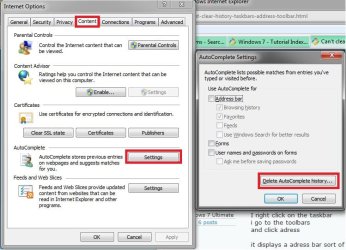
It may also be AutoComplete in Internet Explorer. In IE8, click on Tools, Internet Options, Content tab, Settings under "AutoComplete, and "Delete AutoComplete history".

Autocomplete.jpg

Hope this helps,
Shawn
 

My Computer My Computer

At a glance

64-bit Windows 11 Pro for WorkstationsIntel i7-8700K OC'd to 5 GHz64 GB (4x16GB) G.SKILL TridentZ RGB DDR4 3600...ASUS ROG-STRIX-GTX1080TI-O11G-GAMING
Computer type
PC/Desktop
Computer Manufacturer/Model Number
Self built custom
OS
64-bit Windows 11 Pro for Workstations
CPU
Intel i7-8700K OC'd to 5 GHz
Motherboard
ASUS ROG Maximus XI Formula Z390
Memory
64 GB (4x16GB) G.SKILL TridentZ RGB DDR4 3600 MHz
Graphics Card(s)
ASUS ROG-STRIX-GTX1080TI-O11G-GAMING
Sound Card
Integrated
Monitor(s) Displays
2 x Samsung Odyssey G7 27"
Screen Resolution
2560x1440
Hard Drives
1TB Samsung 990 PRO M.2,
4TB Samsung 990 PRO PRO M.2,
TerraMaster F8 SSD Plus NAS
PSU
Seasonic Prime Titanium 850W
Case
Thermaltake Core P3
Cooling
Corsair Hydro H115i
Keyboard
Logitech wireless K800
Mouse
Logitech MX Master 4
Internet Speed
2 Gb/s Download and 100 Mb/s Upload
Antivirus
Malwarebyte Anti-Malware Premium
Browser
Google Chrome
Other Info
Logitech Z625 speaker system,
Logitech BRIO 4K Pro webcam,
HP Color LaserJet Pro MFP M477fdn,
APC SMART-UPS RT 1000 XL - SURT1000XLI,
Galaxy S23 Plus phone
I'd first like to thank EVERYONE that took the time and helped me. all your information was appreciated,considered and used! You guys are great.

Antman fixed my problem. =D

i went into my registry

[HKEY_CURRENT_USER\Software\Microsoft\Windows\CurrentVersion\Explorer\TypedPaths]

deleted all the urls
rebooted and they were gone.

Thank you so much Antman as well as everyone else who has helped me. You all rock!!! I hope this thread will become handy for someone who is facing the same problem i was.

i hope you all have wonderful days.

night. =]
 

My Computer My Computer

At a glance

Windows 7 Ultimate
OS
Windows 7 Ultimate
Back
Top