Can't connect to century link with windows 7

Wilmathx

New member
Local time
12:11 AM
Messages
9
I have a lenovo pc with a i5 cpu. It has been connected to the century link router by cable for years and I haven't
had any problems.
However, in my zeal to try and connect that pc with a laptop that has xp using a direct connection,
I think messed things up. I can't connect to the internet so I tried to create a new connection.

I followed directions on how to create a direct connection but I keep getting an error message saying "connection failed with
error 651" The modem has reported an error.

I hooked up a different computer to the modem with the cable and it connected without any problems.
Also, I can hook up to the modem wirelessly without any problems but the pc doesn't have a wireless card.

Any ideas?
Thanks
Rick
 

My Computers My Computers

  • At a glance

    Windows 7, Professional, x64i5, [email protected] ghz14 GB
    Computer type
    PC/Desktop
    Computer Manufacturer/Model Number
    Think centre
    OS
    Windows 7, Professional, x64
    CPU
    i5, [email protected] ghz
    Memory
    14 GB
    Browser
    Google
  • Computer type
    PC/Desktop
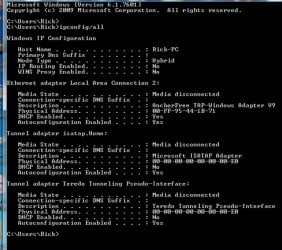
Welcome to the forum. on the netwrok card is it set to dhcp? from a cmd prompt type

ipconfig /all

post results
 

My Computer My Computer

At a glance

win 8 32 bit
Computer type
PC/Desktop
OS
win 8 32 bit
Here are the results. It is all new for me so I don't know what it means.
Thanks for taking interest
 

Attachments

  • ipg.jpg
    ipg.jpg
    252.7 KB · Views: 1

My Computers My Computers

  • At a glance

    Windows 7, Professional, x64i5, [email protected] ghz14 GB
    Computer type
    PC/Desktop
    Computer Manufacturer/Model Number
    Think centre
    OS
    Windows 7, Professional, x64
    CPU
    i5, [email protected] ghz
    Memory
    14 GB
    Browser
    Google
  • Computer type
    PC/Desktop
Dhcp is set but it shows the cable isnt connected?
 

My Computer My Computer

At a glance

win 8 32 bit
Computer type
PC/Desktop
OS
win 8 32 bit
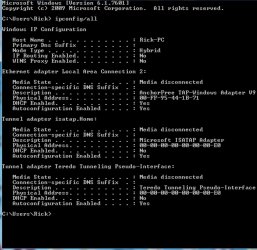
I hooked the cable back up.
The attachment titled ipc. is the newest one.
 

Attachments

  • ipc.jpg
    ipc.jpg
    240.6 KB · Views: 0

My Computers My Computers

  • At a glance

    Windows 7, Professional, x64i5, [email protected] ghz14 GB
    Computer type
    PC/Desktop
    Computer Manufacturer/Model Number
    Think centre
    OS
    Windows 7, Professional, x64
    CPU
    i5, [email protected] ghz
    Memory
    14 GB
    Browser
    Google
  • Computer type
    PC/Desktop
Why are you using a tap network adapter? are you using vpn? remove the tap adapter from the system
 

My Computer My Computer

At a glance

win 8 32 bit
Computer type
PC/Desktop
OS
win 8 32 bit
thanks for the reply but I don't know that much about hardware. I have had this pc for years
and haven't had any problems with it. I am not familiar with what you are talking about.
 

My Computers My Computers

  • At a glance

    Windows 7, Professional, x64i5, [email protected] ghz14 GB
    Computer type
    PC/Desktop
    Computer Manufacturer/Model Number
    Think centre
    OS
    Windows 7, Professional, x64
    CPU
    i5, [email protected] ghz
    Memory
    14 GB
    Browser
    Google
  • Computer type
    PC/Desktop
The AnchorFree adapter is probably for some free VPN you or someone else installed. It may be an issue. It could have also been installed by malware/Adware.

To remove this adapter try the following:

Go to the Windows start orb and in search begin to type: device manager.

In Device Manger look under Network adapters. Now find an adapter that says something about "AnchorFree" if you can. Right click the adapter and uninstall. If you don't see it or not sure what to uninstall, post a screenshot of your network adapters as shown in Device Manager. Or you could try RevoUninstaller and just remove the software it's using. Sometimes Revouninstaller doesn't show everything, in this case use the traditional Windows add/remove method in the Control Panel to uninstall the software if available. RevoUninstaller would be more preferable since it allows you to help get rid of all traces of the program. Just be sure you don't delete registry keys or components not related to the program if you do use RevoUninstaller. Make sure RevoUninstaller creates a system restore point first.


The Teredo (Press the speaker icon) and Microsoft ISATAP adapters you leave alone. Those are core Windows adapters. The Teredo adapter is for IPv4 to IPv6 domain name resolution in case you don't have IPv6 capability (and I strongly urge against having an IPv6 address unless you have a router with NAT64 capability...). The ISATAP adapter is probably for the built-in Windows VPN. Largely used in a corporate/business environment. May also be used for RDP (Remote Desktop). Not entirely sure. But I do know both of those adapters are core Windows adapters. The AnchorFree adapter is not.

Come to think of it. Do post a screenshot of your network adapters from the control panel. I'd like to see what you have going on here. This time in search type: Network and Sharing Center and to the left column go to Change adapter settings. Post a screenshot.


Usually, if you want to connect one PC to another with an Ethernet cable, that cable needs to be a crossover cable and you'd then have to right click your network adapter and share it. It's called ICS (Internet Connection Sharing).

Now, in lieu of a needed crossover cable for direct PC to PC networking, newer network adapters have a feature called Auto-MDIX (Medium-Dependent Interface, or auto crossover). So a cross over cable is not needed. Since you indicated your laptop is running XP, that laptop may not have a newer network adapter capable of Auto-MDIX. In which case a crossover cable or crossover adapter will have to be used. A newer USB network adapter might fix that as well...

Have a look at the pictures and diagram in this listing.


Refer to this document on connecting two computers together: Directly connecting computers and sharing files


Back in my XP days, my desktop's Ethernet connection got messed up. So, I made a one foot long crossover cable and connected that to some female-female Ethernet connectors and a longer Ethernet cable run between my Dell Inspiron 6000 laptop and my desktop and used ICS to share bother adapters. The laptop got its Internet via WiFI and I was then able to access the Internet on my desktop through my laptop. I gamed with this setup for a very long time until I got the motivation to fix the damn Ethernet cable for my desktop. LOL I also ran Battlefield 2142 on both the laptop and the desktop in a game. So the laptop was on the enemy side and my desktop was on the good side. That way I could see what the enemy was up to while I "pwned" all the players on my desktop. LOL

ProTip: Speaking of "pwned" Have you been pwned? Attention Required! | Cloudflare I use their service alerts for ALL my emails.

Have I Been Pwned? - Wikipedia

Anyway...

 

My Computer My Computer

At a glance

Windows 7 Ultimate x64
Computer type
PC/Desktop
OS
Windows 7 Ultimate x64
Sorry, work has been crazy lately so it has taken me awhile to get back to the post.

I did as instructed and uninstalled the "anchor free" adapter. I tried connecting but nothing happened.
I tried to create a new connection but it didn't work.

Thanks everybody for your help. I am in awe of your deep knowledge
of this complex system.
 

My Computers My Computers

  • At a glance

    Windows 7, Professional, x64i5, [email protected] ghz14 GB
    Computer type
    PC/Desktop
    Computer Manufacturer/Model Number
    Think centre
    OS
    Windows 7, Professional, x64
    CPU
    i5, [email protected] ghz
    Memory
    14 GB
    Browser
    Google
  • Computer type
    PC/Desktop
Hi


IPconfig is reporting Anchorfree as DEVICE connection >>2<<
i suspect its defaulting to that as connection 1 has "dissappeared"

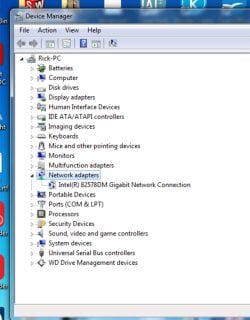
WE NEED to see what inbuilt adapter is on your system..... please post screenshot of Device Manager >> Network adapters
note if there are any marked UNknown/Other or any with a ! please post details

please also can we have the full details of your problem comp
 

My Computer My Computer

At a glance

W7 home premium 32bit/W7HP 64bit/w10 tp insid...E5300 dual core3gbNvidia Geforce 7100 Nforce 630i
Computer type
PC/Desktop
Computer Manufacturer/Model Number
medionl/Aspire 6930G/acer x55a
OS
W7 home premium 32bit/W7HP 64bit/w10 tp insider ring
CPU
E5300 dual core
Motherboard
medion MS7366
Memory
3gb
Graphics Card(s)
Nvidia Geforce 7100 Nforce 630i
Monitor(s) Displays
avixc
Internet Speed
n (isp resticted to 72)
Antivirus
mse/pands
Browser
palemoon
Other Info
Belkin Fd7050 n USB using Railink RT2870 drivers, more upto date
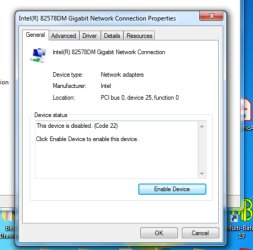
I did as you instructed and may have stumbled upon the problem. When I double clicked on the only network
adapter showing, Intel(R) 82578DM, a window popped up and said the device was disabled.

I held off in clicking the Enable Device button till you see the screenshot.

The screenshot of the network adapters you asked for is there as well as the screenshot of the disabled device window.

Thanks for the help
 

Attachments

  • network adapters screenshot.jpg
    network adapters screenshot.jpg
    312.6 KB · Views: 0
  • the device is disabled.jpg
    the device is disabled.jpg
    279.4 KB · Views: 0

My Computers My Computers

  • At a glance

    Windows 7, Professional, x64i5, [email protected] ghz14 GB
    Computer type
    PC/Desktop
    Computer Manufacturer/Model Number
    Think centre
    OS
    Windows 7, Professional, x64
    CPU
    i5, [email protected] ghz
    Memory
    14 GB
    Browser
    Google
  • Computer type
    PC/Desktop
Hi
just enable it, should then "replace" the AnchorFree connection as the default option.
If it does not connect to the network -- open Network/sharing and remove the AnchorFree option

Note
as was mentioned earlier AnchorFree is likely associated with your AV, this will have its own vpn program/dashboard
(mine certainly does have both) check the settings turn it/them OFF
 
Last edited:

My Computer My Computer

At a glance

W7 home premium 32bit/W7HP 64bit/w10 tp insid...E5300 dual core3gbNvidia Geforce 7100 Nforce 630i
Computer type
PC/Desktop
Computer Manufacturer/Model Number
medionl/Aspire 6930G/acer x55a
OS
W7 home premium 32bit/W7HP 64bit/w10 tp insider ring
CPU
E5300 dual core
Motherboard
medion MS7366
Memory
3gb
Graphics Card(s)
Nvidia Geforce 7100 Nforce 630i
Monitor(s) Displays
avixc
Internet Speed
n (isp resticted to 72)
Antivirus
mse/pands
Browser
palemoon
Other Info
Belkin Fd7050 n USB using Railink RT2870 drivers, more upto date
I enabled it but didn't know how to delete AnchorFree connection. I went to Network and Sharing Center but
did not find any AnchorFree connections.
 

My Computers My Computers

  • At a glance

    Windows 7, Professional, x64i5, [email protected] ghz14 GB
    Computer type
    PC/Desktop
    Computer Manufacturer/Model Number
    Think centre
    OS
    Windows 7, Professional, x64
    CPU
    i5, [email protected] ghz
    Memory
    14 GB
    Browser
    Google
  • Computer type
    PC/Desktop
Hi

as long as you've got your connection back i wouldn't worry
 

My Computer My Computer

At a glance

W7 home premium 32bit/W7HP 64bit/w10 tp insid...E5300 dual core3gbNvidia Geforce 7100 Nforce 630i
Computer type
PC/Desktop
Computer Manufacturer/Model Number
medionl/Aspire 6930G/acer x55a
OS
W7 home premium 32bit/W7HP 64bit/w10 tp insider ring
CPU
E5300 dual core
Motherboard
medion MS7366
Memory
3gb
Graphics Card(s)
Nvidia Geforce 7100 Nforce 630i
Monitor(s) Displays
avixc
Internet Speed
n (isp resticted to 72)
Antivirus
mse/pands
Browser
palemoon
Other Info
Belkin Fd7050 n USB using Railink RT2870 drivers, more upto date
Sorry about the absence. Do you have an Internet connection again?
 

My Computer My Computer

At a glance

Windows 7 Ultimate x64
Computer type
PC/Desktop
OS
Windows 7 Ultimate x64
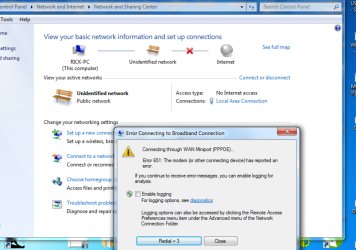
No I don't have a connection yet. I tried connecting and got an error window.
Here's a screenshot
Thanks everybody for the help!
 

Attachments

  • connect error window.jpg
    connect error window.jpg
    245.9 KB · Views: 0

My Computers My Computers

  • At a glance

    Windows 7, Professional, x64i5, [email protected] ghz14 GB
    Computer type
    PC/Desktop
    Computer Manufacturer/Model Number
    Think centre
    OS
    Windows 7, Professional, x64
    CPU
    i5, [email protected] ghz
    Memory
    14 GB
    Browser
    Google
  • Computer type
    PC/Desktop
Does another computer work plugged into the modem? NOT through WiFi. If so, move to step 1. If not, move to step 2.


1) You most likely need to find and replace a file on the computer without an Internet connection with a good working copy from a good working computer. Go to a good working computer and navigate to: C:\Windows\System32\drivers Now you need to find the file raspppoe.sys Copy that file to a USB drive or something.

Plug this USB drive in the computer without an Internet connection and copy/paste the raspppoe.sys file to the same path of C:\Windows\System32\drivers

You may need to give yourself access permission for the copy/paste operation. If so, I'll have to post instructions on that.

A super easy way to find the raspppoe.sys file is to use a program called Everything.exe from VoidTools on both computers. There are many versions to chose from. You can chose to install or not install by running the portable version offered. If your computer is 64 bit, chose the 64 bit setup .exe. I wouldn't use the MSI version for reasons... There are also multilingual and English only versions...Downloads - voidtools

In Everything, search for raspppoe.sys. Pay attention to its path, there may be others. Again, you're looking for the one in C:\Windows\System32\drivers. Right click the file and copy. Paste to the USB drive.

On the none working computer open Everything and search for raspppoe.sys Right click that file and chose Open Path or Explore Path to go straight to the directory where it is at. Paste the working raspppoe.sys file from the USB drive to this directory.


You may need to try and uninstall the currently installed Intel network adapter and reinstall the driver. After all, perhaps the driver on the Internet is newer. First, grab the latest driver from here Now go back into device manger, right click the network adapter that doesn't work and chose uninstall. Now install the new driver. I'd reboot the computer after installation.


2) Is the Internet light on the modem lit orange? No? Follow the instructions here: How to reboot your modem | CenturyLink After the modem reset, power off and on the computer.

If the modem is giving you issues, have it replaced. If you're leasing the modem, opt to buy one that's compatible instead and save yourself some money. I'd go to the broadbandreports website and ask. They pretty much know Internet and networking stuff.
 

My Computer My Computer

At a glance

Windows 7 Ultimate x64
Computer type
PC/Desktop
OS
Windows 7 Ultimate x64
Hi

Thats not the right connection,
whats showing when you click on View your active networks connect/disconnect

rerun ipconfig/all
please recheck the device manager
 

My Computer My Computer

At a glance

W7 home premium 32bit/W7HP 64bit/w10 tp insid...E5300 dual core3gbNvidia Geforce 7100 Nforce 630i
Computer type
PC/Desktop
Computer Manufacturer/Model Number
medionl/Aspire 6930G/acer x55a
OS
W7 home premium 32bit/W7HP 64bit/w10 tp insider ring
CPU
E5300 dual core
Motherboard
medion MS7366
Memory
3gb
Graphics Card(s)
Nvidia Geforce 7100 Nforce 630i
Monitor(s) Displays
avixc
Internet Speed
n (isp resticted to 72)
Antivirus
mse/pands
Browser
palemoon
Other Info
Belkin Fd7050 n USB using Railink RT2870 drivers, more upto date
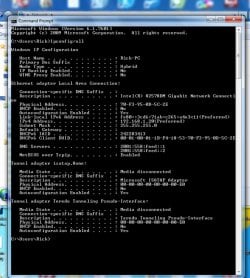
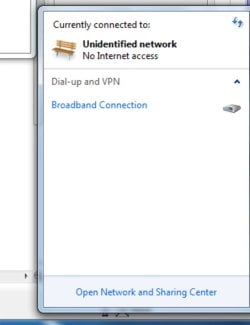
Here is screenshots of ipconfig/all and View your active networks.
BTW, the computer and the connection has been rock solid for years.
The problem started when I tried to create a cable connection between the pc and
a laptop that had xp for the os.

Thanks again!
 

Attachments

  • ipconfig 3.19.jpg
    ipconfig 3.19.jpg
    371 KB · Views: 0
  • active networks.jpg
    active networks.jpg
    81.8 KB · Views: 0

My Computers My Computers

  • At a glance

    Windows 7, Professional, x64i5, [email protected] ghz14 GB
    Computer type
    PC/Desktop
    Computer Manufacturer/Model Number
    Think centre
    OS
    Windows 7, Professional, x64
    CPU
    i5, [email protected] ghz
    Memory
    14 GB
    Browser
    Google
  • Computer type
    PC/Desktop
Hi

at least the right connection is available now

now im not sure if the details its showing are correct im a Wifi guy
@samuria
should be able to confirm if DHCP/default gateway and DNS server feed details are correct

What happens when you click on that Broadband link
(left and right)
 
Last edited:

My Computer My Computer

At a glance

W7 home premium 32bit/W7HP 64bit/w10 tp insid...E5300 dual core3gbNvidia Geforce 7100 Nforce 630i
Computer type
PC/Desktop
Computer Manufacturer/Model Number
medionl/Aspire 6930G/acer x55a
OS
W7 home premium 32bit/W7HP 64bit/w10 tp insider ring
CPU
E5300 dual core
Motherboard
medion MS7366
Memory
3gb
Graphics Card(s)
Nvidia Geforce 7100 Nforce 630i
Monitor(s) Displays
avixc
Internet Speed
n (isp resticted to 72)
Antivirus
mse/pands
Browser
palemoon
Other Info
Belkin Fd7050 n USB using Railink RT2870 drivers, more upto date
Back
Top