Solved Can't connect to lan

Espera

New member
Local time
4:26 AM
Messages
21
I have a
Netgear FS605 v3 Switch connected to 2 computers
1) Hp Workstation with Windows 7 Professional and Ubuntu10.10
2) Acer Aspire E700 With Windows 7 and XP sp3

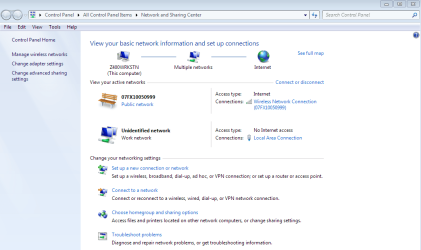
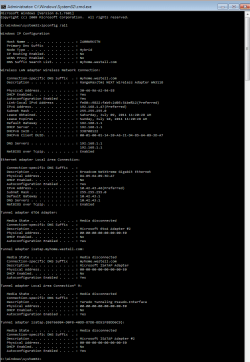
I know the Ip settings worked between the two machines because Ubuntu (hp) and Xp (acer) work fine together over my switch and can see each other and Xp (Acer) can see my Windows 7 (HP) machine and access the files, but windows 7 doesn't see anything and won't let me change my network location to home, won't let me change the icon, or the name, even after I've change the Group Policy settings to allow me to change the settings.

My other network is a neighbors wireless I connect to via a Netgear Rangemax wireless card.

All I really want is to play games over the lan between my two computers and share files.

Thankyou
 

Attachments
  • Capture12.PNG
    Capture12.PNG
    27 KB · Views: 159
  • Capture_network.PNG
    Capture_network.PNG
    35.3 KB · Views: 145
  • Capture123.PNG
    Capture123.PNG
    29.3 KB · Views: 193
  • Capture_unidentified.PNG
    Capture_unidentified.PNG
    7.2 KB · Views: 92

My Computer

Computer Manufacturer/Model Number
HP Z400 Workstation , Acer Aspire E700
OS
32bit(Windows 7 & Ubuntu 10.10 , Windows 7 & Windows XP)
CPU
2.8GHz Intel Xeon W3530 , 2.40GHz Intel Core2 Quad
Motherboard
Acer FG965M, HP 0B4C D
Memory
3GB EEC , 4 GB
Graphics Card(s)
NVIDIA QuadroFX 380 , Radeon X1650
Sound Card
Realtek High Definition Audio
Monitor(s) Displays
HP 2009m x2
Screen Resolution
1600x900
Hard Drives
HDS728080PLA380 [Hard drive] (82.35 GB) -- drive 1, s/n PFDB20S5T56VTJ, rev PF2OA60A, SMART Status: Healthy

SAMSUNG HD160JJ/P [Hard drive] (160.00 GB) -- drive 3, s/n S0DFJ1NLB53172, rev ZM100-34, SMART Status: Healthy

ST3500320AS [Hard drive]
Case
IBM EServer XSeries 205
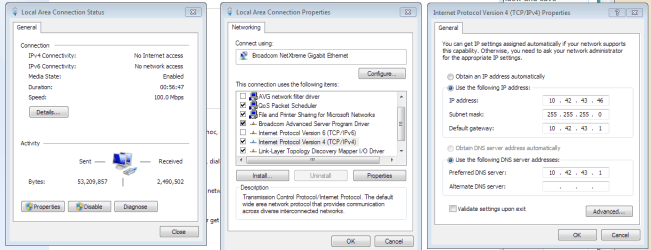
Windows 7 does that because it doesn't have anything telling it what to do. It sounds crazy, but basically Windows 7 chokes when there isn't a router giving it direction (even if you set a static IP when using a router, there's still a "higher being" that can give direction). To fix this annoying problem, go to the network and sharing center, click on change adapter settings, then right click on your adapter and choose properties. Highlight the TCP/IPv4 option and click properties. Give it a static IP, and in the default gateway, put the IP address of the Windows XP computer (it doesn't have to be the computer, it could be a networked printer that has an IP address - it just has to be something that 7 can ping). Reboot your computer, and then you should be able to select from home, work, and public networks.

The easiest thing to do would be to buy a router and use it instead of the switch.
 

My Computer

Computer Manufacturer/Model Number
Dell XPS 15 L502x
OS
Windows 7 Ultimate x64 SP1
CPU
Core i7-2670QM
Memory
8GB DDR3 PC3-10600
Graphics Card(s)
Intel HD Graphics 3000 + GeForce GT 540M
Screen Resolution
1920x1080
Hard Drives
1TB 5400RPM Seagate
Holy geezus that worked like a charm :D

Thanks


oh and I didn't even need to restart.
 

My Computer

Computer Manufacturer/Model Number
HP Z400 Workstation , Acer Aspire E700
OS
32bit(Windows 7 & Ubuntu 10.10 , Windows 7 & Windows XP)
CPU
2.8GHz Intel Xeon W3530 , 2.40GHz Intel Core2 Quad
Motherboard
Acer FG965M, HP 0B4C D
Memory
3GB EEC , 4 GB
Graphics Card(s)
NVIDIA QuadroFX 380 , Radeon X1650
Sound Card
Realtek High Definition Audio
Monitor(s) Displays
HP 2009m x2
Screen Resolution
1600x900
Hard Drives
HDS728080PLA380 [Hard drive] (82.35 GB) -- drive 1, s/n PFDB20S5T56VTJ, rev PF2OA60A, SMART Status: Healthy

SAMSUNG HD160JJ/P [Hard drive] (160.00 GB) -- drive 3, s/n S0DFJ1NLB53172, rev ZM100-34, SMART Status: Healthy

ST3500320AS [Hard drive]
Case
IBM EServer XSeries 205
Glad to help.
 

My Computer

Computer Manufacturer/Model Number
Dell XPS 15 L502x
OS
Windows 7 Ultimate x64 SP1
CPU
Core i7-2670QM
Memory
8GB DDR3 PC3-10600
Graphics Card(s)
Intel HD Graphics 3000 + GeForce GT 540M
Screen Resolution
1920x1080
Hard Drives
1TB 5400RPM Seagate
Can't connect lan via explorer (\\pcnameORip)

I have a GVT PowerBox Pace V5471 (adsl modem and router) and an Intelbras SF 2400 QR (switch).
A working local network and a working WAN.
But one laptop with W7 won't access others PCs in the network via explorer (\\computernameORip).
(1) I am able to ping others successfully via cmd, from this laptop.
(2) Able to connect via Remote Connection to others via Windows Software.
(3) Able to access internet with it.
(4) Can see this laptop on modem DHCP table
(5) Can see this laptop through Netowork on other machines.
(6) Can access it via explorer from other machines (\\computernameORip)

Tried Solutions:
(a)Static IP - fail
(b)Safe mode with network - fail (no computers appears, in oppose to normal mode which might be cache)
( c)Disable firewall (third party) - fail
( d)Windows Diagnostic service - fail
(e)ipconfig /release, /renew, /flushdns and /registerdns (in a correct manner) - fail

Regards
 
Last edited:

My Computer

OS
W7
Back
Top