can't connect to the internet on just ONE computer

Lostpoint

New member
Local time
10:17 AM
Messages
4
Location
Brooklyn
I have Verizon fios high speed Internet. I also run a wireless router from it
for my older models that work with b/g, not n. my son's computer (3weeks old) is
all of a sudden not connecting to the Internet on either wireless network
(original Verizon router or the net gear). iPad and other devices are having no
problems, so I'm assuming it's not the router. Just this one laptop isn't
working. I tried all the usual amateur troub shooting like resetting the router,
the comp, windows help, but nothing will get this one to connect to the
Internet. It does say that it is connected to the router, but no int net access.
Please advise me.

I tried to copy and paste the ipconfig into this box, but couldn't seem to figure out how, but I attached the picture file. Thanks
 

Attachments

  • Capture.PNG
    Capture.PNG
    22.3 KB · Views: 61

My Computer My Computer

At a glance

Home 32bit
OS
Home 32bit
"my son's computer (3weeks old) is
all of a sudden not connecting to the Internet"

was it connecting before??

did someone (your son perhaps) change any network settings on your son's machine?

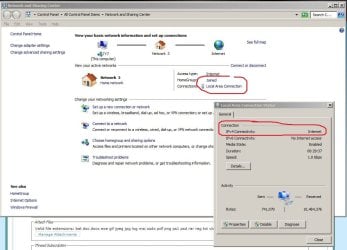
check the settings shown in the attached picture (on your son's machine)
 

Attachments

  • Capture.JPG
    Capture.JPG
    85.5 KB · Views: 252

My Computer My Computer

At a glance

win7 ultimate 32bitcore2 Extreme QX6850-OCd to 3.15 GHz4 GBNVidia 8600 GT
Computer Manufacturer/Model Number
SALEON model 2.2b
OS
win7 ultimate 32bit
CPU
core2 Extreme QX6850-OCd to 3.15 GHz
Motherboard
ASUS P5G41-M LE
Memory
4 GB
Graphics Card(s)
NVidia 8600 GT
Monitor(s) Displays
23" acer
Hard Drives
one SATA 250GB partitioned equally in half
one SATA 160GB-internal storage
PSU
500W Thermaltake
Case
mini tower
Just a couple more questions if I may.

You IPConfig shows that it cannot get an IP address from the router because it is using the default Windows IP address (169.254.xxx.xxx)

It also has no gateway, so the computer has no idea of how to get to the internet because it doesn't know what path to take.

You config says that you have DHCP enabled on your PC. Is DHCP enabled on the router?

What brand and model of router are you using?

Have you tried connecting it to a cable, disable the wireless, and made sure the ethernet LAN connetion is enabled? If so, did you get the same symptoms? (Default IP address, no gateway etc).

If you know that address of your router you could try the laptop with a static IP address and gatway. Say the router is at 192.168.1.1. You would set your laptop's gateway to 192.168.1.1 and set the laptops IP address to something like 192.168.1.20 and see how you do.

Usually the router will do the DNS too. If you don't set that your laptop should get that from the router *provided that it has a valid gateway address*. Or you could set you laptop to use Google's DNS server (which help you find and move around websites), like 8.8.8.8 and/or 8.8.4.4

Not sure of your expertise level, so apologies if you know this already - The gateway address should be the address of your router. For the Internet to work the IP address your Laptop has must be on the same network as the router. Since your router is probably 192.168.0.xxx or 192.168.1.xxx it will not work while you have an address on a different "logical" network..

You might also get some value by reading through Dinesh's fine Network trouble shooting guide... http://www.sevenforums.com/tutorials/18203-internet-troubleshooting-guide.html?filter[2]=Networking Internet
 

My Computer My Computer

At a glance

Linux Mint 17 Cinnamon | Win 7 Ult x64Intel I7-3770K @ 4.2ghz32GB G-Skill C10QEVGA GTX 670 2GB SC
Computer type
PC/Desktop
Computer Manufacturer/Model Number
Home Made
OS
Linux Mint 17 Cinnamon | Win 7 Ult x64
CPU
Intel I7-3770K @ 4.2ghz
Motherboard
ASRock Extreme 4
Memory
32GB G-Skill C10Q
Graphics Card(s)
EVGA GTX 670 2GB SC
Sound Card
Creative Fatality ExtremeGamer
Monitor(s) Displays
LG E2742V x 2
Screen Resolution
1920x1080
Hard Drives
256GB Vertex 4 SSD
2TB Seagate ST2000DM001
1TB Seagate ST1000DM003
PSU
Corsair HX 650
Case
HAF 932 advanced
Cooling
Corsair H100i liquid cooler
Keyboard
Logitech Wireless
Mouse
Logitech Wireless
Internet Speed
OptusNet NBN 100/40
Antivirus
Malwarebytes
Browser
Firefox 30
Other Info
Router: Sagemcom F@st 3846 Crippled by Optus.
was it connecting before?? Yes

did someone (your son perhaps) change any network settings on your son's machine? No
 

My Computer My Computer

At a glance

Home 32bit
OS
Home 32bit
Tanya c
I have a decent pc knowledge, but I would say my weakest area is network.
I thank you for all that info, but it is a bit much to process with these 4 kids running circles around me. I checked dinesh's thing, but it didn't seem to address wireless connections after I did the first couple of steps.
The main thing that is tripping me up is that it was working fine and then all of a sudden, not.
The modem is a Verizon fios modem made by actiontec. That's running n. I also have a netgear router for the b,g older devices hooked up to it. Like I said, the other devices are connecting. Be gentle with me and please tell me what you think would be the cause of this, and what would be, let's say, the first couple of things to check.
Thanks
 

My Computer My Computer

At a glance

Home 32bit
OS
Home 32bit
Update

As dinesh's suggested I did a system restore. Now the pc is conn but only to the netgear b,g. It wouldn't conn to the original source of the fios modem. I'm afraid to play around with it b/c my son is finally able to play the all consuming minecraft.
 

My Computer My Computer

At a glance

Home 32bit
OS
Home 32bit
i am not able to connect my pc via wifi router of tp link but the same pc connect with my phone via hot spot by connecting the tp.link the pc says limtid acces plz help me
 

My Computer My Computer

At a glance

windows7 32
Computer type
PC/Desktop
OS
windows7 32
Internet slowing down and cutting off. Fibre optic.

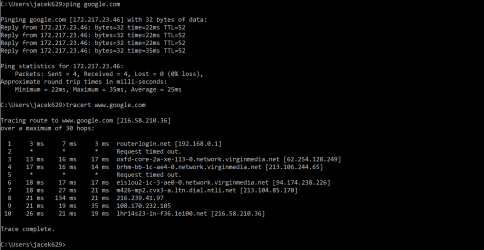
Hello, maybe someone could help please. My network slowed down recently and occasionally is cutting me off completely. There are three other computers connected to that network and the problem happens occurs only on mine. It supposed to be the fibre optic network . Tried to flush the dns, did not help at all. I did the ping tracing but don`t understand the results. Please see attached screenshot Thank you very much for your help.
 

Attachments

  • Capture Slow network.PNG
    Capture Slow network.PNG
    41.8 KB · Views: 0

My Computer My Computer

At a glance

Windows 10 Home x643.90 GhzRam 8gb
Computer type
PC/Desktop
Computer Manufacturer/Model Number
AMD FX(tm)-6350 Six-Core, 3900Mhz, 3Core(s) 6 Logical Processor(s)
OS
Windows 10 Home x64
CPU
3.90 Ghz
Memory
Ram 8gb
Antivirus
Avast Free Antivirus
Browser
Chrome, Edge, Mozilla
Back
Top