First, I know next to zero about Wi-Fi. Short version: I cannot get anything (laptops) to connect to my Linksys WRT3200ACM router.
Over a few years I’ve tried four times to no avail. Three times to help someone with their laptops (virus scans and the like) but now I finally broke down and got my own laptop, a Lenovo “ideapad 5 Pro”.
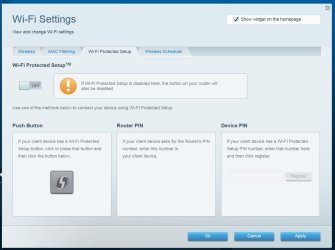
Both my desktop computers are hardwired in. I’ve never used Wi-Fi, but did know enough that I had to turn it on, and the Guest account, in the router.
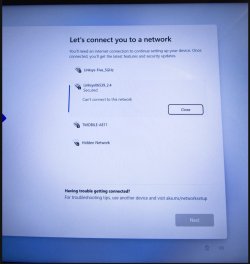
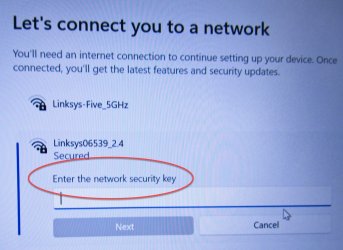
The problem is I can’t even get the laptop started in that it requires a Wi-Fi connection to continue. Like every other time I’ve tried, logging on to my router fails with the laptop needing a “Network Security Key”.
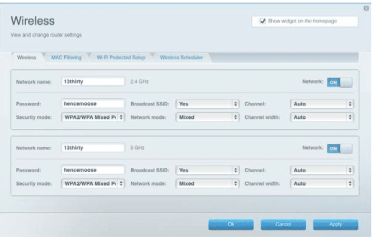
Heck I don’t even know what that is. So I tried both bands and the Guest account, using their respective passwords. I tried the router’s ‘name’ too. No joy.
And, on the laptop, I tried the different band names (like …5GHz and Guest) and the routers name. Still no joy.
I also let the router do a firmware update, too. That was nice as it doubled my download speeds!! But still no joy getting Wi-Fi.
I have a little bit of time that I can return the laptop if I can't get things to work, but I’d rather keep it.
I’m desperate…
Any ideas?
.
Over a few years I’ve tried four times to no avail. Three times to help someone with their laptops (virus scans and the like) but now I finally broke down and got my own laptop, a Lenovo “ideapad 5 Pro”.
Both my desktop computers are hardwired in. I’ve never used Wi-Fi, but did know enough that I had to turn it on, and the Guest account, in the router.
The problem is I can’t even get the laptop started in that it requires a Wi-Fi connection to continue. Like every other time I’ve tried, logging on to my router fails with the laptop needing a “Network Security Key”.
Heck I don’t even know what that is. So I tried both bands and the Guest account, using their respective passwords. I tried the router’s ‘name’ too. No joy.
And, on the laptop, I tried the different band names (like …5GHz and Guest) and the routers name. Still no joy.
I also let the router do a firmware update, too. That was nice as it doubled my download speeds!! But still no joy getting Wi-Fi.
I have a little bit of time that I can return the laptop if I can't get things to work, but I’d rather keep it.
I’m desperate…
Any ideas?
.
My Computer
At a glance
Win 7 Pro 64 SP1i7 6700K SkyLake32 GBnVidia GTX 970
- Computer type
- PC/Desktop
- Computer Manufacturer/Model Number
- home built
- OS
- Win 7 Pro 64 SP1
- CPU
- i7 6700K SkyLake
- Motherboard
- MSI Gaming M7
- Memory
- 32 GB
- Graphics Card(s)
- nVidia GTX 970
- Sound Card
- onboard
- Monitor(s) Displays
- DELL U2711
- Screen Resolution
- 2560x1440
- Hard Drives
- 1 SSD OS, 2 WD Black Caviar data harddrives
- PSU
- EVGA Super Nova 850W G2 'Gold'
- Case
- Thermaltake Soprano Snow Edition
- Cooling
- Cooler Master Hyper 212 evo
- Keyboard
- Logitech K350
- Mouse
- Mad Kats RATT
- Antivirus
- Avast
- Browser
- Firefox