Cant connect to wireless router when wpa-psk security enabled

KoniTec

New member
Local time
3:52 AM
Messages
4
Hi all

This issue may have been posted before, but i couldnt find any posts relating to this by searching.

The problem i have been having and cannot solve is this.

My windows 7 Professional 32bit desktop pc has a pci wireless network card. The pc is able to find my wireless router and the signal is strong.

The router has currently wpa-psk security, however when i try to connect using my pc, it asked for the password which i enter correctly (i choose show characters so i know) , it then tries to connect for about a minute and then fails and brings up the 'unable to connect' box.

If i turn of the security on the router so there is no password, the pc will connect easily within a matter of seconds, and i have full use of the router and the internet connection.

I also have a laptop with the same version of windows 7 on. this however does not have any problems with connecting to the router with the security enabled.

I am at a complete end. i dont know what to do. Please could somebody shed some light.

Much appreciated

KoniTec
 

My Computer My Computer

At a glance

Windows 7 Professional 32bit
OS
Windows 7 Professional 32bit
Hi, welcome to the forums :)

Have you had any need to reset your router at any time? Did it connect any time before now?

Reason I ask is you may want to Remove the Wireless Network and see if it helps. It's especially handy if getting wireless connection issues limited to just 1 machine.


Hope it helps :)
 

My Computer My Computer

At a glance

Windows 7 Ultimate x64AMD Sempron Dual Core3GBNVIDIA GeForce 6150SE nForce 430
Computer Manufacturer/Model Number
Compaq Desktop
OS
Windows 7 Ultimate x64
CPU
AMD Sempron Dual Core
Memory
3GB
Graphics Card(s)
NVIDIA GeForce 6150SE nForce 430
Screen Resolution
1024x768
Hard Drives
150GB Sata
I have reset it fully once only to see if it cured the problem with no success.
My pc will still only connect when security on the router is turned off.

With regards to removing the wirless network as suggested, the router was not on this list.
I did add it to the list, and still no joy.

it still connects straight away with no security on the router, and still wont connect with wpa-psk turned on, on the router.

GRRRRRRR lol
 

My Computer My Computer

At a glance

Windows 7 Professional 32bit
OS
Windows 7 Professional 32bit
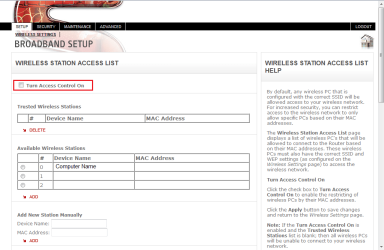
Have you set any Wireless Access lists in your router home page?

It could be that your system (security wise) has not been authorised, for want of a better word, to be allowed access.

Below is an example of what I mean on my Sky router
Access List.PNG
 

My Computer My Computer

At a glance

Windows 7 Ultimate x64AMD Sempron Dual Core3GBNVIDIA GeForce 6150SE nForce 430
Computer Manufacturer/Model Number
Compaq Desktop
OS
Windows 7 Ultimate x64
CPU
AMD Sempron Dual Core
Memory
3GB
Graphics Card(s)
NVIDIA GeForce 6150SE nForce 430
Screen Resolution
1024x768
Hard Drives
150GB Sata
The wireless station access list isnt enabled due to it being a shared house.
We all know the password, and all other devices in the house connect fine using the password.
these are:a vista based laptop, a win 7 based laptop, 3 ipod touches, a psp, a ps3, a xbox 360, and 2 mobile phones.

At first i thought there may be to many things connected to the router,
but even with these things connected and the security on the router turned off, my pc will connect.
 

My Computer My Computer

At a glance

Windows 7 Professional 32bit
OS
Windows 7 Professional 32bit
I've just remembered I had an occasion when a laptop I was repairing (not network issue) would either get stuck identifying or just not connect. Turned out I had to change my router (via it's homepage) from Mixed B/G signal to just B. Might be worth looking at.

   Note
The other devices should still have no issue connecting
 

My Computer My Computer

At a glance

Windows 7 Ultimate x64AMD Sempron Dual Core3GBNVIDIA GeForce 6150SE nForce 430
Computer Manufacturer/Model Number
Compaq Desktop
OS
Windows 7 Ultimate x64
CPU
AMD Sempron Dual Core
Memory
3GB
Graphics Card(s)
NVIDIA GeForce 6150SE nForce 430
Screen Resolution
1024x768
Hard Drives
150GB Sata
I have changed it from b & g to just g, which is the only other option, but still the problem persists
 

My Computer My Computer

At a glance

Windows 7 Professional 32bit
OS
Windows 7 Professional 32bit
Back
Top