
Hello!
I got myself an Audio-Technica AT2020USB+ condenser microphone a few weeks ago, and I haven't really found out how I can change the gain, which I hear is important to do.
There is only one slider where the gain slider also should have been. The mic doesn't have a gain know like some other microphones have.
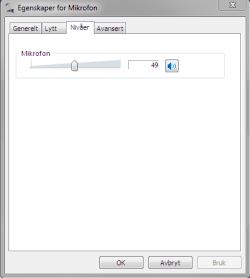
As you can see there is one slider. It only changes volume as far as I know.
How can I change the gain, is it needed, or can I maybe control gain using the volume slider?
If I can't change it directly through the mic or through the control panel, how can I change it? D:
Thanks in advance!
I got myself an Audio-Technica AT2020USB+ condenser microphone a few weeks ago, and I haven't really found out how I can change the gain, which I hear is important to do.
There is only one slider where the gain slider also should have been. The mic doesn't have a gain know like some other microphones have.
As you can see there is one slider. It only changes volume as far as I know.
How can I change the gain, is it needed, or can I maybe control gain using the volume slider?
If I can't change it directly through the mic or through the control panel, how can I change it? D:
Thanks in advance!
My Computer
At a glance
Microsoft Windows 7 64-bitIntel Core i5 2500K Quad Core 3.3 GhzCorsair Vengeance 2x4GBAsus Radeon HD 7950 3GB "DirectCU II TOP"
- Computer type
- PC/Desktop
- Computer Manufacturer/Model Number
- Custom build
- OS
- Microsoft Windows 7 64-bit
- CPU
- Intel Core i5 2500K Quad Core 3.3 Ghz
- Motherboard
- Gigabyte GA-Z68X-UD3H-B3, Socket-1155
- Memory
- Corsair Vengeance 2x4GB
- Graphics Card(s)
- Asus Radeon HD 7950 3GB "DirectCU II TOP"
- Sound Card
- Realtek High Definition Audio (MOBO - DOLBY)
- Monitor(s) Displays
- Samsung 27" LED SyncMaster S27B350 & Asus 24" VW246H
- Screen Resolution
- 1920x1080
- Hard Drives
- Seagate Barracuda 1TB 7200 RPM
Kingston HyperX 120GB 2.5" 555MB/510MB
- PSU
- Fractal Design Tesla 650W Standard
- Case
- Coolermaster Elite 430 Midi
- Cooling
- Stock
- Keyboard
- Razer Black Widow 2011
- Mouse
- Logitech G600
- Internet Speed
- 60 / 60
- Antivirus
- Microsoft Security Essentials
- Browser
- Google Chrome
- Other Info
- Mousepad - Corsair Vengeance MM600
Headset - Astro A40 2014 w/ mixamp pro


