Can't create recovery media "Windows 7 only allows one copy"

alanrudy

New member
Local time
11:21 AM
Messages
26
Tried searching for the answer...my Lenovo x230 has a partitioned 13gb. It says you can recover this disk space if you create recovery media; however when I do that it says..."Windows 7 only allows one copy of the operating system." Anything that I can do? I actually don't even plan on recovering the space but just want a backup in case the partitioned drive fails.
 

My Computer My Computer

At a glance

Windows 7 Home 64
OS
Windows 7 Home 64
Hello.


Just create an image to use, have a look through the information in this tutorial at the link below for some additional ideas and be sure to post back with any further questions you may have and to keep us informed.


My Computer My Computer

At a glance

W 7 64-bit UltimateIntel Q9550 Yorkfield8GB Dominator 8500C5DATI : XFX 5870
Computer Manufacturer/Model Number
* BFK Customs *
OS
W 7 64-bit Ultimate
CPU
Intel Q9550 Yorkfield
Motherboard
ASUS P5Q Pro
Memory
8GB Dominator 8500C5D
Graphics Card(s)
ATI : XFX 5870
Sound Card
Realtek HD Audio 7-1
Monitor(s) Displays
1x 47" LCD HDMI & 3x 26" LCD HDMI
Screen Resolution
1920x1080P & 1920x1200
Hard Drives
1x 80GB Intel X25-M G2 SSD : 1x 500GB & 1x 640GB WD Caviar Black(s)
PSU
Corsair 620HX
Case
Cooler Master RC-690
Cooling
Tuniq Tower 120, 2x 140mm and 3x 120mm case fans
Keyboard
Microsoft 500
Mouse
Razer Diamondback 3G
Internet Speed
14 Mb/s
Other Info
1x Koutech 3Gb/s SATA HDD Hot Swap Rack
The advantage that you will get with using the solution Bare Foot Kid suggested (one I use all the time) is that the image you make NOW, can be restored later exactly is it exists today. In contrast, if you make a restore image using the OEM-provided utility, when you restore later using that, your PC will revert back to the condition it was in when it left their factory -- including ALL the bloatware and NONE of the Window updates your have applied or any of the applications you have installed.
 

My Computer My Computer

At a glance

Win7 Pro 32-bit, Win8 Pro 32-bitAMD Phenom II X6 1090T4GB ddr3 1300AMD HD 4290 onboard
Computer type
PC/Desktop
Computer Manufacturer/Model Number
Custom
OS
Win7 Pro 32-bit, Win8 Pro 32-bit
CPU
AMD Phenom II X6 1090T
Motherboard
Gigabyte
Memory
4GB ddr3 1300
Graphics Card(s)
AMD HD 4290 onboard
Sound Card
Builtin Realtek HD Audio
Monitor(s) Displays
Samsung 24" widescreen, LG 23" widescreen
Screen Resolution
1920x1200/1920x1080
Hard Drives
Kingston 256GB SSD
Keyboard
Logitech Illuminated Keyboard
Mouse
Logitech M705 wireless mouse
Antivirus
Norton Av 2013
Browser
IE v10
Please post back a screenshot of your maximized Disk Management drive map and listings:

1. Type Disk Management in Start Search box.
2. Open Disk Mgmt. window and maximize it.
3. Type Snipping Tool in Start Search box.
4. Open Snipping Tool, choose Rectangular Snip, draw a box around full map and all listings.
5, Save Snip, attach using paper clip in Reply Box.

Tell us what is on each partition, what you want to do exactly and we will give you the steps.
 
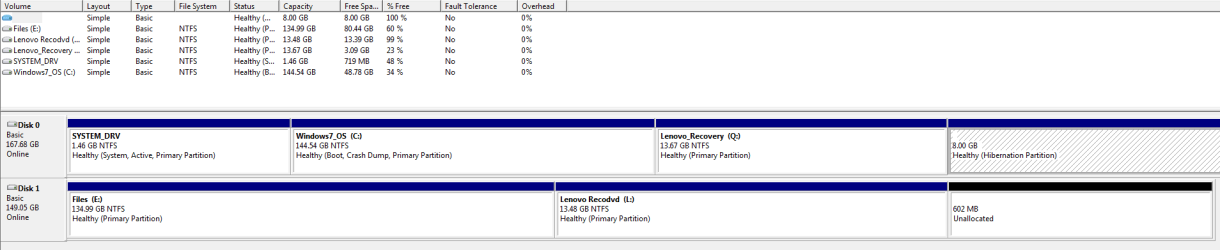
Thanks all for replying! Attached is the image. What I want to do is transfer what is on the Lenovo recovery drive Q and put it on my external hard drive L. Lenovo gives me an option to do that and then has an option to recover that disk space; however when I do it, Windows stops it and says "Windows 7 only allows one copy of the operating system."

The main reason I want to back up is because I have an SSD and have heard some stories of failure with no warning. Also of course in case of a virus or computer problem. The complete imaging solution is not a bad idea, but I think I can make room for both on my external hard drive once I can figure out a solution to this problem. Also, I never hibernate the computer, either sleep, deep sleep (rare), or turn off. I'm thinking of turning off hibernate and recovering the space on the hibernation partition as well, okay to do?
 

Attachments

  • Capture.PNG
    Capture.PNG
    14.1 KB · Views: 97

My Computer My Computer

At a glance

Windows 7 Home 64
OS
Windows 7 Home 64
Hi Alan -

It would help to see a screenshot of the error message moved over so we can see what you're trying to run at the time. The error is not known in Win7, but sounds more like Lenovo being asked to generate another set of Recovery disks. Please clarify.

Your Lenovo Recovery partition runs from boot with the assist of the 1.46 gb boot partition so they both need to remain intact and undisturbed on the HD in order to run Factory Recovery, unless Lenovo now provides another option to save Recovery to external besides generating Recovery disks.

You can also always run WIn7 backup imaging to save a backup image of your current state of the first two partitions. This built-in Win7 backup imaging also comes into play if you choose the best method of all which is to replace the inferior pre-installed Win7 with a Clean Reinstall - Factory OEM Windows 7. Then Backup Imaging can become your own custom Recovery of a much leaner and better performing Win7 without the preinstalled bloatware and useless duplicate utilities which have better versions built into the Win7 OS.

Mull over these options and ask back any questions needed to help decide.
 
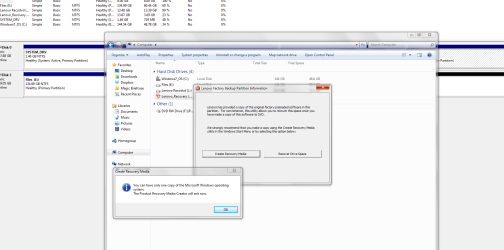
Here is a screenshot of the error. Actually I don't see too many programs that I would not maybe find useful, and since I've already been setting up all my programs and settings the way I like, I prefer not to start over. Do you all think I would get the same issue if I attempt to backup the Q drive with the Macrium utility? Okay to delete Hibernate drive?
 

Attachments

  • Capture2.PNG
    Capture2.PNG
    55.8 KB · Views: 108

My Computer My Computer

At a glance

Windows 7 Home 64
OS
Windows 7 Home 64
That is not a message from Windows - it is deliberate limitation Lenovo have set on their recovery app.

I would think you could get around relatively easily, if you wish.

HP do the same kind of thing.

Not all oem's do that.

The solution with HP is to delete a couple of files , typically:

c:\windows\sminst\hpcd.sys

d:\hpcd.sys
 

My Computers My Computers

  • At a glance

    7 X64i5 84002x8gb 3200mhz
    Computer type
    PC/Desktop
    OS
    7 X64
    CPU
    i5 8400
    Motherboard
    gigabyte b365m ds3h
    Memory
    2x8gb 3200mhz
    Hard Drives
    various
    PSU
    pure power 11 400w cm
    Case
    Coolermaster
    Cooling
    cryorig m9i
  • At a glance

    7x64g54008gb ddr4 2400
    Computer type
    PC/Desktop
    OS
    7x64
    CPU
    g5400
    Motherboard
    ga b365m ds3h
    Memory
    8gb ddr4 2400
    PSU
    xfx pro 450w
Hibernate is a file, not a drive.

You get rid of it with a command. I think it's power -cfg off

That will save you some space on C----equivalent to the amount of your RAM.

Some swear by hibernation, but it's pointless if you shut down instead.
 

My Computer My Computer

At a glance

Windows 7 Home Premium SP1, 64-bitIntel Skylake i5-6600K, not overclocked8 GB HyperX DDR4-2666 (2 x 4 GB)none; graphics are integrated on CPU
Computer type
PC/Desktop
Computer Manufacturer/Model Number
Ignatz Special; 4 speed manual gearbox; factory air conditioning; one of one
OS
Windows 7 Home Premium SP1, 64-bit
CPU
Intel Skylake i5-6600K, not overclocked
Motherboard
AsRock Z170M Extreme 4, micro ATX
Memory
8 GB HyperX DDR4-2666 (2 x 4 GB)
Graphics Card(s)
none; graphics are integrated on CPU
Sound Card
onboard: Realtek ALC1150; external: USB Behringer UF0-202
Monitor(s) Displays
Dell S2340M 23 inch IPS
Screen Resolution
1600 x 900
Hard Drives
System: Crucial MX100 series SSD, 128 GB;
Data: Samsung Spinpoint 103SJ, 1 TB;
Backup: WD Caviar Green WD30EZRX-00D8PB0, 3 TB
PSU
Rosewill SilentNight 500 watt fanless, semi-modular
Case
Antec Solo II
Cooling
Noctua NH-U12S; Noctua F12 intake, Noctua S12A exhaust
Keyboard
Microsoft 200 6JH-00001 USB
Mouse
Dell or Microsoft optical wired; USB
Antivirus
Microsoft Security Essentials and Malwarebytes Premium
Browser
Pale Moon
Other Info
All fans PWM; speeds at idle: CPU circa 500 rpm; intake circa 600 rpm; exhaust circa 600 rpm; CPU temps 27 idle and 47 C load in a warm room (27 C/81 F) when running Intel Extreme Tuning Utility stress test.
It looks like a warning box that comes up when you try to delete the Recovery partition.

Have you actually tried generating your Recovery media from within the Lenovo programs at Start>All Programs? That might work. The error message might only refer to trying to copy or delete the partition itself.

If you haven't already made the Recovery media and it errors similarly when you try to do so, it may be a defect which will allow Lenovo Tech Support to send you Recovery media.

I'd like to be able to say that saving a backup image will work, but there is no guarantee that it won't lose it's ability to boot from Windows or it's hot key even if re-imaged onto the HD. It's best to have the Recovery media in hand before deleting it.
 
Last edited:
It is a lenovo annoyance.

Go to Folder options and make sure Hidden Files and Protected operating system files are showing.

Now look at the recov partition.

If there is a folder in there called FactoryRecovery.

In there should be a file with the .ini extension.

They used to call it servicedone.ini - they might still call it that.

Open it in notepad and change done=1 to done=0

Then click Save at the top notepad.

Now you should be able to run off another set.
 

My Computers My Computers

  • At a glance

    7 X64i5 84002x8gb 3200mhz
    Computer type
    PC/Desktop
    OS
    7 X64
    CPU
    i5 8400
    Motherboard
    gigabyte b365m ds3h
    Memory
    2x8gb 3200mhz
    Hard Drives
    various
    PSU
    pure power 11 400w cm
    Case
    Coolermaster
    Cooling
    cryorig m9i
  • At a glance

    7x64g54008gb ddr4 2400
    Computer type
    PC/Desktop
    OS
    7x64
    CPU
    g5400
    Motherboard
    ga b365m ds3h
    Memory
    8gb ddr4 2400
    PSU
    xfx pro 450w
About Hibernation, oh okay, I thought you had turn Hibernate off and then do something else to recover the space it is taking. Will the space be automatically recovered to C drive or do I have to do something else?

It gives the same error when I try to recover from Start>All programs as well. Thanks all for the help, I'm not an expert like you all are so I don't want to delete any files just in case that causes some other problem. I will try the Macrium program to see if I get the same error.
 

My Computer My Computer

At a glance

Windows 7 Home 64
OS
Windows 7 Home 64
About Hibernation, oh okay, I thought you had turn Hibernate off and then do something else to recover the space it is taking. Will the space be automatically recovered to C drive or do I have to do something else?

No. You don't have to do anything else.

If you have 50 gigs of free space and 8 GB of RAM, you will have 58 GB of free space after you run that command. Just like deleting a file.

If you later decide you want to use hibernation, just run that command again, substituting "on" for "off".
 

My Computer My Computer

At a glance

Windows 7 Home Premium SP1, 64-bitIntel Skylake i5-6600K, not overclocked8 GB HyperX DDR4-2666 (2 x 4 GB)none; graphics are integrated on CPU
Computer type
PC/Desktop
Computer Manufacturer/Model Number
Ignatz Special; 4 speed manual gearbox; factory air conditioning; one of one
OS
Windows 7 Home Premium SP1, 64-bit
CPU
Intel Skylake i5-6600K, not overclocked
Motherboard
AsRock Z170M Extreme 4, micro ATX
Memory
8 GB HyperX DDR4-2666 (2 x 4 GB)
Graphics Card(s)
none; graphics are integrated on CPU
Sound Card
onboard: Realtek ALC1150; external: USB Behringer UF0-202
Monitor(s) Displays
Dell S2340M 23 inch IPS
Screen Resolution
1600 x 900
Hard Drives
System: Crucial MX100 series SSD, 128 GB;
Data: Samsung Spinpoint 103SJ, 1 TB;
Backup: WD Caviar Green WD30EZRX-00D8PB0, 3 TB
PSU
Rosewill SilentNight 500 watt fanless, semi-modular
Case
Antec Solo II
Cooling
Noctua NH-U12S; Noctua F12 intake, Noctua S12A exhaust
Keyboard
Microsoft 200 6JH-00001 USB
Mouse
Dell or Microsoft optical wired; USB
Antivirus
Microsoft Security Essentials and Malwarebytes Premium
Browser
Pale Moon
Other Info
All fans PWM; speeds at idle: CPU circa 500 rpm; intake circa 600 rpm; exhaust circa 600 rpm; CPU temps 27 idle and 47 C load in a warm room (27 C/81 F) when running Intel Extreme Tuning Utility stress test.
About Hibernation, oh okay, I thought you had turn Hibernate off and then do something else to recover the space it is taking. Will the space be automatically recovered to C drive or do I have to do something else?

No. You don't have to do anything else.

If you have 50 gigs of free space and 8 GB of RAM, you will have 58 GB of free space after you run that command. Just like deleting a file.


Except in the OP's situation it appears as though the hibernation file is saved to its own, dedicated partition. He'll have to manipulate his partitions to be able to recover that space (or use 'as is' as a separate 8 GB partition).
 

My Computer My Computer

At a glance

Windows 7 Ultimate x64
OS
Windows 7 Ultimate x64
F5ing is right, it's still there even though I turned off Hibernation. I don't know how to recover that space...how do I manipulate the partions to recover or even worst case, just use the partition as a separate 8gb. SIW2, actually when I click on that Q drive it is empty even though it shows about 11gb being used, so I can't make the changes you advised. But for backing up, I just used Windows backup and restore to copy just that Q drive to the external L drive, I think it worked. It shows that 11gb on there, I can't really figure out if that will work because I don't really want to restore my computer after all I've done to get it how I want. Did I likely do it right and is there a reason why Macrium was advised and not the Windows backup and restore? I will do a system image in the next few days as I've still been making a lot of changes to the computer to get it how I want.
 

My Computer My Computer

At a glance

Windows 7 Home 64
OS
Windows 7 Home 64
If you've disabled hibernation, and you're sure nothing else is there, you can simply delete it and adjust the remaining partitions to utilize that space using either Disk Management or Partition Wizard.

How did you go about getting hibernation to work that way to begin with? Typically the hibernation file gets created in the root of the boot drive, not within a separate, specially created partition...
 

My Computer My Computer

At a glance

Windows 7 Ultimate x64
OS
Windows 7 Ultimate x64
That's how Lenovo shipped it. Just to be safe, repartitioning the c drive won't make me lose anything, correct?
 

My Computer My Computer

At a glance

Windows 7 Home 64
OS
Windows 7 Home 64
Q is likely not empty. Try unhiding Hidden and System files at Control Panel>Folder options>View to access and edit the file SIW2 referenced which will allow another set of disks to be made.

If you still can't get it to generate Recovery Disks, then you can save externally a Win7 or Macrium backup image of the state it's in now which may be the closest you get without ordering Recovery Disks from Lenovo.

Then you can delete Recovery if you want, resize into the space using Disk Mgmt: Partition or Volume - Extend

Or you can save Recovery knowing that if it won't run from Windows or using it's hotkey given on first boot screen, you can force it to run by adding it to a Dual Boot this way: Boot Recovery Partition using EasyBCD.

Most tech enthusiasts won't even run the factory preinstall with it's smothering bloatware and useless OEM utilities than duplicate much better versions in Win7, but choose to Clean Reinstall - Factory OEM Windows 7.

At the minimum I'd Clean Up Factory Bloatware
 
Yeah, it's not empty, just when I click on it nothing comes up, even with show hidden folders clicked, so I can't do what SIW2 advised. I was able to create a backup disk using Windows 7 backup and restore, just basically copied the Q drive and it didn't give me any issues, but not sure I did it right. I can't really figure out if that will work because I don't really want to restore my computer after all I've done to get it how I want. Did I likely do it right? It's safe to repartition my C drive with everything on it and make it 8gb bigger, correct?
 

My Computer My Computer

At a glance

Windows 7 Home 64
OS
Windows 7 Home 64
I was suggesting to save a backup image of Win7 and it's boot partition, nothing more. It won't hurt to have Recovery on the image, however, in case you later want to try to boot it and it's functional.

Sometimes you must change the Partition ID to get it to show OEM files. SIW2 knows how to do this using Partition Wizard.

But you say you don't need Recovery any longer. If so you can delete the partition now and Extend C into it.

Turn off Hibernation if you want to delete it's partition too, then after reboot turn it back on to recreate it on C.
 
Last edited:
Back
Top