Can't delete folders...

jeffshead

New member
Local time
9:28 AM
Messages
36
I just started encountering the following error when deleting any folder that I have just opened prior to right-clicking and selecting delete:
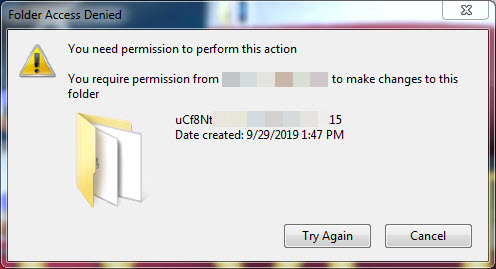
AviPUQn.jpg


I have to wait for about a minute and then I can delete it. This happens only with folders, not files.

This just started happening. I can't think of any changes that I have made.

The folders are on my desktop and I haven't edited the location of my desktop.

I guess my next step is to disable all startup items and re-enable them one by one.

Has anyone encountered this issue?
 
Last edited:

My Computer

OS
Windows 7 Ultimate x64
Hi jeffshead,

I just started encountering the following error when deleting any folder that I have just opened prior to right-clicking and selecting delete.

I have to wait for about a minute and then I can delete it. This happens only with folders, not files.

This just started happening. I can't think of any changes that I have made.

The folders are on my desktop and I haven't edited the location of my desktop.

Do you get the same issue if you delete them via the command prompt?
 

My Computer

Computer type
Laptop
Computer Manufacturer/Model Number
Fujitsu LIFEBOOK
OS
Win 7 HP SP1 64-bit Vista HB SP2 32-bit Linux Mint 18.3
CPU
Intel(R) Pentium(R) CPU P6200 @ 2.13GHz
Motherboard
FUJITSU FJNBB06
Memory
4.00 GB
Graphics Card(s)
Intel(R) Graphics Media Accelerator HD
Sound Card
[1] Realtek High Definition Audio [2] Intel(R) Display Audio
Screen Resolution
1366 x 768 x 32 bits (4294967296 colors) @ 59 Hz
Hard Drives
TOSHIBA MK5076GSX
Antivirus
AVG FREE
Code:
C:\Users\user\Desktop>rmdir /s "C:\Users\user\Desktop\folder"
C:\Users\user\Desktop\folder, Are you sure (Y/N)? y
C:\Users\user\Desktop\folder\folder2 - The directory is not empty.
As you can see, the command above fails as well but it does delete the files in the folders.
If I wait for a minute, the command above deletes the folders.


Code:
C:\Users\user\Desktop>del "C:\Users\user\Desktop\folder\*"
C:\Users\user\Desktop\folder\*, Are you sure (Y/N)? y
C:\Users\user\Desktop\folder\any.exe
Access is denied.
The code above does not work, either. The "any.exe" is not running.
 

My Computer

OS
Windows 7 Ultimate x64
Hi jeffshead,

Code:
C:\Users\user\Desktop>rmdir /s "C:\Users\user\Desktop\folder"
C:\Users\user\Desktop\folder, Are you sure (Y/N)? y
C:\Users\user\Desktop\folder\folder2 - The directory is not empty.
As you can see, the command above fails as well but it does delete the files in the folders.
If I wait for a minute, the command above deletes the folders.
Code:
C:\Users\user\Desktop>del "C:\Users\user\Desktop\folder\*"
C:\Users\user\Desktop\folder\*, Are you sure (Y/N)? y
C:\Users\user\Desktop\folder\any.exe
Access is denied.
The code above does not work, either. The "any.exe" is not running.

Try this [change the folder names/paths accordingly] . . .

del /f/q/s "C:\Users\user\Desktop\folder" *.* > NUL & rmdir /q/s "C:\Users\user\Desktop\folder"

Run the above command from an elevated command prompt.

I hope this helps!
 

My Computer

Computer type
Laptop
Computer Manufacturer/Model Number
Fujitsu LIFEBOOK
OS
Win 7 HP SP1 64-bit Vista HB SP2 32-bit Linux Mint 18.3
CPU
Intel(R) Pentium(R) CPU P6200 @ 2.13GHz
Motherboard
FUJITSU FJNBB06
Memory
4.00 GB
Graphics Card(s)
Intel(R) Graphics Media Accelerator HD
Sound Card
[1] Realtek High Definition Audio [2] Intel(R) Display Audio
Screen Resolution
1366 x 768 x 32 bits (4294967296 colors) @ 59 Hz
Hard Drives
TOSHIBA MK5076GSX
Antivirus
AVG FREE
Code:
C:\Users\user\Desktop>del /f/q/s "C:\Users\user\Desktop\folder" *.* > NUL & rmdir /q/s "C:\Users\user\Desktop\folder"
Access is denied.
C:\Users\user\Desktop\folder\any.exe - Access is denied.
Doesn't work. This seems to be affecting only folders containing an exe. Just tried that command on a different folder and it deleted most of the folders except for a few folders and subfolders but it deleted all of the files. I still have to wait a minute to delete the remaining empty folders.
 

My Computer

OS
Windows 7 Ultimate x64
Hi jeffshead,

Code:
C:\Users\user\Desktop>del /f/q/s "C:\Users\user\Desktop\folder" *.* > NUL & rmdir /q/s "C:\Users\user\Desktop\folder"
Access is denied.
C:\Users\user\Desktop\folder\any.exe - Access is denied.
Doesn't work. This seems to be affecting only folders containing an exe.

[1] Did you run the command from an elevated command prompt?
[2] Is the path and user criteria you used correct?
[3] Try splitting the command into two commands [either side of the & is a seperate command].
 

My Computer

Computer type
Laptop
Computer Manufacturer/Model Number
Fujitsu LIFEBOOK
OS
Win 7 HP SP1 64-bit Vista HB SP2 32-bit Linux Mint 18.3
CPU
Intel(R) Pentium(R) CPU P6200 @ 2.13GHz
Motherboard
FUJITSU FJNBB06
Memory
4.00 GB
Graphics Card(s)
Intel(R) Graphics Media Accelerator HD
Sound Card
[1] Realtek High Definition Audio [2] Intel(R) Display Audio
Screen Resolution
1366 x 768 x 32 bits (4294967296 colors) @ 59 Hz
Hard Drives
TOSHIBA MK5076GSX
Antivirus
AVG FREE
Hi jeffshead,

[1] Did you run the command from an elevated command prompt?
YES

[2] Is the path and user criteria you used correct?
YES


I get the following when I try to delete the empty folders that were leftover after running the previous command:
Code:
C:\Users\user\Desktop\folder>rmdir /q/s "C:\Users\user\Desktop\folder"
The process cannot access the file because it is being used by another process.
 

My Computer

OS
Windows 7 Ultimate x64
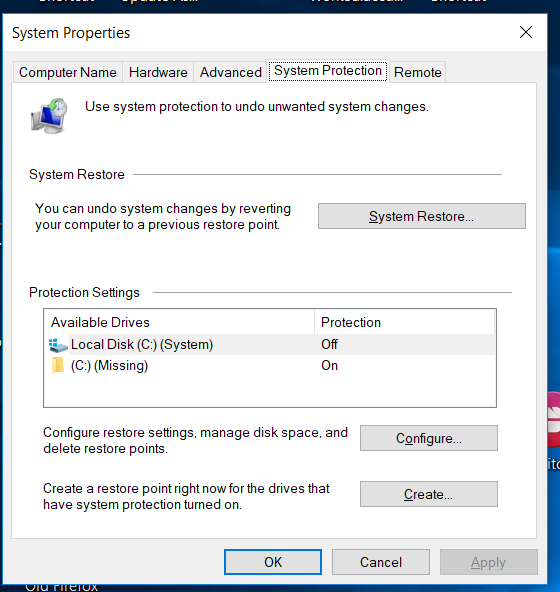
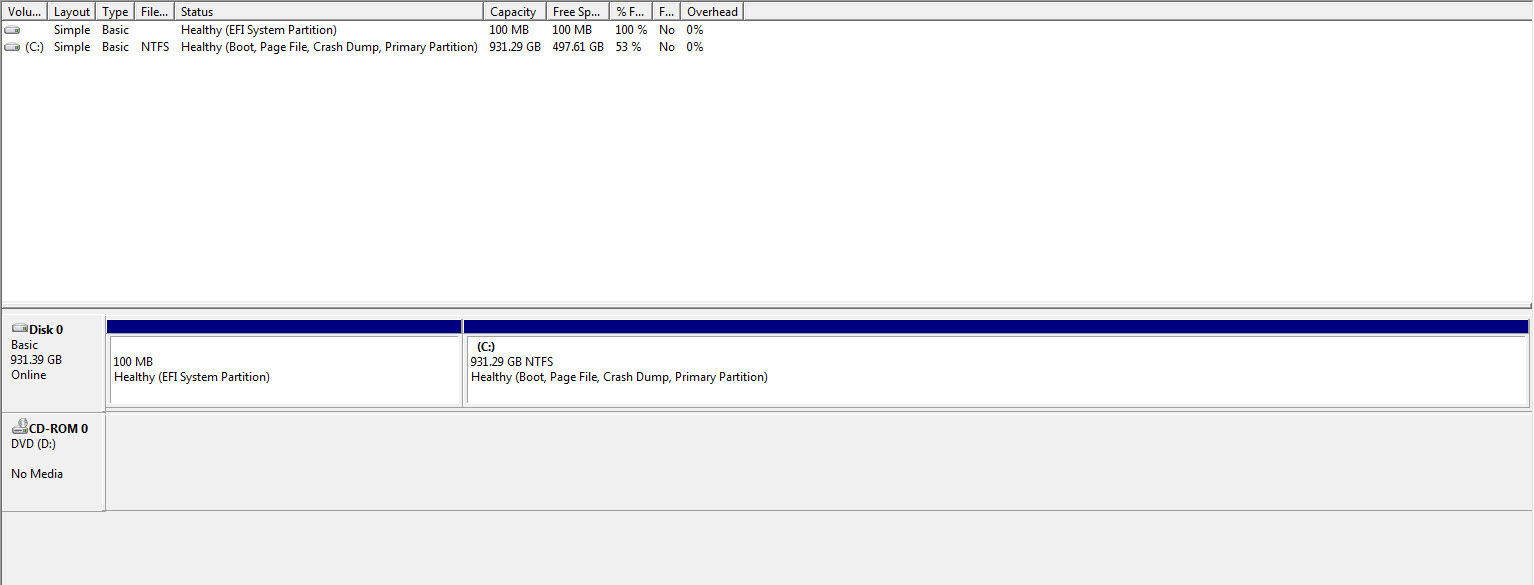
I have the following when I check my settings:
0c09b09d-0888-4177-8db2-b4585fc6a7d4

Notice the missing C drive.
 

My Computer

OS
Windows 7 Ultimate x64

My Computer

Computer type
Laptop
Computer Manufacturer/Model Number
Fujitsu LIFEBOOK
OS
Win 7 HP SP1 64-bit Vista HB SP2 32-bit Linux Mint 18.3
CPU
Intel(R) Pentium(R) CPU P6200 @ 2.13GHz
Motherboard
FUJITSU FJNBB06
Memory
4.00 GB
Graphics Card(s)
Intel(R) Graphics Media Accelerator HD
Sound Card
[1] Realtek High Definition Audio [2] Intel(R) Display Audio
Screen Resolution
1366 x 768 x 32 bits (4294967296 colors) @ 59 Hz
Hard Drives
TOSHIBA MK5076GSX
Antivirus
AVG FREE
I just tried to drag a exe from the desktop to another folder on the C drive and that fails as well.


If I wait about a minute, it works.
 

My Computer

OS
Windows 7 Ultimate x64
Hi jeffshead,

I just tried to drag a exe from the desktop to another folder on the C drive and that fails as well. If I wait about a minute, it works.

You will probably need to add a Wait command [say x number of seconds or so] to the front of =>
rmdir /q/s "C:\Users\user\Desktop\folder"
. . . to allow time for the deletions of the files to complete!

I hope this helps!
 

My Computer

Computer type
Laptop
Computer Manufacturer/Model Number
Fujitsu LIFEBOOK
OS
Win 7 HP SP1 64-bit Vista HB SP2 32-bit Linux Mint 18.3
CPU
Intel(R) Pentium(R) CPU P6200 @ 2.13GHz
Motherboard
FUJITSU FJNBB06
Memory
4.00 GB
Graphics Card(s)
Intel(R) Graphics Media Accelerator HD
Sound Card
[1] Realtek High Definition Audio [2] Intel(R) Display Audio
Screen Resolution
1366 x 768 x 32 bits (4294967296 colors) @ 59 Hz
Hard Drives
TOSHIBA MK5076GSX
Antivirus
AVG FREE
Hi jeffshead,


You will probably need to add a Wait command [say x number of seconds or so] to the front of =>
rmdir /q/s "C:\Users\user\Desktop\folder"
. . . to allow time for the deletions of the files to complete!

I hope this helps!


To clarify, I rebooted the system and waited for all services and processes to load. I tried to drag an exe to a folder that contains the same exe file, in an effort to overwrite the original. That's when I got the error. It has nothing to do with running any of the previous commands.
 

My Computer

OS
Windows 7 Ultimate x64
I uninstalled ESET, same results.

I performed a bare metal restore of three different images going back as far as two weeks and I got the same results with each restored image.

Come to think of it, I have been encountering this same issue, for along time, when deleting files/folders on a network share. I ignored it because I thought the server hosting the share had a temporary lock on the files/folders for whatever reason.


hitting-head-against-wall-hitting-head-against-wall-hitting-head-against-a-wall-hitting-head-against-wall-cartoon-man-hitting-head-on-wall-gif.jpg
 

My Computer

OS
Windows 7 Ultimate x64
Hi jeffshead,

I uninstalled ESET, same results.

Come to think of it, I have been encountering this same issue, for along time, when deleting files/folders on a network share. I ignored it because I thought the server hosting the share had a temporary lock on the files/folders for whatever reason.

It would have been helpful to have known that at the beginning!
 

My Computer

Computer type
Laptop
Computer Manufacturer/Model Number
Fujitsu LIFEBOOK
OS
Win 7 HP SP1 64-bit Vista HB SP2 32-bit Linux Mint 18.3
CPU
Intel(R) Pentium(R) CPU P6200 @ 2.13GHz
Motherboard
FUJITSU FJNBB06
Memory
4.00 GB
Graphics Card(s)
Intel(R) Graphics Media Accelerator HD
Sound Card
[1] Realtek High Definition Audio [2] Intel(R) Display Audio
Screen Resolution
1366 x 768 x 32 bits (4294967296 colors) @ 59 Hz
Hard Drives
TOSHIBA MK5076GSX
Antivirus
AVG FREE
Using Sysinternal's Process Explorer, I see that 'SYSTEM PID 4' has a lock (sometimes, not always) on an exe inside of any given folder when I try to delete the folder.

Armed with this knowledge, I googled "cannot delete file locked by system pid 4" and got a few hits about this issue being caused by having the Application Experience service disabled.

Windows 2008 R2 - Kernel (System Process PID=4) is locking files and folders - Stack Overflow

Of course that service is disabled on my system. I will try with it enabled for a while and see what happens although I don't know why it would matter since the exe being deleted was never ran???
 
Last edited:

My Computer

OS
Windows 7 Ultimate x64
Hi

NOT surprising at all - as soon as you open a program it spawns numerous links, that are still active after you close the originating program/file.

These are likely still open/live when you try and delete. easy option reboot delete


Roy
 

My Computer

Computer type
PC/Desktop
Computer Manufacturer/Model Number
medionl/Aspire 6930G/acer x55a
OS
W7 home premium 32bit/W7HP 64bit/w10 tp insider ring
CPU
E5300 dual core
Motherboard
medion MS7366
Memory
3gb
Graphics Card(s)
Nvidia Geforce 7100 Nforce 630i
Monitor(s) Displays
avixc
Internet Speed
n (isp resticted to 72)
Antivirus
mse/pands
Browser
palemoon
Other Info
Belkin Fd7050 n USB using Railink RT2870 drivers, more upto date
Hi

NOT surprising at all - as soon as you open a program...

Roy


I have neglected my desktop so I'm deleting a bunch of junk. I never ran any of the exe's. I simply opened the folders to view the contents to see if I wanted to keep any of them.
 

My Computer

OS
Windows 7 Ultimate x64
Back
Top