Can't delete my data partition or format it

I posted the steps above. You use the snipping tool to capture what you want, and then attach the image file using the paper clip icon, as if it was an e-mail. That way, the image is in your post, and not in a file that people are expected to download and open.
 

My Computer My Computer

OS
Windows 7 Ultimate x64 SP1
CPU
Intel Core i7-2600
Motherboard
Gigabyte GA-P67A-UD3P-B3
Memory
12 GB Patriot Extreme DDR3-1333
Graphics Card(s)
Nvidia GTX 470
Monitor(s) Displays
Dell UltraSharp 2209WA
Hard Drives
OCZ Agility3 240 GB, WD5001AALS, WD7501AALS
PSU
OCZ ModStream 700W
Case
CoolerMaster HAF 912 Advanced
Cooling
CoolerMaster Hyper 212 Plus
Your Data Partition has your System inside it. That's the problem, somehow move the Data Partition to your main Drive (I don't know how) or reinstall.

No it doesn't, look close my System is my C drive and my data is my G drive

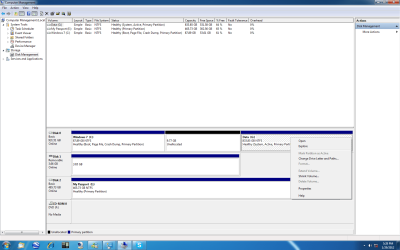
Your boot files are on G:

It is exactly as I suspected. Your bootmgr is sitting on partition G and gets automatically imaged with the system. Run these 4 steps and move the bootmgr to C.

Look at your screenshot.

word pic.png

G: is ACTIVE.
 

My Computer My Computer

OS
ME/XP/Vista/Win7
Here's a picture

I posted the steps above. You use the snipping tool to capture what you want, and then attach the image file using the paper clip icon, as if it was an e-mail.

You need to click on the "Post Reply" button, "Go Advanced" button or reply to someone's comment, to see it (the paper clip icon).
It doesn't appear in "Quick Reply".

Here's a picture.
194494d1327292913-welcome-windows-7-forums-tutorial-section-upload-pictures-03.gif
 

My Computer My Computer

Computer type
PC/Desktop
Computer Manufacturer/Model Number
n/a
OS
W7 Ultimate SP1, LM19.2 MATE, W10 Home 1703, W10 Pro 1703 VM, #All 64 bit
CPU
AMD Phenom II x6 1100T, 3.3 GHz
Motherboard
ASUS M4A88T-M/USB3 (AM3)
Memory
12GB DDR3 1333 G-Skill (4GB x 2), G-Skill (2GB x 2)
Graphics Card(s)
NVIDIA GeForce GTX 660
Sound Card
Realtek?
Monitor(s) Displays
Samsung S23B350
Screen Resolution
1920x1080
Hard Drives
WD Green 2TB (SATA), WD Green 3TB (SATA), WD Blue 4TB (SATA), WD Blue 6TB (SATA)
PSU
Cooler Master
Case
Antec GX300 Tower
Cooling
3x Antec TRICOOL 120mm Fans
Mouse
Wired Optical
Internet Speed
DSL
Antivirus
Avast
Browser
Pale Moon (64 bit)
Other Info
2018-12-27 Upgraded HDDs
2015-12-10 Upgraded case, graphics card, storage
2015-08-15 Upgraded motherboard & RAM
2015-07-15 Upgraded LM17.1 to LM17.2
I posted the steps above. You use the snipping tool to capture what you want, and then attach the image file using the paper clip icon, as if it was an e-mail. That way, the image is in your post, and not in a file that people are expected to download and open.

I used the snipping tool but I have to save it somewhere and I used the attachment at this site and uploaded it and I still got a file so what am I doing wrong?
 

My Computer My Computer

OS
Windows 7 x64 RC1, Vista Ultimate, XP Pro
CPU
AMD 955
Memory
4 gigs - 1333
Graphics Card(s)
5750
Monitor(s) Displays
i-inc 28"
Screen Resolution
1920x1200
Hard Drives
2 SATA2 750 GB - 1 SATA2 1TB - 1 SATA3 1TB - 1 USB3 2TB - 1 USB3 500 GB, SSD 60 GB
Internet Speed
7 Megs
It's just a picture.

I used the snipping tool but I have to save it somewhere and I used the attachment at this site and uploaded it and I still got a file so what am I doing wrong?

The "Snipping Tool" creates png files by default (basically ordinary pictures).

Simply choose "Save As" from the "File" menu.
Save the png file (e.g. Pictures Folder, Desktop or any other convenient spot).

You don't need to paste the picture into Word.

If you want to edit it (e.g. highlight a certain area), you could paste it into "Paint" or another graphics program.
 
Last edited:

My Computer My Computer

Computer type
PC/Desktop
Computer Manufacturer/Model Number
n/a
OS
W7 Ultimate SP1, LM19.2 MATE, W10 Home 1703, W10 Pro 1703 VM, #All 64 bit
CPU
AMD Phenom II x6 1100T, 3.3 GHz
Motherboard
ASUS M4A88T-M/USB3 (AM3)
Memory
12GB DDR3 1333 G-Skill (4GB x 2), G-Skill (2GB x 2)
Graphics Card(s)
NVIDIA GeForce GTX 660
Sound Card
Realtek?
Monitor(s) Displays
Samsung S23B350
Screen Resolution
1920x1080
Hard Drives
WD Green 2TB (SATA), WD Green 3TB (SATA), WD Blue 4TB (SATA), WD Blue 6TB (SATA)
PSU
Cooler Master
Case
Antec GX300 Tower
Cooling
3x Antec TRICOOL 120mm Fans
Mouse
Wired Optical
Internet Speed
DSL
Antivirus
Avast
Browser
Pale Moon (64 bit)
Other Info
2018-12-27 Upgraded HDDs
2015-12-10 Upgraded case, graphics card, storage
2015-08-15 Upgraded motherboard & RAM
2015-07-15 Upgraded LM17.1 to LM17.2
Bottom line: you must move your boot manager files over to C using the recommended approach identified above. This will mark C as now the "active" partition, and G will be marked "inactive". Then you can do anything you want with G.

Thank you for your explanation, I do appreacted it. I will real it over a couple of time to make sure I get it. Thanks again.[/QUOTE]

Note that the first snippet above looks right, but the second sentence looks wrong. That's because your quote of my post was done incorrectly.

"Quoted text" is bounded by a pair of delimiters. The leading delimiter is [ q u o t e ] and the trailing delimiter is [ / q u o t e ] (without the imbedded blanks of course, which I've put here just so I could post it in-stream.

Any text bounded by this pair of starting/ending delimiters will be marked as quoted text and displayed in a box, indented, etc. I'm sure your quotes of my post were intended to appear this way, but did not. And the reason looks like you failed to retain the LEADING DELIMITER. You ended the quoted text correctly with [ / q u o t e ] but you accidentally (or unwittingly) deleted the leading delimiter which is placed their automatically if you push the "QUOTE" button to begin your reply.

That's the easiest way to quote text and then insert your own reply. Start by pushing the QUOTE button and edit the result, being sure to have each subset of quoted text you want to reply to individually bounded by the above described leading and trailing delimiters. And if you do this multiple times, injecting your own reply to each subset of quoted text, just be sure you have each quoted text snippet properly bounded by the pair of delimiters. Then it will all look like you want.

You can verify that it all looks right by using the "Preview Post" button at the bottom of the composition area instead of "Submit Reply". If the preview looks good you can then submit it. If it has problems you can still correct it before posting. And even after posting you can correct it by pushing the EDIT button (which will always appear on your own posts).

 

My Computer My Computer

Computer type
PC/Desktop
Computer Manufacturer/Model Number
Home-built, two systems (1) and (2)
OS
Windows 7 Pro x64 (1), Win7 Pro X64 (2)
CPU
i5-3350p 3.1Ghz/6MB-cache (1); E8400 3.0Ghz/6MB-cache (2)
Motherboard
ASUS P8Z77-V Pro (1); ASUS P5Q3 (2)
Memory
8GB PC3-12800 DDR3 (1); 4GB PC3-10600 DDR3 (2)
Graphics Card(s)
ATI HD7750 (1), (see TV cards); ATI R7 250 (2)
Sound Card
Realtek ALC892 HD Audio (1); Realtek ALC1200 HD Audio (2)
Monitor(s) Displays
Eizo HD2441W LCD, Eizo S2433W (1); Eizo 24" S2433W (2)
Screen Resolution
1920x1200, 1920x1200 (1); 1920x1200 (2)
Hard Drives
(1) 1TB SATA-II (7200RPM), 2x2TB SATA-III (7200RPM), 250GB SATA-III (10000RPM) for OS; 2x2TB external USB 3.0

(2) 320GB SATA-II (7200RPM), 750GB SATA-II (7200RPM), 150GB SATA-II (10000RPM) for OS; 2TB external USB 3.0
PSU
Nesteq ECS-6001 600W (1); Nesteq ECS-5001 500W (2)
Case
Acousti-Case 360 (1) and (2)
Cooling
Noctua NH-U12P SE2 for CPU, 2x120mm case fans (1) and (2)
Keyboard
IBM PS/2 (1) and (2)
Mouse
Logitech MX Revolution wireless (1); Microsoft wired (2)
Internet Speed
100mbps down / 10mbps up
Antivirus
Microsoft Security Essentials; Malwarebyte Anti-Malware Pro
Browser
Firefox
Other Info
Ceton InfiniTV 4-tuner cablecard-enabled TV card as well as Hauppauge HVR-2250 OTA/ATSC 2-tuner TV card in (1), running under Win7 WMC
Back
Top