Can't disable grouping since trying 7 Taskbar Tweaker.

Eujin

New member
Local time
1:27 AM
Messages
5
Hello all. I registered just for this, as it's driving me insane


I went seeking a way to disable taskbar previews. I was led to 7 Taskbar tweaker. I tried it, it did what I wanted, but only while running, so I closed it.

However, immediately upon closing, All of a sudden my windows in the taskbar are now linked/grouped. Like-windows (Such as multiple instances of firefox) are now permenantly locked to one another, and the /only/ way I can get them to stop is running 7 taskbar tweaker again. Locked like this, I cannot rearrange each window on the task bar, all 3 move together.

I've gone into taskbar and start menu properties and set taskbar buttons to never combine(they were already set to that, so I changed them back to group, restarted, and set to never combine again). None of this works.


Whatever 7 taskbar tweaker changed, it seems win7 is no longer listening to grouping options, even in the registry.

Does anyone know what it changes, or anyway to revert what it has done?

This is driving me mad. So any/all help is greatly appreciated.:cry:

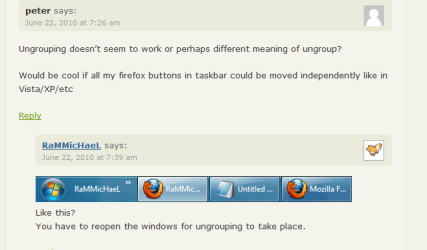
Attached image is what I'm stuck with right now, highlighted in red.
 

Attachments

  • taskbarinsanity.jpg
    taskbarinsanity.jpg
    9.7 KB · Views: 66

My Computer My Computer

OS
Windows 7 Home Premium 64bit

My Computer My Computer

Computer type
PC/Desktop
Computer Manufacturer/Model Number
Self built custom
OS
64-bit Windows 11 Pro for Workstations
CPU
Intel i7-8700K OC'd to 5 GHz
Motherboard
ASUS ROG Maximus XI Formula Z390
Memory
64 GB (4x16GB) G.SKILL TridentZ RGB DDR4 3600 MHz
Graphics Card(s)
ASUS ROG-STRIX-GTX1080TI-O11G-GAMING
Sound Card
Integrated
Monitor(s) Displays
2 x Samsung Odyssey G7 27"
Screen Resolution
2560x1440
Hard Drives
1TB Samsung 990 PRO M.2,
4TB Samsung 990 PRO PRO M.2,
TerraMaster F8 SSD Plus NAS
PSU
Seasonic Prime Titanium 850W
Case
Thermaltake Core P3
Cooling
Corsair Hydro H115i
Keyboard
Logitech wireless K800
Mouse
Logitech MX Master 4
Internet Speed
2 Gb/s Download and 100 Mb/s Upload
Antivirus
Malwarebyte Anti-Malware Premium
Browser
Google Chrome
Other Info
Logitech Z625 speaker system,
Logitech BRIO 4K Pro webcam,
HP Color LaserJet Pro MFP M477fdn,
APC SMART-UPS RT 1000 XL - SURT1000XLI,
Galaxy S23 Plus phone
Thanks for the response. Sadly, I'm no longer concerned about the taskbar thumbnails.
Because of this, I wish I had never messed around with trying to disable them.

It's the taskbar window/icon linking that's driving me mad.

I already have grouping disabled.

The problem, is that now instead of a group, I just have 1 long bar with however many windows in it, separated by a small line. The example image provided in your link shows what I mean. if you look at the "Example: Taskbar buttons not grouped" and look at the notepad windows, they're all physically connected, just separated by a small line.

Before running 7 taskbar tweaker, they were independent bars altogether that I could move individually, now, even after rebooting and no longer running the 7tt, they all act as if they're one huge bar, and can no longer be moved individually.
 

My Computer My Computer

OS
Windows 7 Home Premium 64bit
Grouping is basically to either have icons or buttons on the taskbar.

When multiple opened windows from the same program, say Firefox, they will still be grouped together like this. When you move/drag one button of multiple say firefox buttons, it will move all of the say Firefox buttons together.

Try the download in step 1 in OPTION TWO in the tutorial below to have icons again to see if that may be what you are after.

http://www.sevenforums.com/tutorials/432-taskbar-open-window-buttons-icons.html

Hope this helps,
Shawn
 
Last edited:

My Computer My Computer

Computer type
PC/Desktop
Computer Manufacturer/Model Number
Self built custom
OS
64-bit Windows 11 Pro for Workstations
CPU
Intel i7-8700K OC'd to 5 GHz
Motherboard
ASUS ROG Maximus XI Formula Z390
Memory
64 GB (4x16GB) G.SKILL TridentZ RGB DDR4 3600 MHz
Graphics Card(s)
ASUS ROG-STRIX-GTX1080TI-O11G-GAMING
Sound Card
Integrated
Monitor(s) Displays
2 x Samsung Odyssey G7 27"
Screen Resolution
2560x1440
Hard Drives
1TB Samsung 990 PRO M.2,
4TB Samsung 990 PRO PRO M.2,
TerraMaster F8 SSD Plus NAS
PSU
Seasonic Prime Titanium 850W
Case
Thermaltake Core P3
Cooling
Corsair Hydro H115i
Keyboard
Logitech wireless K800
Mouse
Logitech MX Master 4
Internet Speed
2 Gb/s Download and 100 Mb/s Upload
Antivirus
Malwarebyte Anti-Malware Premium
Browser
Google Chrome
Other Info
Logitech Z625 speaker system,
Logitech BRIO 4K Pro webcam,
HP Color LaserJet Pro MFP M477fdn,
APC SMART-UPS RT 1000 XL - SURT1000XLI,
Galaxy S23 Plus phone
Hey shawn,

Did you mean to link a disable task manager registry, or something else?

My concern is that while I realize that having the same programs linked as one giant bar in the task bar(which I just found out is officially called "Glommed") is a normal operation of windows, it wasn't as such until after I closed 7TT the first time.
 

My Computer My Computer

OS
Windows 7 Home Premium 64bit
go to link below--see first screen shot...look at right side 2nd setting down 'Combining'

7 Taskbar Tweaker - RaMMicHaeL's home page

also see FAQ just down the page a bit:

"In case you want to remove the tweaker’s settings from the registry, look for them here:
HKEY_CURRENT_USER\Software\7 Taskbar Tweaker
HKEY_CURRENT_USER\Software\Microsoft\Windows\CurrentVersion\Run (“7 Taskbar Tweaker” value)"
 

My Computer My Computer

Computer Manufacturer/Model Number
SALEON model 2.2b
OS
win7 ultimate 32bit
CPU
core2 Extreme QX6850-OCd to 3.15 GHz
Motherboard
ASUS P5G41-M LE
Memory
4 GB
Graphics Card(s)
NVidia 8600 GT
Monitor(s) Displays
23" acer
Hard Drives
one SATA 250GB partitioned equally in half
one SATA 160GB-internal storage
PSU
500W Thermaltake
Case
mini tower
Hey shawn,

Did you mean to link a disable task manager registry, or something else?

My concern is that while I realize that having the same programs linked as one giant bar in the task bar(which I just found out is officially called "Glommed") is a normal operation of windows, it wasn't as such until after I closed 7TT the first time.

Ooops, sorry about that. The link is fixed.

It looks like Tman may have the solution that you were wanting. :)
 

My Computer My Computer

Computer type
PC/Desktop
Computer Manufacturer/Model Number
Self built custom
OS
64-bit Windows 11 Pro for Workstations
CPU
Intel i7-8700K OC'd to 5 GHz
Motherboard
ASUS ROG Maximus XI Formula Z390
Memory
64 GB (4x16GB) G.SKILL TridentZ RGB DDR4 3600 MHz
Graphics Card(s)
ASUS ROG-STRIX-GTX1080TI-O11G-GAMING
Sound Card
Integrated
Monitor(s) Displays
2 x Samsung Odyssey G7 27"
Screen Resolution
2560x1440
Hard Drives
1TB Samsung 990 PRO M.2,
4TB Samsung 990 PRO PRO M.2,
TerraMaster F8 SSD Plus NAS
PSU
Seasonic Prime Titanium 850W
Case
Thermaltake Core P3
Cooling
Corsair Hydro H115i
Keyboard
Logitech wireless K800
Mouse
Logitech MX Master 4
Internet Speed
2 Gb/s Download and 100 Mb/s Upload
Antivirus
Malwarebyte Anti-Malware Premium
Browser
Google Chrome
Other Info
Logitech Z625 speaker system,
Logitech BRIO 4K Pro webcam,
HP Color LaserJet Pro MFP M477fdn,
APC SMART-UPS RT 1000 XL - SURT1000XLI,
Galaxy S23 Plus phone
Brink and Tman, thanks for your responses.

Ok, to Tman: I've tried deleting 7 Taskbar Tweaker's registry settings when the program is not running, then rebooting. Unfortunately, this doesn't fix the taskbar linking/combining that 7 Taskbar Tweaker created. When I run 7tt, the taskbar goes back to how it used to work before I ever ran 7tt. As soon as i close 7tt, it goes right back to being comined/linked. This is what's driving me mad.

To Brink: Step one in option two is already how my registry is set up.
 

My Computer My Computer

OS
Windows 7 Home Premium 64bit

Attachments

  • Capture.PNG
    Capture.PNG
    13.3 KB · Views: 146

My Computer My Computer

Computer Manufacturer/Model Number
SALEON model 2.2b
OS
win7 ultimate 32bit
CPU
core2 Extreme QX6850-OCd to 3.15 GHz
Motherboard
ASUS P5G41-M LE
Memory
4 GB
Graphics Card(s)
NVidia 8600 GT
Monitor(s) Displays
23" acer
Hard Drives
one SATA 250GB partitioned equally in half
one SATA 160GB-internal storage
PSU
500W Thermaltake
Case
mini tower
Tman: Thanks for responding again.

So here's the problem. Before I ran 7TT the first time, my taskbar already acted that way. IE: 2 separate Firefox windows that were open could be independently moved around the taskbar. Opening a new window of firefox would make it pop out to the right of the other firefox windows, but it would not be attached, and could be moved around independently. It had been this way since installing windows 7.

Upon running 7TT and trying to change the display thumbnail setting, then closing 7TT, all of a sudden my firefox windows are now linked to one another on the taskbar, not in a single condensed window with multiple options, but in one giant linked/combined bar that cannot be moved on its own.

Now, I can get it to go back to its original behavior by opening up 7tt and telling it to "Don't group", and while the program itself is nice. I shouldn't have to run an application to allow me to do what I had working previously, which is where my frustration is originating from.

I've emailed the creator in hopes to find out if there's a chance the DLL 7tt injects into explorer could be the problem, or if he knows of anyway to force disable the grouping by application id. I'm half wondering if it resets everything to what it lists as "default" when closing, even if that wasn't what windows was doing previously. I have no idea, and am not sure what else I can do at this point.
 

My Computer My Computer

OS
Windows 7 Home Premium 64bit
you could just uninstall 7TT :)
 

My Computer My Computer

Computer Manufacturer/Model Number
SALEON model 2.2b
OS
win7 ultimate 32bit
CPU
core2 Extreme QX6850-OCd to 3.15 GHz
Motherboard
ASUS P5G41-M LE
Memory
4 GB
Graphics Card(s)
NVidia 8600 GT
Monitor(s) Displays
23" acer
Hard Drives
one SATA 250GB partitioned equally in half
one SATA 160GB-internal storage
PSU
500W Thermaltake
Case
mini tower
Tman: Thanks for responding again.

So here's the problem. Before I ran 7TT the first time, my taskbar already acted that way. IE: 2 separate Firefox windows that were open could be independently moved around the taskbar. Opening a new window of firefox would make it pop out to the right of the other firefox windows, but it would not be attached, and could be moved around independently. It had been this way since installing windows 7.

Upon running 7TT and trying to change the display thumbnail setting, then closing 7TT, all of a sudden my firefox windows are now linked to one another on the taskbar, not in a single condensed window with multiple options, but in one giant linked/combined bar that cannot be moved on its own.

Now, I can get it to go back to its original behavior by opening up 7tt and telling it to "Don't group", and while the program itself is nice. I shouldn't have to run an application to allow me to do what I had working previously, which is where my frustration is originating from.

I've emailed the creator in hopes to find out if there's a chance the DLL 7tt injects into explorer could be the problem, or if he knows of anyway to force disable the grouping by application id. I'm half wondering if it resets everything to what it lists as "default" when closing, even if that wasn't what windows was doing previously. I have no idea, and am not sure what else I can do at this point.

Just restore you system to the time where u didnt install 7TT, only if u have create restore point before changing anything... so make sure to create restore point before use tweaks software so u can roll back if there something wrong after you make a change...
 

My Computer My Computer

Computer Manufacturer/Model Number
Dell
OS
Windows 7 x86
I would love to know how to stop application grouping in the way Eujin describes. I want my 2 notepad windows to be moved around in the taskbar independently of each other not both moved around as one.

It actually amazes me that there is not an option for this somewhere in taskbar settings... I don't want to have to run this app every time.
 

My Computer My Computer

OS
Windows 7 Ultimate 32bit
Sorry for "necroing", just found as I'm looking for a good spot on a good site, full of super clever super friendly folk, to hopefully help debug an issue I've created with my 7tt.

nizmo, assuming you're reporting the same issue as Eujin, and you've contacted the dev but no clue, there's a few things to try,
ie

- proc(reg)mon while 7tt loads and fixes the bug (not hopeful, as 7tt is a black magic hooker:)
-- sfc /scannow to 'restore/ undo shells mods' (if this works, copy the cbs.log to temp/desktop and see if any hints are gleaned re WHATCHANGED)
--- Create a new user profile, log in, and see if this is similarly affected.


you might be able to find out using an inspection-application (I've acquired several spy.exe's, and wininspector and windetective both look useful).

Assuming of course you haven't fixed or reformatted

(Brink, this is a 7forum-wide SOS!) Any 7tt users that are inspection savvy, that might be able to solve my mystery of 'no right drag')? (I'll create a new post for that).


Hoping to acquire a debug release to get this mystery solved!
 

My Computer My Computer

Computer type
Laptop
Computer Manufacturer/Model Number
Dell
OS
Windows 7 Ultimate 64bit
CPU
2.2
Memory
8Gb
Graphics Card(s)
NVIDIA
Screen Resolution
1280/762
Mouse
built in pad || iphone || MS wireless
Internet Speed
100MB
Antivirus
Avast
Browser
Chrome, Chrome portable
Back
Top