Solved Can't disable UAC on non-admin account

voldemarz

New member
Local time
12:46 PM
Messages
8
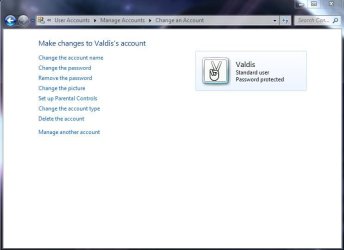
I guess some recent Windows updates have change the way UAC settings are changed. Now it seems impossible to change UAC settings of non-admin account.

It says that that I have to be logged in as an administrator, but before opening this window it anyway asked for admin password.

In User Account settings for a specific account there is no possibility to change UAC behavior.

Anyone knows how can I do it?
 

Attachments

  • uac.JPG
    uac.JPG
    45.1 KB · Views: 46
  • uac2.JPG
    uac2.JPG
    31.5 KB · Views: 30

My Computer My Computer

OS
Windows 7
There is a method involving group policies that may work for you here.

I would have a read over this thread on technet first though.
disabling UAC - reg setting
 

My Computer My Computer

Computer Manufacturer/Model Number
Insane hobo technologies. ;-)
OS
Windows 7 x64
CPU
Intel i7 2600k
Motherboard
Asrock z68 extreme 4 gen 3
Memory
G.skill Ripjaw 16gigs @ 1866
Graphics Card(s)
Nvidia gtx580 (evga)
Sound Card
Integrated HD audio + hdmi
Monitor(s) Displays
24" ASUS widescreen + 42" insignia
Screen Resolution
1080p (1920x1080)
Hard Drives
128 Samsung 830
256 Samsung 840
3 x 1tb storage drive (various)
1 western digital 1tb (eSATA)
1 Seagate 1tb (eSATA)
PSU
1 kilowatt SLI/Crossfire rated Silverstone modular
Case
NZXT Phantom + additional 220 fan
Cooling
Zalmann
Keyboard
Microsoft wireless 3000 (v2)
Mouse
MS - wireless 5000 (bluetrack)
Internet Speed
depends on if you ask me or my provider.
Other Info
The above information is provided as is, and the author assumes no responsibility for issues it may cause with your sanity or fanboyism.
I wanted to change UAC setting to get rid of destop dimming. Now when I checked my current UAC settings again I realized that there should be no dimming already with current settings (previously I tried to lover the notification setting by one level automatically as I usually do when I get dimming).

So the problem actually is that the desktop dims when it shouldn't. Not sure in which case it happens though, have to wait until it happens again.

But the fact you can't change UAC settings for non-admin users is really weird.
 

Attachments

  • uac.JPG
    uac.JPG
    41 KB · Views: 11
Last edited:

My Computer My Computer

OS
Windows 7
are you certain this is causing the desktop dimming?
seems to me it would much more likely be a setting in power options.
or the monitor itself even.
 

My Computer My Computer

Computer Manufacturer/Model Number
Insane hobo technologies. ;-)
OS
Windows 7 x64
CPU
Intel i7 2600k
Motherboard
Asrock z68 extreme 4 gen 3
Memory
G.skill Ripjaw 16gigs @ 1866
Graphics Card(s)
Nvidia gtx580 (evga)
Sound Card
Integrated HD audio + hdmi
Monitor(s) Displays
24" ASUS widescreen + 42" insignia
Screen Resolution
1080p (1920x1080)
Hard Drives
128 Samsung 830
256 Samsung 840
3 x 1tb storage drive (various)
1 western digital 1tb (eSATA)
1 Seagate 1tb (eSATA)
PSU
1 kilowatt SLI/Crossfire rated Silverstone modular
Case
NZXT Phantom + additional 220 fan
Cooling
Zalmann
Keyboard
Microsoft wireless 3000 (v2)
Mouse
MS - wireless 5000 (bluetrack)
Internet Speed
depends on if you ask me or my provider.
Other Info
The above information is provided as is, and the author assumes no responsibility for issues it may cause with your sanity or fanboyism.
I don't know what is causing it. I'm talking about the kind of dimming which happens when you try to do something that requires admin rights and then password input box pops up and desktop is dimmed. I usually set UAC settings so that I don't get dimmed desktop right after I have installed Windows. That is why I was surprised to see my desktop dimmed.

I guess we can mark this problem as solved. I have to gather more info about the actual problem (when it happens again) and then I'll probably come back for some help.
 

My Computer My Computer

OS
Windows 7
Back
Top