
Solved can't enter BIOS when booting (Win7 / Ubuntu Linux dual boot system)

prb123

New member
Local time
7:23 PM
Messages
3
Hello everyone!

I've made my Sony VAIO into a dual-boot machine (Win7 64-bit and Ubuntu Linux) and I'm having trouble getting into the BIOS.

When powering up, even though I repeatedly press and hold down the DEL key it always goes straight to the GRUB menu:
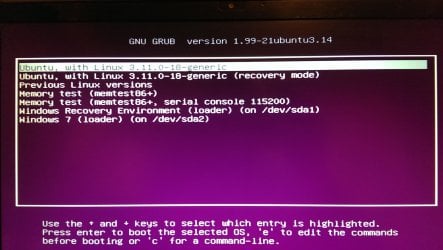
IMAG0320.jpg

And then when I select to load Windows 7, I keep pressing DEL but it goes straight to Windows.

It doesn't seem to matter how fast I am on the keys - I can't get into the BIOS.

I have a should I be trying to enter the BIOS before getting to the GRUB menu, or after?

Also, (and this may be irrelevant) I've checked my registry to determine what kind of BIOS I have (HKEY_LOCAL_MACHINE / HARDWARE / DESCRIPTION / System ), where I found that the SystemBiosVersion variable = Sony - 20110905 BIOS Date: 09/05/11 11:20:58 Ver: 04.06.03

(I would have thought the BIOS would be something like American Megatrends!)

Anyways... is there any way I can get into the BIOS from Windows, i.e. after Windows has loaded? Do I have to remove Linux from my computer? I hope not!

Thanks so much for your help and have a great day.
 

My Computer My Computer

At a glance

Windows 7 Home Premium 64bit
Computer type
Laptop
Computer Manufacturer/Model Number
Sony VAIO
OS
Windows 7 Home Premium 64bit
Best to keep in mind that the BIOS is completely different from ANY operating system. There is no connection between the two things, other than the BIOS handing off control to an OS.

You press DEL (or whatever key enters the BIOS) before any operating system begins to start up.
You can start pressing the key repeatedly (once a second) just as soon as you hear the POST beep or see anything happen on the display screen.
Once you reach the Grub loader it is too late. Start over.

You can't get into the BIOS from an operating system. You can only shut down and/or restart.
Nothing in the operating system's registry has anything to do with your system's BIOS, other than communicating with it initially.
 

My Computer My Computer

At a glance

Windows 7 64 Bit Home Premium SP1i7-3820GSkill F3-14900CL9Q - 16GBEVGA GeForce GTX660 - Driver 352.86
Computer type
PC/Desktop
Computer Manufacturer/Model Number
Home Built - Jan 2013
OS
Windows 7 64 Bit Home Premium SP1
CPU
i7-3820
Motherboard
Asus P9X79-PRO - Bios 4608
Memory
GSkill F3-14900CL9Q - 16GB
Graphics Card(s)
EVGA GeForce GTX660 - Driver 352.86
Sound Card
On board Realtek ALC898
Monitor(s) Displays
Acer S271HL
Screen Resolution
1920 x 1080
Hard Drives
#1- Samsung 840 Pro Series
#2- Western Digital WD1002FAEX Sata3 Black
#3- Western Digital WD1002FAEX Sata3 Black
PSU
Corsair CMPSU-850TX-V2 - 850 watt (by Seasonic)
Case
Corsair Obsidian 550D
Cooling
Standard 3 120mm case fans, Cooler Master Hyper 212 EVO
Keyboard
MS KC-0405
Mouse
Intellimouse 5-button
Internet Speed
56 Mbits/Sec (on a good day)
Antivirus
Avast & Malwarebytes
Browser
Firefox
Other Info
Asus DVD - DRW-24B1ST 24X
Thanks for your reply, TVeblen. I'll give it a go again and hopefully get through soon! Have a great week.
 

My Computer My Computer

At a glance

Windows 7 Home Premium 64bit
Computer type
Laptop
Computer Manufacturer/Model Number
Sony VAIO
OS
Windows 7 Home Premium 64bit
Let us know how you make out.
 

My Computer My Computer

At a glance

Windows 7 64 Bit Home Premium SP1i7-3820GSkill F3-14900CL9Q - 16GBEVGA GeForce GTX660 - Driver 352.86
Computer type
PC/Desktop
Computer Manufacturer/Model Number
Home Built - Jan 2013
OS
Windows 7 64 Bit Home Premium SP1
CPU
i7-3820
Motherboard
Asus P9X79-PRO - Bios 4608
Memory
GSkill F3-14900CL9Q - 16GB
Graphics Card(s)
EVGA GeForce GTX660 - Driver 352.86
Sound Card
On board Realtek ALC898
Monitor(s) Displays
Acer S271HL
Screen Resolution
1920 x 1080
Hard Drives
#1- Samsung 840 Pro Series
#2- Western Digital WD1002FAEX Sata3 Black
#3- Western Digital WD1002FAEX Sata3 Black
PSU
Corsair CMPSU-850TX-V2 - 850 watt (by Seasonic)
Case
Corsair Obsidian 550D
Cooling
Standard 3 120mm case fans, Cooler Master Hyper 212 EVO
Keyboard
MS KC-0405
Mouse
Intellimouse 5-button
Internet Speed
56 Mbits/Sec (on a good day)
Antivirus
Avast & Malwarebytes
Browser
Firefox
Other Info
Asus DVD - DRW-24B1ST 24X
Well, it turns out that if I press F2 (not DEL, as I suspected earlier) on-off repeatedly starting as soon as I press the power-on button, then it takes me - after I give my BIOS password, as usual - directly into the BIOS, instead of going to the GRUB screen. So, problem solved!

Thank you again TVeblen for taking the time to go over some of the basics with me.
 

My Computer My Computer

At a glance

Windows 7 Home Premium 64bit
Computer type
Laptop
Computer Manufacturer/Model Number
Sony VAIO
OS
Windows 7 Home Premium 64bit
Glad to hear. Congrats!
 

My Computer My Computer

At a glance

Windows 7 64 Bit Home Premium SP1i7-3820GSkill F3-14900CL9Q - 16GBEVGA GeForce GTX660 - Driver 352.86
Computer type
PC/Desktop
Computer Manufacturer/Model Number
Home Built - Jan 2013
OS
Windows 7 64 Bit Home Premium SP1
CPU
i7-3820
Motherboard
Asus P9X79-PRO - Bios 4608
Memory
GSkill F3-14900CL9Q - 16GB
Graphics Card(s)
EVGA GeForce GTX660 - Driver 352.86
Sound Card
On board Realtek ALC898
Monitor(s) Displays
Acer S271HL
Screen Resolution
1920 x 1080
Hard Drives
#1- Samsung 840 Pro Series
#2- Western Digital WD1002FAEX Sata3 Black
#3- Western Digital WD1002FAEX Sata3 Black
PSU
Corsair CMPSU-850TX-V2 - 850 watt (by Seasonic)
Case
Corsair Obsidian 550D
Cooling
Standard 3 120mm case fans, Cooler Master Hyper 212 EVO
Keyboard
MS KC-0405
Mouse
Intellimouse 5-button
Internet Speed
56 Mbits/Sec (on a good day)
Antivirus
Avast & Malwarebytes
Browser
Firefox
Other Info
Asus DVD - DRW-24B1ST 24X
Back
Top