Windows/Linux dual-boot imaging using Macrium

Golden

000
VIP
SF Team
Local time
10:23 AM
Messages
19,301
Location
South Australia
G'day,

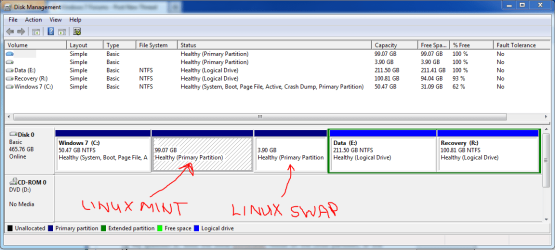
I've setup a dual-boot Windows 7 + LinuxMint13 on a single hard disk. My plan was to use Macrium to image this setup. For the Windows partition, this isn't a problem. For the Linux partition, however, I'm unsure whether a restore of an image of this partition would work, because of my lack of understanding of the relationship between the Windows and GRUB2 bootloaders - let me explain further:

After the initial Windows installation, I used EasyBCD to copy the bootloader to the C: partition, allowing me to remove the 100MB System Reserved partition. I then installed LinuxMint, and again used EasyBCD to add the LinuxMint boot entry. I again used the 'Write MBR' function under the BCD Deployment option in EasyBCD, to ensure the Windows bootloader appears first at bootup. This allows me to select the LinuxMint entry, which in turn chainloads the GRUB2 bootloader, which eventually loads LinuxMint. This works perfectly.
Capture.PNG

My question is: does the GRUB bootloader reside on the Linux partition, or does it reside on the Windows partition by virtue of the EasyBCD manipulation I have done?

If its the former, than using Macrium to image just the LinuxMint partition will work for me. Can anyone confirm this? Should I also image the Linux Swap partition as part of the LinuxMint partition image?

Thanks,
Golden
 

My Computer

Computer type
PC/Desktop
Computer Manufacturer/Model Number
Golden Mk. I.4
OS
Windows 10 Pro x64 ; Xubuntu x64
CPU
Intel i7 860 @ 2.80 GHz O/C'ed to 4.0GHz
Motherboard
Gigabyte P55A-UD3R Rev.1. Award BIOS F13
Memory
16GB Corsair Vengance DDR3 @ 661 MHz Dual Channel (9-9-9-24)
Graphics Card(s)
EVGA NVidia GTX 560 1024MB
Sound Card
Realtek Integrated
Monitor(s) Displays
Dual Samsung SyncMaster 2494HS
Screen Resolution
1920*1080 and 1920*1080
Hard Drives
1*Samsung 840 EVO 120GB SSD;
1*OCZ Vertex 2 60GB SSD;
2*Samsung F3 SpinPoint 1TB in RAID0;
1*Samsung F1 SpinPoint 1TB;
2*Western Digital 1TB External USB 3.0
1*Western Digital 500GB External USB 3.0
1*Seagate 500GB External USB 2.0
PSU
Thermaltake ToughPower QFan 750W
Case
Thermaltake Element S VK60001W2Z
Cooling
Corsair H60 Water Cooling, 2*230mm and 2*80mm case fans
Keyboard
Logitech G110
Mouse
Logitech MX518
OK. I guess there is only one way to find out then.....bombs away!
 

My Computer

Computer type
PC/Desktop
Computer Manufacturer/Model Number
Golden Mk. I.4
OS
Windows 10 Pro x64 ; Xubuntu x64
CPU
Intel i7 860 @ 2.80 GHz O/C'ed to 4.0GHz
Motherboard
Gigabyte P55A-UD3R Rev.1. Award BIOS F13
Memory
16GB Corsair Vengance DDR3 @ 661 MHz Dual Channel (9-9-9-24)
Graphics Card(s)
EVGA NVidia GTX 560 1024MB
Sound Card
Realtek Integrated
Monitor(s) Displays
Dual Samsung SyncMaster 2494HS
Screen Resolution
1920*1080 and 1920*1080
Hard Drives
1*Samsung 840 EVO 120GB SSD;
1*OCZ Vertex 2 60GB SSD;
2*Samsung F3 SpinPoint 1TB in RAID0;
1*Samsung F1 SpinPoint 1TB;
2*Western Digital 1TB External USB 3.0
1*Western Digital 500GB External USB 3.0
1*Seagate 500GB External USB 2.0
PSU
Thermaltake ToughPower QFan 750W
Case
Thermaltake Element S VK60001W2Z
Cooling
Corsair H60 Water Cooling, 2*230mm and 2*80mm case fans
Keyboard
Logitech G110
Mouse
Logitech MX518
I think it does not really matter where the Linux Grub resides. As long as you image/restore all participating partitions (C, Mint, Mint swap), things should work.
 

My Computer

Computer Manufacturer/Model Number
HP, Dell, Gateway, Toshiba - 4 laptops and 2 desktops
OS
Vista, Windows7, Mint Mate, Zorin, Windows 8
CPU
from 1.6GHz Duo to i7
Monitor(s) Displays
2x HP w2207
Hard Drives
5x HDD, 7x SSD, 12x Externals
Keyboard
with trackball - no mices
Mouse
Trackball mice
Internet Speed
DSL 6000
Hi Golden. From my experience with dual booting Windows and Linux, the GRUB bootloader is part of the Linux program. With EasyBCD you are adding an entry for GRUB into the Windows bootloader, but I don't think it contains the actual GRUB bootloader, so I would be careful about.
 

My Computer

Computer Manufacturer/Model Number
Customized build from CyberPower
OS
Windows 7 Home Premium 64bit SP 1
CPU
Intel i5 2500k
Motherboard
Asus P8P67 Deluxe
Memory
8 gigabytes Corsair PC3-12800 DDR3
Graphics Card(s)
EVGA GeForce GTX 460 superclocked
Sound Card
Integrated
Monitor(s) Displays
ViewSonic 23" LCD
Screen Resolution
1980 x 1080
Hard Drives
120 Gb Samsung 840 Pro SSD
120 Gb Kingston Hyper X SSD
1 Tb WD Caviar Black HDD
PSU
Coolermaster 1000 watt modular
Case
Coolermaster HAF X full tower
Cooling
Coolermaster Hyper 212 plus
Keyboard
Logitech USB
Mouse
Microsoft 3 button
Internet Speed
download 1.5 Mb/sec upload 300Kb/sec
OK.

This is what I did:

1. Wiped all the partitions
2. Restored the LinuxMint and Swap partitions ONLY

Result : LinuxMint will not boot.

Thus, I conclude that the GRUB bootloader (or something related to it) must be written to the Windows NTFS partition (which I wiped but did not restore).

I'll wipe everything again, then restore the Windows, LinuxMint and Swap partitions. Then test to see if Linux will boot.

I think you are right Wolfgang, all 3 partitions must exist/be restored as they are all integral to one another.

Regards,
Golden
 

My Computer

Computer type
PC/Desktop
Computer Manufacturer/Model Number
Golden Mk. I.4
OS
Windows 10 Pro x64 ; Xubuntu x64
CPU
Intel i7 860 @ 2.80 GHz O/C'ed to 4.0GHz
Motherboard
Gigabyte P55A-UD3R Rev.1. Award BIOS F13
Memory
16GB Corsair Vengance DDR3 @ 661 MHz Dual Channel (9-9-9-24)
Graphics Card(s)
EVGA NVidia GTX 560 1024MB
Sound Card
Realtek Integrated
Monitor(s) Displays
Dual Samsung SyncMaster 2494HS
Screen Resolution
1920*1080 and 1920*1080
Hard Drives
1*Samsung 840 EVO 120GB SSD;
1*OCZ Vertex 2 60GB SSD;
2*Samsung F3 SpinPoint 1TB in RAID0;
1*Samsung F1 SpinPoint 1TB;
2*Western Digital 1TB External USB 3.0
1*Western Digital 500GB External USB 3.0
1*Seagate 500GB External USB 2.0
PSU
Thermaltake ToughPower QFan 750W
Case
Thermaltake Element S VK60001W2Z
Cooling
Corsair H60 Water Cooling, 2*230mm and 2*80mm case fans
Keyboard
Logitech G110
Mouse
Logitech MX518
Crap!

Windows boots just fine, but Linux won't budge from this prompt:

Code:
error: unknown filesystem.
grub rescue> _

Bleh :sick:
 

My Computer

Computer type
PC/Desktop
Computer Manufacturer/Model Number
Golden Mk. I.4
OS
Windows 10 Pro x64 ; Xubuntu x64
CPU
Intel i7 860 @ 2.80 GHz O/C'ed to 4.0GHz
Motherboard
Gigabyte P55A-UD3R Rev.1. Award BIOS F13
Memory
16GB Corsair Vengance DDR3 @ 661 MHz Dual Channel (9-9-9-24)
Graphics Card(s)
EVGA NVidia GTX 560 1024MB
Sound Card
Realtek Integrated
Monitor(s) Displays
Dual Samsung SyncMaster 2494HS
Screen Resolution
1920*1080 and 1920*1080
Hard Drives
1*Samsung 840 EVO 120GB SSD;
1*OCZ Vertex 2 60GB SSD;
2*Samsung F3 SpinPoint 1TB in RAID0;
1*Samsung F1 SpinPoint 1TB;
2*Western Digital 1TB External USB 3.0
1*Western Digital 500GB External USB 3.0
1*Seagate 500GB External USB 2.0
PSU
Thermaltake ToughPower QFan 750W
Case
Thermaltake Element S VK60001W2Z
Cooling
Corsair H60 Water Cooling, 2*230mm and 2*80mm case fans
Keyboard
Logitech G110
Mouse
Logitech MX518
Easybcd uses neogrub on the Windows partition.

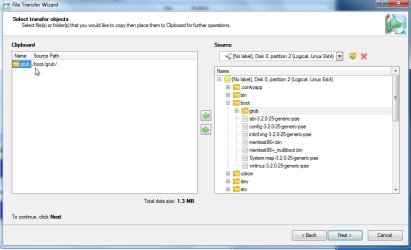
Suggest you use Paragon free - it has file transfer wizard - you can see/copy to or from /move/delete anything on Linux partition using that from within Windows.

It also images and restores ext2/3/4/ perfectly.

I will post a settings.xml you can use to replace the one in Paragon "program" folder to make it easier.

http://www.paragon-software.com/home/br-free/

ftw.jpg
 

My Computers

System One System Two

  • Computer type
    PC/Desktop
    OS
    7 X64
    CPU
    i5 8400
    Motherboard
    gigabyte b365m ds3h
    Memory
    2x8gb 3200mhz
    Hard Drives
    various
    PSU
    pure power 11 400w cm
    Case
    Coolermaster
    Cooling
    cryorig m9i
  • Computer type
    PC/Desktop
    OS
    7x64
    CPU
    g5400
    Motherboard
    ga b365m ds3h
    Memory
    8gb ddr4 2400
    PSU
    xfx pro 450w
I am not surprised at all that you are having problems with getting Linux to boot, as I have gone through the same thing myself. Someone from another forum mentioned I should try Clonezilla Clonezilla - About, because it works with both NTFS and EXT file systems and I have had good luck with that. But if the Paragon software will do the same thing, I would go that route.
 

My Computer

Computer Manufacturer/Model Number
Customized build from CyberPower
OS
Windows 7 Home Premium 64bit SP 1
CPU
Intel i5 2500k
Motherboard
Asus P8P67 Deluxe
Memory
8 gigabytes Corsair PC3-12800 DDR3
Graphics Card(s)
EVGA GeForce GTX 460 superclocked
Sound Card
Integrated
Monitor(s) Displays
ViewSonic 23" LCD
Screen Resolution
1980 x 1080
Hard Drives
120 Gb Samsung 840 Pro SSD
120 Gb Kingston Hyper X SSD
1 Tb WD Caviar Black HDD
PSU
Coolermaster 1000 watt modular
Case
Coolermaster HAF X full tower
Cooling
Coolermaster Hyper 212 plus
Keyboard
Logitech USB
Mouse
Microsoft 3 button
Internet Speed
download 1.5 Mb/sec upload 300Kb/sec
OK.

This is what I did:

1. Wiped all the partitions
2. Restored the LinuxMint and Swap partitions ONLY

Result : LinuxMint will not boot.

Thus, I conclude that the GRUB bootloader (or something related to it) must be written to the Windows NTFS partition (which I wiped but did not restore).

I'll wipe everything again, then restore the Windows, LinuxMint and Swap partitions. Then test to see if Linux will boot.

I think you are right Wolfgang, all 3 partitions must exist/be restored as they are all integral to one another.

Regards,
Golden
Was linuxmint partition active at that time?
 

My Computer

Computer type
Laptop
Computer Manufacturer/Model Number
ACER ASPIRE 5742G
OS
Microsoft Windows 7 Home Premium 64-bits 7601 Multiprocessor Free Service Pack 1
CPU
Intel(R) Core(TM) i3 CPU M 370 @ 2.40GHz
Motherboard
Acer Aspire 5742G
Memory
4,00 GB
Graphics Card(s)
ATI Mobility Radeon HD 5400 Series
Sound Card
(1) AMD High Definition Audio Device (2) Realtek High Defi
Screen Resolution
1366 x 768 x 32 bits (4294967296 colors) @ 60 Hz
Hard Drives
WDC WD5000BEVT-22ZAT0
MBR is win7 mbr and can easily be rebuilt using "startup repair" win7. It loads the volume boot sector of active partition (your win7 partition) and loads the bootmenu. In bootmenu is:

-win7. Start winload.exe from partition that start at sector 56234234 for example. Boot fails if you change the start sector of that partition. But "startup repair" will fix that problem.
-a special entry that loads neogrub (easybcd stuff). It's something like normal grub and uses a small file that says: chainload to "volume boot sector" of harddisk 1 partition 3 for example. If linuxmint still is in partition 3 it works after restore. Otherwise delete the menu option using easybcd and recreate it. chainloading means "jump to another bootloader". Then it loads the linuxmunt bootloader in partition 3.
If linuxmint is now in partition 4 you can still delete entry using easybcd and make it again.

But grub itselft in partition 4 has also a config file where linux is! It still points to partition 3! That should be fixed.
Do you understand?
 

My Computer

Computer type
Laptop
Computer Manufacturer/Model Number
ACER ASPIRE 5742G
OS
Microsoft Windows 7 Home Premium 64-bits 7601 Multiprocessor Free Service Pack 1
CPU
Intel(R) Core(TM) i3 CPU M 370 @ 2.40GHz
Motherboard
Acer Aspire 5742G
Memory
4,00 GB
Graphics Card(s)
ATI Mobility Radeon HD 5400 Series
Sound Card
(1) AMD High Definition Audio Device (2) Realtek High Defi
Screen Resolution
1366 x 768 x 32 bits (4294967296 colors) @ 60 Hz
Hard Drives
WDC WD5000BEVT-22ZAT0
Yep, that is why you need paragon file transfer wizard- you can get at the contents of the mint partition using it.
 

My Computers

System One System Two

  • Computer type
    PC/Desktop
    OS
    7 X64
    CPU
    i5 8400
    Motherboard
    gigabyte b365m ds3h
    Memory
    2x8gb 3200mhz
    Hard Drives
    various
    PSU
    pure power 11 400w cm
    Case
    Coolermaster
    Cooling
    cryorig m9i
  • Computer type
    PC/Desktop
    OS
    7x64
    CPU
    g5400
    Motherboard
    ga b365m ds3h
    Memory
    8gb ddr4 2400
    PSU
    xfx pro 450w
MBR is win7 mbr and can easily be rebuilt using "startup repair" win7. It loads the volume boot sector of active partition (your win7 partition) and loads the bootmenu. In bootmenu is:

-win7. Start winload.exe from partition that start at sector 56234234 for example. Boot fails if you change the start sector of that partition. But "startup repair" will fix that problem.
-a special entry that loads neogrub (easybcd stuff). It's something like normal grub and uses a small file that says: chainload to "volume boot sector" of harddisk 1 partition 3 for example. If linuxmint still is in partition 3 it works after restore. Otherwise delete the menu option using easybcd and recreate it. chainloading means "jump to another bootloader". Then it loads the linuxmunt bootloader in partition 3.
If linuxmint is now in partition 4 you can still delete entry using easybcd and make it again.

But grub itselft in partition 4 has also a config file where linux is! It still points to partition 3! That should be fixed.
Do you understand?
After that boot from boot repair CD https://help.ubuntu.com/community/Boot-Repair and edit GRUB config. Just replace hd0,3 to hd0,4 in my example (replace all instances) , save it and boot.
 

My Computer

Computer type
Laptop
Computer Manufacturer/Model Number
ACER ASPIRE 5742G
OS
Microsoft Windows 7 Home Premium 64-bits 7601 Multiprocessor Free Service Pack 1
CPU
Intel(R) Core(TM) i3 CPU M 370 @ 2.40GHz
Motherboard
Acer Aspire 5742G
Memory
4,00 GB
Graphics Card(s)
ATI Mobility Radeon HD 5400 Series
Sound Card
(1) AMD High Definition Audio Device (2) Realtek High Defi
Screen Resolution
1366 x 768 x 32 bits (4294967296 colors) @ 60 Hz
Hard Drives
WDC WD5000BEVT-22ZAT0
Thanks for the replies guys - I must say though, its a bit over my head as I'm still coming to terms with various bootloaders, chainloading and GRUB.

Right now though, it seems as if I was mistaken : my understanding was that I could restore everything back to the way it was from the Macrium images, but it appears I am wrong (even if I restore both the Windows and Linux partitions precisely the same as existed at the time that the images were made).

Thats the bit I am struggling to understand : if the images of a working system are restored, why won't the system work as before?
 

My Computer

Computer type
PC/Desktop
Computer Manufacturer/Model Number
Golden Mk. I.4
OS
Windows 10 Pro x64 ; Xubuntu x64
CPU
Intel i7 860 @ 2.80 GHz O/C'ed to 4.0GHz
Motherboard
Gigabyte P55A-UD3R Rev.1. Award BIOS F13
Memory
16GB Corsair Vengance DDR3 @ 661 MHz Dual Channel (9-9-9-24)
Graphics Card(s)
EVGA NVidia GTX 560 1024MB
Sound Card
Realtek Integrated
Monitor(s) Displays
Dual Samsung SyncMaster 2494HS
Screen Resolution
1920*1080 and 1920*1080
Hard Drives
1*Samsung 840 EVO 120GB SSD;
1*OCZ Vertex 2 60GB SSD;
2*Samsung F3 SpinPoint 1TB in RAID0;
1*Samsung F1 SpinPoint 1TB;
2*Western Digital 1TB External USB 3.0
1*Western Digital 500GB External USB 3.0
1*Seagate 500GB External USB 2.0
PSU
Thermaltake ToughPower QFan 750W
Case
Thermaltake Element S VK60001W2Z
Cooling
Corsair H60 Water Cooling, 2*230mm and 2*80mm case fans
Keyboard
Logitech G110
Mouse
Logitech MX518
Thanks for the replies guys - I must say though, its a bit over my head as I'm still coming to terms with various bootloaders, chainloading and GRUB.

Right now though, it seems as if I was mistaken : my understanding was that I could restore everything back to the way it was from the Macrium images, but it appears I am wrong (even if I restore both the Windows and Linux partitions precisely the same as existed at the time that the images were made).

Thats the bit I am struggling to understand : if the images of a working system are restored, why won't the system work as before?
Are all partitions in the same order on disk as before?
Are all partitions still the same type as before (I mean logical or primary)?
Was the same partition flagged ACTIVE as before (it boots form that partition)?
Did win7 boot succesfully after restore (without doing repair tricks)?
 

My Computer

Computer type
Laptop
Computer Manufacturer/Model Number
ACER ASPIRE 5742G
OS
Microsoft Windows 7 Home Premium 64-bits 7601 Multiprocessor Free Service Pack 1
CPU
Intel(R) Core(TM) i3 CPU M 370 @ 2.40GHz
Motherboard
Acer Aspire 5742G
Memory
4,00 GB
Graphics Card(s)
ATI Mobility Radeon HD 5400 Series
Sound Card
(1) AMD High Definition Audio Device (2) Realtek High Defi
Screen Resolution
1366 x 768 x 32 bits (4294967296 colors) @ 60 Hz
Hard Drives
WDC WD5000BEVT-22ZAT0
Please post C:\NST\menu.lst
what else is in C:\NST folder?
 

My Computer

Computer type
Laptop
Computer Manufacturer/Model Number
ACER ASPIRE 5742G
OS
Microsoft Windows 7 Home Premium 64-bits 7601 Multiprocessor Free Service Pack 1
CPU
Intel(R) Core(TM) i3 CPU M 370 @ 2.40GHz
Motherboard
Acer Aspire 5742G
Memory
4,00 GB
Graphics Card(s)
ATI Mobility Radeon HD 5400 Series
Sound Card
(1) AMD High Definition Audio Device (2) Realtek High Defi
Screen Resolution
1366 x 768 x 32 bits (4294967296 colors) @ 60 Hz
Hard Drives
WDC WD5000BEVT-22ZAT0
Are all partitions in the same order on disk as before?
Yes, I restore C: first, then the Mint and Swap partitions
Are all partitions still the same type as before (I mean logical or primary)?
Yes
Was the same partition flagged ACTIVE as before (it boots form that partition)?
Umm....do you mean the C: partition? This is the partition I boot Windows from.
Did win7 boot succesfully after restore (without doing repair tricks)?
Yes, perfect boot. No trouble.

In C:\NST, I don't have a menu.lst -I only have 2 x .mbr files:

AutoNeoGrub0.mbr - dated 02/08/2012 not sure why this file exists, date doesn't correspond?
AutoNeoGrub1.mbr - dated 06/08/2012 (date image restored)

I have attached them - these are typical contents:

Code:
ë^€  9ÿÿ                                                                                        ú1ÛŽÓ¼€è  [ëk ÁëŒÈÃŽÛSj}Ëh  ¼ û¹ ¸‰ËKÁã    º€ QSè¤ [YrâéöÜœ1ö1ÿ¹ß üó¥»üf¸MË“f9uè9êÆ   f9t(f`¿ ¸™» ¹ è€ suïfaf9uMÇ  ÿ€& þr3*ˆæ*‰Á$?t°¿ ´h 
1ÛèK suñùè\‡óƒÆþþrÏw¾²1°¹ 1ÒëϾ‘èM ëþRVWUùÍ]_^ZÃú¸  ŽÐ¼ÜûfaëÁ`PSQþÈ ÁÐà ǰèÏÿY[XrþÈuças    `1Àè½ÿaOùôÍ.¬< uöÃ
Missing MBR-helper.                                                                                        Uª²é‘ý                                                                                                                                                                                                                                                                                                                                                                                                                 ëXGRLDR         ø                                         )c¯Ä
NO NAME    FAT32   úü¶ÿ€þÿu² 1À½ |ŽÐfàû‰V@´A»ªUÍrûUªu
öÁtƐ}Bf1Àf‰FD‹FfFf‰FHf‰FLf‹Ff÷f$fFLf‹F,fPè‹ ¾½}‚/Äžèè™ 1ÿ¹ ¾À}ó¦tƒÇ ƒçà;~uëJußfXè* ëÌ&ÿu    &ÿufX1ÛfPèK s‹V@Rÿ®èèZ JuúfXè ëäSfÁàf·^f÷ófFH»` ŽÃ1Ûf;FDtf‰FDè* &g€b&gf‹[Ãf=øÿÿõrfHfHf¶V
Rf÷âZfFLÃf`f1ÒfRfPSjjf1ÉfÿvYf÷ñBYR1Òf÷ñ†ÖY†ÅÀäḉæŠV@ÍafarMf@^s    RŒÂ€ÆŽÂZÃdisk error No ANG1                                        ÀY¾²}¬´Í< u÷ëþ  Uªë<GRLDR     à @ð                 )c¯Ä
NO NAME    FAT12   úü¶ÿ€þÿu² 1À½ |ŽÐfàû‰V$`´A»ªURÍZrûUªuöÁt    „ÒyƘ}BaŽÀ‹v‹~vljv(‰~*ŠF÷fÆ×‰v,‰~.‹^±Óë‹FØH÷ó™‰F&Æ×‰v0‰~2ÇF6ÿÿ‹F÷fr‰F6‹F,‹V.‹N&Äžèè Ä¾è¾Ã}±Wó¦_tƒÇ t&8-uë¾À}éø &ÿu‹N‹F(‹V*è] X¿  «‰ÆZRös€Æ~6sÆÑî*s±Óè€ä=÷ëŽÚ*ƒø÷vÒ1À«¾  *ƒèrŠN
÷áF0V2è
 ëê‹V$Rÿ®èœ`1ÉQQRPSAQ±Q‘SR‹F‰Ã÷f‘Z÷ñ’öó†Ä@’‘†ÍÐÉÐÉÑ[¸‰æŠV$ÍrI[_ ŽÃaa@uBâ³Ãdisk error No ANG1                                     ÃY¾µ}¬´Í< u÷ëþ  Uªë.I/O error              @   ÿ€       ü1ÀŽÐ¼ |‰åP» SPˆV$´A»ªUÍr    ÐÙsÆÅ}Bf1À°WœfHf™f÷v(fRf™fÁàf÷vRfF,è^fX‹V&f÷âf÷vRf@èö ^ލ¨±,ó¥f‰M´f‹E¬fHf÷vf@f‰E°f*f…Àt·€èÇ f*f…Àt·Àè» f*f…Àtè´ f‹]´fƒërOSf+^Xs€ÄëAfSf+^rfXf“f÷vfRf…Òu
Áà“f‹» Àèv fXf™f÷vR…ÒuÁà“f‹ °» €èZ X“Áãf‹[œèN Sœr-1öŽß¿ã}Vf*fP*’*þÌ‘ó¦u‘®fX^Œßù„øþÖ;vr×fÿE´fÿM°…[ÿ¾à}sv‹V$RWËùrÄ^üuÄ^úf¶N
f÷áfFf`fRfPSjjfÿvYf÷ñBYR1Òf÷ñ†ÖY†ÅÀäá@´‰æŠV$Í[r_ ŽÃafaf@â¾ÃNo ang1       ãQ¾|¬´Í< u÷ëþUªëRNTFS              ø  ÿ ?         € €                                            úü¶ÿ1À½ |ŽÐfàû‰VþP´A»ªUÍrûUªu
öÁtƆªBf¾üGRUBt» ~f‹† f@èá èÞ èÛ f1À‹F‰FüèŒ ˆËŠF
è„ ˆÍ Ý€í    ˆnûŠFDèe €ùv°éû ˆNùŠF@èR €ùuíˆNúf‹F0ˆéfÓàf† f‰Fôº ŠNúÓâ‰Ñ»  Sèy âû[?FIul‰Ñè4 ‰ß°€è@r^» 8f1À°èЉßéÖ Àxˆéë    öØ,    ˆÁÃ0ÉþÁfÑèsùþÉÃSW‰ß‹GH‰Ã÷füÁá    9Áu‰Ù‰û_‹ƒï~üƒÃ;u    ‹‰âð_[ðëNf`f1ÒfRfPSjjf1ÉfÿvYf÷ñBYR1Òf÷ñ†ÖY†ÅÀäḉæŠVþÍafar7f@^s    RŒÂ€ÆŽÂZÃ0  †ÈëNo ang1                     Ó¡¾È}¬´Í< u÷ëþ  Uªèo°è…‚¾ f|  uït€<0uçƒÆ4èõ ƒ§ èE°°è[‚” ‹\    €ûuñ€| u    ÿttVëÿt0f1Òf‹L(ù wmfÁé    » `Sè¹° èë r[f|@ uñŠNùf1Û³fÓãf1Ò^YQ¬¹ QP¨t*VfRfSf‰Ù» Pè:r&?INu è˜þ‰ÞƒÆ4èd sf[fZ^fÚXÐèYâÇY⿍¶Ðé ÿƒ| …ñýf‹‰ûèΰ€èr r.€|t‹Lľètó¤ëf1Òf‹L(fÁé    Äžèè‹VþRÿ®è°é¯þ‰óöGtùÃ0íV¶ÓƒÃRŠOþ¬Š'€üAr€üZw€Ä 8àuCCâè€< u^øÃ^tëÃè è/ röuè% söè è øÃP1À‰‰E‹Eø‰EXÿ  u€
Ë]öuf‰Þ€<ÿt€< u‰u_8uê‰]‰uÃ}rù‹u€| u
‰ó_të"f‹L(fÁé    ƒù‡žý Pf1Òè<XrÉ‹t0Þ‰u€
ötè\ ‰Þ;]rùÃ_8uðP‰u‰]f‹D öuèŠ ëSèQýf‹DèJý[?FI…=ý¹ èýX_€?ÿt·8t_ëò‰ÞÃP€
;]ƒý8t_ëð‰]f‹Fôf‰Gf@f‰G_;]s#€?€uf‹WŠNúfÓâèF f    À„Ûüf‰Gf‰WëÕ‹]€%÷XÃW¿  ŠNúfÓàf‰Âf¸   fÓàf‰Áè ‚©ü?FI…¡üèkü_ÃÿufRfQS‹uŠöt‰óŠNûfÓê;]s8u
f9Ww‰Þ_ëê‰uè{þ[fYfZrè øEÃQSöD„MüŠD$f‰MŠNûf‰ÐfÓèf‰EfÓàf)Âf‰U 1Òf‰Uf‹Tt èÇ f;Uv÷ŠNûf    ÀtGf‹Ef+EfEfÓàfE öt*fPf@f+UfUfÓâf9ÂuQè‰ Yf‹EfÓàf‰ÂfXf– f† öuJfSf‰Óf+]fÓãf‰Ùf[f+M fÇE     f;Mvf‹MfQf    ÀuèÇ ëèûâûfYf)Mv
f‰Uè& ébÿ[YÃf1À„ÉtQ¬fÁÈþÉu÷YöÙ€ÁÀáðé¦û¬ˆÁˆÍ€átÀíèÐÿfÓèf‰UfˆéèÁÿfÓøfEÃötÏfRS‹uŠè2ýr€| t¼fÇE    [fZt ë±U‰åf1À‡FfÁàfF] U‰åfÁfÁn]ÃVèØÿfPèèÿ^WèÌÿfPèÜÿ_ÃWfRfÁá    ötCf1ÒŠU€ât8‰ßQŠNû€Á    fÓâWèœÿf)ÐfÇFð   fÓfðYfÑf+NðfQè9 fYfNðgã*‰û‰ßf‰Êf1Àf‰Áè–ÿ¹ €f9Ñv‰ÑQÁéfó«è‚ÿYf)Êuæ‰ûfZ_ÃVüfPèTÿ^f‹VðfÐfPèFÿ_WVf1ɹ €f9Ñv‰ÑQÁéfó¥è7ÿYf)Êuæ_^f1Ò*öÄ€u
¹ ó¥º ë]‰ÁáÿAñ0ÿú w^ÿu¬ˆÃ·öÃt4‰ÐHQS±ƒørÑèþÉëõ*‰ÃÓëRº ÓâJ!ÐZƒÀ‰Á÷ÛK&ŠªBâù[Yë¤BÐëþÏ9Îr®èºþf)Vðtú t^ðéØù          GRUBè  [ŒÈÁëÃSh Ëf1À‰ØfÁàf`   .f£b »  ŽÃŒÛú.`  À"À¾ ŽÞf1öf1ÿf¹ $  üfó¥¾ ŽÞ$þ"ÀŽÛêO   `   ÿÿ   ’  ÿÿ   ’  ûh 
f`œ.ö t1ÀŽÀ¿üf¸DUCE.  $@f«.ö €u$.€>  t¾©èÏî¾èèÉî¾²èÃîèûr-è ë(.€>  t¾©è«î¾èè¥î¾éèŸîè×s    .€& èÖÇÑë2.€ €faf`œÆ  ´A»ªUè#îrûUªu
öÁtÆ  Bfaf`œ`þÂuǼÿÿǺþRè
„Òyþòwf‹Df‰Df1Àf‰D`ƒ> ÿuÇ ?þ´Ír€á?tˆõ‰ af1Û„Òyf‹\f\f…ÛùtZ€>  Bt<½  ¡ ‰Â¶ ‰ ˆâB‰ XP¢$ ÿ6£Ç£ë fSfS1Û¹! XZèˆóf[£ëXP1ÒRRfSRj?j’´B‰æèAíaZaXfaf`œVœü1À„Òyÿ¼¡¼<rÆ"üP¿7ˆÐÀèÐàfd«ˆÐ$Ô
„ät€Ä0ˆ%G0ªX„ÒyÆ,GÔ
„ät€Ä0ˆ%G0ªfÇ):  ¾0è흂X1ö>8Sï…,f1Àf9 „ f9„f9 „f9(„f¡‰ÃfÑè…ø f‹fƒù‡ë ÷ÙÃK…â ¸€ .£&f‹Lgã)¡X…À„Ê PRŠ€Á
1ÒBÓâ‘’1Ò÷ñ…ÒZX…® .£&ü¾ 1ÿ¹ .ó¥„Òy¿% .¡¼ª^Vf1À„Òy
.f‹D.fD&f‰G.Š&ˆG&Šf¸   Óà&ˆG
Áà    &‰GÁè&f‰G€ÁfÓà&f‰G.‹Gƒøÿt&ˆGÁè@&‰G&f¡(&f‰G(&f¡@&f‰G,¾ü‰÷*=ëþu    Hª¸„«1À«¾Bèàëøé%„ÒxM.Ƽÿf¡@fƒø u=1ۿƹ üf¯uF.ˆ¼ƒÇCâïNu!° ¿ ¹O üó®u¾@¿ ¹O üó¥†  1ö| …¢ŠD
„À„™ˆÁ¸€ öñ„ä…Œ‹D…À„ƒƒø?‡|‹DH„ä…r€|ð‚j.€>  BuÆDü» ¹< ŠD<‡N‹D…À…À ‹D…À…<‹D…À…3ŠD„Àt"f‹D f…À„!f‹D$f…À„» ¹X ¾Qé  f‹D f…À…ÿ ‹D…À…ö .‹Dƒøÿt
ˆDÁè@‰D^Vf1À„Òy
.f‹D.fDf£ ˆ$ ¾Iè ê» 
¹R ‰Þ1ÿ*«ÎϹ )ùó¤&  ˜— ¼ª¿ú&‹=ëþu    Hª¸„«1À«øé¬1öŠD„Àt|‹D…Àtu¾Yƒøw¾aSQèCêY[1ö.‹Dƒøÿt
ˆDÁè@‰D_Wf1À„Òy
.f‹E.fEf£ ‰Þ1ÿ*«ÎϹ )ùó¤&  ˜— ¼ª¿ú&‹=ëþu    Hª¸„«1À«øé'^V&€<t"&€<t&€<t&€<t&€<…t
¾iè¶éùéû þþr&ÿ¼¾wè¡é¾¾¹ f‹;Du8Äuf9Duf9Duf9Dt0ŠÐà…· ŠD$?„® ŠD$?„¥ f‹Df…À„š f‹Df…À„ ƒÆâ*<Uª…‚ ¾¾¹ [Sf‹;Du8Äuf9Duf9Duf9DtT&‹>ºÿðƒwIÿþu¿ ~&‰>º&ƒºf*f«f*f«’f*f’<t<t<t
<t    <…t&fWf’f«f*&f‹Gf«ëƒÆâ‰ù뾂è¸èù^œVþu7¿þ¾¹ø üó¥¿î¾ ~¹ üó¥¿ ~¾~¹øüó¥>º~uǺƒ.º^¸þ¿%‰þ²1„+ÿ9º…5ÿ
þòw
‚)ƒ>¼‡ 1ÀŽØŠ6u€Î€‰åŠVsè,è¾ÅˆÐ$Ô
00†Ä‰D èèB8òƒÚ S´èÀçr€á?ùt[ˆÕQ¸» ~¹ 0öè¦çû[¾§r¹„äùu´¾¾¿¾ÿþssf1Éf*f«f    Áf*f«f    Áf*f«f    Áf*f«f    ÁgãØŠDðÐàù–¾ê…xÿ–ŠDò$?ù–¾ê„iÿ–ŠDö$?ù–¾ê„Zÿ–f‹Døf…Àù–¾ê„Iÿ–f‹Düf…Àù–¾ê„8ÿ–뇁<Uªù–¾ê…(ÿ–‰^ÇF²Æ èÇ!xǼÿÿǺþëÆ7éÇ8t  $(%XŸÀäÁÈžr#faf`œ.€> ÿt.Š6¼„Òx¶ÿ.; tùœfaÃƉèˆâÇ ƒÆÆ"Ã.€> ÿt.Æ ÿ²ùhh 
f`œœéxþ1ÀŽÀŽØ¸» z¹ º€ è[æû‚¶ „ä…° >þ}Uª…¦ >þ{Uª…œ ¾¾}þþ}s1¹ ‰÷f*f÷Ørâ÷ëê‰þ*Ðàu*$?t**$?tf*f÷Øsf*f÷ØrÊùœ.ö trVœr¾¸{¿¸}¹$ üó¥.ö €t0¾òè#æ¾Óèæ¾—.Ç  9.Æ è
æ¾kèæè< .Æ ÿrõfÇü    ê |  .ö €u
¾3èÝåè þòèÓå¾ÓèÍå¾èÇåëþfVfRfºÿÿÿÿ.f¶ <ÿt    fº   ÷â’1ÀŽØf¡lf‰Áf…Òx,fÐfP.f¶ f    Àt¾ fPè}åfX¾,èÏ f‰ÎfƒÆfXëf‰Ðf‰Öf‹lf9Ësf1Éf‰Ðf¾   fP´ÍPœ´Íu?u=XfXf9ór)fVfPfRf)ðf1Òf¾   f÷ö¾,fSèr f[fZfXf^fƒÆf9Ãv£fZf^Ý.3 Xt
.3 u´ Íë´ÍùfXfZf^ÃfRfQSf¹
   ‰óf1Òf÷ñ€Â0.ˆFf    ÀuîVN9Þv.Š.†.ˆCëï^[fYfZÃVèÄÿ.€<t.Æ Fëó^è‘äÃVSfP¸ ; ‰÷¹ >üó¥fX[^Ãf`ŒÃú` À"À¾ ŽÆf1öf1ÿf¹ $  üfó¥¾ ŽÆ$þ"ÀŽÃ¹ 1öV¿ |WVü󥿄¾ ¹ ü.fó¥ûË„ÒyþÂu!Ç ÿÿ€>  Btö u
f>ü#GRUª„jÃ
Press space bar 
Press   to start GRUB, any other key to boot previous MBR ...  to boot previous MBR, any other key to start GRUB ... 
Timeout:      
Invalid previous MBR. Press any key to start GRUB ...  to hold the screen, any other key to boot previous MBR ... 
Error while reading MBR of   in partition table of drive (hd0 )  
Error 
Cannot find   in all drives. Press Ctrl+Alt+Del to restart. 
Try (hd0,0 ) :  EXT2:  NTFS5:  FAT32:  FAT16:  FAT12:  non-MS: skip  Extended:  invalid or null                                                                                       hot-key         µ  MË“`f1À.f£#.f£#´ÍröÁ?t€á?.ˆ#þÆ.ˆ6#a.¶#Q.¶#Q¶ÊQhÒ"è!ƒÄ.‹#è s1Ƀù?s-Aè rƒù?rðë I€ùs´Ã¸ PŽÀŽØ1Û¸¶ `‰Þ‰ßÍaÃù?v¹? .‰#.Š6#„öt    è’ ‚‹ w¶è‡ ‚€ wþÆuóþÎ.ˆ6#€þÿu.Š6#„öuþÎþÎ.ˆ6#.Š#èï rRw±èæ rIwA.:#rñ€ù?v±?.ˆ#.¶#Q.¶#AQ¶ÊQhó"èRƒÄ.‹#.Š6#.ˆ .ˆ6     ´ ôõ ±´. #» PŽÃŽÛ1Û`‰Þ‰ßÍaþÅrHþͱ´. #» XŽÃŽÛ1Û`‰Þ‰ß¶ Íar7þÅè4 t"±´. #» XŽÃŽÛ1Û`‰Þ‰ß¶ Íarè u€ýr–€þ tÃ8öÃùÃQVW.‹#ÁḠPŽØ¸ XŽÀ1ö1ÿüfó§_^YÃ.Ç # µ ¶ ¸» XŽÃŽÛ1Û`±‰Þ‰ßÍar\¸» PŽÃŽÛ1Û`‰Þ‰ßÍaœ.:6#r¶ÿþÅþƝr"è6 t¸» XŽÃŽÛ1Û`‰Þ‰ß±Íarè u.ÿ #t€ýr•€ùvÃ8ÉÃùÃQVW¹€ ¸ PŽØ¸ XŽÀ1ö1ÿüfó§_^YÃ`‰åƒÅ‹v ƒÅ.¬„Àt\<%uP.¬„ÀtR<d»
 t<xt<Xuá» fWf1ÿ1É‹F 1Ò÷ó‰×fÁÏA…Àuñ1ÛfÁljø$<    v0´Íâêf_ƒÅë¦1Û´ÍëžaÃ
BIOS: Drive=0x%X, H=%d, S=%d
 TUNE: Drive=0x%X, H=%d, S=%d
 f                                                                                                                                                                                                                                       GRUª

I have a hunch about the Macrium restore, so I am going to test something...........
 

Attachments

My Computer

Computer type
PC/Desktop
Computer Manufacturer/Model Number
Golden Mk. I.4
OS
Windows 10 Pro x64 ; Xubuntu x64
CPU
Intel i7 860 @ 2.80 GHz O/C'ed to 4.0GHz
Motherboard
Gigabyte P55A-UD3R Rev.1. Award BIOS F13
Memory
16GB Corsair Vengance DDR3 @ 661 MHz Dual Channel (9-9-9-24)
Graphics Card(s)
EVGA NVidia GTX 560 1024MB
Sound Card
Realtek Integrated
Monitor(s) Displays
Dual Samsung SyncMaster 2494HS
Screen Resolution
1920*1080 and 1920*1080
Hard Drives
1*Samsung 840 EVO 120GB SSD;
1*OCZ Vertex 2 60GB SSD;
2*Samsung F3 SpinPoint 1TB in RAID0;
1*Samsung F1 SpinPoint 1TB;
2*Western Digital 1TB External USB 3.0
1*Western Digital 500GB External USB 3.0
1*Seagate 500GB External USB 2.0
PSU
Thermaltake ToughPower QFan 750W
Case
Thermaltake Element S VK60001W2Z
Cooling
Corsair H60 Water Cooling, 2*230mm and 2*80mm case fans
Keyboard
Logitech G110
Mouse
Logitech MX518
Did you remove linux from bootmenu using easybcd, and later recreated again?
AutoNeoGrub0.mbr and AutoNeoGrub1.mbr are actually the same. They refer to ang0 and the other to ang1 (on 4 places). But basic it's a generic thing.

In elevated command prompt:
Code:
bcdedit/enum all
Do you see AutoNeoGrub0 or AutoNeoGrub1 in the list, or both? If AutoNeoGrubx is not listed there then delete AutoNeoGrubx.mbr

Which one did you delete?
Do you have a file called ang0 or ang1. Most likely in root folder. check linux and win7
 

My Computer

Computer type
Laptop
Computer Manufacturer/Model Number
ACER ASPIRE 5742G
OS
Microsoft Windows 7 Home Premium 64-bits 7601 Multiprocessor Free Service Pack 1
CPU
Intel(R) Core(TM) i3 CPU M 370 @ 2.40GHz
Motherboard
Acer Aspire 5742G
Memory
4,00 GB
Graphics Card(s)
ATI Mobility Radeon HD 5400 Series
Sound Card
(1) AMD High Definition Audio Device (2) Realtek High Defi
Screen Resolution
1366 x 768 x 32 bits (4294967296 colors) @ 60 Hz
Hard Drives
WDC WD5000BEVT-22ZAT0
Hi,

Originally, I had a backup of the BCD prior to adding the Linux entry, so i restored that, and then added the Linux entry, but it still fails to boot Linux.

I see both an ANG0 and ANG1 in C:\

Using bcdedit /enum all, I see:
Code:
Real-mode Boot Sector
---------------------
identifier              {c2c5dd6a-dca7-11e1-8c3c-10bf480d8583}
device                  partition=C:
path                    \NST\AutoNeoGrub0.mbr
description             Linux Mint 13 x64

I deleted AutoNeoGrub1.mbr and also ANG1, and then rebooted. Linux still did not reboot.

Regards,
Golden
 

My Computer

Computer type
PC/Desktop
Computer Manufacturer/Model Number
Golden Mk. I.4
OS
Windows 10 Pro x64 ; Xubuntu x64
CPU
Intel i7 860 @ 2.80 GHz O/C'ed to 4.0GHz
Motherboard
Gigabyte P55A-UD3R Rev.1. Award BIOS F13
Memory
16GB Corsair Vengance DDR3 @ 661 MHz Dual Channel (9-9-9-24)
Graphics Card(s)
EVGA NVidia GTX 560 1024MB
Sound Card
Realtek Integrated
Monitor(s) Displays
Dual Samsung SyncMaster 2494HS
Screen Resolution
1920*1080 and 1920*1080
Hard Drives
1*Samsung 840 EVO 120GB SSD;
1*OCZ Vertex 2 60GB SSD;
2*Samsung F3 SpinPoint 1TB in RAID0;
1*Samsung F1 SpinPoint 1TB;
2*Western Digital 1TB External USB 3.0
1*Western Digital 500GB External USB 3.0
1*Seagate 500GB External USB 2.0
PSU
Thermaltake ToughPower QFan 750W
Case
Thermaltake Element S VK60001W2Z
Cooling
Corsair H60 Water Cooling, 2*230mm and 2*80mm case fans
Keyboard
Logitech G110
Mouse
Logitech MX518
Post ANG0 please
 

My Computer

Computer type
Laptop
Computer Manufacturer/Model Number
ACER ASPIRE 5742G
OS
Microsoft Windows 7 Home Premium 64-bits 7601 Multiprocessor Free Service Pack 1
CPU
Intel(R) Core(TM) i3 CPU M 370 @ 2.40GHz
Motherboard
Acer Aspire 5742G
Memory
4,00 GB
Graphics Card(s)
ATI Mobility Radeon HD 5400 Series
Sound Card
(1) AMD High Definition Audio Device (2) Realtek High Defi
Screen Resolution
1366 x 768 x 32 bits (4294967296 colors) @ 60 Hz
Hard Drives
WDC WD5000BEVT-22ZAT0
Post /boot/grub/grub.cfg from linux as well
 

My Computer

Computer type
Laptop
Computer Manufacturer/Model Number
ACER ASPIRE 5742G
OS
Microsoft Windows 7 Home Premium 64-bits 7601 Multiprocessor Free Service Pack 1
CPU
Intel(R) Core(TM) i3 CPU M 370 @ 2.40GHz
Motherboard
Acer Aspire 5742G
Memory
4,00 GB
Graphics Card(s)
ATI Mobility Radeon HD 5400 Series
Sound Card
(1) AMD High Definition Audio Device (2) Realtek High Defi
Screen Resolution
1366 x 768 x 32 bits (4294967296 colors) @ 60 Hz
Hard Drives
WDC WD5000BEVT-22ZAT0
Back
Top