Can't Find Script Engine - VBScript

vfusion

New member
Local time
10:11 PM
Messages
16
Hi,
I'm having the above titled problem after I removed Kaspersky Internet Security 2011 from the system.

Already tried KAV Remover & other uninstall softwares to clean up the Kaspersky's leftovers. Also tried various methods; re-register regsvr32 jscript.dll / regsvr32 vbscript.dll / etc..

To date, still unable to run any .vbs script files. Any ideas, please ?
 

My Computer

OS
Windows 7 PRO 32BIT
Thanks, already tried short guide (the MS Fixit) earlier & again without success. Furthermore, the folder ({B54F3741-5B07-11cf-A4B0-00AA004A55E8} ) is not found in the CLSID directory.
MSI FIX should be run as administrator.

Please try manually navigate there and post a screenshot, at least of the nearest folders to that.

Also, could try reg file.
 

Attachments

My Computer

Computer type
PC/Desktop
OS
Windows 8.1 ; Windows 7 x86 (Dec2008-Jan2013)
Other Info
"The scale icon at the top right of a post or tutorial is how you can give rep to the member."
Thanks, already tried short guide (the MS Fixit) earlier & again without success. Furthermore, the folder ({B54F3741-5B07-11cf-A4B0-00AA004A55E8} ) is not found in the CLSID directory.
MSI FIX should be run as administrator.

Please try manually navigate there and post a screenshot, at least of the nearest folders to that.

Also, could try reg file.

Hi,

I created the folder {B54F3741-5B07-11cf-A4B0-00AA004A55E8} in the CLSID directory and thereafter able to run the vbs files. Just to double check if I did it right:


  1. At the CLSID folder: Right clicked mouse and added a New KEY ( {B54F3741-5B07-11cf-A4B0-00AA004A55E8} )
  2. At the {B54F3741-5B07-11cf-A4B0-00AA004A55E8} folder: Right clicked mouse and added New STRING (InprocServer32)
  3. At the InprocServer32 : Modify the value to "C:\\Windows\\system32\\vbscript.dll"

Please advise if I did the right thingy (i.e new Key & String ?), do not want other problems later on. Thanks again.
 

My Computer

OS
Windows 7 PRO 32BIT
Nope. InprocServer32 is a key, not a string.
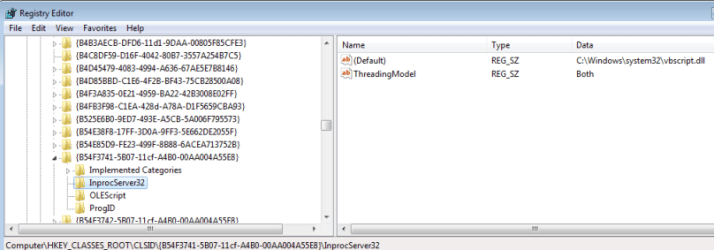
Check this reg file and screenshot in attachment
 

Attachments

  • VB_REGEDIT.png
    VB_REGEDIT.png
    28.8 KB · Views: 719

My Computer

Computer type
PC/Desktop
OS
Windows 8.1 ; Windows 7 x86 (Dec2008-Jan2013)
Other Info
"The scale icon at the top right of a post or tutorial is how you can give rep to the member."
Nope. InprocServer32 is a key, not a string.
Check this reg file and screenshot in attachment


Replaced InprocServer32 to 'key'.
The key in my registry is exactly like your screenshot, however mine is without the other key 'ThreadingModel'.
Thanks

Edit:
The key Threadin Model is found after adding the Reg File..
Thanks again Neutron16, rep added in appreciation of your assistance.


My Computer

OS
Windows 7 PRO 32BIT
Nope. InprocServer32 is a key, not a string.
Check this reg file and screenshot in attachment


Replaced InprocServer32 to 'key'.
The key in my registry is exactly like your screenshot, however mine is without the other key 'ThreadingModel'.
Thanks.

You are welcome. You probably need to add ThreadingModel just in case.
 

My Computer

Computer type
PC/Desktop
OS
Windows 8.1 ; Windows 7 x86 (Dec2008-Jan2013)
Other Info
"The scale icon at the top right of a post or tutorial is how you can give rep to the member."
Back
Top