When XP Mode is installed, the default user profile (account) is called XPMUser. The password you set (you can't install XP Mode without!) is now your default password, and auto login is set on, also by default.
So, now your XP Mode login credentials are:
- Username: XPMUser
- Password: The one you set during installation.
Integration features are also on by default, so if you create new user accounts remember to set a password.
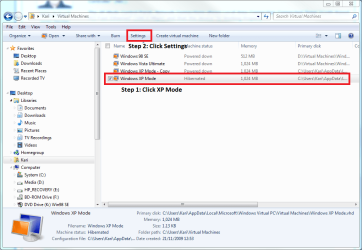
If you do not want to auto login, delete saved credentials from XP Mode settings. First open settings:
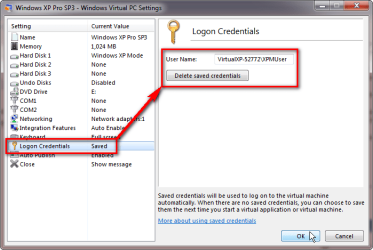
Then delete XPMUser's saved login credentials:
Now XP Mode stops every time when started to ask your logon credentials.
Kari
My Computer
At a glance
Windows 10 Pro x64 EN-GB1.6 GHz Intel Core i7-720QM Processor6 GBATI Mobility Radeon HD 5850 Graphics
Computer type
Laptop
Computer Manufacturer/Model Number
HP ENVY 17-1150eg
OS
Windows 10 Pro x64 EN-GB
CPU
1.6 GHz Intel Core i7-720QM Processor
Memory
6 GB
Graphics Card(s)
ATI Mobility Radeon HD 5850 Graphics
Sound Card
Beats sound system with integrated subwoofer
Monitor(s) Displays
17" laptop display, 22" LED and 32" Full HD TV through HDMI
Screen Resolution
1600*900 (1), 1920*1080 (2&3)
Hard Drives
Internal: 2 x 500 GB SATA Hard Disk Drive 7200 rpm
External: 2TB for backups, 3TB USB3 network drive for media
Cooling
As Envy runs a bit warm, I have it on a Cooler Master pad
Right on the money! Kari This is also the case when installing other OSs on VMs as well where a default password is required despite the options found later for auto login. Often you may run into a security prompting for password while in the XP Mode for certain things as well.
W7 Ultimate x64/W10 Pro x64/W11 Pro Triple Bo...AMD Phenom II X4 975 Deneb 3.6ghz - 965 2nd r...Kingston Hyper X DDR3 1600 1.5v 16gb - Hyper ...MSI HD Radeon 5750 1gb - MSI HD Radeon 6450 o...
Computer type
PC/Desktop
Computer Manufacturer/Model Number
Custom builds = 2
OS
W7 Ultimate x64/W10 Pro x64/W11 Pro Triple Boot - Main PC W7 Remote PC Micro ATX W7 Pro x64/W11 Pro
CPU
AMD Phenom II X4 975 Deneb 3.6ghz - 965 2nd remote pc
Motherboard
Gigabyte GA-790XTA-UD4-Gigabyte GA-880GM-D2H remote pc
Memory
Kingston Hyper X DDR3 1600 1.5v 16gb - Hyper X Fury 8gb 2nd
Graphics Card(s)
MSI HD Radeon 5750 1gb - MSI HD Radeon 6450 on mini tower
Sound Card
Creative Labs X-Fi Xtreme Audio P - Realtek onooard 2nd case
Monitor(s) Displays
ASUS VW199T-P 19" HP 2082a Main-HP 2082a 20" remote pc
Screen Resolution
Asus 1440x900 - HP 1600x900
Hard Drives
WD Black 1TB HD per OS W7, W10, and pending W11 presently on 500gb OS Drive - Pending Triple 1TB HDs for Spanned Storage/backup volume
Single 2TB external USB enclosure, single 1TB System 7 Host/Boot drive, Pending 8TB external HD for system image b
PSU
Corsair 750TX - primary / Corsair CX600 - second
Case
Antec 900-2 - SSD compatible / NZXT Vulcan mini tower
That particular error is mostly due to the need to reinstall the application it comes with which would be the XP Mode in this case. A short guide for fixing these types of errors can be seen at How To Fix Mfc71.dll is Missing or Not Found Errors
One thing to note there is the caution about downloading driver files from some site and advises removing any you have already downloaded to proceed on with the steps explained on how to do it the right way. That allows the installer to work with Windows.
W7 Ultimate x64/W10 Pro x64/W11 Pro Triple Bo...AMD Phenom II X4 975 Deneb 3.6ghz - 965 2nd r...Kingston Hyper X DDR3 1600 1.5v 16gb - Hyper ...MSI HD Radeon 5750 1gb - MSI HD Radeon 6450 o...
Computer type
PC/Desktop
Computer Manufacturer/Model Number
Custom builds = 2
OS
W7 Ultimate x64/W10 Pro x64/W11 Pro Triple Boot - Main PC W7 Remote PC Micro ATX W7 Pro x64/W11 Pro
CPU
AMD Phenom II X4 975 Deneb 3.6ghz - 965 2nd remote pc
Motherboard
Gigabyte GA-790XTA-UD4-Gigabyte GA-880GM-D2H remote pc
Memory
Kingston Hyper X DDR3 1600 1.5v 16gb - Hyper X Fury 8gb 2nd
Graphics Card(s)
MSI HD Radeon 5750 1gb - MSI HD Radeon 6450 on mini tower
Sound Card
Creative Labs X-Fi Xtreme Audio P - Realtek onooard 2nd case
Monitor(s) Displays
ASUS VW199T-P 19" HP 2082a Main-HP 2082a 20" remote pc
Screen Resolution
Asus 1440x900 - HP 1600x900
Hard Drives
WD Black 1TB HD per OS W7, W10, and pending W11 presently on 500gb OS Drive - Pending Triple 1TB HDs for Spanned Storage/backup volume
Single 2TB external USB enclosure, single 1TB System 7 Host/Boot drive, Pending 8TB external HD for system image b
PSU
Corsair 750TX - primary / Corsair CX600 - second
Case
Antec 900-2 - SSD compatible / NZXT Vulcan mini tower
Thanks Night Hawk. I loaded about a hundred winXP updates to my virtual machine. Still getting the same error.
I am hoping the error will resolve itself when i install the latest USBXpress drivers.
Actually the application instructs me to update to the 12/2008 drivers.
Do you happen to know - is the USBXpress drivers specific to my application or is it more generic and available somewhere on-line?
My Computer
At a glance
Windows 7 Pro 64 bitIntel core i74gigNVIDIA Gforce 240
The thing to know about the XP Mode in particular as well as any other VM program is that you can't simply install drivers of any type as you would on the usual install OS to physical hard drive. VMs work a bit differently there.
The first reason is due to sharing things with the host rather then seeing them installed on the VM as hardwares in the same fashion. The XP Mode has it's own generics forms of onboard controllers for various things including 3d acceleration, sound sharing from host, virtual memory for video, NAT and a few other virtual network adapter options found there.
You are going to find you won't be able to run a number of things there if you haven't already found them to work on the previous XP Mode install you had for those reasons. The usb and other external from VM support seen there is due to the integrated components support incorporated into it.
W7 Ultimate x64/W10 Pro x64/W11 Pro Triple Bo...AMD Phenom II X4 975 Deneb 3.6ghz - 965 2nd r...Kingston Hyper X DDR3 1600 1.5v 16gb - Hyper ...MSI HD Radeon 5750 1gb - MSI HD Radeon 6450 o...
Computer type
PC/Desktop
Computer Manufacturer/Model Number
Custom builds = 2
OS
W7 Ultimate x64/W10 Pro x64/W11 Pro Triple Boot - Main PC W7 Remote PC Micro ATX W7 Pro x64/W11 Pro
CPU
AMD Phenom II X4 975 Deneb 3.6ghz - 965 2nd remote pc
Motherboard
Gigabyte GA-790XTA-UD4-Gigabyte GA-880GM-D2H remote pc
Memory
Kingston Hyper X DDR3 1600 1.5v 16gb - Hyper X Fury 8gb 2nd
Graphics Card(s)
MSI HD Radeon 5750 1gb - MSI HD Radeon 6450 on mini tower
Sound Card
Creative Labs X-Fi Xtreme Audio P - Realtek onooard 2nd case
Monitor(s) Displays
ASUS VW199T-P 19" HP 2082a Main-HP 2082a 20" remote pc
Screen Resolution
Asus 1440x900 - HP 1600x900
Hard Drives
WD Black 1TB HD per OS W7, W10, and pending W11 presently on 500gb OS Drive - Pending Triple 1TB HDs for Spanned Storage/backup volume
Single 2TB external USB enclosure, single 1TB System 7 Host/Boot drive, Pending 8TB external HD for system image b
PSU
Corsair 750TX - primary / Corsair CX600 - second
Case
Antec 900-2 - SSD compatible / NZXT Vulcan mini tower
Funny though. The people that made my App are the ones that told me to run it in XP Mode [because they haven't gotten around to writing code for Windows7]. The installation instructions call for the drivers to be installed in the VM. I am following the instructions to the letter.
BTW - As soon as i plug the hardware into the USB port that i attached to the VM, XP Mode installs drivers for it.
My Computer
At a glance
Windows 7 Pro 64 bitIntel core i74gigNVIDIA Gforce 240
In most cases you wouldn't be installing drivers for hardwares and devices. Apparently they wrote this specifically for the XP Mode or the XP Mode is simply installing from it's generic driver base upon detecting the port in use.
Another thing to mention here is that if you have an external usb device or drive plugged and seen on the host OS(7) different programs like VM Player or VirtualBox have the option for unmounting the volume it from the host for use on the VM. That can make a flash drive or external HD a good way to transfer files over to a VM.
The XP Mode on the other hand already offers the integrated components support allowing direct access to drives and devices on the host OS depending on what it is as a shared resource. This was designed more for business interests however who would then be running their XP apps on the XP Mode when upgrading to 7 where direct access to drives and printers was the idea there.
W7 Ultimate x64/W10 Pro x64/W11 Pro Triple Bo...AMD Phenom II X4 975 Deneb 3.6ghz - 965 2nd r...Kingston Hyper X DDR3 1600 1.5v 16gb - Hyper ...MSI HD Radeon 5750 1gb - MSI HD Radeon 6450 o...
Computer type
PC/Desktop
Computer Manufacturer/Model Number
Custom builds = 2
OS
W7 Ultimate x64/W10 Pro x64/W11 Pro Triple Boot - Main PC W7 Remote PC Micro ATX W7 Pro x64/W11 Pro
CPU
AMD Phenom II X4 975 Deneb 3.6ghz - 965 2nd remote pc
Motherboard
Gigabyte GA-790XTA-UD4-Gigabyte GA-880GM-D2H remote pc
Memory
Kingston Hyper X DDR3 1600 1.5v 16gb - Hyper X Fury 8gb 2nd
Graphics Card(s)
MSI HD Radeon 5750 1gb - MSI HD Radeon 6450 on mini tower
Sound Card
Creative Labs X-Fi Xtreme Audio P - Realtek onooard 2nd case
Monitor(s) Displays
ASUS VW199T-P 19" HP 2082a Main-HP 2082a 20" remote pc
Screen Resolution
Asus 1440x900 - HP 1600x900
Hard Drives
WD Black 1TB HD per OS W7, W10, and pending W11 presently on 500gb OS Drive - Pending Triple 1TB HDs for Spanned Storage/backup volume
Single 2TB external USB enclosure, single 1TB System 7 Host/Boot drive, Pending 8TB external HD for system image b
PSU
Corsair 750TX - primary / Corsair CX600 - second
Case
Antec 900-2 - SSD compatible / NZXT Vulcan mini tower



 This is also the case when installing other OSs on VMs as well where a default password is required despite the options found later for auto login. Often you may run into a security prompting for password while in the XP Mode for certain things as well.


