Scanner not working in XP Mode after downloading SP3

C32C3

New member
Local time
6:29 PM
Messages
228
My Epson Perfection 1640SU scanner is no longer being recognized in WinXP Mode.

The last time I used the scanner was before downloading & installing Service Pack 3 via automatic downloads. Now that I have need to scan, WinXP is not recognizing my scanner.

I have checked and the scanner is properly connected to my pc. I have the installation disc & have installed the necessary drivers.

I have turned the scanner on AFTER opening the XP Mode hoping Windows would auto detect the scanner but it did not detect it.

Any suggestions?
 

My Computer My Computer

At a glance

Win7 Ultimate x64Intel Core i7 950 (4x 3066 MHz with HT) Quad ...6GB DDR3 1333MhzNvidia GTS 450 (1024MB GDDR5 | DX 11)
Computer Manufacturer/Model Number
Deviantsystems
OS
Win7 Ultimate x64
CPU
Intel Core i7 950 (4x 3066 MHz with HT) Quad Core
Motherboard
Asus P6X58D-E
Memory
6GB DDR3 1333Mhz
Graphics Card(s)
Nvidia GTS 450 (1024MB GDDR5 | DX 11)
Sound Card
Intel HD Audio via Realtek ALC889 with 8-channel support
Monitor(s) Displays
Sony Bravia 32"
Screen Resolution
1080i, x1768x992
Hard Drives
2x WD 1TB 7200 RPM Sata
PSU
OCZ ModXStream Pro 600W 80+
Case
Lian Li PC-7FN
Cooling
Processor cooling: Scythe Big Shuriken SCBSK-1000
Keyboard
Microsoft Ergonomic
Mouse
Logitec Trackball
Try uninstalling the driver for the scanner with the scanner unplugged THEN reboot and then plug the scanner in to see if Windows will detect it then and install the drivers.
 

My Computer My Computer

At a glance

W10 Pro desktop, W11 laptop, W11 Pro tablet (...3.7Ghz 8700K i7, i7-11800H, i7-1065G716G desktop, 16G laptop, 4G tabletAMD Radeon RX580, RTX 3060, Intel Iris Plus
Computer type
PC/Desktop
Computer Manufacturer/Model Number
Home Built desktop, Dell G15 5511 Gaming laptop,MS Surface Pro 7 tablet
OS
W10 Pro desktop, W11 laptop, W11 Pro tablet (all 64-bit)
CPU
3.7Ghz 8700K i7, i7-11800H, i7-1065G7
Motherboard
ASUS TUF Z370-Pro Gaming in desktop
Memory
16G desktop, 16G laptop, 4G tablet
Graphics Card(s)
AMD Radeon RX580, RTX 3060, Intel Iris Plus
Sound Card
High Definition Audio (Built-in to mobo)
Monitor(s) Displays
Samsung U32J59 32" (2x), 15.6", 12"
Screen Resolution
3840x2160, 3840x2160, 1920x1080, 2160x1440
Hard Drives
500G SSD for OS; 2T, 10T & 15T HDDs for Data on Desktop, 1TB SSD laptop, 128G SSD tablet.
PSU
Corsair CX 750M
Case
Antec 100
Cooling
CM 212+
Keyboard
IBM Model M - used continuously since 1986
Mouse
Microsoft Pro IntelliMouse
Internet Speed
400M down 8M up
Antivirus
Windows Defender
Browser
FireFox
Other Info
Built my first computer (8Mhz 8088cpu, 640K RAM, 20MB HDD, 2 360K floppy drives) in 1985 and have been building them for myself, relatives and friends ever since.
strollin: thanks for your reply. I do not see the drivers listed in Add/Remove Software and am wondering how to go about uninstalling them. Would you tell me?

Also, does WinXP have system restore capability? It's been years since I have used XP.

Thanks.
 

My Computer My Computer

At a glance

Win7 Ultimate x64Intel Core i7 950 (4x 3066 MHz with HT) Quad ...6GB DDR3 1333MhzNvidia GTS 450 (1024MB GDDR5 | DX 11)
Computer Manufacturer/Model Number
Deviantsystems
OS
Win7 Ultimate x64
CPU
Intel Core i7 950 (4x 3066 MHz with HT) Quad Core
Motherboard
Asus P6X58D-E
Memory
6GB DDR3 1333Mhz
Graphics Card(s)
Nvidia GTS 450 (1024MB GDDR5 | DX 11)
Sound Card
Intel HD Audio via Realtek ALC889 with 8-channel support
Monitor(s) Displays
Sony Bravia 32"
Screen Resolution
1080i, x1768x992
Hard Drives
2x WD 1TB 7200 RPM Sata
PSU
OCZ ModXStream Pro 600W 80+
Case
Lian Li PC-7FN
Cooling
Processor cooling: Scythe Big Shuriken SCBSK-1000
Keyboard
Microsoft Ergonomic
Mouse
Logitec Trackball
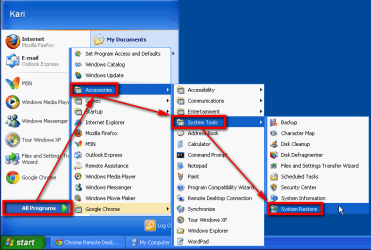
Windows XP Mode is a completely normal XP so the system restore can be found on the same place than in XP:

XP_Mode_system_restore.png

What I do not get is why did Windows Update offer you SP3? It is already included in XP Mode when you install it; Windows XP is an XP SP3, no need to install service packs.

Kari
 

My Computer My Computer

At a glance

Windows 10 Pro x64 EN-GB1.6 GHz Intel Core i7-720QM Processor6 GBATI Mobility Radeon HD 5850 Graphics
Computer type
Laptop
Computer Manufacturer/Model Number
HP ENVY 17-1150eg
OS
Windows 10 Pro x64 EN-GB
CPU
1.6 GHz Intel Core i7-720QM Processor
Memory
6 GB
Graphics Card(s)
ATI Mobility Radeon HD 5850 Graphics
Sound Card
Beats sound system with integrated subwoofer
Monitor(s) Displays
17" laptop display, 22" LED and 32" Full HD TV through HDMI
Screen Resolution
1600*900 (1), 1920*1080 (2&3)
Hard Drives
Internal: 2 x 500 GB SATA Hard Disk Drive 7200 rpm
External: 2TB for backups, 3TB USB3 network drive for media
Cooling
As Envy runs a bit warm, I have it on a Cooler Master pad
Keyboard
Logitech diNovo Media Desktop Laser (bluetooth)
Mouse
Logitech Performance Mouse MX
Internet Speed
50/10 Mbps VDSL
Antivirus
Windows Defender 4.3.9431.0
Browser
Maxthon 3.5.2., IE11
Kari, after reading your post I think that I assumed that MS had updated my WinXP Mode to SP3. I do remember being updated to a service pack when I first started using the XP Mode.


I remember clicking on the balloon that appears in the lower right hand corner of the taskbar in order to see what it is that's being installed. I assume the SP was SP3 because that is what my system info tells me I now have. But I agree, this doesn't make any sense if what you say is true.


With that said, I did according to what is pictured in your attachments. I can restore WinXP to 13 november which is shown as the date when I installed MS Word 2002. If I restore to that date will I have to reinstall Word 2002 again? I don't think so but I am a bit unsure. I had to activate Word by calling MS because for reasons unknown I could not do it via the internet even though I was connected.
 

My Computer My Computer

At a glance

Win7 Ultimate x64Intel Core i7 950 (4x 3066 MHz with HT) Quad ...6GB DDR3 1333MhzNvidia GTS 450 (1024MB GDDR5 | DX 11)
Computer Manufacturer/Model Number
Deviantsystems
OS
Win7 Ultimate x64
CPU
Intel Core i7 950 (4x 3066 MHz with HT) Quad Core
Motherboard
Asus P6X58D-E
Memory
6GB DDR3 1333Mhz
Graphics Card(s)
Nvidia GTS 450 (1024MB GDDR5 | DX 11)
Sound Card
Intel HD Audio via Realtek ALC889 with 8-channel support
Monitor(s) Displays
Sony Bravia 32"
Screen Resolution
1080i, x1768x992
Hard Drives
2x WD 1TB 7200 RPM Sata
PSU
OCZ ModXStream Pro 600W 80+
Case
Lian Li PC-7FN
Cooling
Processor cooling: Scythe Big Shuriken SCBSK-1000
Keyboard
Microsoft Ergonomic
Mouse
Logitec Trackball
Try uninstalling the driver for the scanner with the scanner unplugged THEN reboot and then plug the scanner in to see if Windows will detect it then and install the drivers.

I did a system restore to return XP to its state prior to the installation of the scanners' drivers.

I unplugged the scanner before allowing the system to reboot after the system restore.

I then plugged in the scanner however Windows is still not recognizing it.
 

My Computer My Computer

At a glance

Win7 Ultimate x64Intel Core i7 950 (4x 3066 MHz with HT) Quad ...6GB DDR3 1333MhzNvidia GTS 450 (1024MB GDDR5 | DX 11)
Computer Manufacturer/Model Number
Deviantsystems
OS
Win7 Ultimate x64
CPU
Intel Core i7 950 (4x 3066 MHz with HT) Quad Core
Motherboard
Asus P6X58D-E
Memory
6GB DDR3 1333Mhz
Graphics Card(s)
Nvidia GTS 450 (1024MB GDDR5 | DX 11)
Sound Card
Intel HD Audio via Realtek ALC889 with 8-channel support
Monitor(s) Displays
Sony Bravia 32"
Screen Resolution
1080i, x1768x992
Hard Drives
2x WD 1TB 7200 RPM Sata
PSU
OCZ ModXStream Pro 600W 80+
Case
Lian Li PC-7FN
Cooling
Processor cooling: Scythe Big Shuriken SCBSK-1000
Keyboard
Microsoft Ergonomic
Mouse
Logitec Trackball
Update:

I cannot put into words why, but the thought came to me to disconnect the two external hdd's that I had connected and been using previous to attempting to solve the problem with my scanner in the XP Mode.

When I disconnected the two external hdd's, WinXP quickly recognized my scanner and installed the necessary drivers, all in about thirty seconds. Wow! That was a surprise.

Still, I have no idea why the connection of the two external hdd's in my host pc would prevent the installation of the scanner in my guest pc. But, needless to say the next time I need to scan I will make sure my external hdd's are not connected.

My thanks to all who responded.
 

My Computer My Computer

At a glance

Win7 Ultimate x64Intel Core i7 950 (4x 3066 MHz with HT) Quad ...6GB DDR3 1333MhzNvidia GTS 450 (1024MB GDDR5 | DX 11)
Computer Manufacturer/Model Number
Deviantsystems
OS
Win7 Ultimate x64
CPU
Intel Core i7 950 (4x 3066 MHz with HT) Quad Core
Motherboard
Asus P6X58D-E
Memory
6GB DDR3 1333Mhz
Graphics Card(s)
Nvidia GTS 450 (1024MB GDDR5 | DX 11)
Sound Card
Intel HD Audio via Realtek ALC889 with 8-channel support
Monitor(s) Displays
Sony Bravia 32"
Screen Resolution
1080i, x1768x992
Hard Drives
2x WD 1TB 7200 RPM Sata
PSU
OCZ ModXStream Pro 600W 80+
Case
Lian Li PC-7FN
Cooling
Processor cooling: Scythe Big Shuriken SCBSK-1000
Keyboard
Microsoft Ergonomic
Mouse
Logitec Trackball
Back
Top