Solved Can't find Windows.Old folder after upgrade install.

bishop101

New member
Member
VIP
Local time
6:57 PM
Messages
110
Location
North
Hi, I did an upgrade install W7 to W7 however I can't find the Windows.old folder to delete. I looked it up in disk cleanup as well but nothing.

I remember it would be in program files > windows.old or in the windows folder but I can't find anything even after enabling 'show hidden folders and files'.

In disk management drive C only has 1 partition (w7 installation 64-bit) but it's taking up around 70GB.

I'm using a SSD could that be the problem? I want to reclaim the space.

thanks,
 

My Computer My Computer

At a glance

Windows 7 Professional x64AMD Phenom™ 9500 Quad-Core Processor8 GB DDR2 OCZPower Color 5750
OS
Windows 7 Professional x64
CPU
AMD Phenom™ 9500 Quad-Core Processor
Motherboard
MCP61PM-HM (Nettle3)
Memory
8 GB DDR2 OCZ
Graphics Card(s)
Power Color 5750
Monitor(s) Displays
HP w2207h
Hard Drives
2x Seagate ST336032 0AS SCSI 326 GB,
WD Caviar Black 600 GB,
WD Caviar Black 1 TB
PSU
Corsair TX 650w
Case
Cooler Master 690 Advanced
The Windows.old folder would be on C: drive. But I'm not sure upgrade makes that folder. Not sure, I only do clean install.
 

My Computer My Computer

At a glance

Windows 7 Home Premium 64-BitIntel Core i5-4670K8GB HyperX BLUIntel HD 4600 Graphics
Computer type
PC/Desktop
Computer Manufacturer/Model Number
Custom Build
OS
Windows 7 Home Premium 64-Bit
CPU
Intel Core i5-4670K
Motherboard
Gigabyte GA-Z87MX-D3H
Memory
8GB HyperX BLU
Graphics Card(s)
Intel HD 4600 Graphics
Monitor(s) Displays
Vizta V24Lmh
Screen Resolution
1920x1080x32 @60Hz
Hard Drives
Toshiba 1TB
PSU
Dynex 650W
Case
Antec GX700
Keyboard
Logitech mk270
Mouse
Logitech mk270
Internet Speed
50 mbps down/5 mbps up
Antivirus
MSE
Browser
Chrome
Other Info
First custom build, saving up for a GTX770!

My Computer My Computer

At a glance

64-bit Windows 11 Pro for WorkstationsIntel i7-8700K OC'd to 5 GHz64 GB (4x16GB) G.SKILL TridentZ RGB DDR4 3600...ASUS ROG-STRIX-GTX1080TI-O11G-GAMING
Computer type
PC/Desktop
Computer Manufacturer/Model Number
Self built custom
OS
64-bit Windows 11 Pro for Workstations
CPU
Intel i7-8700K OC'd to 5 GHz
Motherboard
ASUS ROG Maximus XI Formula Z390
Memory
64 GB (4x16GB) G.SKILL TridentZ RGB DDR4 3600 MHz
Graphics Card(s)
ASUS ROG-STRIX-GTX1080TI-O11G-GAMING
Sound Card
Integrated
Monitor(s) Displays
2 x Samsung Odyssey G7 27"
Screen Resolution
2560x1440
Hard Drives
1TB Samsung 990 PRO M.2,
4TB Samsung 990 PRO PRO M.2,
TerraMaster F8 SSD Plus NAS
PSU
Seasonic Prime Titanium 850W
Case
Thermaltake Core P3
Cooling
Corsair Hydro H115i
Keyboard
Logitech wireless K800
Mouse
Logitech MX Master 4
Internet Speed
2 Gb/s Download and 100 Mb/s Upload
Antivirus
Malwarebyte Anti-Malware Premium
Browser
Google Chrome
Other Info
Logitech Z625 speaker system,
Logitech BRIO 4K Pro webcam,
HP Color LaserJet Pro MFP M477fdn,
APC SMART-UPS RT 1000 XL - SURT1000XLI,
Galaxy S23 Plus phone
I bought a new ssd, I put w7 on it, but the Key wouldn't work for me because it said my version was only for upgrade. I couldn't validate the W7 installation, I found a worked around on the net by installing it again, it work validated, but now there was 70GB used up on my ssd. Can't find the old windows folder. After the first installation it was only 30 GB.
 

My Computer My Computer

At a glance

Windows 7 Professional x64AMD Phenom™ 9500 Quad-Core Processor8 GB DDR2 OCZPower Color 5750
OS
Windows 7 Professional x64
CPU
AMD Phenom™ 9500 Quad-Core Processor
Motherboard
MCP61PM-HM (Nettle3)
Memory
8 GB DDR2 OCZ
Graphics Card(s)
Power Color 5750
Monitor(s) Displays
HP w2207h
Hard Drives
2x Seagate ST336032 0AS SCSI 326 GB,
WD Caviar Black 600 GB,
WD Caviar Black 1 TB
PSU
Corsair TX 650w
Case
Cooler Master 690 Advanced
Did you qualify for the upgrade? IMO, it's wrong if you didn't. Anyway did you follow the tut, and try all 3 if the other 2 didn't work? If it didn't work, backup your files and format your drive. Then do a custom install.
 

My Computer My Computer

At a glance

Windows 7 Home Premium 64-BitIntel Core i5-4670K8GB HyperX BLUIntel HD 4600 Graphics
Computer type
PC/Desktop
Computer Manufacturer/Model Number
Custom Build
OS
Windows 7 Home Premium 64-Bit
CPU
Intel Core i5-4670K
Motherboard
Gigabyte GA-Z87MX-D3H
Memory
8GB HyperX BLU
Graphics Card(s)
Intel HD 4600 Graphics
Monitor(s) Displays
Vizta V24Lmh
Screen Resolution
1920x1080x32 @60Hz
Hard Drives
Toshiba 1TB
PSU
Dynex 650W
Case
Antec GX700
Keyboard
Logitech mk270
Mouse
Logitech mk270
Internet Speed
50 mbps down/5 mbps up
Antivirus
MSE
Browser
Chrome
Other Info
First custom build, saving up for a GTX770!
I bought a new ssd, I put w7 on it, but the Key wouldn't work for me because it said my version was only for upgrade. I couldn't validate the W7 installation, I found a worked around on the net by installing it again, it work validated, but now there was 70GB used up on my ssd. Can't find the old windows folder. After the first installation it was only 30 GB.

Sounds like you had to do this,

http://www.sevenforums.com/tutorials/31402-clean-install-upgrade-windows-7-version.html

See if this shows you where that space has gone,

WinDirStat - Windows Directory Statistics
 

My Computer My Computer

At a glance

Win 10 Pro x64Intel I5-2500K @3.3GHz16GB G.Skill Ripjaws X (4x4GB)EVGA GeForce 750 Ti SC 2GB
Computer type
PC/Desktop
Computer Manufacturer/Model Number
Self Built
OS
Win 10 Pro x64
CPU
Intel I5-2500K @3.3GHz
Motherboard
Asrock P67 Extreme4
Memory
16GB G.Skill Ripjaws X (4x4GB)
Graphics Card(s)
EVGA GeForce 750 Ti SC 2GB
Sound Card
ASUS Xonar DG 5.1 Channels 24-bit 96KHz PCI Interface Sound
Monitor(s) Displays
auria eq2367
Screen Resolution
1920 x 1080
Hard Drives
250GB Samsung 850 EVO SSD
1TB WD Blue
1TB Hitachi
PSU
SeaSonic X 650W 80 Plus Gold
Case
Corsair Obsidian 750D
Cooling
Corsair H60, Three 140mm case fans
Keyboard
Logitech Wireless Keyboard K520
Mouse
Logitech Wireless Mouse M310
Internet Speed
Wave Broadband ~ 100 dn 5 up
Antivirus
Windows Defender, Malwarebytes Premium
Browser
Edge, IE11, Chrome
Other Info
Laptop specs: HP g7-1365dx /
CPU: AMD A6-3420M APU with Radeon(tm) HD Graphics /
RAM: Crucial 8Gb (2x4Gb) /
SSD: Crucial M4-CT128M4SSD2 ATA Device/ FW 000F /
GFX: AMD Radeon HD 6520G /
OS: Windows 10 Pro x64
I came up from 64-bit vista, same machine just new ssd.

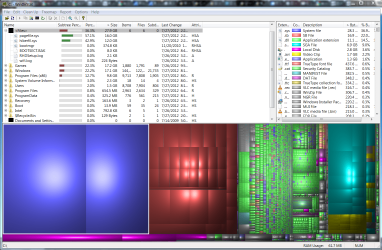
Using windirstat I looked at the ssd, I think its the pagefile thats eating up all my space.
Perhaps I should move it to a hdd?

Maybe I'm interpreting it wrong, I don't see anything that should look like windows.old
 

Attachments

  • Capture.PNG
    Capture.PNG
    259.8 KB · Views: 23

My Computer My Computer

At a glance

Windows 7 Professional x64AMD Phenom™ 9500 Quad-Core Processor8 GB DDR2 OCZPower Color 5750
OS
Windows 7 Professional x64
CPU
AMD Phenom™ 9500 Quad-Core Processor
Motherboard
MCP61PM-HM (Nettle3)
Memory
8 GB DDR2 OCZ
Graphics Card(s)
Power Color 5750
Monitor(s) Displays
HP w2207h
Hard Drives
2x Seagate ST336032 0AS SCSI 326 GB,
WD Caviar Black 600 GB,
WD Caviar Black 1 TB
PSU
Corsair TX 650w
Case
Cooler Master 690 Advanced

My Computer My Computer

At a glance

Win 10 Pro x64Intel I5-2500K @3.3GHz16GB G.Skill Ripjaws X (4x4GB)EVGA GeForce 750 Ti SC 2GB
Computer type
PC/Desktop
Computer Manufacturer/Model Number
Self Built
OS
Win 10 Pro x64
CPU
Intel I5-2500K @3.3GHz
Motherboard
Asrock P67 Extreme4
Memory
16GB G.Skill Ripjaws X (4x4GB)
Graphics Card(s)
EVGA GeForce 750 Ti SC 2GB
Sound Card
ASUS Xonar DG 5.1 Channels 24-bit 96KHz PCI Interface Sound
Monitor(s) Displays
auria eq2367
Screen Resolution
1920 x 1080
Hard Drives
250GB Samsung 850 EVO SSD
1TB WD Blue
1TB Hitachi
PSU
SeaSonic X 650W 80 Plus Gold
Case
Corsair Obsidian 750D
Cooling
Corsair H60, Three 140mm case fans
Keyboard
Logitech Wireless Keyboard K520
Mouse
Logitech Wireless Mouse M310
Internet Speed
Wave Broadband ~ 100 dn 5 up
Antivirus
Windows Defender, Malwarebytes Premium
Browser
Edge, IE11, Chrome
Other Info
Laptop specs: HP g7-1365dx /
CPU: AMD A6-3420M APU with Radeon(tm) HD Graphics /
RAM: Crucial 8Gb (2x4Gb) /
SSD: Crucial M4-CT128M4SSD2 ATA Device/ FW 000F /
GFX: AMD Radeon HD 6520G /
OS: Windows 10 Pro x64
In addition to deleting the hiberfile, set the pagefile to 2GB. I always do that on my SSDs without any problems.

PS: I see no Windows.old
 

My Computer My Computer

At a glance

Vista, Windows7, Mint Mate, Zorin, Windows 8from 1.6GHz Duo to i7
Computer Manufacturer/Model Number
HP, Dell, Gateway, Toshiba - 4 laptops and 2 desktops
OS
Vista, Windows7, Mint Mate, Zorin, Windows 8
CPU
from 1.6GHz Duo to i7
Monitor(s) Displays
2x HP w2207
Hard Drives
5x HDD, 7x SSD, 12x Externals
Keyboard
with trackball - no mices
Mouse
Trackball mice
Internet Speed
DSL 6000
I don't see a windows.old either, did you do the install by booting from your disc or from the desktop?

From boot the first time, second time from desktop.

I will move the files to hdd.
 

My Computer My Computer

At a glance

Windows 7 Professional x64AMD Phenom™ 9500 Quad-Core Processor8 GB DDR2 OCZPower Color 5750
OS
Windows 7 Professional x64
CPU
AMD Phenom™ 9500 Quad-Core Processor
Motherboard
MCP61PM-HM (Nettle3)
Memory
8 GB DDR2 OCZ
Graphics Card(s)
Power Color 5750
Monitor(s) Displays
HP w2207h
Hard Drives
2x Seagate ST336032 0AS SCSI 326 GB,
WD Caviar Black 600 GB,
WD Caviar Black 1 TB
PSU
Corsair TX 650w
Case
Cooler Master 690 Advanced
Back
Top