- Local time
- 6:33 AM
- Messages
- 119
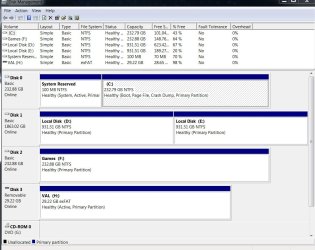
Several months ago I changed the file system of my USB drive from default FAT32 to exFAT (Can't remember why, probably in order to be able to copy large files). Now I can not copy anything on it. I keep receiving 0X80071AC3 error. Of course I looked up internet but to no avail. I tried solutions like these.
But to no avail.
I am not able to format my USB drive back to device defaults. The pop up windows turn grey and the formatting took forever.
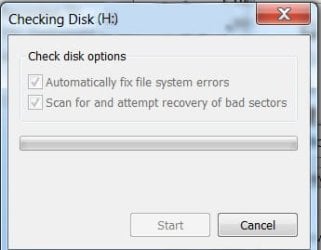
When I try to check disk for errors using Properties>Tools I got message that there's no problem. BUT, when I check both "Automatic fix file for errors" AND "Scan for and attempt recovery of bad sectors" (see pic), the pop up window turns gray and nothing happens.
So, should I throw my USB drive to the garbage and buy a new one?
But this one is almost new, I bought it recently.
Any help will be greatly appreciated.
But to no avail.
I am not able to format my USB drive back to device defaults. The pop up windows turn grey and the formatting took forever.
When I try to check disk for errors using Properties>Tools I got message that there's no problem. BUT, when I check both "Automatic fix file for errors" AND "Scan for and attempt recovery of bad sectors" (see pic), the pop up window turns gray and nothing happens.
So, should I throw my USB drive to the garbage and buy a new one?
But this one is almost new, I bought it recently.
Any help will be greatly appreciated.
Attachments
My Computer
- Computer type
- PC/Desktop
- OS
- Windows 7 Ultimate x64
- CPU
- Intel(R) Xeon(R) CPU E3-1231 v3 @ 3.40GHz
- Motherboard
- ASUSTeK COMPUTER INC. Z97-A Rev 1.xx
- Memory
- 16 GB
- Graphics Card(s)
- AMD Radeon (TM) R9 390 Series
- Sound Card
- (1) AMD High Definition Audio Device (2) Realtek High Defi

 Have a nice day.