- Local time
- 6:54 PM
- Messages
- 565
Steampunk7 :
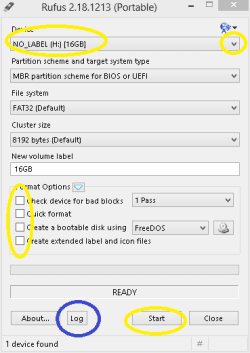
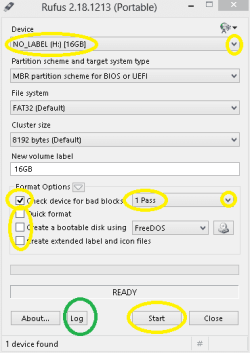
1. First of all, I would recommend Full / Slow format with Rufus 2.18. Sometimes Quick format is not enough!
It may take more than 3-4 hours but there is a good thing about 2.18 version. It will not keep you guessing & will continuously tell you the process completion percentage. Also to mention that Rufus shows logs as well.
2. When you get the new Pen drive , you should perform some checks on it :
4 Tools to Test and Detect Fake or Counterfeit USB Flash Drives • Raymond.CC
8 Free Tools to Test Read and Write Speed of USB Flash Drives • Raymond.CC
3 Tools to Check and Test USB Flash Drive • Raymond.CC
(( Just to mention :
* Rufus has a more powerful format tool than the in-built Disk Management. It has helped me save / restore my pen drives 4-5 times. Sometimes, the drives were listed in the Disk Management but would not appear in 'My Computer / Computer' Folder & Disk Management was unable to format & make them usable again.
* H2testw & CrystalDiskMark do it sufficiently well for me for over all checking of Usb Flash drives, External & Internal hard disks. Both are having portable versions available but CrystalDiskMark's latest portable version has an issue that can be resolved easily :
CrystalDiskMark Downloads & How to fix CrystalDiskMark’s UI bug ))
Thanks & Regards. ...
1. First of all, I would recommend Full / Slow format with Rufus 2.18. Sometimes Quick format is not enough!
It may take more than 3-4 hours but there is a good thing about 2.18 version. It will not keep you guessing & will continuously tell you the process completion percentage. Also to mention that Rufus shows logs as well.
2. When you get the new Pen drive , you should perform some checks on it :
4 Tools to Test and Detect Fake or Counterfeit USB Flash Drives • Raymond.CC
8 Free Tools to Test Read and Write Speed of USB Flash Drives • Raymond.CC
3 Tools to Check and Test USB Flash Drive • Raymond.CC
(( Just to mention :
* Rufus has a more powerful format tool than the in-built Disk Management. It has helped me save / restore my pen drives 4-5 times. Sometimes, the drives were listed in the Disk Management but would not appear in 'My Computer / Computer' Folder & Disk Management was unable to format & make them usable again.
* H2testw & CrystalDiskMark do it sufficiently well for me for over all checking of Usb Flash drives, External & Internal hard disks. Both are having portable versions available but CrystalDiskMark's latest portable version has an issue that can be resolved easily :
CrystalDiskMark Downloads & How to fix CrystalDiskMark’s UI bug ))
Thanks & Regards. ...
My Computer
- Computer type
- Laptop
- Computer Manufacturer/Model Number
- hp compaq presario c795VU notebook pc
- OS
- Windows 7 Ultimate x32 With Sp1 + Vista Ultimate x32 with Sp1 & Sp2 !!
- CPU
- Intel Mobile Core 2 Duo T5750 @ 2.00GHz Merom 65nm Technolog
- Motherboard
- Hewlett-Packard 30D9 (CPU)
- Memory
- 2.00GB Dual-Channel DDR2 @ 332MHz (5-5-5-15)
- Graphics Card(s)
- Mobile Intel(R) 965 Express Chipset Family
- Sound Card
- High Definition Audio Device
- Monitor(s) Displays
- LP154WX4-TLCB on Mobile Intel 965 Express Chipset Family
- Screen Resolution
- 1280x800 @ 60Hz
- Hard Drives
- 149GB Western Digital WDC WD1600BEVS-60VAT0 ATA Device (SATA)
- Keyboard
- Standard 101/102-Key or Microsoft Natural PS/2 Key + HP QLB
- Mouse
- ALPS pointing device
- Antivirus
- Kaspersky AV 2017(Win 7) & AVG AntiVirus Free 2016 (VISTA)
- Browser
- google chrome