Solved can't get laptop to boot past starting windows logo

zachjen

New member
Local time
2:05 PM
Messages
8
Acer Aspire 5532-5534
Windows 7 Home Premium

I can't get the laptop to boot past the glowing window logo that says "Starting Windows". It doesn't freeze it just hangs there forever. I tried booting into safe mode and it hangs at windows\system32\drivers\atipcie.sys and then restarts.

I don't need to save anything on the computer so easiest way to get it up and running will work. I don't have any discs to restore.

Thank you in advance.
 

My Computer My Computer

At a glance

win7 home premium SP1 64bitIntel Core i5-2320 CPU @ 3.00GHz 2.99Ghz8GB
Computer type
PC/Desktop
Computer Manufacturer/Model Number
Gateway DX4870
OS
win7 home premium SP1 64bit
CPU
Intel Core i5-2320 CPU @ 3.00GHz 2.99Ghz
Memory
8GB
Sure you don't mind to loose everything?!
 

My Computer My Computer

At a glance

Microsoft Windows 7 Home Premium 64-bits 7601...Intel(R) Core(TM) i3 CPU M 370 @ 2.40GHz4,00 GBATI Mobility Radeon HD 5400 Series
Computer type
Laptop
Computer Manufacturer/Model Number
ACER ASPIRE 5742G
OS
Microsoft Windows 7 Home Premium 64-bits 7601 Multiprocessor Free Service Pack 1
CPU
Intel(R) Core(TM) i3 CPU M 370 @ 2.40GHz
Motherboard
Acer Aspire 5742G
Memory
4,00 GB
Graphics Card(s)
ATI Mobility Radeon HD 5400 Series
Sound Card
(1) AMD High Definition Audio Device (2) Realtek High Defi
Screen Resolution
1366 x 768 x 32 bits (4294967296 colors) @ 60 Hz
Hard Drives
WDC WD5000BEVT-22ZAT0
Any idea why this happens? Installed som strange software?
 

My Computer My Computer

At a glance

Microsoft Windows 7 Home Premium 64-bits 7601...Intel(R) Core(TM) i3 CPU M 370 @ 2.40GHz4,00 GBATI Mobility Radeon HD 5400 Series
Computer type
Laptop
Computer Manufacturer/Model Number
ACER ASPIRE 5742G
OS
Microsoft Windows 7 Home Premium 64-bits 7601 Multiprocessor Free Service Pack 1
CPU
Intel(R) Core(TM) i3 CPU M 370 @ 2.40GHz
Motherboard
Acer Aspire 5742G
Memory
4,00 GB
Graphics Card(s)
ATI Mobility Radeon HD 5400 Series
Sound Card
(1) AMD High Definition Audio Device (2) Realtek High Defi
Screen Resolution
1366 x 768 x 32 bits (4294967296 colors) @ 60 Hz
Hard Drives
WDC WD5000BEVT-22ZAT0
Reformatting the Acer Aspire
1. Press the "ALT" and "F10" keys together while your computer is restarting and the Acer logo is showing to enter the Acer Aspire's reformatting utility.
2. Follow the on-screen prompts. Your laptop's hard drive will reformat and the original applications will be reinstalled. Your computer will restart after the reformatting process is complete.
3. Enter your name and other personal information when prompted during the Windows operating system setup process.
 

My Computer My Computer

At a glance

Microsoft Windows 7 Home Premium 64-bits 7601...Intel(R) Core(TM) i3 CPU M 370 @ 2.40GHz4,00 GBATI Mobility Radeon HD 5400 Series
Computer type
Laptop
Computer Manufacturer/Model Number
ACER ASPIRE 5742G
OS
Microsoft Windows 7 Home Premium 64-bits 7601 Multiprocessor Free Service Pack 1
CPU
Intel(R) Core(TM) i3 CPU M 370 @ 2.40GHz
Motherboard
Acer Aspire 5742G
Memory
4,00 GB
Graphics Card(s)
ATI Mobility Radeon HD 5400 Series
Sound Card
(1) AMD High Definition Audio Device (2) Realtek High Defi
Screen Resolution
1366 x 768 x 32 bits (4294967296 colors) @ 60 Hz
Hard Drives
WDC WD5000BEVT-22ZAT0
overheating issues maybe?
 

My Computer My Computer

At a glance

Windows 7 Professional / Windows 8 Prointel i5 - 3450, 3.10GHz, 6MB CacheKingston Hyper x 8gb 1600mhzEVGA Nvidia 550Ti with 3D
Computer type
PC/Desktop
Computer Manufacturer/Model Number
custom build
OS
Windows 7 Professional / Windows 8 Pro
CPU
intel i5 - 3450, 3.10GHz, 6MB Cache
Motherboard
gigabyte Z77-D3H
Memory
Kingston Hyper x 8gb 1600mhz
Graphics Card(s)
EVGA Nvidia 550Ti with 3D
Sound Card
N/A
Monitor(s) Displays
BenQ XL2411T 23inch gaming monitor
Screen Resolution
120mhz
Hard Drives
Kingston Hyper X 3K SSD 120GB
PSU
Corsair CX600M
Case
Zalman Z5
Cooling
coolermaster Hyper TX3
Keyboard
Cherry ZF5000
Mouse
Cherry ZF5000
Internet Speed
Sky Fibre 26meg download / 9mb upload
Antivirus
MSE free anti virus
Browser
Firefox
Sure you don't mind to loose everything?!

I don't mind. I just took over this computer from a friend about a week ago and have yet to really make it mine so nothing really to lose.
 

My Computer My Computer

At a glance

win7 home premium SP1 64bitIntel Core i5-2320 CPU @ 3.00GHz 2.99Ghz8GB
Computer type
PC/Desktop
Computer Manufacturer/Model Number
Gateway DX4870
OS
win7 home premium SP1 64bit
CPU
Intel Core i5-2320 CPU @ 3.00GHz 2.99Ghz
Memory
8GB
Any idea why this happens? Installed som strange software?

no haven't installed anything on it. worked one day the next it wouldn't boot.
 

My Computer My Computer

At a glance

win7 home premium SP1 64bitIntel Core i5-2320 CPU @ 3.00GHz 2.99Ghz8GB
Computer type
PC/Desktop
Computer Manufacturer/Model Number
Gateway DX4870
OS
win7 home premium SP1 64bit
CPU
Intel Core i5-2320 CPU @ 3.00GHz 2.99Ghz
Memory
8GB

My Computer My Computer

At a glance

win7 home premium SP1 64bitIntel Core i5-2320 CPU @ 3.00GHz 2.99Ghz8GB
Computer type
PC/Desktop
Computer Manufacturer/Model Number
Gateway DX4870
OS
win7 home premium SP1 64bit
CPU
Intel Core i5-2320 CPU @ 3.00GHz 2.99Ghz
Memory
8GB

My Computer My Computer

At a glance

Windows 7 Professional x64Intel i5 quad processor16 GBRadeon HD 5770
Computer type
PC/Desktop
Computer Manufacturer/Model Number
Custom Built
OS
Windows 7 Professional x64
CPU
Intel i5 quad processor
Motherboard
DP67BG
Memory
16 GB
Graphics Card(s)
Radeon HD 5770
Sound Card
Realtek High Definition Audio
Monitor(s) Displays
Samsung SyncMaster
Screen Resolution
1920X1080
Hard Drives
WD 2TB (SATA Internal)
WD 1TB (USB External)
PSU
Corsair GS800
Case
Tower (Generic)
Cooling
3 Internal Fans
Keyboard
MS Wireless
Mouse
MS Optical Wired
Internet Speed
54 mbps
Antivirus
Emsisoft
Browser
IE-Version 9, Palemoon-Version 24.2.0
Reformatting the Acer Aspire
1. Press the "ALT" and "F10" keys together while your computer is restarting and the Acer logo is showing to enter the Acer Aspire's reformatting utility.
2. Follow the on-screen prompts. Your laptop's hard drive will reformat and the original applications will be reinstalled. Your computer will restart after the reformatting process is complete.
3. Enter your name and other personal information when prompted during the Windows operating system setup process.

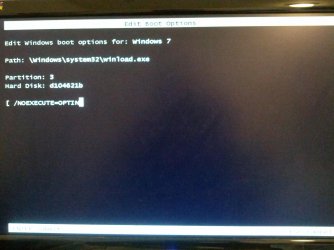
the attatched pic shows what I get when I try the ALT+F10. If I hit enter at this screen it just goes to the starting windows screen and hangs.
 

Attachments

  • IMG_20120717_175418.jpg
    IMG_20120717_175418.jpg
    442.7 KB · Views: 11
Last edited:

My Computer My Computer

At a glance

win7 home premium SP1 64bitIntel Core i5-2320 CPU @ 3.00GHz 2.99Ghz8GB
Computer type
PC/Desktop
Computer Manufacturer/Model Number
Gateway DX4870
OS
win7 home premium SP1 64bit
CPU
Intel Core i5-2320 CPU @ 3.00GHz 2.99Ghz
Memory
8GB
when i try to do a factory restore or restore to an earlier point the progress bar goes to 100% and says finshed. I click ok to restart computer and it freezes on that screen. the mouse won't move and I have to pwer the computer down and then I am back to where I started with it hanging at the starting windows screen.
 

My Computer My Computer

At a glance

win7 home premium SP1 64bitIntel Core i5-2320 CPU @ 3.00GHz 2.99Ghz8GB
Computer type
PC/Desktop
Computer Manufacturer/Model Number
Gateway DX4870
OS
win7 home premium SP1 64bit
CPU
Intel Core i5-2320 CPU @ 3.00GHz 2.99Ghz
Memory
8GB
Back
Top