
eglovesasailor
New member
- Local time
- 1:27 AM
- Messages
- 20
Hi;
I am running Windows 7 on an Acer TC-605 desktop PC. I can't get past "Reboot and select proper Boot device".
I can get into BIOS.
Every time I power up I get one beep and it goes straight to the "Reboot and select..." screen. Which does nothing, except repeat itself.
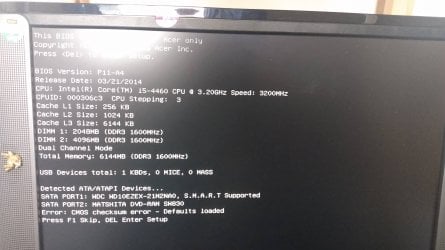
I renewed the CMOS battery. After I put in the new one and powered up I got TWO beeps and the boot screen shown in my photo.
But when I press a key, it reverts to the Reboot and select... prompt.
And if I power up for a second time with the newly installed CMOS battery, it goes back to one beep and Reboot and select...
If I then remove the battery and power cable again and then replace the battery and power up, I get the two beeps again and the boot screen shown in my photo.
I've been through this cycle a few times, and during one, corrected the date and time, but that made no difference.
I have a Windows startup and repair cd for this machine, but it won't boot from there, either.
It seems to recognise the drives sometimes, but not always. I have no idea what is going on or where to go from here.
If anyone can help me I would be very grateful. I like this PC and it deserves to live again!
Stay safe and well, everyone.

I am running Windows 7 on an Acer TC-605 desktop PC. I can't get past "Reboot and select proper Boot device".
I can get into BIOS.
Every time I power up I get one beep and it goes straight to the "Reboot and select..." screen. Which does nothing, except repeat itself.
I renewed the CMOS battery. After I put in the new one and powered up I got TWO beeps and the boot screen shown in my photo.
But when I press a key, it reverts to the Reboot and select... prompt.
And if I power up for a second time with the newly installed CMOS battery, it goes back to one beep and Reboot and select...
If I then remove the battery and power cable again and then replace the battery and power up, I get the two beeps again and the boot screen shown in my photo.
I've been through this cycle a few times, and during one, corrected the date and time, but that made no difference.
I have a Windows startup and repair cd for this machine, but it won't boot from there, either.
It seems to recognise the drives sometimes, but not always. I have no idea what is going on or where to go from here.
If anyone can help me I would be very grateful. I like this PC and it deserves to live again!
Stay safe and well, everyone.
Attachments
My Computer
- Computer type
- PC/Desktop
- OS
- Windows 7 Home Premium on 2 PCs, one 64 bit, one 32 bit


