Solved Can't get past welcome screen

seanmoha

New member
Local time
5:45 AM
Messages
42
Helo All, and thank you in advance!I've been going on through this forum trying to figure out why my computer stays stuck on the welcome screen once I type in my admin. password. My computer isn't frozen,as the mouse and the spinning circle are active. I'm not sure what to do. The last time I used my computer was yesterday to do pc tuneup using cap pc tune up software, I used it once every week and never had any problems . I've had Windows 7 Pro installed for maybe 10ish months now and have never encountered this problem.Please help!Specs:ASUS P6T Motherboard - LGA 1366, Intel X58Microsoft Windows 7 Professional 64BitIntel Core i7 960 ProcessorKingston HyperX 12GB DDR3 1333MHz MemoryWD Caviar 500GB Serial ATA HD 7200/32MB/SATA-3GEVGA 512-P3-1154-TR GeForce GTS 250 Video Card - 512MB DDR3LG GH22NS50AUAU DVD Writer - DVD+R 22x, DVD+RW 8X, DVD-RW 6x, DVD-RAM 12
 
Last edited:

My Computer My Computer

Computer Manufacturer/Model Number
na
OS
windows 7 x64
CPU
i960
Motherboard
asus
Memory
12
Graphics Card(s)
2
Sound Card
2
Monitor(s) Displays
acer
Hard Drives
500gig
PSU
na
Case
na
Cooling
na
Hello seanmoha, welcome to Seven Forums!


The first, easiest thing to try would be a system restore, be sure to select e restore point before you made the latest changes and be sure to post back with any further questions you may have and to keep us informed.

How to Do a System Restore in Windows 7
 

My Computer My Computer

Computer Manufacturer/Model Number
* BFK Customs *
OS
W 7 64-bit Ultimate
CPU
Intel Q9550 Yorkfield
Motherboard
ASUS P5Q Pro
Memory
8GB Dominator 8500C5D
Graphics Card(s)
ATI : XFX 5870
Sound Card
Realtek HD Audio 7-1
Monitor(s) Displays
1x 47" LCD HDMI & 3x 26" LCD HDMI
Screen Resolution
1920x1080P & 1920x1200
Hard Drives
1x 80GB Intel X25-M G2 SSD : 1x 500GB & 1x 640GB WD Caviar Black(s)
PSU
Corsair 620HX
Case
Cooler Master RC-690
Cooling
Tuniq Tower 120, 2x 140mm and 3x 120mm case fans
Keyboard
Microsoft 500
Mouse
Razer Diamondback 3G
Internet Speed
14 Mb/s
Other Info
1x Koutech 3Gb/s SATA HDD Hot Swap Rack
Dear Bare Foot Kid, I'm not able to get pass the welcome screen so I won't be able to get to my start menu. Please advise more if you can, Thanks in advance
 

My Computer My Computer

Computer Manufacturer/Model Number
na
OS
windows 7 x64
CPU
i960
Motherboard
asus
Memory
12
Graphics Card(s)
2
Sound Card
2
Monitor(s) Displays
acer
Hard Drives
500gig
PSU
na
Case
na
Cooling
na
Dear Bare Foot Kid, I'm not able to get pass the welcome screen so I won't be able to get to my start menu. Please advise more if you can, Thanks in advance


Please have a look at Method Two in the tutorial I listed.
 

My Computer My Computer

Computer Manufacturer/Model Number
* BFK Customs *
OS
W 7 64-bit Ultimate
CPU
Intel Q9550 Yorkfield
Motherboard
ASUS P5Q Pro
Memory
8GB Dominator 8500C5D
Graphics Card(s)
ATI : XFX 5870
Sound Card
Realtek HD Audio 7-1
Monitor(s) Displays
1x 47" LCD HDMI & 3x 26" LCD HDMI
Screen Resolution
1920x1080P & 1920x1200
Hard Drives
1x 80GB Intel X25-M G2 SSD : 1x 500GB & 1x 640GB WD Caviar Black(s)
PSU
Corsair 620HX
Case
Cooler Master RC-690
Cooling
Tuniq Tower 120, 2x 140mm and 3x 120mm case fans
Keyboard
Microsoft 500
Mouse
Razer Diamondback 3G
Internet Speed
14 Mb/s
Other Info
1x Koutech 3Gb/s SATA HDD Hot Swap Rack
Please forgive me as you can tell that I'm not too tech savvy, I'm trying to do that but all I get is a black screen and nothing is happening.
 

My Computer My Computer

Computer Manufacturer/Model Number
na
OS
windows 7 x64
CPU
i960
Motherboard
asus
Memory
12
Graphics Card(s)
2
Sound Card
2
Monitor(s) Displays
acer
Hard Drives
500gig
PSU
na
Case
na
Cooling
na
Restart the PC and immediately start tapping the F8 hot-key to see if you get this "Repair ... " in this screen below, if you do you may be able to start the system restore from there.

click to enlarge
Repair.jpg
 

My Computer My Computer

Computer Manufacturer/Model Number
* BFK Customs *
OS
W 7 64-bit Ultimate
CPU
Intel Q9550 Yorkfield
Motherboard
ASUS P5Q Pro
Memory
8GB Dominator 8500C5D
Graphics Card(s)
ATI : XFX 5870
Sound Card
Realtek HD Audio 7-1
Monitor(s) Displays
1x 47" LCD HDMI & 3x 26" LCD HDMI
Screen Resolution
1920x1080P & 1920x1200
Hard Drives
1x 80GB Intel X25-M G2 SSD : 1x 500GB & 1x 640GB WD Caviar Black(s)
PSU
Corsair 620HX
Case
Cooler Master RC-690
Cooling
Tuniq Tower 120, 2x 140mm and 3x 120mm case fans
Keyboard
Microsoft 500
Mouse
Razer Diamondback 3G
Internet Speed
14 Mb/s
Other Info
1x Koutech 3Gb/s SATA HDD Hot Swap Rack

My Computer My Computer

Computer type
PC/Desktop
Computer Manufacturer/Model Number
Dell XPS 420
OS
Windows 10, Home Clean Install
CPU
Intel Core2 processsor Q8200(2.33Ghz 1333FSB) Quad Core Tech
Motherboard
Dell
Memory
6 gb
Graphics Card(s)
ATI Radeon 256MB HD3650
Sound Card
Intergrated 7.1 Channel Audio
Monitor(s) Displays
Dell SP2009W 20"
Hard Drives
640 GB Serial ATA Hard drive
Cooling
Fan
Keyboard
Dell USB Keyboard
Mouse
Dell Premium Optical USB
Internet Speed
DSL 2.85
I kept on trying that and all I get is a blank screen
 

My Computer My Computer

Computer Manufacturer/Model Number
na
OS
windows 7 x64
CPU
i960
Motherboard
asus
Memory
12
Graphics Card(s)
2
Sound Card
2
Monitor(s) Displays
acer
Hard Drives
500gig
PSU
na
Case
na
Cooling
na
Thanks for the reply Rich46 but I kept on trying to start in safe mode but f8 hot key is not giving me anything but a blank screen
 

My Computer My Computer

Computer Manufacturer/Model Number
na
OS
windows 7 x64
CPU
i960
Motherboard
asus
Memory
12
Graphics Card(s)
2
Sound Card
2
Monitor(s) Displays
acer
Hard Drives
500gig
PSU
na
Case
na
Cooling
na
You may have to run a system repair.
 

My Computer My Computer

Computer Manufacturer/Model Number
Dell and Custom
OS
Systems 1 and 2: Windows 7 Enterprise x64, Win 8 Developer
CPU
System 1: i7 [email protected], System 2: AMD FX-4100 Zambezi 3.6G
Motherboard
System 1:Dell 06NWYK System 2: ASUS M5A97 AM3+
Memory
System 1: 8GB System 2: 8GB
Graphics Card(s)
System 1: ATI FirePro V4800 System 2: Radeon HD 6850
Sound Card
System 1: onboard System 2: onboard
Monitor(s) Displays
System1: Viewsonic HDMI 24"
Screen Resolution
System 1: 1920x1080 System 2: 1920x1080
Hard Drives
System 1: Mirrored .5B drives System 2: Seagate Barracuda ST1000DM003 1TB 7200 RPM 64MB Cache SATA 6.0Gb/s
Case
System 1: Dell System 2: Cooler Master
Internet Speed
10 MBPS
thank u Lemur, how do I do that?
 

My Computer My Computer

Computer Manufacturer/Model Number
na
OS
windows 7 x64
CPU
i960
Motherboard
asus
Memory
12
Graphics Card(s)
2
Sound Card
2
Monitor(s) Displays
acer
Hard Drives
500gig
PSU
na
Case
na
Cooling
na
my son had some trouble like that and if i remember right it had something to do with setting (
command rate 1t ) to 2t in your bios under memory . hope this help you ....
:cool:

scrooge
 

My Computer My Computer

Computer Manufacturer/Model Number
home build
OS
win 7 ( 64 bit)
CPU
Intel Core i7-870 Lynnfield 2.93GHz 8MB L3 Cache LGA 1156 95
Motherboard
ASUS P7P55 LX LGA 1156
Memory
G.SKILL Sniper Series 16GB (4 x 4GB) 240-Pin DDR3 SDRAM
Graphics Card(s)
ATI Radeon HD6800 Series
Sound Card
hdmi
Monitor(s) Displays
42" lg 3d tv
Screen Resolution
1920 x 1080
Hard Drives
1 ssd pci-e revodrive
4 seagate 1.5 tb
PSU
Rosewill BRONZE Series RBR1000-M 1000W Continuous@40°C, 80Pl
Case
CoolMaster 922
Cooling
CORSAIR CWCH60 Hydro Series H60 High Performance Liquid CPU
Keyboard
logtech
Mouse
logitect
Internet Speed
5 mbit
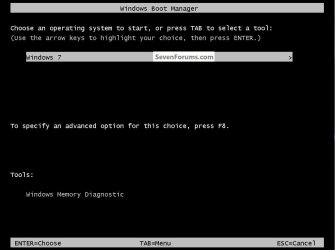
OK let's try this; restart the PC and immediately start tapping the space bar to get here, when there select the F8 option to get to the screen I posted above to see if you get the "Repair ... " option.


click to enlarge
SpaceBar.jpg
 

My Computer My Computer

Computer Manufacturer/Model Number
* BFK Customs *
OS
W 7 64-bit Ultimate
CPU
Intel Q9550 Yorkfield
Motherboard
ASUS P5Q Pro
Memory
8GB Dominator 8500C5D
Graphics Card(s)
ATI : XFX 5870
Sound Card
Realtek HD Audio 7-1
Monitor(s) Displays
1x 47" LCD HDMI & 3x 26" LCD HDMI
Screen Resolution
1920x1080P & 1920x1200
Hard Drives
1x 80GB Intel X25-M G2 SSD : 1x 500GB & 1x 640GB WD Caviar Black(s)
PSU
Corsair 620HX
Case
Cooler Master RC-690
Cooling
Tuniq Tower 120, 2x 140mm and 3x 120mm case fans
Keyboard
Microsoft 500
Mouse
Razer Diamondback 3G
Internet Speed
14 Mb/s
Other Info
1x Koutech 3Gb/s SATA HDD Hot Swap Rack

My Computer My Computer

Computer type
PC/Desktop
Computer Manufacturer/Model Number
Dell XPS 420
OS
Windows 10, Home Clean Install
CPU
Intel Core2 processsor Q8200(2.33Ghz 1333FSB) Quad Core Tech
Motherboard
Dell
Memory
6 gb
Graphics Card(s)
ATI Radeon 256MB HD3650
Sound Card
Intergrated 7.1 Channel Audio
Monitor(s) Displays
Dell SP2009W 20"
Hard Drives
640 GB Serial ATA Hard drive
Cooling
Fan
Keyboard
Dell USB Keyboard
Mouse
Dell Premium Optical USB
Internet Speed
DSL 2.85
you might also try the "last known good configuration" option.
 

My Computer My Computer

Computer Manufacturer/Model Number
Alienware AREA-51 M17x
OS
windows 7 ultimate 64bit
CPU
Intel Core2 Extreme x9000 2.8GHZ
Motherboard
Asus P965 Intel chipset
Memory
4Gig
Graphics Card(s)
2 NVidia GeForce 8800M GTX (SLi)
Sound Card
onboard
Monitor(s) Displays
17in. built-in, 47in JVC LCD
Screen Resolution
1080p
Hard Drives
2 250Gig Hitachi (RAID 0) @ 7200RPM
Case
17in. laptop
Mouse
touchpad, Logitech Anywhere Mouse cordless laser
Internet Speed
cable
Rich, I cant get pass "welcome" just after I enter my admin password so I wont be able to do that , Thanks anyways.Scrooge, If I get pass the welcome screen then I will try, thanks .
 

My Computer My Computer

Computer Manufacturer/Model Number
na
OS
windows 7 x64
CPU
i960
Motherboard
asus
Memory
12
Graphics Card(s)
2
Sound Card
2
Monitor(s) Displays
acer
Hard Drives
500gig
PSU
na
Case
na
Cooling
na
BFK, I did that and all I got is a blank screen.Thanks Kword88
 

My Computer My Computer

Computer Manufacturer/Model Number
na
OS
windows 7 x64
CPU
i960
Motherboard
asus
Memory
12
Graphics Card(s)
2
Sound Card
2
Monitor(s) Displays
acer
Hard Drives
500gig
PSU
na
Case
na
Cooling
na
not sure you understand me . when booting up go to your bios and in the memory settings check and see if it's 1t or 2t in the command rate. if it's 1t change it to 2t and see if that helps.

scrooge
 

My Computer My Computer

Computer Manufacturer/Model Number
home build
OS
win 7 ( 64 bit)
CPU
Intel Core i7-870 Lynnfield 2.93GHz 8MB L3 Cache LGA 1156 95
Motherboard
ASUS P7P55 LX LGA 1156
Memory
G.SKILL Sniper Series 16GB (4 x 4GB) 240-Pin DDR3 SDRAM
Graphics Card(s)
ATI Radeon HD6800 Series
Sound Card
hdmi
Monitor(s) Displays
42" lg 3d tv
Screen Resolution
1920 x 1080
Hard Drives
1 ssd pci-e revodrive
4 seagate 1.5 tb
PSU
Rosewill BRONZE Series RBR1000-M 1000W Continuous@40°C, 80Pl
Case
CoolMaster 922
Cooling
CORSAIR CWCH60 Hydro Series H60 High Performance Liquid CPU
Keyboard
logtech
Mouse
logitect
Internet Speed
5 mbit

My Computer My Computer

Computer Manufacturer/Model Number
* BFK Customs *
OS
W 7 64-bit Ultimate
CPU
Intel Q9550 Yorkfield
Motherboard
ASUS P5Q Pro
Memory
8GB Dominator 8500C5D
Graphics Card(s)
ATI : XFX 5870
Sound Card
Realtek HD Audio 7-1
Monitor(s) Displays
1x 47" LCD HDMI & 3x 26" LCD HDMI
Screen Resolution
1920x1080P & 1920x1200
Hard Drives
1x 80GB Intel X25-M G2 SSD : 1x 500GB & 1x 640GB WD Caviar Black(s)
PSU
Corsair 620HX
Case
Cooler Master RC-690
Cooling
Tuniq Tower 120, 2x 140mm and 3x 120mm case fans
Keyboard
Microsoft 500
Mouse
Razer Diamondback 3G
Internet Speed
14 Mb/s
Other Info
1x Koutech 3Gb/s SATA HDD Hot Swap Rack
If you create a recovery DVD, you may be able to boot to recovery options
Create Recovery DVD. It may be necessary to use another computer to complete this portion of the repair.
The Windows 7 recovery disk, which you have just created, is used to boot Seven when it won't boot to reach the
System Recovery Options
If necessary boot the Recovery CD to run Startup Repair which will allow you to reach System Restore or System File Checker, which will allow you to fix any corruption.
If Windows still will not start, try booting into Safe Mode to run sfc /scannow to repair System files.


Below is a bulletin distributed by MS to explain the start up procedure when Windows will not boot. Startup Repair

Problems starting up a PC can be tricky to fix, since Windows hasn’t had a chance to load its arsenal of troubleshooting tools. Some people simply give up and reinstall Windows.
Startup Repair is designed to prevent a time-consuming reinstallation by diagnosing and repairing problems that prevent Windows from booting. Introduced in Windows Vista, Startup Repair is even easier to use because Windows 7 now installs it on your hard drive for you.

wol_error.gif
Click this bar to view the full image.
65a1558c-4130-45c3-93b4-e1de3c40739d.jpg
The Startup Repair tool in Windows 7 can help fix problems that prevent Windows from booting up.


Get help
 
Last edited:

My Computer My Computer

Computer type
PC/Desktop
Computer Manufacturer/Model Number
Dell XPS 420
OS
Windows 10, Home Clean Install
CPU
Intel Core2 processsor Q8200(2.33Ghz 1333FSB) Quad Core Tech
Motherboard
Dell
Memory
6 gb
Graphics Card(s)
ATI Radeon 256MB HD3650
Sound Card
Intergrated 7.1 Channel Audio
Monitor(s) Displays
Dell SP2009W 20"
Hard Drives
640 GB Serial ATA Hard drive
Cooling
Fan
Keyboard
Dell USB Keyboard
Mouse
Dell Premium Optical USB
Internet Speed
DSL 2.85
Back
Top