
Solved Can't Get SYstem to BOOT...

Ccaptain Jack

New member
Local time
3:20 PM
Messages
12
:sarc:

This my very first build ever and I can't get the system to BOOT ....I keep getting .....Reboot and select proper Boot device or Insert Boot Media in the selected Boot device and press a key_ After I have accessed the BIOS and selected the ASUS DVD/CD drive as options#1 boot and CRUCIAL M4 SSD option#2 boot. The other drives are disconnected at the present moment. What have I done incorrectly? I am able to boot using a recovery disk but I am unable to load the Windows 7 from the actual program disk with Windows 7 Pro 64 bit on it. I have tried using bootsect.exe as well as disk that came with ASUS DVD/CD drive once the system BOOTs using the recovery disk and I get nothing! I even tried loading the MOBO drivers and I get....error...message...no OS is load on this computer. What is left for me to?

I am attempting to load Windows 7 PRO and the drivers for the MOBO, ASUS DVD/CD, VIDEO Card and HDD's so I can do the following once they are loaded:


1. Using the SSD for Boot/OS/Programs
2. Using the 2 TB HDD in RAID1 for libraries (data/media, my DOCS, Music, Pics, etc.)
3. Using the 1 TB external HDD for backup-Microsoft Sync and Norton backup Utilities

Please Help!!!

System specs:
Sapphire Radeon HD 7850 2G DDR5 PCIE 3.0
Cosair GS 700
Intel Core i5-3570K 3.4GHz Quad Core
Cooler Master Hyper 212 EVO 82.9 CFM Sleeve Bearing
Gigabyte GA-Z77-D3H-MVP mATX LGA 1155
Corsair Vengeance 4GB (2x 4GB) DDR3-1600
Crucial m4 256GB 2.5-Inch Solid State Drive SATA 6Gb/s
Seagate Barracuda 3TB 3.5" 7200 RPM
Seagate Barracuda 2x(1TB 3.5" 7200 RPM)
Cooler Master HAF 912 ATX Mid Tower
Asus BC-12B1ST-BLK/B/AS Blue-Ray Reader, DVD/CD Writer
WD 1 TB external drive
 

My Computer

Computer Manufacturer/Model Number
Custom Gaming Build
OS
Windows 7 PRO 64 Bit
CPU
Intel Core i5-3570K 3.4GHz Quad Core
Motherboard
Gigabyte GA-Z77-D3H-MVP mATX LGA 1155
Memory
Corsair Vengeance 8GB (2x 4GB) DDR3-1600
Graphics Card(s)
Sapphire Radeon HD 7850 2G DDR5 PCIE 3.0
Monitor(s) Displays
Samsung 24' HHDTv
Hard Drives
Crucial m4 256GB 2.5-Inch Solid State Drive SATA 6Gb/s
Seagate Barracuda 3TB 3.5" 7200 RPM
Seagate Barracuda 2x(1TB 3.5" 7200 RPM)
WD 1 TB external drive
PSU
Cosair GS 700 watt
Case
Cooler Master HAF 912 ATX Mid Tower
Cooling
Cooler Master Hyper 212 EVO 82.9 CFM Sleeve Bearing
Are you getting the words " Press any key to boot from cd/dvd " ??

Where did the W7 pro disc come from ?
 

My Computer

Computer type
PC/Desktop
Computer Manufacturer/Model Number
Skylake Special #666
OS
Windows 10 Pro x64
CPU
Intel Core i7 6700K
Motherboard
Asus Sabertooth Z170 Mark 1
Memory
GSkill TridentZ RGB 16GB 3600 16-16-16-36
Graphics Card(s)
EVGA GTX 980 Ti SC x2
Sound Card
Realtek High Definition
Monitor(s) Displays
AOC G2460PG
Screen Resolution
1920 x 1080 144Hz
Hard Drives
Samsung 860 Pro 256GB, Seagate Barracuda 4TB x2
PSU
EVGA 1000 P2, EVGA White Custom Braided Cables
Case
Corsair Vengeance C70 Gunmetal Black
Cooling
Corsair H100i v2, Corsair ML120 x2, Thermal Grizzly Kryonaut
Keyboard
Logitech G910 Orion Spectrum
Mouse
Logitech G700s
Internet Speed
Verizon Fios Quantum Gateway 75/75
Antivirus
Windows Defender, Malwarebytes Free 3.8.3
Browser
Chrome
Other Info
Corsair SP120 x4, LG Blu-ray Drive, Durabrand HT-395 100 Watt Dolby Digital Amp, Corsair H2100 Wireless 7.1 Headset
Yes. It is what came with my other system.
 

My Computer

Computer Manufacturer/Model Number
Custom Gaming Build
OS
Windows 7 PRO 64 Bit
CPU
Intel Core i5-3570K 3.4GHz Quad Core
Motherboard
Gigabyte GA-Z77-D3H-MVP mATX LGA 1155
Memory
Corsair Vengeance 8GB (2x 4GB) DDR3-1600
Graphics Card(s)
Sapphire Radeon HD 7850 2G DDR5 PCIE 3.0
Monitor(s) Displays
Samsung 24' HHDTv
Hard Drives
Crucial m4 256GB 2.5-Inch Solid State Drive SATA 6Gb/s
Seagate Barracuda 3TB 3.5" 7200 RPM
Seagate Barracuda 2x(1TB 3.5" 7200 RPM)
WD 1 TB external drive
PSU
Cosair GS 700 watt
Case
Cooler Master HAF 912 ATX Mid Tower
Cooling
Cooler Master Hyper 212 EVO 82.9 CFM Sleeve Bearing
You can not use a HP/Compaq Recovery DVD & product key, on a Gigabyte GA-Z77-D3H-MVP mATX LGA 1155, that would be a illegal install.
You may like to download a ISO from a good source like:
Windows Download and Shop - Microsoft Windows
Than install Windows 7.
As the Gigabyte GA-Z77-D3H-MVP mATX LGA 1155 has a uEFI/BIOS firmware.
How to install Windows 64 bit on a uEFI BIOS:
http://www.sevenforums.com/tutorial...e-firmware-interface-install-windows-7-a.html
 

My Computer

OS
ME/XP/Vista/Win7
Ok, I have located an ISO image from a good source: Microsoft as recommended. It is in the process of downloading to my terminal! Once it finishes downloading. I will need to convert it from an ISO image to the USB bootable data / an UEFI for use on a USB disk. Does it matters if I use an external HDD of 500 GB? Will I need to remove any of the data I have stored on there? (It is the only storage item I have large enough to store 4GB or more.) Then, I will need to plug the ISO image to USB/UEFI into a USB port on my new build, SELECT=====> F12 which is used on my MOBO to access the BOOT sequence for one time use or DELETE to change the boot sequence in the BIOS ====>Then SELECT====> USB as primary boot. Also, since I want to use the SSD of 256GB for programs and BOOT does it need to be select as BOOT option #2 as well as change IDE to ACHI in BIOS and disconnect the other 3 HDD I have connected that I will eventually setup in RAID once I research that subject? Finally, are there any other changes I need to make to BIOS that I may have over looked?
 
Last edited:

My Computer

Computer Manufacturer/Model Number
Custom Gaming Build
OS
Windows 7 PRO 64 Bit
CPU
Intel Core i5-3570K 3.4GHz Quad Core
Motherboard
Gigabyte GA-Z77-D3H-MVP mATX LGA 1155
Memory
Corsair Vengeance 8GB (2x 4GB) DDR3-1600
Graphics Card(s)
Sapphire Radeon HD 7850 2G DDR5 PCIE 3.0
Monitor(s) Displays
Samsung 24' HHDTv
Hard Drives
Crucial m4 256GB 2.5-Inch Solid State Drive SATA 6Gb/s
Seagate Barracuda 3TB 3.5" 7200 RPM
Seagate Barracuda 2x(1TB 3.5" 7200 RPM)
WD 1 TB external drive
PSU
Cosair GS 700 watt
Case
Cooler Master HAF 912 ATX Mid Tower
Cooling
Cooler Master Hyper 212 EVO 82.9 CFM Sleeve Bearing
When booting from win7 system repair DVD enter command prompt

Code:
diskpart
list disk
exit

Do you see all disks? Detach the external disk (at least temporary) , to make it easier to troubleshoot

Did you try startup repair?
 

My Computer

Computer type
Laptop
Computer Manufacturer/Model Number
ACER ASPIRE 5742G
OS
Microsoft Windows 7 Home Premium 64-bits 7601 Multiprocessor Free Service Pack 1
CPU
Intel(R) Core(TM) i3 CPU M 370 @ 2.40GHz
Motherboard
Acer Aspire 5742G
Memory
4,00 GB
Graphics Card(s)
ATI Mobility Radeon HD 5400 Series
Sound Card
(1) AMD High Definition Audio Device (2) Realtek High Defi
Screen Resolution
1366 x 768 x 32 bits (4294967296 colors) @ 60 Hz
Hard Drives
WDC WD5000BEVT-22ZAT0
Yes, I entered Diskpart, list disk, select disk X (the 500 GB external HDD) list partiton, select partition 1 (which is the 500 GB external HDD). However, I don't know any of the other commands to use after that. I can see the drive but I don't know how to load the file from this point on.....perhaps would it be excute...etc?
 

My Computer

Computer Manufacturer/Model Number
Custom Gaming Build
OS
Windows 7 PRO 64 Bit
CPU
Intel Core i5-3570K 3.4GHz Quad Core
Motherboard
Gigabyte GA-Z77-D3H-MVP mATX LGA 1155
Memory
Corsair Vengeance 8GB (2x 4GB) DDR3-1600
Graphics Card(s)
Sapphire Radeon HD 7850 2G DDR5 PCIE 3.0
Monitor(s) Displays
Samsung 24' HHDTv
Hard Drives
Crucial m4 256GB 2.5-Inch Solid State Drive SATA 6Gb/s
Seagate Barracuda 3TB 3.5" 7200 RPM
Seagate Barracuda 2x(1TB 3.5" 7200 RPM)
WD 1 TB external drive
PSU
Cosair GS 700 watt
Case
Cooler Master HAF 912 ATX Mid Tower
Cooling
Cooler Master Hyper 212 EVO 82.9 CFM Sleeve Bearing
Yes, I entered Diskpart, list disk, select disk X (the 500 GB external HDD) list partiton, select partition 1 (which is the 500 GB external HDD). However, I don't know any of the other commands to use after that. I can see the drive but I don't know how to load the file from this point on.....perhaps would it be excute...etc?

sel disk X (x=0,1,2)
list part

All partitions are still there? Did you delete partition(s). Waht's the problem, so what do you want to achieve?
 

My Computer

Computer type
Laptop
Computer Manufacturer/Model Number
ACER ASPIRE 5742G
OS
Microsoft Windows 7 Home Premium 64-bits 7601 Multiprocessor Free Service Pack 1
CPU
Intel(R) Core(TM) i3 CPU M 370 @ 2.40GHz
Motherboard
Acer Aspire 5742G
Memory
4,00 GB
Graphics Card(s)
ATI Mobility Radeon HD 5400 Series
Sound Card
(1) AMD High Definition Audio Device (2) Realtek High Defi
Screen Resolution
1366 x 768 x 32 bits (4294967296 colors) @ 60 Hz
Hard Drives
WDC WD5000BEVT-22ZAT0
All of the items are new and never have been used before. I just finished assembling them and wasn't able to get the optical drive to read my windows CD. So I am simply trying to get the computer to load Windows from my DVD/CD drive so I can:


1. Using the SSD for Boot/OS/Programs
2. Using the 2 TB HDD in RAID1 for libraries (data/media, my DOCS, Music, Pics, etc.)
3. Using the 1 TB external HDD for backup-Microsoft Sync and Norton backup Utilities


Then I would like to load...my other files/drivers and games on to my SSD.

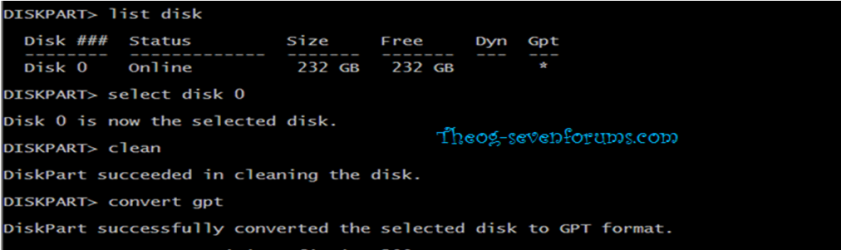
Originally, it would only say......Reboot and select proper Boot device or Insert Boot Media in the selected Boot device and press a key. So I rebooted the computer and I can get it to do the screenshot from above by using my recovery disc to access the command prompt and not disc which has my Windows 7 Pro on it. At the prompt on the screen I entered Diskpart, list disk, select disk #4, list partition (there are none), select partition #1, clean,……and I was left without any other commands to enter.


So here is where there is a big……disconnect!

Now I know that I should have been entering convert gpt which I wasn’t aware of. So once it converts the SSD to gpt format. I will enter exit, exit. Now I should have a newly formed uEFI BIOS for the MOBO to read the upload from the USB to the SSD! Then, I will have to click install!
 
Last edited:

My Computer

Computer Manufacturer/Model Number
Custom Gaming Build
OS
Windows 7 PRO 64 Bit
CPU
Intel Core i5-3570K 3.4GHz Quad Core
Motherboard
Gigabyte GA-Z77-D3H-MVP mATX LGA 1155
Memory
Corsair Vengeance 8GB (2x 4GB) DDR3-1600
Graphics Card(s)
Sapphire Radeon HD 7850 2G DDR5 PCIE 3.0
Monitor(s) Displays
Samsung 24' HHDTv
Hard Drives
Crucial m4 256GB 2.5-Inch Solid State Drive SATA 6Gb/s
Seagate Barracuda 3TB 3.5" 7200 RPM
Seagate Barracuda 2x(1TB 3.5" 7200 RPM)
WD 1 TB external drive
PSU
Cosair GS 700 watt
Case
Cooler Master HAF 912 ATX Mid Tower
Cooling
Cooler Master Hyper 212 EVO 82.9 CFM Sleeve Bearing
UPDATE:

After a very trying and difficult learning curve to over come, I am very please to annouce....I was able to acheive my end results!!! HOORAY! My first computer build is live and loading Windows 7 Pro 64bit. Thanks......,theog and kaktussoft! I could not have done this with out your support seeing that I know asbolute nothing about computers prior to this except.......press START!
 

My Computer

Computer Manufacturer/Model Number
Custom Gaming Build
OS
Windows 7 PRO 64 Bit
CPU
Intel Core i5-3570K 3.4GHz Quad Core
Motherboard
Gigabyte GA-Z77-D3H-MVP mATX LGA 1155
Memory
Corsair Vengeance 8GB (2x 4GB) DDR3-1600
Graphics Card(s)
Sapphire Radeon HD 7850 2G DDR5 PCIE 3.0
Monitor(s) Displays
Samsung 24' HHDTv
Hard Drives
Crucial m4 256GB 2.5-Inch Solid State Drive SATA 6Gb/s
Seagate Barracuda 3TB 3.5" 7200 RPM
Seagate Barracuda 2x(1TB 3.5" 7200 RPM)
WD 1 TB external drive
PSU
Cosair GS 700 watt
Case
Cooler Master HAF 912 ATX Mid Tower
Cooling
Cooler Master Hyper 212 EVO 82.9 CFM Sleeve Bearing
UPDATE:

After a very trying and difficult learning curve to over come, I am very please to annouce....I was able to acheive my end results!!! HOORAY! My first computer build is live and loading Windows 7 Pro 64bit. Thanks......,theog and kaktussoft! I could not have done this with out your support seeing that I know asbolute nothing about computers prior to this except.......press START!


You are welcome. :dinesh::dinesh:
 

My Computer

OS
ME/XP/Vista/Win7
YEs, I have a uEFI MOBO and was able to install windows 7 following the info provided by the members of this board!!! Worked like a charm!
 

My Computer

Computer Manufacturer/Model Number
Custom Gaming Build
OS
Windows 7 PRO 64 Bit
CPU
Intel Core i5-3570K 3.4GHz Quad Core
Motherboard
Gigabyte GA-Z77-D3H-MVP mATX LGA 1155
Memory
Corsair Vengeance 8GB (2x 4GB) DDR3-1600
Graphics Card(s)
Sapphire Radeon HD 7850 2G DDR5 PCIE 3.0
Monitor(s) Displays
Samsung 24' HHDTv
Hard Drives
Crucial m4 256GB 2.5-Inch Solid State Drive SATA 6Gb/s
Seagate Barracuda 3TB 3.5" 7200 RPM
Seagate Barracuda 2x(1TB 3.5" 7200 RPM)
WD 1 TB external drive
PSU
Cosair GS 700 watt
Case
Cooler Master HAF 912 ATX Mid Tower
Cooling
Cooler Master Hyper 212 EVO 82.9 CFM Sleeve Bearing
Back
Top