Solved Can't get the sound to work on a new system

shootncut

New member
Local time
5:24 AM
Messages
11
Bought a second hand machine without OS from a computer shop, had Win7 installed in a different shop, but now can’t get the sound to work. Clicking on the speaker icon runs through windows diagnostic utility, which solved nothing.

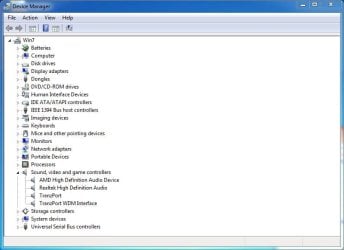
Installed absolutely all windows updates. In device manager no icons have any alerts, including all sound-related ones, as you can see.
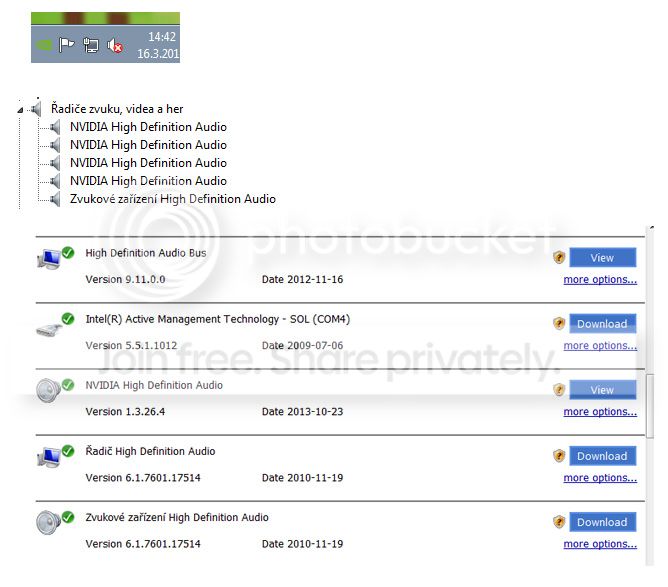
Used DriverMax to update two drivers, so now all sound-related ones are up to date.
Restarted, still same red X.


Thank you very much,
David
Untitled-2.jpg~original
 

My Computer My Computer

At a glance

Win 7
Computer type
PC/Desktop
OS
Win 7
Please post a screen shot of what is showing in the Device Manager for Sound devices. Also what is set as the Default Playback Device in the Sound Panel, Playback section.

How to post screen shots

Here are mine, for examples.
 

Attachments

  • Device Manager Capture.JPG
    Device Manager Capture.JPG
    48.5 KB · Views: 0
  • Sound Panel.JPG
    Sound Panel.JPG
    30.8 KB · Views: 15

My Computer My Computer

At a glance

Windows 10 64 bitIntel i7 6700K16GB Corsair DominatorIntel CPU Graphics
Computer type
PC/Desktop
Computer Manufacturer/Model Number
My Own Build
OS
Windows 10 64 bit
CPU
Intel i7 6700K
Motherboard
ASUS ROG Maximus VIII Hero
Memory
16GB Corsair Dominator
Graphics Card(s)
Intel CPU Graphics
Sound Card
RealTek
Monitor(s) Displays
27" Dell S2719dgf
Screen Resolution
2560X1440
Hard Drives
1 TB Samsung 850 EVO SSD for Win 10 Pro
500GB Samsung 850 EVO SSD for Win 10 Insider
2 TB drive for backup
PSU
EVGA Supernova 750G2
Case
BeQuiet Silent Base 600
Cooling
Deepcool Captain 120EX
Keyboard
Microsoft Wireless 2000
Mouse
Microsoft wireless
Internet Speed
100 MB/sec (Cable)
Antivirus
Microsoft Defender and Malwarebytes
Browser
Edge/Firefox
Other Info
Cakewalk (Sonar) by BandLab and Studio One 4.1 Pro recording studio software. MOTU 896Mk3 Hybrid recording interface, Frontier Tranzport wireless control unit, Behringer X-Touch Control Surface.
Five USB connected optical drives for CD Audio production using Nero BurningROM
Thank you very much for your time.

Nothing seems out of order in DM. 'zvukove zarizeni' means sound device.

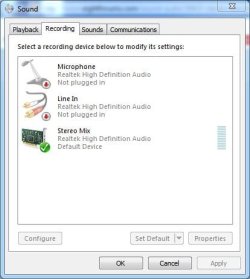
Under playback are speakers and headphones, neither of which are connected, as you can see, which wouldn’t make any difference, since the sound icon on the task bar has a permanent red X.

Third image is from control panel/sound/adjust volume, and the error message states :
Sound mixing
No sound device installed.

Thank you again.

Images:

777777.jpg~original
 
Last edited:

My Computer My Computer

At a glance

Win 7
Computer type
PC/Desktop
OS
Win 7
Can you translate to English what the PC sound card is? In the Device Manager/Sounds I see the NVIDIA High Definition Audio, which is for HDMI audio, and one other High Definition Audio. What is that? RealTek? VIA?
 

My Computer My Computer

At a glance

Windows 10 64 bitIntel i7 6700K16GB Corsair DominatorIntel CPU Graphics
Computer type
PC/Desktop
Computer Manufacturer/Model Number
My Own Build
OS
Windows 10 64 bit
CPU
Intel i7 6700K
Motherboard
ASUS ROG Maximus VIII Hero
Memory
16GB Corsair Dominator
Graphics Card(s)
Intel CPU Graphics
Sound Card
RealTek
Monitor(s) Displays
27" Dell S2719dgf
Screen Resolution
2560X1440
Hard Drives
1 TB Samsung 850 EVO SSD for Win 10 Pro
500GB Samsung 850 EVO SSD for Win 10 Insider
2 TB drive for backup
PSU
EVGA Supernova 750G2
Case
BeQuiet Silent Base 600
Cooling
Deepcool Captain 120EX
Keyboard
Microsoft Wireless 2000
Mouse
Microsoft wireless
Internet Speed
100 MB/sec (Cable)
Antivirus
Microsoft Defender and Malwarebytes
Browser
Edge/Firefox
Other Info
Cakewalk (Sonar) by BandLab and Studio One 4.1 Pro recording studio software. MOTU 896Mk3 Hybrid recording interface, Frontier Tranzport wireless control unit, Behringer X-Touch Control Surface.
Five USB connected optical drives for CD Audio production using Nero BurningROM
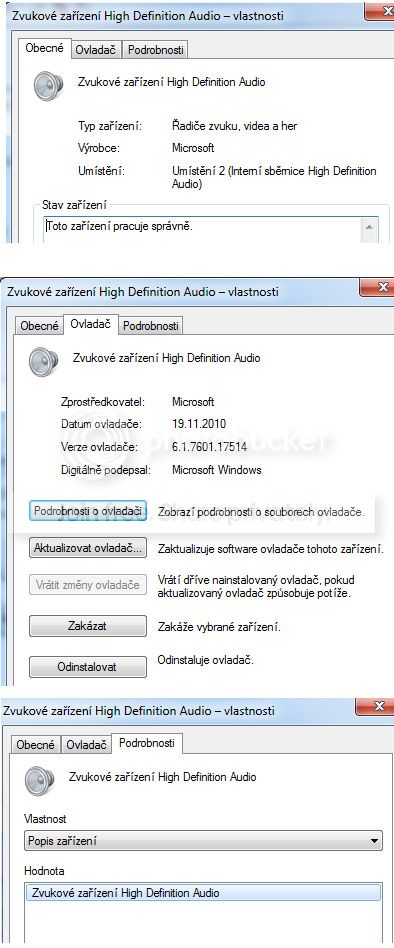
Under general tab:
Type: sound, game and video controller
Manufactured by: Microsoft
Location: location 2 (internal bus hd audio)
Status: working properly

I checked for driver and it said it has the latest one.

Under controller tab just dates, etc.

Last tab (details) has even less, just ‘hd sound device’.

I tried turning it off and restarting, but it didn't do anything.

jdsfsdfds.jpg~original


This user also had no sound, and it was because of power service being off.

http://www.sevenforums.com/sound-audio/39547-no-audio-devices-installed.html

I checked, it’s on and automatic.
Mine is a 3GHZ Core Duo desktop, his may have been a laptop.

Thank you,
D
 

My Computer My Computer

At a glance

Win 7
Computer type
PC/Desktop
OS
Win 7
If it is the Microsoft HD Audio Codec, it should be for the PC sound, but may not be.

Check the BIOS, make sure the Integrated Audio is Enabled.
 

My Computer My Computer

At a glance

Windows 10 64 bitIntel i7 6700K16GB Corsair DominatorIntel CPU Graphics
Computer type
PC/Desktop
Computer Manufacturer/Model Number
My Own Build
OS
Windows 10 64 bit
CPU
Intel i7 6700K
Motherboard
ASUS ROG Maximus VIII Hero
Memory
16GB Corsair Dominator
Graphics Card(s)
Intel CPU Graphics
Sound Card
RealTek
Monitor(s) Displays
27" Dell S2719dgf
Screen Resolution
2560X1440
Hard Drives
1 TB Samsung 850 EVO SSD for Win 10 Pro
500GB Samsung 850 EVO SSD for Win 10 Insider
2 TB drive for backup
PSU
EVGA Supernova 750G2
Case
BeQuiet Silent Base 600
Cooling
Deepcool Captain 120EX
Keyboard
Microsoft Wireless 2000
Mouse
Microsoft wireless
Internet Speed
100 MB/sec (Cable)
Antivirus
Microsoft Defender and Malwarebytes
Browser
Edge/Firefox
Other Info
Cakewalk (Sonar) by BandLab and Studio One 4.1 Pro recording studio software. MOTU 896Mk3 Hybrid recording interface, Frontier Tranzport wireless control unit, Behringer X-Touch Control Surface.
Five USB connected optical drives for CD Audio production using Nero BurningROM
BIOS wording is a bit confusing. It says [enable] after a peripheral, which could mean that it is enableD, or that it's disabled, and by selecting it you can choose and save Enable.

In BIOS under peripherals, everything except Trusted Platform Module had [enable], including Audio, High definition audio codec and High definition front panel audio. I switched the Audio to the [disable] status, which made the other two disappear, and restarted.
No difference. Taskbar volume icon still has the X. So looks like [enable] does mean enabled.
So that's another possible fix that didn't work. Real mystery.

Thank you,
D
 

My Computer My Computer

At a glance

Win 7
Computer type
PC/Desktop
OS
Win 7
Two more possibilities.

1. The sound chip on the motherboard is defective, and you will have to install a separate sound card.
2. A Windows corruption and in that case it will take a complete, new, install.
 

My Computer My Computer

At a glance

Windows 10 64 bitIntel i7 6700K16GB Corsair DominatorIntel CPU Graphics
Computer type
PC/Desktop
Computer Manufacturer/Model Number
My Own Build
OS
Windows 10 64 bit
CPU
Intel i7 6700K
Motherboard
ASUS ROG Maximus VIII Hero
Memory
16GB Corsair Dominator
Graphics Card(s)
Intel CPU Graphics
Sound Card
RealTek
Monitor(s) Displays
27" Dell S2719dgf
Screen Resolution
2560X1440
Hard Drives
1 TB Samsung 850 EVO SSD for Win 10 Pro
500GB Samsung 850 EVO SSD for Win 10 Insider
2 TB drive for backup
PSU
EVGA Supernova 750G2
Case
BeQuiet Silent Base 600
Cooling
Deepcool Captain 120EX
Keyboard
Microsoft Wireless 2000
Mouse
Microsoft wireless
Internet Speed
100 MB/sec (Cable)
Antivirus
Microsoft Defender and Malwarebytes
Browser
Edge/Firefox
Other Info
Cakewalk (Sonar) by BandLab and Studio One 4.1 Pro recording studio software. MOTU 896Mk3 Hybrid recording interface, Frontier Tranzport wireless control unit, Behringer X-Touch Control Surface.
Five USB connected optical drives for CD Audio production using Nero BurningROM
Thank you, will take it back to the shop.
 

My Computer My Computer

At a glance

Win 7
Computer type
PC/Desktop
OS
Win 7
Sorry, but after all you have done, those two options were the only ones remaining.

I hope the shop gets it sorted out for you.
 

My Computer My Computer

At a glance

Windows 10 64 bitIntel i7 6700K16GB Corsair DominatorIntel CPU Graphics
Computer type
PC/Desktop
Computer Manufacturer/Model Number
My Own Build
OS
Windows 10 64 bit
CPU
Intel i7 6700K
Motherboard
ASUS ROG Maximus VIII Hero
Memory
16GB Corsair Dominator
Graphics Card(s)
Intel CPU Graphics
Sound Card
RealTek
Monitor(s) Displays
27" Dell S2719dgf
Screen Resolution
2560X1440
Hard Drives
1 TB Samsung 850 EVO SSD for Win 10 Pro
500GB Samsung 850 EVO SSD for Win 10 Insider
2 TB drive for backup
PSU
EVGA Supernova 750G2
Case
BeQuiet Silent Base 600
Cooling
Deepcool Captain 120EX
Keyboard
Microsoft Wireless 2000
Mouse
Microsoft wireless
Internet Speed
100 MB/sec (Cable)
Antivirus
Microsoft Defender and Malwarebytes
Browser
Edge/Firefox
Other Info
Cakewalk (Sonar) by BandLab and Studio One 4.1 Pro recording studio software. MOTU 896Mk3 Hybrid recording interface, Frontier Tranzport wireless control unit, Behringer X-Touch Control Surface.
Five USB connected optical drives for CD Audio production using Nero BurningROM
Back
Top