Solved Can't get the taskbar transparency

jszl

New member
Local time
8:35 PM
Messages
10
I had bought HP Pavilion dv7 series 2 years ago and it came with windows 7 in it. The tranparency worked. Today I replaced the hard drive and installed new windows from a CD, and apparently the video card doesn't support that anymore? Is video card within a HDD, so I also replaced the video card, or is windows going berserk? How do I get the transparency back?
 

My Computer My Computer

OS
Windows 7 64 bit
I would say all you did replaced was the hard drive the video card is integrated to your motherboard most likely.
I would recommend you go to this site and download the video card drivers and install them HP Support & Drivers | United States
Jerry
 

My Computer My Computer

Computer type
Laptop
Computer Manufacturer/Model Number
Sager NP9170
OS
Win 7 Pro x64 / Win 10 Pro
CPU
Intel(R) Core(TM) i7-3630QM CPU @ 2.40GHz
Motherboard
CLEVO P170EM
Memory
12 GB
Graphics Card(s)
(1) Intel(R) HD Graphics 4000 (2) NVIDIA GeForce GTX 675M
Sound Card
(1) Realtek High Definition Audio (2) Intel(R) Display Aud
Monitor(s) Displays
17.3
Screen Resolution
1920x1080
Hard Drives
(1) Samsung 860 EVO 500GB(OS) (1) Samsung 860 EVO 500GB(Data)
Keyboard
Backlite
Antivirus
MSE, Malwarebytes Pro
Browser
Firefox
Other Info
DESKTOP: Custom-built.
OS: Win 10 Pro x64.
CASE: Rosewill R5.
CPU: Intel I5 4670K CPU @ 3.40GHz.
CPU COOLER: Cool Master Hyper 212 EVO.
MOTHERBOARD: Asus Z87-A.
MEMORY: Kingston HyperX 2x4 GB.
GPU: Nvidia Geforce 650 TI.
PSU: Corsair TX750.
DRIVES: (1) Samsung 840 120 GB SSD (2) Western Digital blue 500 GB 7200 RPM.
I allready updated the drivers, problem remained the same.
 

My Computer My Computer

OS
Windows 7 64 bit
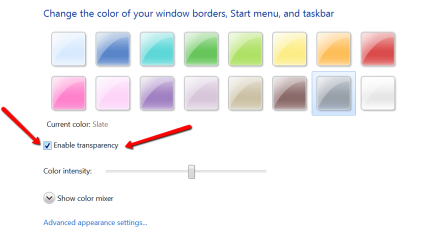
A replacement of a hard drive should not effect the transparency. Check whether your aero is turned on - in Control Panel\Appearance and Personalization\Personalization\Window Color and Appearance
 

Attachments

  • 2012-06-28_2303.png
    2012-06-28_2303.png
    31.7 KB · Views: 19

My Computer My Computer

Computer Manufacturer/Model Number
HP, Dell, Gateway, Toshiba - 4 laptops and 2 desktops
OS
Vista, Windows7, Mint Mate, Zorin, Windows 8
CPU
from 1.6GHz Duo to i7
Monitor(s) Displays
2x HP w2207
Hard Drives
5x HDD, 7x SSD, 12x Externals
Keyboard
with trackball - no mices
Mouse
Trackball mice
Internet Speed
DSL 6000
A replacement of a hard drive should not effect the transparency. Check whether your aero is turned on - in Control Panel\Appearance and Personalization\Personalization\Window Color and Appearance

Hi,
I can't get to that window. When I click on window color, I get a new window (see picutre below)
2dhi6o6.png

And when I click the troubleshot message, after noticing that aero theme can't be loaded, I click next, when this message appears: "The current video card may support Aero with a driver that is compliant with the Windows Display Driver Model (WDDM). Contact the manufacturer of your computer or video card for a WDDM-compatible driver."
I click next and get to the following window:
2vbttsk.png

I also went to the device manager and tried to manually update the drivers, but is says the drivers are allready most recent.
 

My Computer My Computer

OS
Windows 7 64 bit
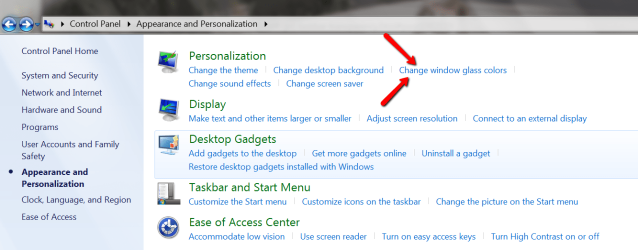
Type 'aero' into Start/Search and go to where the arrows point.
 

Attachments

  • 2012-06-28_2336.png
    2012-06-28_2336.png
    19.5 KB · Views: 15

My Computer My Computer

Computer Manufacturer/Model Number
HP, Dell, Gateway, Toshiba - 4 laptops and 2 desktops
OS
Vista, Windows7, Mint Mate, Zorin, Windows 8
CPU
from 1.6GHz Duo to i7
Monitor(s) Displays
2x HP w2207
Hard Drives
5x HDD, 7x SSD, 12x Externals
Keyboard
with trackball - no mices
Mouse
Trackball mice
Internet Speed
DSL 6000
Can't get there either....
zxske8.png

Edit: Is ti possible that some windows don't support aero theme? Because the widnows I got with the computer were allready installed on it, and the windows I have now are from a CD i got at home.
 

My Computer My Computer

OS
Windows 7 64 bit
That is strange. Can you go here:
 

Attachments

  • 2012-06-28_2336.png
    2012-06-28_2336.png
    65 KB · Views: 48

My Computer My Computer

Computer Manufacturer/Model Number
HP, Dell, Gateway, Toshiba - 4 laptops and 2 desktops
OS
Vista, Windows7, Mint Mate, Zorin, Windows 8
CPU
from 1.6GHz Duo to i7
Monitor(s) Displays
2x HP w2207
Hard Drives
5x HDD, 7x SSD, 12x Externals
Keyboard
with trackball - no mices
Mouse
Trackball mice
Internet Speed
DSL 6000
Nope, there is no such thing on my windows...
1jxm6e.png
 

My Computer My Computer

OS
Windows 7 64 bit
GOT IT!
The graphics card drviers were, for some reason, not installed.... After I installed them it works.
 

My Computer My Computer

OS
Windows 7 64 bit
That's good to hear, I had my suspicions that it was the drivers.
Jerry
 

My Computer My Computer

Computer type
Laptop
Computer Manufacturer/Model Number
Sager NP9170
OS
Win 7 Pro x64 / Win 10 Pro
CPU
Intel(R) Core(TM) i7-3630QM CPU @ 2.40GHz
Motherboard
CLEVO P170EM
Memory
12 GB
Graphics Card(s)
(1) Intel(R) HD Graphics 4000 (2) NVIDIA GeForce GTX 675M
Sound Card
(1) Realtek High Definition Audio (2) Intel(R) Display Aud
Monitor(s) Displays
17.3
Screen Resolution
1920x1080
Hard Drives
(1) Samsung 860 EVO 500GB(OS) (1) Samsung 860 EVO 500GB(Data)
Keyboard
Backlite
Antivirus
MSE, Malwarebytes Pro
Browser
Firefox
Other Info
DESKTOP: Custom-built.
OS: Win 10 Pro x64.
CASE: Rosewill R5.
CPU: Intel I5 4670K CPU @ 3.40GHz.
CPU COOLER: Cool Master Hyper 212 EVO.
MOTHERBOARD: Asus Z87-A.
MEMORY: Kingston HyperX 2x4 GB.
GPU: Nvidia Geforce 650 TI.
PSU: Corsair TX750.
DRIVES: (1) Samsung 840 120 GB SSD (2) Western Digital blue 500 GB 7200 RPM.
Back
Top