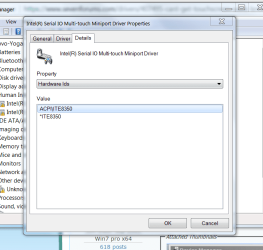
My Yoga laptop (wich originally shipped with Windows 10) I downgraded it to Windows 7. Ive been able to find and install every driver without any major issues, in fact I used this forum to get help finding them. But the one thing i cant make work is the touchscreen. Ive tried installing some basic lenovo drivers and what not. But nothing ive tried has gotten Windows 7 to recognize that this display is touch capable. In system properties it states that there is no Pen or Touch input available for this display. And in device manager there is a single (Unknown Device) which im pretty sure would be the touch controller. If anybody could help me find a suitable driver that would be great, thanks
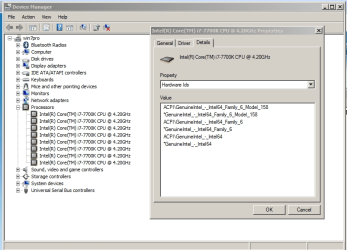
no problem. Post a screenshot of the hardware ID for the touchscreen. start > run > devmgmt.msc > right click on problem device > properties > details > hardware IDs
as a sample, here's my cpu hardware device ID
Attachments
1.png
40.9 KB
· Views: 1
My Computer
At a glance
Win7 pro x64stock i7 7700kCorsair Vengeance LPX 16GB (2x8GB) DDR4 @ 320...integrated Intel HD 630
Computer type
PC/Desktop
Computer Manufacturer/Model Number
diy
OS
Win7 pro x64
CPU
stock i7 7700k
Motherboard
Gigabyte Z270N-WIFI mini-ITX
Memory
Corsair Vengeance LPX 16GB (2x8GB) DDR4 @ 3200MHz
Graphics Card(s)
integrated Intel HD 630
Sound Card
onboard Realtek ALC1220
Monitor(s) Displays
two vertically mounted samsung 55" 4k un55mu8000
Screen Resolution
1920x1280
Hard Drives
256GB Samsung EVO 960 M.2 pci-e NVMe SSD
PSU
SilverStone Nightjar ST45NF 450Watt Fanless
Case
No case. Motherboard is mounted directly onto power supply
Cooling
Evercool low profile 815EP with Panaflow 12L fan at 7v
I was hoping to find a windows 8 version of your driver so you could install it manually, but could not find one.
btw driveridentifier is also pretty good for this situation but I don't usually recommend it because malwarebytes detects it as malware. That said, if you install it, run it, then uninstall it, then reboot, then run whatever antimalware program you use and let it clean up, you will probably be okay.
My Computer
At a glance
Win7 pro x64stock i7 7700kCorsair Vengeance LPX 16GB (2x8GB) DDR4 @ 320...integrated Intel HD 630
Computer type
PC/Desktop
Computer Manufacturer/Model Number
diy
OS
Win7 pro x64
CPU
stock i7 7700k
Motherboard
Gigabyte Z270N-WIFI mini-ITX
Memory
Corsair Vengeance LPX 16GB (2x8GB) DDR4 @ 3200MHz
Graphics Card(s)
integrated Intel HD 630
Sound Card
onboard Realtek ALC1220
Monitor(s) Displays
two vertically mounted samsung 55" 4k un55mu8000
Screen Resolution
1920x1280
Hard Drives
256GB Samsung EVO 960 M.2 pci-e NVMe SSD
PSU
SilverStone Nightjar ST45NF 450Watt Fanless
Case
No case. Motherboard is mounted directly onto power supply
Cooling
Evercool low profile 815EP with Panaflow 12L fan at 7v