can't initialize to MBR!

we back track in one search when looking up this particular model series to discover something found about another which could be the source of the problem. How-to Install Windows Xp on HP Pavilion dv6236EA

According to that disabling the Native ide mode for sata drives allowed XP to install while previous attempts failed while the mode was enabled. I know Gigabyte boards see this setting in the bios while Asus boards don't. The Foxconn board in yours however may also see this option usually in the "Integrated Peripherals"or "Onboard" sections depending on the bios used.
I think this is what I should try now. I hope I find it in the BIOS!:(
 

My Computer

Computer Manufacturer/Model Number
HP p6347c
OS
W7
CPU
AMD Athlon(tm) II X4 630 Processor
Motherboard
AMD RS780/RS880
Memory
8 GB
Graphics Card(s)
ATI Radeon HD 4200
Sound Card
Realtek High Definition Audio
Monitor(s) Displays
HP w2338h (HP w2338h Wide LCD Monitor)
Hard Drives
WDC WD6400AAKS-65A7B SCSI Disk Device
Guess what!
I went into the BIOS and found a submenu under SATA II with 3 options: IDE, AHCI, and RAID. I enabled IDE, loaded the XP CD, and hooorray, it installed!
Turned off PC, and rebooted right into XP again.
I was elated, reconnected the 7 drive, went back into the BIOS to switch back to AHCI, to see whether I could boot into W7 as well. No such luck! "The boot selection failed because a required device is inaccessible".
Now I can't boot into either drive!
When I disconnect the 7 drive and switch the BIOS back to IDE, I get the "NTLDR is missing" notice on booting!
How come it wasn't missing before?
And how do I get those 2 drives to boot, or at least one of them for now?
 

My Computer

Computer Manufacturer/Model Number
HP p6347c
OS
W7
CPU
AMD Athlon(tm) II X4 630 Processor
Motherboard
AMD RS780/RS880
Memory
8 GB
Graphics Card(s)
ATI Radeon HD 4200
Sound Card
Realtek High Definition Audio
Monitor(s) Displays
HP w2338h (HP w2338h Wide LCD Monitor)
Hard Drives
WDC WD6400AAKS-65A7B SCSI Disk Device
Leave it in ide mode for the time being and boot up from the recovery disk if you were provided with or burned one to use the startup repair tool. First make sure the 7 drive is the default drive however.

If you don't a set of recovery like most new systems won't and didn't use the option seen in 7 to create a repair cd you can download an ISO image from Neosmart and use a program that supports burning ISO images to disk. Since 7 is temporarily out of commission the system you are on or another will need a burning program unless 7 is also on for the support now seen.

The 64bit as well as 32bit repair tool cd images are available for download at Download Windows 7 System Recovery Discs — The NeoSmart Files

Once you have the image burned onto a cd-r you boot up from that and run the startup repair tool. You might have to do that more then once. The command prompt prompt option is also available for the "bootrec /fixmbr" and "bootrec /fixboot" commands while the startup repair tool should clean that up for you.

The bios can be reset to the defaults while the Native ide mode should have already been the default setting. But I suspect HP had it setup for the AHCI mode to begin with. But depending on how you found the settings you simply only have to go back in and disable the ide mode to see 7 going again. The repair tools cd however is still good to have onhand in case something trashes the boot sector or something else goes wrong where the repair tools can help.

Nothing to panic about with the XP "missing ntldr" error there however. That one goes back to 2000 as well as an annoyance seen often with XP! A few simple tips for this are seen at NTLDR is Missing Error Resolution

Did you set the optical drive as first in the boot order this time around by chance? An empty drive is one thing pointed to there if you removed the XP cd as soon as the install went well.
 

My Computers

System One System Two

  • Computer type
    PC/Desktop
    Computer Manufacturer/Model Number
    Custom builds = 2
    OS
    W7 Ultimate x64/W10 Pro x64/W11 Pro Triple Boot - Main PC W7 Remote PC Micro ATX W7 Pro x64/W11 Pro
    CPU
    AMD Phenom II X4 975 Deneb 3.6ghz - 965 2nd remote pc
    Motherboard
    Gigabyte GA-790XTA-UD4-Gigabyte GA-880GM-D2H remote pc
    Memory
    Kingston Hyper X DDR3 1600 1.5v 16gb - Hyper X Fury 8gb 2nd
    Graphics Card(s)
    MSI HD Radeon 5750 1gb - MSI HD Radeon 6450 on mini tower
    Sound Card
    Creative Labs X-Fi Xtreme Audio P - Realtek onooard 2nd case
    Monitor(s) Displays
    ASUS VW199T-P 19" HP 2082a Main-HP 2082a 20" remote pc
    Screen Resolution
    Asus 1440x900 - HP 1600x900
    Hard Drives
    WD Black 1TB HD per OS W7, W10, and pending W11 presently on 500gb OS Drive - Pending Triple 1TB HDs for Spanned Storage/backup volume
    Single 2TB external USB enclosure, single 1TB System 7 Host/Boot drive, Pending 8TB external HD for system image b
    PSU
    Corsair 750TX - primary / Corsair CX600 - second
    Case
    Antec 900-2 - SSD compatible / NZXT Vulcan mini tower
    Cooling
    Zalman CNPS9900A
    Keyboard
    AZIO L70 Backlit Letters Gaming - ONN Cordless/USB
    Mouse
    MSI DS200 Programmable, Logitech Cordless
    Internet Speed
    30mbps upgrade - primary hard wired - mini tower usb WiFi
    Antivirus
    GFI VIPRE Internet Security 2014 on W7 2016 beta on W10,
    Browser
    Cyberfox, WaterFox 64bit FF variants, FireFox x64, Pale Moon
    Other Info
    Accomdata fan cooled usb 2.0 PIDE/Sata II, III external enclosure.
    Sambient usb/eSata PATA/Sata II, III external enclosure.
  • Computer type
    PC/Desktop
    System Manufacturer/Model Number
    CUSTOM ASSEMBLY
    OS
    W7 Pro x64/W11 Pro
    CPU
    AMD Deneb 3.6ghz - 965
    Motherboard
    Gigabyte GA-880GM-D2H remote pc
    Memory
    Kingston Hyper X Fury 8gb
    Graphics Card(s)
    MSI HD Radeon 6450 DVI Output
    Sound Card
    Realtek onooard Creative or Other separate PENDING
    Monitor(s) Displays
    VIZIO 32" LCD TV Separate LCD Pending
    Screen Resolution
    1600x1080
    Hard Drives
    WD 500GB OS Host/Boot WD Green 1TB Storage/Backup
    PSU
    Corsair 600W - THERMALTAKE 600W spare case
    Case
    NZXT Vulcan mini tower
    Cooling
    Twin 120mm Top Fans - 240mm Side Cover
    Keyboard
    ONN Cordless/USB Logitech Cordless
    Mouse
    ONN USB/Cordless - Logitech Cordless
    Internet Speed
    DSL 5G
    Browser
    MS Edge, FireFox, WaterFox x64, FireFox Nightly
    Other Info
    OS Testing-Remote Access to Main TeamViewer
Leave it in ide mode for the time being and boot up from the recovery disk if you were provided with or burned one to use the startup repair tool. First make sure the 7 drive is the default drive however.
I have a rescue disk I made when I got the PC. But it doesn't rescue.
I went into the BIOS to make sure that IDE is selected for now. I had to leave the CD drive first in the boot order to use the rescue CD. I made sure that the W7 drive is first in the HD group boot order.

When I select to "run start-up repair from CD" it loads , then tells me "cannot repair automatically".
When I select to run from HD it ends in "the boot selection failed because a required device is inaccessible".
I am stuck again! :mad:
 

My Computer

Computer Manufacturer/Model Number
HP p6347c
OS
W7
CPU
AMD Athlon(tm) II X4 630 Processor
Motherboard
AMD RS780/RS880
Memory
8 GB
Graphics Card(s)
ATI Radeon HD 4200
Sound Card
Realtek High Definition Audio
Monitor(s) Displays
HP w2338h (HP w2338h Wide LCD Monitor)
Hard Drives
WDC WD6400AAKS-65A7B SCSI Disk Device
@Night Hawk:
In my desperation about being unconnected I tried the following, successfully:
Disconnected the new drive
Set the BIOS to default
Ran my rescue CD
Ran "repair" off the CD
Selected reboot normally.
Basta! Got back into W7!

This is where I am now. How do we get to use our XP drive now?
 

My Computer

Computer Manufacturer/Model Number
HP p6347c
OS
W7
CPU
AMD Athlon(tm) II X4 630 Processor
Motherboard
AMD RS780/RS880
Memory
8 GB
Graphics Card(s)
ATI Radeon HD 4200
Sound Card
Realtek High Definition Audio
Monitor(s) Displays
HP w2338h (HP w2338h Wide LCD Monitor)
Hard Drives
WDC WD6400AAKS-65A7B SCSI Disk Device
What was the mode setting now seen at? AHCI or ide? If AHCI you may be pooched as far as XP not running. Note the following reference on AHCI.

AHCI is fully supported out of the box for Windows Vista and Linux operating systems from kernel 2.6.19, as well as later operating systems such as Windows 7. NetBSD also supports drivers in AHCI mode out of the box in certain versions. OpenBSD has had an AHCI driver starting with OpenBSD 4.1. DragonFlyBSD based its AHCI implementation on OpenBSD's and added extended features such as port multiplier support. FreeBSD supports AHCI as well. Solaris 10 introduced AHCI support in the 8/07 release [3]. Older operating systems require hardware-specific drivers to support AHCI.

That's part of the 2009 wikipedia information seen at Advanced Host Controller Interface - Wikipedia, the free encyclopedia

I'm certainly glad you saw 7 load immediately showing there wasn't a problem with that drive to work through. I can imagine you are relieved as far as the preinstall! ;)

To get the XP install running again you will likely need to switch back to the ide mode if it isn't that way with the defaults as well as make sure the Plug'n'Play and OS2 support settings are enabled in the bios long enough to install any AHCI driver set for XP.

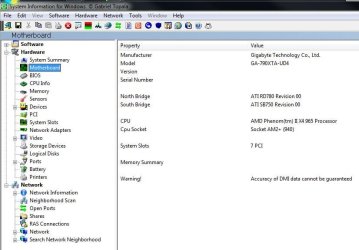
For that you may want to contact the HP or Foxconn support. But first for Foxconn you may want to get the SIW program look at the model number of the board using the System Info for Windows tool. You will only need to download the freeware with installer version of that however. SIW | Download

The only thing the installer does is create a desktop shortcut still being a stand alone program without any registry involvement. Once on look under the Hardware>Motherboard item. (note image attached below)

If you are able to locate and install the drivers on the XP install you should be able to run XP without problems. The support would be a help.

One thing if you find it set to AHCI by default you could try to switch to the ide mode to see if 7 will still run before replugging the XP drive back in. If 7 runs well you should be able to replug the new drive and run XP normally.
 

Attachments

  • SIW Board Info.jpg
    SIW Board Info.jpg
    76.8 KB · Views: 4

My Computers

System One System Two

  • Computer type
    PC/Desktop
    Computer Manufacturer/Model Number
    Custom builds = 2
    OS
    W7 Ultimate x64/W10 Pro x64/W11 Pro Triple Boot - Main PC W7 Remote PC Micro ATX W7 Pro x64/W11 Pro
    CPU
    AMD Phenom II X4 975 Deneb 3.6ghz - 965 2nd remote pc
    Motherboard
    Gigabyte GA-790XTA-UD4-Gigabyte GA-880GM-D2H remote pc
    Memory
    Kingston Hyper X DDR3 1600 1.5v 16gb - Hyper X Fury 8gb 2nd
    Graphics Card(s)
    MSI HD Radeon 5750 1gb - MSI HD Radeon 6450 on mini tower
    Sound Card
    Creative Labs X-Fi Xtreme Audio P - Realtek onooard 2nd case
    Monitor(s) Displays
    ASUS VW199T-P 19" HP 2082a Main-HP 2082a 20" remote pc
    Screen Resolution
    Asus 1440x900 - HP 1600x900
    Hard Drives
    WD Black 1TB HD per OS W7, W10, and pending W11 presently on 500gb OS Drive - Pending Triple 1TB HDs for Spanned Storage/backup volume
    Single 2TB external USB enclosure, single 1TB System 7 Host/Boot drive, Pending 8TB external HD for system image b
    PSU
    Corsair 750TX - primary / Corsair CX600 - second
    Case
    Antec 900-2 - SSD compatible / NZXT Vulcan mini tower
    Cooling
    Zalman CNPS9900A
    Keyboard
    AZIO L70 Backlit Letters Gaming - ONN Cordless/USB
    Mouse
    MSI DS200 Programmable, Logitech Cordless
    Internet Speed
    30mbps upgrade - primary hard wired - mini tower usb WiFi
    Antivirus
    GFI VIPRE Internet Security 2014 on W7 2016 beta on W10,
    Browser
    Cyberfox, WaterFox 64bit FF variants, FireFox x64, Pale Moon
    Other Info
    Accomdata fan cooled usb 2.0 PIDE/Sata II, III external enclosure.
    Sambient usb/eSata PATA/Sata II, III external enclosure.
  • Computer type
    PC/Desktop
    System Manufacturer/Model Number
    CUSTOM ASSEMBLY
    OS
    W7 Pro x64/W11 Pro
    CPU
    AMD Deneb 3.6ghz - 965
    Motherboard
    Gigabyte GA-880GM-D2H remote pc
    Memory
    Kingston Hyper X Fury 8gb
    Graphics Card(s)
    MSI HD Radeon 6450 DVI Output
    Sound Card
    Realtek onooard Creative or Other separate PENDING
    Monitor(s) Displays
    VIZIO 32" LCD TV Separate LCD Pending
    Screen Resolution
    1600x1080
    Hard Drives
    WD 500GB OS Host/Boot WD Green 1TB Storage/Backup
    PSU
    Corsair 600W - THERMALTAKE 600W spare case
    Case
    NZXT Vulcan mini tower
    Cooling
    Twin 120mm Top Fans - 240mm Side Cover
    Keyboard
    ONN Cordless/USB Logitech Cordless
    Mouse
    ONN USB/Cordless - Logitech Cordless
    Internet Speed
    DSL 5G
    Browser
    MS Edge, FireFox, WaterFox x64, FireFox Nightly
    Other Info
    OS Testing-Remote Access to Main TeamViewer
What was the mode setting now seen at? AHCI or ide? If AHCI you may be pooched as far as XP not running.
Could I at least do it by going into the BIOS and switching back to IDE and changing boot priority to the second drive before trying to boot XP?
 

My Computer

Computer Manufacturer/Model Number
HP p6347c
OS
W7
CPU
AMD Athlon(tm) II X4 630 Processor
Motherboard
AMD RS780/RS880
Memory
8 GB
Graphics Card(s)
ATI Radeon HD 4200
Sound Card
Realtek High Definition Audio
Monitor(s) Displays
HP w2338h (HP w2338h Wide LCD Monitor)
Hard Drives
WDC WD6400AAKS-65A7B SCSI Disk Device
Someone on Tom's hardware forum suggested this:
You need to slipstream the SATA drivers onto your XP CD. It is easy to do. Just Google "slipstream XP". Put your network driver on it and you can go online as soon as you finish installing XP. Slipstream SP3 too. Make sure you use the correct method for whichever service pack you choose. I think it is different for each one.
Make sense to you? This is the site for it: http://www.maximumpc.com/article/howtos/how_to_slipstream_windows_xp_sp3_and_vista_sp1
 
Last edited:

My Computer

Computer Manufacturer/Model Number
HP p6347c
OS
W7
CPU
AMD Athlon(tm) II X4 630 Processor
Motherboard
AMD RS780/RS880
Memory
8 GB
Graphics Card(s)
ATI Radeon HD 4200
Sound Card
Realtek High Definition Audio
Monitor(s) Displays
HP w2338h (HP w2338h Wide LCD Monitor)
Hard Drives
WDC WD6400AAKS-65A7B SCSI Disk Device
First you may want to see if 7 will still run when switching to the ide mode unless it's already that way when you restored the factory defaults for the board. Once you are set with 7 in the ide mode you should be able to simply plug the XP drive back in and boot from it to see XP load or add the new entry into the 7 boot loader once the XP files are copied over seeing the boot.ini edit as well.

For slipstreaming sata/Raid controllers you first would need them available. Or only with a second optical drive installed you would burn them to separate cd to have onhand when pressing the F6 option during the installation. But you already installed XP where now you would simply install the drivers onto the older version.

When looking earlier HP only showed Vista/7 updates at the support site and why the SIW tool for finding out the model number of the board is the big step needed. Once you have the model number you can look up the specifications which should show who made the chipset. NVidia, AMD, etc. From there you would be able to look up any XP drivers sets for that particular board at the chipset manufacturer if needed.

The one thing most don't realize is that OEM manufacturers will no longer be supporting XP by providing drivers for newer products coming out. Years back the same was seen for 98 when moving up from an old Socket A build. The time for 98 then ME and 2000 later went by for them and now XP is on the way out.

Hopefully newer releases of the XP Mode or improved VM wares will see more direct access to hardware resources where you will be able to tuck the old version away. These are all things to come there however.

The alternate option would be seeing if the game will install on the 32bit 7 where you would simply dual boot that with the 64bit host and bypass the hassles you are running into. Know anyone running the 32bit 7 who could try that out for you?

If they could install the game on the 32bit 7 you would still need to buy another 7 disk however to custom install on the new drive but be running the game on the latest Windows version.

The problem there is while XP was installed the support for the old version will hamper the gaming since you won't have drivers available for that model through the HP support itself unless contacting their own support for additional information on how to run XP.

For now however try the SIW tool there to find out the board model number. From there a good search can reveal if any XP drivers were actually written. You will need them anyways.
 

My Computers

System One System Two

  • Computer type
    PC/Desktop
    Computer Manufacturer/Model Number
    Custom builds = 2
    OS
    W7 Ultimate x64/W10 Pro x64/W11 Pro Triple Boot - Main PC W7 Remote PC Micro ATX W7 Pro x64/W11 Pro
    CPU
    AMD Phenom II X4 975 Deneb 3.6ghz - 965 2nd remote pc
    Motherboard
    Gigabyte GA-790XTA-UD4-Gigabyte GA-880GM-D2H remote pc
    Memory
    Kingston Hyper X DDR3 1600 1.5v 16gb - Hyper X Fury 8gb 2nd
    Graphics Card(s)
    MSI HD Radeon 5750 1gb - MSI HD Radeon 6450 on mini tower
    Sound Card
    Creative Labs X-Fi Xtreme Audio P - Realtek onooard 2nd case
    Monitor(s) Displays
    ASUS VW199T-P 19" HP 2082a Main-HP 2082a 20" remote pc
    Screen Resolution
    Asus 1440x900 - HP 1600x900
    Hard Drives
    WD Black 1TB HD per OS W7, W10, and pending W11 presently on 500gb OS Drive - Pending Triple 1TB HDs for Spanned Storage/backup volume
    Single 2TB external USB enclosure, single 1TB System 7 Host/Boot drive, Pending 8TB external HD for system image b
    PSU
    Corsair 750TX - primary / Corsair CX600 - second
    Case
    Antec 900-2 - SSD compatible / NZXT Vulcan mini tower
    Cooling
    Zalman CNPS9900A
    Keyboard
    AZIO L70 Backlit Letters Gaming - ONN Cordless/USB
    Mouse
    MSI DS200 Programmable, Logitech Cordless
    Internet Speed
    30mbps upgrade - primary hard wired - mini tower usb WiFi
    Antivirus
    GFI VIPRE Internet Security 2014 on W7 2016 beta on W10,
    Browser
    Cyberfox, WaterFox 64bit FF variants, FireFox x64, Pale Moon
    Other Info
    Accomdata fan cooled usb 2.0 PIDE/Sata II, III external enclosure.
    Sambient usb/eSata PATA/Sata II, III external enclosure.
  • Computer type
    PC/Desktop
    System Manufacturer/Model Number
    CUSTOM ASSEMBLY
    OS
    W7 Pro x64/W11 Pro
    CPU
    AMD Deneb 3.6ghz - 965
    Motherboard
    Gigabyte GA-880GM-D2H remote pc
    Memory
    Kingston Hyper X Fury 8gb
    Graphics Card(s)
    MSI HD Radeon 6450 DVI Output
    Sound Card
    Realtek onooard Creative or Other separate PENDING
    Monitor(s) Displays
    VIZIO 32" LCD TV Separate LCD Pending
    Screen Resolution
    1600x1080
    Hard Drives
    WD 500GB OS Host/Boot WD Green 1TB Storage/Backup
    PSU
    Corsair 600W - THERMALTAKE 600W spare case
    Case
    NZXT Vulcan mini tower
    Cooling
    Twin 120mm Top Fans - 240mm Side Cover
    Keyboard
    ONN Cordless/USB Logitech Cordless
    Mouse
    ONN USB/Cordless - Logitech Cordless
    Internet Speed
    DSL 5G
    Browser
    MS Edge, FireFox, WaterFox x64, FireFox Nightly
    Other Info
    OS Testing-Remote Access to Main TeamViewer
First you may want to see if 7 will still run when switching to the ide mode unless it's already that way when you restored the factory defaults for the board. Once you are set with 7 in the ide mode you should be able to simply plug the XP drive back in and boot from it to see XP load or add the new entry into the 7 boot loader once the XP files are copied over seeing the boot.ini edit as well.
I think the default setting in my BIOS was not IDE. I would have to set it manually again.
 

My Computer

Computer Manufacturer/Model Number
HP p6347c
OS
W7
CPU
AMD Athlon(tm) II X4 630 Processor
Motherboard
AMD RS780/RS880
Memory
8 GB
Graphics Card(s)
ATI Radeon HD 4200
Sound Card
Realtek High Definition Audio
Monitor(s) Displays
HP w2338h (HP w2338h Wide LCD Monitor)
Hard Drives
WDC WD6400AAKS-65A7B SCSI Disk Device
That would be one way to find out for sure! Hopefully 7 will still run normally. But this is the one thing about premade OEM systems where they configure everything by their methods where their techs already know just where to look when problems come up.

That won't make life any easier for you however! This is why you may have to consider the 32bit 7 as the second OS if you find the game will go on and run. I found that here when some refused to install or run on the 32bit Vista but went right on the 32bit 7! That has a great deal of backward compatibility with XP written type games and apps it seems.
 

My Computers

System One System Two

  • Computer type
    PC/Desktop
    Computer Manufacturer/Model Number
    Custom builds = 2
    OS
    W7 Ultimate x64/W10 Pro x64/W11 Pro Triple Boot - Main PC W7 Remote PC Micro ATX W7 Pro x64/W11 Pro
    CPU
    AMD Phenom II X4 975 Deneb 3.6ghz - 965 2nd remote pc
    Motherboard
    Gigabyte GA-790XTA-UD4-Gigabyte GA-880GM-D2H remote pc
    Memory
    Kingston Hyper X DDR3 1600 1.5v 16gb - Hyper X Fury 8gb 2nd
    Graphics Card(s)
    MSI HD Radeon 5750 1gb - MSI HD Radeon 6450 on mini tower
    Sound Card
    Creative Labs X-Fi Xtreme Audio P - Realtek onooard 2nd case
    Monitor(s) Displays
    ASUS VW199T-P 19" HP 2082a Main-HP 2082a 20" remote pc
    Screen Resolution
    Asus 1440x900 - HP 1600x900
    Hard Drives
    WD Black 1TB HD per OS W7, W10, and pending W11 presently on 500gb OS Drive - Pending Triple 1TB HDs for Spanned Storage/backup volume
    Single 2TB external USB enclosure, single 1TB System 7 Host/Boot drive, Pending 8TB external HD for system image b
    PSU
    Corsair 750TX - primary / Corsair CX600 - second
    Case
    Antec 900-2 - SSD compatible / NZXT Vulcan mini tower
    Cooling
    Zalman CNPS9900A
    Keyboard
    AZIO L70 Backlit Letters Gaming - ONN Cordless/USB
    Mouse
    MSI DS200 Programmable, Logitech Cordless
    Internet Speed
    30mbps upgrade - primary hard wired - mini tower usb WiFi
    Antivirus
    GFI VIPRE Internet Security 2014 on W7 2016 beta on W10,
    Browser
    Cyberfox, WaterFox 64bit FF variants, FireFox x64, Pale Moon
    Other Info
    Accomdata fan cooled usb 2.0 PIDE/Sata II, III external enclosure.
    Sambient usb/eSata PATA/Sata II, III external enclosure.
  • Computer type
    PC/Desktop
    System Manufacturer/Model Number
    CUSTOM ASSEMBLY
    OS
    W7 Pro x64/W11 Pro
    CPU
    AMD Deneb 3.6ghz - 965
    Motherboard
    Gigabyte GA-880GM-D2H remote pc
    Memory
    Kingston Hyper X Fury 8gb
    Graphics Card(s)
    MSI HD Radeon 6450 DVI Output
    Sound Card
    Realtek onooard Creative or Other separate PENDING
    Monitor(s) Displays
    VIZIO 32" LCD TV Separate LCD Pending
    Screen Resolution
    1600x1080
    Hard Drives
    WD 500GB OS Host/Boot WD Green 1TB Storage/Backup
    PSU
    Corsair 600W - THERMALTAKE 600W spare case
    Case
    NZXT Vulcan mini tower
    Cooling
    Twin 120mm Top Fans - 240mm Side Cover
    Keyboard
    ONN Cordless/USB Logitech Cordless
    Mouse
    ONN USB/Cordless - Logitech Cordless
    Internet Speed
    DSL 5G
    Browser
    MS Edge, FireFox, WaterFox x64, FireFox Nightly
    Other Info
    OS Testing-Remote Access to Main TeamViewer
That would be one way to find out for sure! Hopefully 7 will still run normally. But this is the one thing about premade OEM systems where they configure everything by their methods where their techs already know just where to look when problems come up.
Yes, that's why I am unwilling to give it up. SInce I was able to restore the BIOS before to work with W7 again, it should be possible again now, wouldn't you think?
That won't make life any easier for you however! This is why you may have to consider the 32bit 7 as the second OS if you find the game will go on and run. I found that here when some refused to install or run on the 32bit Vista but went right on the 32bit 7! That has a great deal of backward compatibility with XP written type games and apps it seems.
I don't think it would run on 32bit either, nor on Vista. XP was the last OS it worked on.
 

My Computer

Computer Manufacturer/Model Number
HP p6347c
OS
W7
CPU
AMD Athlon(tm) II X4 630 Processor
Motherboard
AMD RS780/RS880
Memory
8 GB
Graphics Card(s)
ATI Radeon HD 4200
Sound Card
Realtek High Definition Audio
Monitor(s) Displays
HP w2338h (HP w2338h Wide LCD Monitor)
Hard Drives
WDC WD6400AAKS-65A7B SCSI Disk Device
If you find it set at AHCI and switch to ide and it fails you simply re-enter the bios to change it back. A quck return trip there would be all you needed.

As for the game itself what "failed to install or run" on the 32bit Vista doesn't mean it won't go the 32bit 7! What I am pointing out is that 7 is now seeing an improved backward compatibility to XP softwares over what had been seen with Vista.

All you can do however is see if someone you know running the 32bit 7 can try out it out on their machine to see if the installation works unless you have a cd key requirement for that or a log into an online account situation like many games see. You simply want to find out if it will.

Recently I tossed a temp install of the 32bit 7 on a real old case and saw XP device drivers work like they had been written for 7 specifically! Never rule anything out completely with 7! :D until tested that is.
 

My Computers

System One System Two

  • Computer type
    PC/Desktop
    Computer Manufacturer/Model Number
    Custom builds = 2
    OS
    W7 Ultimate x64/W10 Pro x64/W11 Pro Triple Boot - Main PC W7 Remote PC Micro ATX W7 Pro x64/W11 Pro
    CPU
    AMD Phenom II X4 975 Deneb 3.6ghz - 965 2nd remote pc
    Motherboard
    Gigabyte GA-790XTA-UD4-Gigabyte GA-880GM-D2H remote pc
    Memory
    Kingston Hyper X DDR3 1600 1.5v 16gb - Hyper X Fury 8gb 2nd
    Graphics Card(s)
    MSI HD Radeon 5750 1gb - MSI HD Radeon 6450 on mini tower
    Sound Card
    Creative Labs X-Fi Xtreme Audio P - Realtek onooard 2nd case
    Monitor(s) Displays
    ASUS VW199T-P 19" HP 2082a Main-HP 2082a 20" remote pc
    Screen Resolution
    Asus 1440x900 - HP 1600x900
    Hard Drives
    WD Black 1TB HD per OS W7, W10, and pending W11 presently on 500gb OS Drive - Pending Triple 1TB HDs for Spanned Storage/backup volume
    Single 2TB external USB enclosure, single 1TB System 7 Host/Boot drive, Pending 8TB external HD for system image b
    PSU
    Corsair 750TX - primary / Corsair CX600 - second
    Case
    Antec 900-2 - SSD compatible / NZXT Vulcan mini tower
    Cooling
    Zalman CNPS9900A
    Keyboard
    AZIO L70 Backlit Letters Gaming - ONN Cordless/USB
    Mouse
    MSI DS200 Programmable, Logitech Cordless
    Internet Speed
    30mbps upgrade - primary hard wired - mini tower usb WiFi
    Antivirus
    GFI VIPRE Internet Security 2014 on W7 2016 beta on W10,
    Browser
    Cyberfox, WaterFox 64bit FF variants, FireFox x64, Pale Moon
    Other Info
    Accomdata fan cooled usb 2.0 PIDE/Sata II, III external enclosure.
    Sambient usb/eSata PATA/Sata II, III external enclosure.
  • Computer type
    PC/Desktop
    System Manufacturer/Model Number
    CUSTOM ASSEMBLY
    OS
    W7 Pro x64/W11 Pro
    CPU
    AMD Deneb 3.6ghz - 965
    Motherboard
    Gigabyte GA-880GM-D2H remote pc
    Memory
    Kingston Hyper X Fury 8gb
    Graphics Card(s)
    MSI HD Radeon 6450 DVI Output
    Sound Card
    Realtek onooard Creative or Other separate PENDING
    Monitor(s) Displays
    VIZIO 32" LCD TV Separate LCD Pending
    Screen Resolution
    1600x1080
    Hard Drives
    WD 500GB OS Host/Boot WD Green 1TB Storage/Backup
    PSU
    Corsair 600W - THERMALTAKE 600W spare case
    Case
    NZXT Vulcan mini tower
    Cooling
    Twin 120mm Top Fans - 240mm Side Cover
    Keyboard
    ONN Cordless/USB Logitech Cordless
    Mouse
    ONN USB/Cordless - Logitech Cordless
    Internet Speed
    DSL 5G
    Browser
    MS Edge, FireFox, WaterFox x64, FireFox Nightly
    Other Info
    OS Testing-Remote Access to Main TeamViewer
I connected the XP drive as well this morning, without changing the default BIOS, and W7 can see it. That means I could use it for storage, but so far not for booting into it. Maybe if I slip stream SP3 into the OS it will be possible?
 

My Computer

Computer Manufacturer/Model Number
HP p6347c
OS
W7
CPU
AMD Athlon(tm) II X4 630 Processor
Motherboard
AMD RS780/RS880
Memory
8 GB
Graphics Card(s)
ATI Radeon HD 4200
Sound Card
Realtek High Definition Audio
Monitor(s) Displays
HP w2338h (HP w2338h Wide LCD Monitor)
Hard Drives
WDC WD6400AAKS-65A7B SCSI Disk Device
You would need to slipstream SP3 into the XP install disk to add the service pack into the installation process.

With 7 up and running again it comes as no surprize it immediately saw the new drive once plugged back in. You can also try getting the new entry for XP as if XP was running to take care of that part.

The boot files copied over as well as the boot entry can always be removed easily later if XP doesn't run or succeed the next time around. But if XP loads right away you would have the entry part for the dual boot already taken care of. Once booted in XP you would then simply go for the SP3 install.
 

My Computers

System One System Two

  • Computer type
    PC/Desktop
    Computer Manufacturer/Model Number
    Custom builds = 2
    OS
    W7 Ultimate x64/W10 Pro x64/W11 Pro Triple Boot - Main PC W7 Remote PC Micro ATX W7 Pro x64/W11 Pro
    CPU
    AMD Phenom II X4 975 Deneb 3.6ghz - 965 2nd remote pc
    Motherboard
    Gigabyte GA-790XTA-UD4-Gigabyte GA-880GM-D2H remote pc
    Memory
    Kingston Hyper X DDR3 1600 1.5v 16gb - Hyper X Fury 8gb 2nd
    Graphics Card(s)
    MSI HD Radeon 5750 1gb - MSI HD Radeon 6450 on mini tower
    Sound Card
    Creative Labs X-Fi Xtreme Audio P - Realtek onooard 2nd case
    Monitor(s) Displays
    ASUS VW199T-P 19" HP 2082a Main-HP 2082a 20" remote pc
    Screen Resolution
    Asus 1440x900 - HP 1600x900
    Hard Drives
    WD Black 1TB HD per OS W7, W10, and pending W11 presently on 500gb OS Drive - Pending Triple 1TB HDs for Spanned Storage/backup volume
    Single 2TB external USB enclosure, single 1TB System 7 Host/Boot drive, Pending 8TB external HD for system image b
    PSU
    Corsair 750TX - primary / Corsair CX600 - second
    Case
    Antec 900-2 - SSD compatible / NZXT Vulcan mini tower
    Cooling
    Zalman CNPS9900A
    Keyboard
    AZIO L70 Backlit Letters Gaming - ONN Cordless/USB
    Mouse
    MSI DS200 Programmable, Logitech Cordless
    Internet Speed
    30mbps upgrade - primary hard wired - mini tower usb WiFi
    Antivirus
    GFI VIPRE Internet Security 2014 on W7 2016 beta on W10,
    Browser
    Cyberfox, WaterFox 64bit FF variants, FireFox x64, Pale Moon
    Other Info
    Accomdata fan cooled usb 2.0 PIDE/Sata II, III external enclosure.
    Sambient usb/eSata PATA/Sata II, III external enclosure.
  • Computer type
    PC/Desktop
    System Manufacturer/Model Number
    CUSTOM ASSEMBLY
    OS
    W7 Pro x64/W11 Pro
    CPU
    AMD Deneb 3.6ghz - 965
    Motherboard
    Gigabyte GA-880GM-D2H remote pc
    Memory
    Kingston Hyper X Fury 8gb
    Graphics Card(s)
    MSI HD Radeon 6450 DVI Output
    Sound Card
    Realtek onooard Creative or Other separate PENDING
    Monitor(s) Displays
    VIZIO 32" LCD TV Separate LCD Pending
    Screen Resolution
    1600x1080
    Hard Drives
    WD 500GB OS Host/Boot WD Green 1TB Storage/Backup
    PSU
    Corsair 600W - THERMALTAKE 600W spare case
    Case
    NZXT Vulcan mini tower
    Cooling
    Twin 120mm Top Fans - 240mm Side Cover
    Keyboard
    ONN Cordless/USB Logitech Cordless
    Mouse
    ONN USB/Cordless - Logitech Cordless
    Internet Speed
    DSL 5G
    Browser
    MS Edge, FireFox, WaterFox x64, FireFox Nightly
    Other Info
    OS Testing-Remote Access to Main TeamViewer
You would need to slipstream SP3 into the XP install disk to add the service pack into the installation process.
I can't add it to the install disk, being read only. Can't I add it to the Xp files on the HD?
With 7 up and running again it comes as no surprize it immediately saw the new drive once plugged back in. You can also try getting the new entry for XP as if XP was running to take care of that part. The boot files copied over as well as the boot entry can always be removed easily later if XP doesn't run or succeed the next time around. But if XP loads right away you would have the entry part for the dual boot already taken care of. Once booted in XP you would then simply go for the SP3 install.
Can't I add the SP3 file to the XP files while being in W7?
 

My Computer

Computer Manufacturer/Model Number
HP p6347c
OS
W7
CPU
AMD Athlon(tm) II X4 630 Processor
Motherboard
AMD RS780/RS880
Memory
8 GB
Graphics Card(s)
ATI Radeon HD 4200
Sound Card
Realtek High Definition Audio
Monitor(s) Displays
HP w2338h (HP w2338h Wide LCD Monitor)
Hard Drives
WDC WD6400AAKS-65A7B SCSI Disk Device
That's what slipstreaming refers to. Not the otiginal but adding drivers or an SP into a backup copy or ISO image in order to have everything install at the same time. You are still using the same product key on the same machine.

For your situation however first you have an XP install present and if able to boot into it can simply download and install the redistributed SP3 to a temp folder if not through the MS update site. The full package however can be saved to disk if any reinstall is needed later rather then repeat downloads or visits to the update site in order to save time. You've spent quite a bit already so far!

The full 316mb for SP3 is ready for download at Download Windows XP Service Pack 3 Build 5512 FINAL Free Trial - Microsoft periodically combines updates, fixes, and other improvements into a single package - Service Pack - Softpedia That has it's own installer to start up while booted in XP.

First you want to see if XP will load once the entry is added in or simply using the boot device menu option to boot from that drive while you have it set to the ide mode. If XP loads right up the SP3 can simply go on once downloaded. That will take about 20minutes requiring a couple of full restarts to finish. Then you simply follow the guide on seeing the new entry for XP added into the 7 boot loader.

Once you have the new entry in for XP in the 7 BCD store and have SP3 on you should be all set to simply install the game you want once all the other updates available for things like adobe reader and a few other items are set. If the game lacks the DX 9c installer you will want to download that for XP however. Download details: DirectX End-User Runtime
 

My Computers

System One System Two

  • Computer type
    PC/Desktop
    Computer Manufacturer/Model Number
    Custom builds = 2
    OS
    W7 Ultimate x64/W10 Pro x64/W11 Pro Triple Boot - Main PC W7 Remote PC Micro ATX W7 Pro x64/W11 Pro
    CPU
    AMD Phenom II X4 975 Deneb 3.6ghz - 965 2nd remote pc
    Motherboard
    Gigabyte GA-790XTA-UD4-Gigabyte GA-880GM-D2H remote pc
    Memory
    Kingston Hyper X DDR3 1600 1.5v 16gb - Hyper X Fury 8gb 2nd
    Graphics Card(s)
    MSI HD Radeon 5750 1gb - MSI HD Radeon 6450 on mini tower
    Sound Card
    Creative Labs X-Fi Xtreme Audio P - Realtek onooard 2nd case
    Monitor(s) Displays
    ASUS VW199T-P 19" HP 2082a Main-HP 2082a 20" remote pc
    Screen Resolution
    Asus 1440x900 - HP 1600x900
    Hard Drives
    WD Black 1TB HD per OS W7, W10, and pending W11 presently on 500gb OS Drive - Pending Triple 1TB HDs for Spanned Storage/backup volume
    Single 2TB external USB enclosure, single 1TB System 7 Host/Boot drive, Pending 8TB external HD for system image b
    PSU
    Corsair 750TX - primary / Corsair CX600 - second
    Case
    Antec 900-2 - SSD compatible / NZXT Vulcan mini tower
    Cooling
    Zalman CNPS9900A
    Keyboard
    AZIO L70 Backlit Letters Gaming - ONN Cordless/USB
    Mouse
    MSI DS200 Programmable, Logitech Cordless
    Internet Speed
    30mbps upgrade - primary hard wired - mini tower usb WiFi
    Antivirus
    GFI VIPRE Internet Security 2014 on W7 2016 beta on W10,
    Browser
    Cyberfox, WaterFox 64bit FF variants, FireFox x64, Pale Moon
    Other Info
    Accomdata fan cooled usb 2.0 PIDE/Sata II, III external enclosure.
    Sambient usb/eSata PATA/Sata II, III external enclosure.
  • Computer type
    PC/Desktop
    System Manufacturer/Model Number
    CUSTOM ASSEMBLY
    OS
    W7 Pro x64/W11 Pro
    CPU
    AMD Deneb 3.6ghz - 965
    Motherboard
    Gigabyte GA-880GM-D2H remote pc
    Memory
    Kingston Hyper X Fury 8gb
    Graphics Card(s)
    MSI HD Radeon 6450 DVI Output
    Sound Card
    Realtek onooard Creative or Other separate PENDING
    Monitor(s) Displays
    VIZIO 32" LCD TV Separate LCD Pending
    Screen Resolution
    1600x1080
    Hard Drives
    WD 500GB OS Host/Boot WD Green 1TB Storage/Backup
    PSU
    Corsair 600W - THERMALTAKE 600W spare case
    Case
    NZXT Vulcan mini tower
    Cooling
    Twin 120mm Top Fans - 240mm Side Cover
    Keyboard
    ONN Cordless/USB Logitech Cordless
    Mouse
    ONN USB/Cordless - Logitech Cordless
    Internet Speed
    DSL 5G
    Browser
    MS Edge, FireFox, WaterFox x64, FireFox Nightly
    Other Info
    OS Testing-Remote Access to Main TeamViewer
For your situation however first you have an XP install present and if able to boot into it can simply download and install the redistributed SP3 to a temp folder if not through the MS update site.
But - remember, I can't boot into XP, even when I change the BIOS to IDE, because "NTLDR is missing"!
 

My Computer

Computer Manufacturer/Model Number
HP p6347c
OS
W7
CPU
AMD Athlon(tm) II X4 630 Processor
Motherboard
AMD RS780/RS880
Memory
8 GB
Graphics Card(s)
ATI Radeon HD 4200
Sound Card
Realtek High Definition Audio
Monitor(s) Displays
HP w2338h (HP w2338h Wide LCD Monitor)
Hard Drives
WDC WD6400AAKS-65A7B SCSI Disk Device
Have you tried copying the boot files over to the 7 drive, editing the boot.ini file to point at the second drive where XP is located, and added a new entry for XP in the 7 boot loader with EasyBCD?

This is what you wanted to set up a dual boot with 7. The guide posted earlier will take you through each step there in Method Two for installing XP after 7. Once the new entry is added in the boot options menu you can boot into XP when the system starts rather then the default 7 install.

The error is seen when going to boot from the second drive when changing the boot order or simply selecting the second drive from the boot device menu(one of the F keys assigned like F4, F11, F12) which still seems a bit odd unless something pooched the XP boot sector when swapping modes?

For now however getting the new entry in and then selecting XP at startup will reveal if all is still well with the XP install you got on. You still have to have 7 running however in order to see a working dual boot with half the problem solved already. Once the new entry is in we can work out the error if that is still seen after.
 

My Computers

System One System Two

  • Computer type
    PC/Desktop
    Computer Manufacturer/Model Number
    Custom builds = 2
    OS
    W7 Ultimate x64/W10 Pro x64/W11 Pro Triple Boot - Main PC W7 Remote PC Micro ATX W7 Pro x64/W11 Pro
    CPU
    AMD Phenom II X4 975 Deneb 3.6ghz - 965 2nd remote pc
    Motherboard
    Gigabyte GA-790XTA-UD4-Gigabyte GA-880GM-D2H remote pc
    Memory
    Kingston Hyper X DDR3 1600 1.5v 16gb - Hyper X Fury 8gb 2nd
    Graphics Card(s)
    MSI HD Radeon 5750 1gb - MSI HD Radeon 6450 on mini tower
    Sound Card
    Creative Labs X-Fi Xtreme Audio P - Realtek onooard 2nd case
    Monitor(s) Displays
    ASUS VW199T-P 19" HP 2082a Main-HP 2082a 20" remote pc
    Screen Resolution
    Asus 1440x900 - HP 1600x900
    Hard Drives
    WD Black 1TB HD per OS W7, W10, and pending W11 presently on 500gb OS Drive - Pending Triple 1TB HDs for Spanned Storage/backup volume
    Single 2TB external USB enclosure, single 1TB System 7 Host/Boot drive, Pending 8TB external HD for system image b
    PSU
    Corsair 750TX - primary / Corsair CX600 - second
    Case
    Antec 900-2 - SSD compatible / NZXT Vulcan mini tower
    Cooling
    Zalman CNPS9900A
    Keyboard
    AZIO L70 Backlit Letters Gaming - ONN Cordless/USB
    Mouse
    MSI DS200 Programmable, Logitech Cordless
    Internet Speed
    30mbps upgrade - primary hard wired - mini tower usb WiFi
    Antivirus
    GFI VIPRE Internet Security 2014 on W7 2016 beta on W10,
    Browser
    Cyberfox, WaterFox 64bit FF variants, FireFox x64, Pale Moon
    Other Info
    Accomdata fan cooled usb 2.0 PIDE/Sata II, III external enclosure.
    Sambient usb/eSata PATA/Sata II, III external enclosure.
  • Computer type
    PC/Desktop
    System Manufacturer/Model Number
    CUSTOM ASSEMBLY
    OS
    W7 Pro x64/W11 Pro
    CPU
    AMD Deneb 3.6ghz - 965
    Motherboard
    Gigabyte GA-880GM-D2H remote pc
    Memory
    Kingston Hyper X Fury 8gb
    Graphics Card(s)
    MSI HD Radeon 6450 DVI Output
    Sound Card
    Realtek onooard Creative or Other separate PENDING
    Monitor(s) Displays
    VIZIO 32" LCD TV Separate LCD Pending
    Screen Resolution
    1600x1080
    Hard Drives
    WD 500GB OS Host/Boot WD Green 1TB Storage/Backup
    PSU
    Corsair 600W - THERMALTAKE 600W spare case
    Case
    NZXT Vulcan mini tower
    Cooling
    Twin 120mm Top Fans - 240mm Side Cover
    Keyboard
    ONN Cordless/USB Logitech Cordless
    Mouse
    ONN USB/Cordless - Logitech Cordless
    Internet Speed
    DSL 5G
    Browser
    MS Edge, FireFox, WaterFox x64, FireFox Nightly
    Other Info
    OS Testing-Remote Access to Main TeamViewer
My BIOS is set to RAID, so I suppose this applies to me:
If you have a RAID setup, you will need to have the XP RAID drivers on a Floppy disc available to select and load at the F6 prompt while installing XP.
But I already installed XP!
Do I have to worry about that now?
 

My Computer

Computer Manufacturer/Model Number
HP p6347c
OS
W7
CPU
AMD Athlon(tm) II X4 630 Processor
Motherboard
AMD RS780/RS880
Memory
8 GB
Graphics Card(s)
ATI Radeon HD 4200
Sound Card
Realtek High Definition Audio
Monitor(s) Displays
HP w2338h (HP w2338h Wide LCD Monitor)
Hard Drives
WDC WD6400AAKS-65A7B SCSI Disk Device
Back
Top