Can't install framework, Error 643

DylJade

New member
Local time
5:03 PM
Messages
5
Hey everyone,

So this is my last resort before I'll try just reinstalling my OS. But since I don't know where the issue is stemming from, I'm not sure if that would just be a waste of time.

General overview of the issue:

I built my PC in October (see specs below), and since then have fought on and off to update my framework. Every time I try to though, it's error 643. I assume this has to be because I have incompatible hardware installed with WIN7. I did modify my OS installer to include the drivers for my hardware (MB, CPU and USB 3.0). Afterward, I manually installed the updates, and then installed Zeffy's wufuc patch and have had no issues with anything except for my framework, and occasional permission issues.

I'm at the end of my rope here. I've tried everything that I can possibly think of (outside of reinstalling my OS), everything the internet had to offer as a solution, everything both my Dad and roommate could think of and we're all at a loss. (BG on that note, I've been a programmer for 11 years, my dad is a computer engineer and my roommate has a degree in CS)

I think this has to do with the issue I'm having with permissions, but no matter how I approach it, I can't seem to correct it (and yes I've tried through my registry and cmd pt).

If anyone has any suggestions I would greatly appreciate it.


SPECS:

Asus Z270E
Kaby Lake 7600K
8 GB RAM
1TB SATA Int
GTX 1060 6GB
*WIN7 SP1 Professional

There is a lot more I can add to this list but this is what I found relevant, ask for more info or look at my page.

Thanks!
 

My Computer

Computer type
PC/Desktop
Computer Manufacturer/Model Number
Custom
OS
Windows 7 Professional x64
CPU
i5 Kaby Lake 7600K
Motherboard
Asus Z270E
Memory
T-Force DARK 8GB (2 x 4GB) DDR4
Graphics Card(s)
GeForce GTX 1060 6GB
Sound Card
Dragonfly EXT
Monitor(s) Displays
ASUS MX25AQ : ASUS MX259H
Screen Resolution
2560x1440 : 1920x1080
Hard Drives
1TB Seagate BarraCuda 64MB SATA 6.0Gb/s HDD
1TB Seagate Backup Plus Slim EHD (USB 3.0)
2TB Seagate Backup Plus Slim EHD (USB 3.0)
PSU
650W ATX12V SLI CrossFire
Case
DIYPC VT380-BK (altered)
Cooling
Cooler Master Hyper 212 EVO
Keyboard
Tesoro Lobera Spectrum (Red Switch)
Mouse
Tesoro Shrike H2L V2 : Blackweb Wireless BT
Internet Speed
200 MB/s
Antivirus
Norton (from OS install), Malwarebytes, AVG (no install yet)
Browser
Chrome, Firefox
Other Info
TP-LINK 7 Port USB 3.0 Hub UH700
Tripp Lite SD reader UBS 3.0
ASUS DRW-24F1ST x24 DVD RW

My Computer

Computer type
PC/Desktop
Computer Manufacturer/Model Number
medionl/Aspire 6930G/acer x55a
OS
W7 home premium 32bit/W7HP 64bit/w10 tp insider ring
CPU
E5300 dual core
Motherboard
medion MS7366
Memory
3gb
Graphics Card(s)
Nvidia Geforce 7100 Nforce 630i
Monitor(s) Displays
avixc
Internet Speed
n (isp resticted to 72)
Antivirus
mse/pands
Browser
palemoon
Other Info
Belkin Fd7050 n USB using Railink RT2870 drivers, more upto date
re: Roy

Hi Dyljade,

That error code also relates to a permissions problem

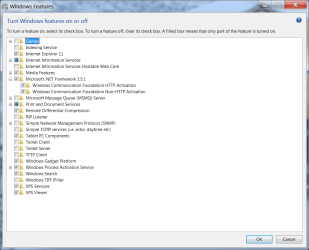
Can you open your features window via programs/features
Expand Netframework - whats showing (screenshot would be handy)

run these in this order
KB947821 (X64 version)
https://support.microsoft.com/en-us/help/947821/fix-windows-update-errors-by-using-the-dism-or-system-update-readiness

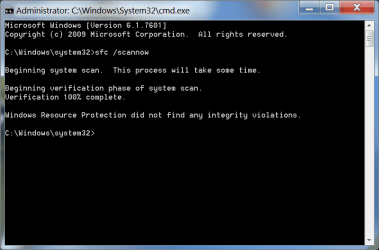
sfc /scannow

then the NF repair tool

Download Microsoft .NET Framework Repair Tool from Official Microsoft Download Center

Roy


Roy,

I assume this is what you wanted. I'm trying your solution now and will update when finished. I've run repair tools before, not sure if this was one of them (too much time, too many attempts to keep track).

Thanks
 

Attachments

  • netfeat.png
    netfeat.png
    171.7 KB · Views: 0

My Computer

Computer type
PC/Desktop
Computer Manufacturer/Model Number
Custom
OS
Windows 7 Professional x64
CPU
i5 Kaby Lake 7600K
Motherboard
Asus Z270E
Memory
T-Force DARK 8GB (2 x 4GB) DDR4
Graphics Card(s)
GeForce GTX 1060 6GB
Sound Card
Dragonfly EXT
Monitor(s) Displays
ASUS MX25AQ : ASUS MX259H
Screen Resolution
2560x1440 : 1920x1080
Hard Drives
1TB Seagate BarraCuda 64MB SATA 6.0Gb/s HDD
1TB Seagate Backup Plus Slim EHD (USB 3.0)
2TB Seagate Backup Plus Slim EHD (USB 3.0)
PSU
650W ATX12V SLI CrossFire
Case
DIYPC VT380-BK (altered)
Cooling
Cooler Master Hyper 212 EVO
Keyboard
Tesoro Lobera Spectrum (Red Switch)
Mouse
Tesoro Shrike H2L V2 : Blackweb Wireless BT
Internet Speed
200 MB/s
Antivirus
Norton (from OS install), Malwarebytes, AVG (no install yet)
Browser
Chrome, Firefox
Other Info
TP-LINK 7 Port USB 3.0 Hub UH700
Tripp Lite SD reader UBS 3.0
ASUS DRW-24F1ST x24 DVD RW
re: Roy

Hi Dyljade,

That error code also relates to a permissions problem

Can you open your features window via programs/features
Expand Netframework - whats showing (screenshot would be handy)

run these in this order
KB947821 (X64 version)
https://support.microsoft.com/en-us/help/947821/fix-windows-update-errors-by-using-the-dism-or-system-update-readiness

sfc /scannow

then the NF repair tool

Download Microsoft .NET Framework Repair Tool from Official Microsoft Download Center

Roy


Roy,

I had no issues with the KB947821, scannow found no issues (this has always been the case), but when I tried to run the NetFxRepair, it brought up this error window. Again tying back into permission issues.
 

Attachments

  • sfcscan.png
    sfcscan.png
    92.2 KB · Views: 0
  • permissue.1.png
    permissue.1.png
    74.2 KB · Views: 11

My Computer

Computer type
PC/Desktop
Computer Manufacturer/Model Number
Custom
OS
Windows 7 Professional x64
CPU
i5 Kaby Lake 7600K
Motherboard
Asus Z270E
Memory
T-Force DARK 8GB (2 x 4GB) DDR4
Graphics Card(s)
GeForce GTX 1060 6GB
Sound Card
Dragonfly EXT
Monitor(s) Displays
ASUS MX25AQ : ASUS MX259H
Screen Resolution
2560x1440 : 1920x1080
Hard Drives
1TB Seagate BarraCuda 64MB SATA 6.0Gb/s HDD
1TB Seagate Backup Plus Slim EHD (USB 3.0)
2TB Seagate Backup Plus Slim EHD (USB 3.0)
PSU
650W ATX12V SLI CrossFire
Case
DIYPC VT380-BK (altered)
Cooling
Cooler Master Hyper 212 EVO
Keyboard
Tesoro Lobera Spectrum (Red Switch)
Mouse
Tesoro Shrike H2L V2 : Blackweb Wireless BT
Internet Speed
200 MB/s
Antivirus
Norton (from OS install), Malwarebytes, AVG (no install yet)
Browser
Chrome, Firefox
Other Info
TP-LINK 7 Port USB 3.0 Hub UH700
Tripp Lite SD reader UBS 3.0
ASUS DRW-24F1ST x24 DVD RW
Hi DylJade,

from the screenshot please uncheck
on NF3.5
The 2 activation - HTTP/NonHTTP

and further down
Windows process activation service

Try updating.

Roy
 

My Computer

Computer type
PC/Desktop
Computer Manufacturer/Model Number
medionl/Aspire 6930G/acer x55a
OS
W7 home premium 32bit/W7HP 64bit/w10 tp insider ring
CPU
E5300 dual core
Motherboard
medion MS7366
Memory
3gb
Graphics Card(s)
Nvidia Geforce 7100 Nforce 630i
Monitor(s) Displays
avixc
Internet Speed
n (isp resticted to 72)
Antivirus
mse/pands
Browser
palemoon
Other Info
Belkin Fd7050 n USB using Railink RT2870 drivers, more upto date
Hi DylJade,

from the screenshot please uncheck
on NF3.5
The 2 activation - HTTP/NonHTTP

and further down
Windows process activation service

Try updating.

Roy

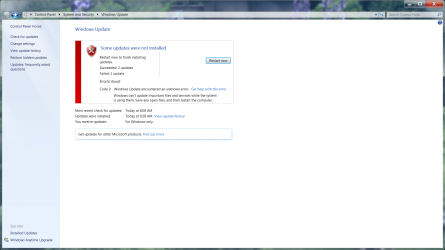
Roy, I tried what you suggested but the .net update still failed to install.
 

Attachments

  • updateerror.png
    updateerror.png
    420.9 KB · Views: 1

My Computer

Computer type
PC/Desktop
Computer Manufacturer/Model Number
Custom
OS
Windows 7 Professional x64
CPU
i5 Kaby Lake 7600K
Motherboard
Asus Z270E
Memory
T-Force DARK 8GB (2 x 4GB) DDR4
Graphics Card(s)
GeForce GTX 1060 6GB
Sound Card
Dragonfly EXT
Monitor(s) Displays
ASUS MX25AQ : ASUS MX259H
Screen Resolution
2560x1440 : 1920x1080
Hard Drives
1TB Seagate BarraCuda 64MB SATA 6.0Gb/s HDD
1TB Seagate Backup Plus Slim EHD (USB 3.0)
2TB Seagate Backup Plus Slim EHD (USB 3.0)
PSU
650W ATX12V SLI CrossFire
Case
DIYPC VT380-BK (altered)
Cooling
Cooler Master Hyper 212 EVO
Keyboard
Tesoro Lobera Spectrum (Red Switch)
Mouse
Tesoro Shrike H2L V2 : Blackweb Wireless BT
Internet Speed
200 MB/s
Antivirus
Norton (from OS install), Malwarebytes, AVG (no install yet)
Browser
Chrome, Firefox
Other Info
TP-LINK 7 Port USB 3.0 Hub UH700
Tripp Lite SD reader UBS 3.0
ASUS DRW-24F1ST x24 DVD RW
HMMMM

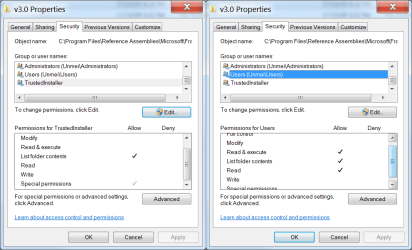
lets have a look at the permissions

can you navigate to
Programe Files >> Reference Assemblies >> Microsoft >> Framework

here you will see
v3.0
v3.5

Right click on each
then onto the Security Tab

in the top box
scroll to your users identity
in the in the lower permissions window
these 3 should be ticked
Read & Execute
List folder Contents
Read

back to the top box
Trusted Installer
ONLY List folder contents should be ticked

notes
if the same - Download Tweaking.com .. reset permissions
Do you or have you run any 3rd party optimiser/registry programs

Roy
 

My Computer

Computer type
PC/Desktop
Computer Manufacturer/Model Number
medionl/Aspire 6930G/acer x55a
OS
W7 home premium 32bit/W7HP 64bit/w10 tp insider ring
CPU
E5300 dual core
Motherboard
medion MS7366
Memory
3gb
Graphics Card(s)
Nvidia Geforce 7100 Nforce 630i
Monitor(s) Displays
avixc
Internet Speed
n (isp resticted to 72)
Antivirus
mse/pands
Browser
palemoon
Other Info
Belkin Fd7050 n USB using Railink RT2870 drivers, more upto date
Roy,

The only difference is the "special permissions" on the trusted installer settings.
I'll try using the repair tool from tweaking.com.

The only thing I have installed like that is a take ownership patch, but I had this issue before I installed that (it's the reason I installed it since I couldn't seem to change the permissions no matter the angle that I took).
 

Attachments

  • 3.0per.png
    3.0per.png
    65.2 KB · Views: 0
  • 3.5per.png
    3.5per.png
    61.5 KB · Views: 0

My Computer

Computer type
PC/Desktop
Computer Manufacturer/Model Number
Custom
OS
Windows 7 Professional x64
CPU
i5 Kaby Lake 7600K
Motherboard
Asus Z270E
Memory
T-Force DARK 8GB (2 x 4GB) DDR4
Graphics Card(s)
GeForce GTX 1060 6GB
Sound Card
Dragonfly EXT
Monitor(s) Displays
ASUS MX25AQ : ASUS MX259H
Screen Resolution
2560x1440 : 1920x1080
Hard Drives
1TB Seagate BarraCuda 64MB SATA 6.0Gb/s HDD
1TB Seagate Backup Plus Slim EHD (USB 3.0)
2TB Seagate Backup Plus Slim EHD (USB 3.0)
PSU
650W ATX12V SLI CrossFire
Case
DIYPC VT380-BK (altered)
Cooling
Cooler Master Hyper 212 EVO
Keyboard
Tesoro Lobera Spectrum (Red Switch)
Mouse
Tesoro Shrike H2L V2 : Blackweb Wireless BT
Internet Speed
200 MB/s
Antivirus
Norton (from OS install), Malwarebytes, AVG (no install yet)
Browser
Chrome, Firefox
Other Info
TP-LINK 7 Port USB 3.0 Hub UH700
Tripp Lite SD reader UBS 3.0
ASUS DRW-24F1ST x24 DVD RW
Those special permissions shouldn't be there.

Please TRY and remove them, you may be locked out tho
Its odd that thier lighter than the normal.

Tweaking's program should have high enough privaledges to rectify them.

Roy
 

My Computer

Computer type
PC/Desktop
Computer Manufacturer/Model Number
medionl/Aspire 6930G/acer x55a
OS
W7 home premium 32bit/W7HP 64bit/w10 tp insider ring
CPU
E5300 dual core
Motherboard
medion MS7366
Memory
3gb
Graphics Card(s)
Nvidia Geforce 7100 Nforce 630i
Monitor(s) Displays
avixc
Internet Speed
n (isp resticted to 72)
Antivirus
mse/pands
Browser
palemoon
Other Info
Belkin Fd7050 n USB using Railink RT2870 drivers, more upto date
Back
Top