
You are using an out of date browser. It may not display this or other websites correctly.
You should upgrade or use an alternative browser.
You should upgrade or use an alternative browser.
Can't install Google Chrome 8
- Thread starter Chorna
- Start date


Run the installer as administrator: http://www.sevenforums.com/tutorials/11841-run-administrator.html
Or use the offline installer: http://dl.google.com/chrome/install/552.0/chrome_installer.exe
Or use the offline installer: http://dl.google.com/chrome/install/552.0/chrome_installer.exe
My Computer
- Computer type
- PC/Desktop
- Computer Manufacturer/Model Number
- Custom Build
- OS
- Windows 10 Pro x64, Arch Linux
- CPU
- Intel Core 2 Quad Q8200 OC'd 3.08GHz
- Motherboard
- Asus Rampage formula LGA775
- Memory
- 8GB DDR2 900Mhz
- Graphics Card(s)
- MSI GT730 2GB GDDR5 (Kepler)
- Sound Card
- Supreme FX2
- Monitor(s) Displays
- Samsung LS22F350 LED
- Screen Resolution
- 1080P
- Hard Drives
- Kingston SSDNow UV400 120GB, 500GB Hitachi, 2TB Samsung, 500GB Seagate FreeAgent, 640GB Samsung, 160GB Toshiba (Arch)
- PSU
- AeroCool 500W Bronze
- Cooling
- Cooler Master V6 + 3X fans
- Keyboard
- Prolink keyboard
- Mouse
- Logitech M705
- Internet Speed
- 1MiB/s
- Browser
- Chrome Beta

Can you install anything?
What is the filename.ext of the file that is downloaded? Should be ChromeSetup.exe or ChromeStandaloneSetup.exe.
Are you sure the download is completing successfully? What is the size the the offline installer version?
When I downloaded it, it was 20,806KB.
If you right click on ChromeStandaloneSetup.exe what is the highlighted choice shown? It should be Open.
What is the filename.ext of the file that is downloaded? Should be ChromeSetup.exe or ChromeStandaloneSetup.exe.
Are you sure the download is completing successfully? What is the size the the offline installer version?
When I downloaded it, it was 20,806KB.
If you right click on ChromeStandaloneSetup.exe what is the highlighted choice shown? It should be Open.
My Computer
- Computer type
- PC/Desktop
- Computer Manufacturer/Model Number
- Lenovo IdeaCenter 450
- OS
- Windows 10 Pro X64
- CPU
- Intel Quad Core i7-4770 @ 3.4Ghz
- Memory
- 16.0GB PC3-12800 DDR3 SDRAM 1600 MHz
- Graphics Card(s)
- Intel Integrated HD Graphics
- Sound Card
- Realtek HD Audio
- Monitor(s) Displays
- HP 22" LCD
- Screen Resolution
- 1680 x 1050
- Hard Drives
- 250GB Samsung EVO SATA-3 SSD
2TB Seagate ST2000DM001 SATA-2
1.5TB Seagate ST3150041AS SATA
- Keyboard
- Dell USB
- Mouse
- Lenovo USB
- Internet Speed
- Cable via Road Runner 3MB Upload, 30MB Download
- Antivirus
- Windows Defender, MBAM Pro, MBAE
- Browser
- Seamonkey
- Other Info
- UEFI/GPT
PLDS DVD-RW DH16AERSH

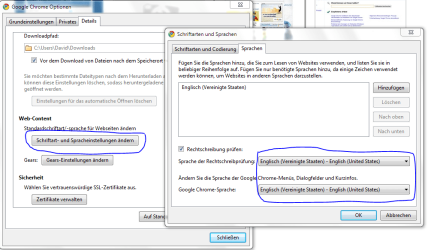
Just get a portable version (I use this one, it comes with an updater) To swich it to english language, either delete the other language dlls in /Chrome/Locales or go through the Wrench/Optionen/Details/Web Content.
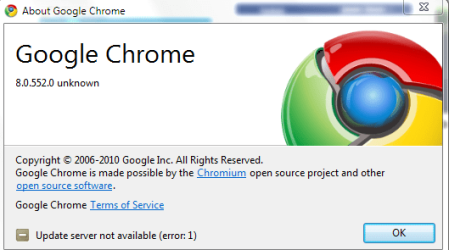
Since Chrome 8.x is only as a dev version available ATM. Just run the updater and click the DEV button

The checkbox is for version control so you don't update if there is no new version
And...voila
-DG
Since Chrome 8.x is only as a dev version available ATM. Just run the updater and click the DEV button
The checkbox is for version control so you don't update if there is no new version
And...voila
-DG
My Computer
- Computer Manufacturer/Model Number
- HP m8000n
- OS
- Windows 7 Ultimate x86
- CPU
- DualCore AMD Athlon 64 X2, 2600 MHz 5200+
- Motherboard
- Asus M2N68-LA (Narra)
- Memory
- Samsung 2GB DDR2
- Graphics Card(s)
- Onboard NVIDIA GeForce 6150SE nForce 430
- Sound Card
- Onboard nVIDIA nForce 6100-430 (MCP61P)
- Monitor(s) Displays
- Westinghouse 19" LED
- Screen Resolution
- 1280x1024
- Hard Drives
- SATA II Seagate Barracuda 500GB
USB II WD Elements 500GB
USB II WD My Book 1TB
USB II WD My Book 2TB
- PSU
- Stock (HP)
- Case
- Stock (HP)
- Cooling
- Stock
- Keyboard
- Logitech Classic KB 200
- Mouse
- Standard HP opticle USB mouse


Attachments
My Computer
- Computer Manufacturer/Model Number
- packard bell IXTREME M5722
- OS
- Operating System : Windows 7 Home Premium Edition 6.01.7600 SP1 (x64)
- CPU
- Processor : Intel Core 2 Quad Q8300 @ 2500 MHz
- Motherboard
- Mainboard : Packard Bell (Acer EG43M )
- Memory
- Physical Memory :8GB Corsair4x 2GB 800MHz C5 DDR2
- Graphics Card(s)
- Video Card : XFX 6700 AMD
- Monitor(s) Displays
- Maestro 234DL - BenQ V2220 - BenQ VW2420H
- Screen Resolution
- Current Display :1920x1080p pixels at 60 Hz in HD LED
- Hard Drives
- Hard Disks : WDC (1000 GB)
Drive C: (Hard Disk) : 428 GB available on 491 GB
Drive D: (Hard Disk) : 426 GB available on 492 GB
SAMSUNG spinpoint HD103SJ 1000.2 GB
(X 2) KINGSTON SSD NOW V 30GB
- PSU
- XFX ProSeries 550W PSU
- Case
- PACKARD BELL IXTREME
- Cooling
- System Blower Current: 150mA Air Flow16CFM ;Akasa 90mm rear
- Keyboard
- Gigabyte Aivia K8100
- Mouse
- TRUST-Wireless Laser Mouse - Carbon edition MI-7770C
- Internet Speed
- TP-LINK > TL-WN951N / AV500 Gigabit Powerline Adapters
- Browser
- chrome dev
- Other Info
- EXTRA COOLING>(FAN CONTROLLER) PC Bay Cooler 3 x 40mm fans; Akasa AK-HD-BL Blue hard drive cooler 2 x 40 mm fan 4500 rpm 29.7 dBA
Bios> American Megatrends Inc.
Version : P01-A1
Date : 08/31/2009
You're very welcome, chorna. I'm glad it worked for you
@bianzion:
This is a portable version. Of course the chrome files have been moved. Besides the external updater works better anyways. (you can jump between channels as much as you'd like to)
-DG
@bianzion:
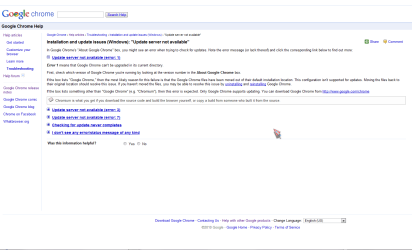
If the box lists "Google Chrome," then the most likely reason for this failure is that the Google Chrome files have been moved out of their default installation location. This configuration isn't supported for updates. Moving the files back to their original location should resolve this issue.
This is a portable version. Of course the chrome files have been moved. Besides the external updater works better anyways. (you can jump between channels as much as you'd like to)
-DG
My Computer
- Computer Manufacturer/Model Number
- HP m8000n
- OS
- Windows 7 Ultimate x86
- CPU
- DualCore AMD Athlon 64 X2, 2600 MHz 5200+
- Motherboard
- Asus M2N68-LA (Narra)
- Memory
- Samsung 2GB DDR2
- Graphics Card(s)
- Onboard NVIDIA GeForce 6150SE nForce 430
- Sound Card
- Onboard nVIDIA nForce 6100-430 (MCP61P)
- Monitor(s) Displays
- Westinghouse 19" LED
- Screen Resolution
- 1280x1024
- Hard Drives
- SATA II Seagate Barracuda 500GB
USB II WD Elements 500GB
USB II WD My Book 1TB
USB II WD My Book 2TB
- PSU
- Stock (HP)
- Case
- Stock (HP)
- Cooling
- Stock
- Keyboard
- Logitech Classic KB 200
- Mouse
- Standard HP opticle USB mouse
You're very welcome, chorna. I'm glad it worked for you
@bianzion:If the box lists "Google Chrome," then the most likely reason for this failure is that the Google Chrome files have been moved out of their default installation location. This configuration isn't supported for updates. Moving the files back to their original location should resolve this issue.
This is a portable version. Of course the chrome files have been moved. Besides the external updater works better anyways. (you can jump between channels as much as you'd like to)
-DG
point taken

My Computer
- Computer Manufacturer/Model Number
- packard bell IXTREME M5722
- OS
- Operating System : Windows 7 Home Premium Edition 6.01.7600 SP1 (x64)
- CPU
- Processor : Intel Core 2 Quad Q8300 @ 2500 MHz
- Motherboard
- Mainboard : Packard Bell (Acer EG43M )
- Memory
- Physical Memory :8GB Corsair4x 2GB 800MHz C5 DDR2
- Graphics Card(s)
- Video Card : XFX 6700 AMD
- Monitor(s) Displays
- Maestro 234DL - BenQ V2220 - BenQ VW2420H
- Screen Resolution
- Current Display :1920x1080p pixels at 60 Hz in HD LED
- Hard Drives
- Hard Disks : WDC (1000 GB)
Drive C: (Hard Disk) : 428 GB available on 491 GB
Drive D: (Hard Disk) : 426 GB available on 492 GB
SAMSUNG spinpoint HD103SJ 1000.2 GB
(X 2) KINGSTON SSD NOW V 30GB
- PSU
- XFX ProSeries 550W PSU
- Case
- PACKARD BELL IXTREME
- Cooling
- System Blower Current: 150mA Air Flow16CFM ;Akasa 90mm rear
- Keyboard
- Gigabyte Aivia K8100
- Mouse
- TRUST-Wireless Laser Mouse - Carbon edition MI-7770C
- Internet Speed
- TP-LINK > TL-WN951N / AV500 Gigabit Powerline Adapters
- Browser
- chrome dev
- Other Info
- EXTRA COOLING>(FAN CONTROLLER) PC Bay Cooler 3 x 40mm fans; Akasa AK-HD-BL Blue hard drive cooler 2 x 40 mm fan 4500 rpm 29.7 dBA
Bios> American Megatrends Inc.
Version : P01-A1
Date : 08/31/2009
zakspeedrs2001
New member
- Local time
- 3:30 PM
- Messages
- 1
hi all
i had a similar prob where i would be able to download the setup file but when i run it nothing happens - turns out that SpyBot was stopping Chrome from installing!!!!!!
i had a similar prob where i would be able to download the setup file but when i run it nothing happens - turns out that SpyBot was stopping Chrome from installing!!!!!!
My Computer
- OS
- win7 64 ultimate
Interesting observation! I don't use Spybot nearly as much as I used to but I never experienced such odd behavior.
Anyways that's a point to be taken into consideration if something doesn't install as it should.
Thanks (and welcome to SF btw
-DG
Anyways that's a point to be taken into consideration if something doesn't install as it should.
Thanks (and welcome to SF btw
-DG
My Computer
- Computer Manufacturer/Model Number
- HP m8000n
- OS
- Windows 7 Ultimate x86
- CPU
- DualCore AMD Athlon 64 X2, 2600 MHz 5200+
- Motherboard
- Asus M2N68-LA (Narra)
- Memory
- Samsung 2GB DDR2
- Graphics Card(s)
- Onboard NVIDIA GeForce 6150SE nForce 430
- Sound Card
- Onboard nVIDIA nForce 6100-430 (MCP61P)
- Monitor(s) Displays
- Westinghouse 19" LED
- Screen Resolution
- 1280x1024
- Hard Drives
- SATA II Seagate Barracuda 500GB
USB II WD Elements 500GB
USB II WD My Book 1TB
USB II WD My Book 2TB
- PSU
- Stock (HP)
- Case
- Stock (HP)
- Cooling
- Stock
- Keyboard
- Logitech Classic KB 200
- Mouse
- Standard HP opticle USB mouse

- Local time
- 6:30 AM
- Messages
- 707
Had a problem installing Chrome last year, clicking on the .exe & nothing happened the culprit turned out to be 7zip I had to right click the .exe & extract the contents twice.
My Computer
- Computer type
- PC/Desktop
- Computer Manufacturer/Model Number
- self build
- OS
- Windows 7 Ultimate 64 bit
- CPU
- Intel Core i7 4770K overclocked to 4.7GHz Quad Core Haswell
- Motherboard
- Asus Z87 Pro (Socket 1150) ATX Motherboard
- Memory
- 16GB Team Group Vulcan Gold 2133MHz
- Graphics Card(s)
- ATI Radeon HD 7880 Series Display adapter
- Monitor(s) Displays
- NEC LCD2690WUXi2
- Screen Resolution
- 26" 1920 x 1200
- Hard Drives
- Samsung 500GB SSD 840 EVO SATA 6Gb/s
Samsung 250GB SSD 840 EVO SATA 6Gb/s
- PSU
- Corsair AX760 Platinum
- Case
- Cooler Master HAF X Gaming Tower
- Cooling
- XSPC RayStorm 750 RS360 Water cooling
- Mouse
- Razer Death Adder left handed
- Internet Speed
- 126Mb download 11.5Mb up
- Antivirus
- Avast free
- Browser
- Opera
- Other Info
- Main Browser is Opera
Favorite software Adobe Lightroom & Photoshop
best plugins Nik software
Firewall : Private firewall 7
That's even more odd (odder?, Steve. Not that I doubt you but I can't imagine how this could happen. 7-zip is not involved in any way when the "execution routine" is called. Unless of course it wasn't an official install file but a kind of self extracting archive that was somehow damaged.
-DG
, Steve. Not that I doubt you but I can't imagine how this could happen. 7-zip is not involved in any way when the "execution routine" is called. Unless of course it wasn't an official install file but a kind of self extracting archive that was somehow damaged.-DG
My Computer
- Computer Manufacturer/Model Number
- HP m8000n
- OS
- Windows 7 Ultimate x86
- CPU
- DualCore AMD Athlon 64 X2, 2600 MHz 5200+
- Motherboard
- Asus M2N68-LA (Narra)
- Memory
- Samsung 2GB DDR2
- Graphics Card(s)
- Onboard NVIDIA GeForce 6150SE nForce 430
- Sound Card
- Onboard nVIDIA nForce 6100-430 (MCP61P)
- Monitor(s) Displays
- Westinghouse 19" LED
- Screen Resolution
- 1280x1024
- Hard Drives
- SATA II Seagate Barracuda 500GB
USB II WD Elements 500GB
USB II WD My Book 1TB
USB II WD My Book 2TB
- PSU
- Stock (HP)
- Case
- Stock (HP)
- Cooling
- Stock
- Keyboard
- Logitech Classic KB 200
- Mouse
- Standard HP opticle USB mouse
- Local time
- 6:30 AM
- Messages
- 707
It was a real pain trying to find the cause of the problem I eventually right clicked on the exe by accident & found I could extract the contents. When I uninstalled 7zip the problem went away.
I guess maybe that 7zip needed a a file to be on my PC & it was missing something from net framework etc...
edit
just Googled the problem & found one guy who had the same problem installing a .exe (not Chrome)
using 7zip the only difference was in his case 7zip was reporting an error.
I guess maybe that 7zip needed a a file to be on my PC & it was missing something from net framework etc...
edit
just Googled the problem & found one guy who had the same problem installing a .exe (not Chrome)
using 7zip the only difference was in his case 7zip was reporting an error.
Last edited:
My Computer
- Computer type
- PC/Desktop
- Computer Manufacturer/Model Number
- self build
- OS
- Windows 7 Ultimate 64 bit
- CPU
- Intel Core i7 4770K overclocked to 4.7GHz Quad Core Haswell
- Motherboard
- Asus Z87 Pro (Socket 1150) ATX Motherboard
- Memory
- 16GB Team Group Vulcan Gold 2133MHz
- Graphics Card(s)
- ATI Radeon HD 7880 Series Display adapter
- Monitor(s) Displays
- NEC LCD2690WUXi2
- Screen Resolution
- 26" 1920 x 1200
- Hard Drives
- Samsung 500GB SSD 840 EVO SATA 6Gb/s
Samsung 250GB SSD 840 EVO SATA 6Gb/s
- PSU
- Corsair AX760 Platinum
- Case
- Cooler Master HAF X Gaming Tower
- Cooling
- XSPC RayStorm 750 RS360 Water cooling
- Mouse
- Razer Death Adder left handed
- Internet Speed
- 126Mb download 11.5Mb up
- Antivirus
- Avast free
- Browser
- Opera
- Other Info
- Main Browser is Opera
Favorite software Adobe Lightroom & Photoshop
best plugins Nik software
Firewall : Private firewall 7
Similar threads
- Replies
- 2
- Views
- 2K
- Replies
- 15
- Views
- 3K

- Replies
- 7
- Views
- 1K
