
Can't install NET Framework 4 Client Profile, error code: (0x80070643)

Steampunk7

New member
Member
VIP
Local time
11:04 PM
Messages
119
I've been struggling for the last several days, trying to fix several problems with my PC. It started with some keyboard keys which didn't work correctly. I eventually fixed that problem, but the new one appeared. I couldn't download 170+ window updates, after having run Repair Install.

Some of those updates have been installed successfully, other failed to install.
After many attempted fixes and solutions, I decided not to install all 170 updates at once, but to check the "update packages" in chronological order. First the oldest ones from 2011, then 2012 and so on. First three years went smoothly, 2014 was a bit of problem. Then ensued next round of fixes, hotfixes and various solutions which I found online.
The usual scenario was: out of x updates x-1 installed successfully, one failed.
Then > all these fixes
I went through that cycle several times.

I scanned my system a couple of times in between, (Super AntiSpyware, ESET online scanner).
To repair potentially damaged system reg keys I run Reenable II Lite as well.
Some failed updates I downloaded directly from Microsoft Update Catalog and installed them manually.

To cut an (already long) post short: I eventually, after 4 days of failed attempts - succeeded in installing all 170+ updates, but...this last update I am not able to install. Attached is the installation log.

(I forgot to say that I am not able to reach Windows Defender. When I click on it I always got pop up notification saying that the WD is turned off. Then I clicked on the words "click here to turn it on". Since nothing happened, I decided to let it be turned off, and I installed Malwarebyte 3.0, Trial version, instead)

In short: lot of issues here. Mouse wheel also does not work. Can't zoom in in Photoshop. Can't increase/decrease fonts on the webpage, etc...

I'd be extremely grateful if anyone could help me bring my PC in order as it was a week ago when everything worked as charm.
 

Attachments

Last edited:

My Computer

Computer type
PC/Desktop
OS
Windows 7 Ultimate x64
CPU
Intel(R) Xeon(R) CPU E3-1231 v3 @ 3.40GHz
Motherboard
ASUSTeK COMPUTER INC. Z97-A Rev 1.xx
Memory
16 GB
Graphics Card(s)
AMD Radeon (TM) R9 390 Series
Sound Card
(1) AMD High Definition Audio Device (2) Realtek High Defi
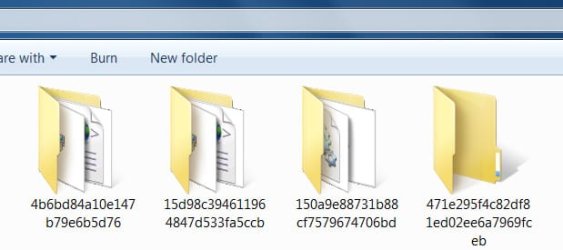
In addition, I have just noticed that in my D partition 7 new folders appeared. I can not delete them because "the file in it is open in another program".
 

Attachments

  • 12.jpg
    12.jpg
    81.4 KB · Views: 19

My Computer

Computer type
PC/Desktop
OS
Windows 7 Ultimate x64
CPU
Intel(R) Xeon(R) CPU E3-1231 v3 @ 3.40GHz
Motherboard
ASUSTeK COMPUTER INC. Z97-A Rev 1.xx
Memory
16 GB
Graphics Card(s)
AMD Radeon (TM) R9 390 Series
Sound Card
(1) AMD High Definition Audio Device (2) Realtek High Defi
Hi Steampunk7,

I couldn't download 170+ window updates, after having run Repair Install.

Some of those updates have been installed successfully, others failed to install.

After many attempted fixes and solutions, I decided not to install all 170 updates at once, but to check the "update packages" in chronological order. First the oldest ones from 2011, then 2012 and so on. First three years went smoothly, 2014 was a bit of problem. Then ensued next round of fixes, hotfixes and various solutions which I found online.

The usual scenario was: out of x updates x-1 installed successfully, one failed.

Some failed updates I downloaded directly from Microsoft page and install manually.

To cut an (already long) post short: I eventually, after 4 days of failed attempts - succeeded in installing all 170+ updates, but...this last update I am not able to install.

Just for future reference, if you need to do a Repair Install or Clean Install, it will be a lot quicker and easier to use DISM++. If you want further information on this then please let us know!

I hope this helps!
 

My Computer

Computer type
Laptop
Computer Manufacturer/Model Number
Fujitsu LIFEBOOK
OS
Win 7 HP SP1 64-bit Vista HB SP2 32-bit Linux Mint 18.3
CPU
Intel(R) Pentium(R) CPU P6200 @ 2.13GHz
Motherboard
FUJITSU FJNBB06
Memory
4.00 GB
Graphics Card(s)
Intel(R) Graphics Media Accelerator HD
Sound Card
[1] Realtek High Definition Audio [2] Intel(R) Display Audio
Screen Resolution
1366 x 768 x 32 bits (4294967296 colors) @ 59 Hz
Hard Drives
TOSHIBA MK5076GSX
Antivirus
AVG FREE
Paul, I downloaded DISM ++...further info would be helpful. But bear in mind that I haven't used it so far. I would not want to do something wrong which would result in having to format C disc and install Win7, all programs, settings, themes, plug-ins and so on again :)
Do you think it would solve all these problems? I mean I already performed Repair Install twice. I even managed to install practically all updates in the meantime (with the exception of this NET Framework 4 Client Profile)...admittedly, scroll wheel still does not work.
 

My Computer

Computer type
PC/Desktop
OS
Windows 7 Ultimate x64
CPU
Intel(R) Xeon(R) CPU E3-1231 v3 @ 3.40GHz
Motherboard
ASUSTeK COMPUTER INC. Z97-A Rev 1.xx
Memory
16 GB
Graphics Card(s)
AMD Radeon (TM) R9 390 Series
Sound Card
(1) AMD High Definition Audio Device (2) Realtek High Defi
Hi Steampunk7,

It is pretty straight forward. If you don't feel confident then you might want to create a System Image first [see the instructions below] for your own piece of mind!

Paul, I downloaded DISM ++...further info would be helpful. But bear in mind that I haven't used it so far. I would not want to do something wrong which would result in having to format C disc and install Win7, all programs, settings, themes, plug-ins and so on again :)

DISM++ - Basic Overview

DISM++ is a FREE implementation tool that has the ability to perform Windows Updates [WU]. Some of the advantages [but not all] are:

[1] The GUI is very easy to understand and use.
[2] It is much faster than M$’s WU because it uses a different engine.
[3] It downloads the DB from M$, scans your OS, and then lists the updates available.
[4] It gives you the option of what you want to install.
[5] It doesn’t install superseded updates like M$ does.
[6] It warns you of any suspect and Telemetry updates, and any updates that have known issues.
[7] It doesn’t require re-booting between updates.
[8] It can be used to either update an install.wim image OFFLINE, or to update the LIVE OS.

DISM++ - Run Windows Updates On The LIVE OS

DISM++ Direct download [zip] => DISM++.
DISM++ Website [you will need to translate the page] => DISM++ |New Windows Utility.

Here is the quick procedure guide:

[1] Download the latest version of DISM++ [see the DISM++ Direct download [zip] link above].
[2] Extract the files using something like 7-Zip here => 7-Zip.
[3] Double-click Dism++x86 or Dism++x64 and then click Run.
[4] Click Updates in the left-hand pane and then click Scan [bottom right].
[5] Once the scan has completed, click Install Updates [blue button to the right of Scan].
[6] If any pop-ups appear warning you of any undesirable updates [suspect, Telemetry, known issues], click Cancel and it will skip that one. There will be several of these that will appear so click Cancel to all of them.
[7] It is advisable to run the DISM++ WU a couple of times. To do this, just re-boot and Scan again [from number [4] above].
[8] Run M$ WU to see if there are any other updates available.

That's it!

Create A System Image

Once you have your OS updated and running the way you like it, create a system image. This way, if things go wrong in the future, you will be able to restore your OS back to the exact same state that it is now in a very short time. This is because you will NOT have to install ALL the updates again, not to mention the amount of time needed to download and install them, and the numerous restarts required. There are two imaging programs which are very popular among members here, the first is AOMEI Backupper Standard [FREE], and the second is Macrium Reflect [FREE].

I hope this helps!
 
Last edited:

My Computer

Computer type
Laptop
Computer Manufacturer/Model Number
Fujitsu LIFEBOOK
OS
Win 7 HP SP1 64-bit Vista HB SP2 32-bit Linux Mint 18.3
CPU
Intel(R) Pentium(R) CPU P6200 @ 2.13GHz
Motherboard
FUJITSU FJNBB06
Memory
4.00 GB
Graphics Card(s)
Intel(R) Graphics Media Accelerator HD
Sound Card
[1] Realtek High Definition Audio [2] Intel(R) Display Audio
Screen Resolution
1366 x 768 x 32 bits (4294967296 colors) @ 59 Hz
Hard Drives
TOSHIBA MK5076GSX
Antivirus
AVG FREE
Hi Steampunk7,

I even managed to install practically all updates in the meantime (with the exception of this NET Framework 4 Client Profile.

Did you try downloading and installing the standalone version of .NET Framework?

I hope this helps!
 

My Computer

Computer type
Laptop
Computer Manufacturer/Model Number
Fujitsu LIFEBOOK
OS
Win 7 HP SP1 64-bit Vista HB SP2 32-bit Linux Mint 18.3
CPU
Intel(R) Pentium(R) CPU P6200 @ 2.13GHz
Motherboard
FUJITSU FJNBB06
Memory
4.00 GB
Graphics Card(s)
Intel(R) Graphics Media Accelerator HD
Sound Card
[1] Realtek High Definition Audio [2] Intel(R) Display Audio
Screen Resolution
1366 x 768 x 32 bits (4294967296 colors) @ 59 Hz
Hard Drives
TOSHIBA MK5076GSX
Antivirus
AVG FREE
Hi Steampunk7,

Did you try downloading and installing the standalone version of .NET Framework?

I hope this helps!

Yes I did (that's what I said in the initial post), but it did not install. btw, how should I know which of the updates on DISM++list to install? Some of those are already checked, others are not.
 
Last edited:

My Computer

Computer type
PC/Desktop
OS
Windows 7 Ultimate x64
CPU
Intel(R) Xeon(R) CPU E3-1231 v3 @ 3.40GHz
Motherboard
ASUSTeK COMPUTER INC. Z97-A Rev 1.xx
Memory
16 GB
Graphics Card(s)
AMD Radeon (TM) R9 390 Series
Sound Card
(1) AMD High Definition Audio Device (2) Realtek High Defi
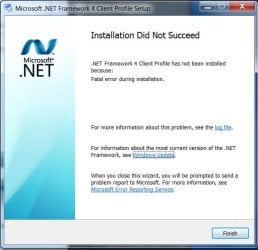
Hi Steampunk7,

Yes I did, but it did not install.

When you say it didn't install, were there any messages generated?
What is the full path of the .NET Framework [.msu] file that you downloaded?

I hope this helps!
 

My Computer

Computer type
Laptop
Computer Manufacturer/Model Number
Fujitsu LIFEBOOK
OS
Win 7 HP SP1 64-bit Vista HB SP2 32-bit Linux Mint 18.3
CPU
Intel(R) Pentium(R) CPU P6200 @ 2.13GHz
Motherboard
FUJITSU FJNBB06
Memory
4.00 GB
Graphics Card(s)
Intel(R) Graphics Media Accelerator HD
Sound Card
[1] Realtek High Definition Audio [2] Intel(R) Display Audio
Screen Resolution
1366 x 768 x 32 bits (4294967296 colors) @ 59 Hz
Hard Drives
TOSHIBA MK5076GSX
Antivirus
AVG FREE
Hi Steampunk7,
When you say it didn't install, were there any messages generated?
What is the full path of the .NET Framework [.msu] file that you downloaded?

Yes, it did generate message. I attached log file in my initial post. No offense, but did you read it :) ?
 

My Computer

Computer type
PC/Desktop
OS
Windows 7 Ultimate x64
CPU
Intel(R) Xeon(R) CPU E3-1231 v3 @ 3.40GHz
Motherboard
ASUSTeK COMPUTER INC. Z97-A Rev 1.xx
Memory
16 GB
Graphics Card(s)
AMD Radeon (TM) R9 390 Series
Sound Card
(1) AMD High Definition Audio Device (2) Realtek High Defi
Btw, since that particular file seems to be quite old (2011.), perhaps the most current version of the NET Framework prevents the install..?
 

Attachments

  • 14.jpg
    14.jpg
    150.4 KB · Views: 14

My Computer

Computer type
PC/Desktop
OS
Windows 7 Ultimate x64
CPU
Intel(R) Xeon(R) CPU E3-1231 v3 @ 3.40GHz
Motherboard
ASUSTeK COMPUTER INC. Z97-A Rev 1.xx
Memory
16 GB
Graphics Card(s)
AMD Radeon (TM) R9 390 Series
Sound Card
(1) AMD High Definition Audio Device (2) Realtek High Defi
Hi Steampunk7,

BTW, since that particular file seems to be quite old (2011.), perhaps the most current version of the NET Framework prevents the install..?

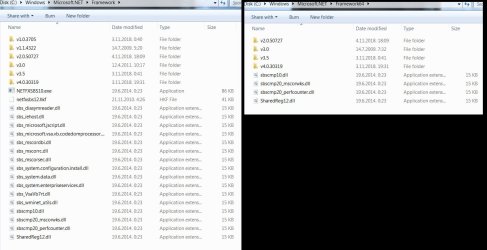
What version(s) of .NET Framework have you actually got installed?

Computer > Local Disk (C:) > Windows > Microsoft.NET > Framework

I hope this helps!
 

My Computer

Computer type
Laptop
Computer Manufacturer/Model Number
Fujitsu LIFEBOOK
OS
Win 7 HP SP1 64-bit Vista HB SP2 32-bit Linux Mint 18.3
CPU
Intel(R) Pentium(R) CPU P6200 @ 2.13GHz
Motherboard
FUJITSU FJNBB06
Memory
4.00 GB
Graphics Card(s)
Intel(R) Graphics Media Accelerator HD
Sound Card
[1] Realtek High Definition Audio [2] Intel(R) Display Audio
Screen Resolution
1366 x 768 x 32 bits (4294967296 colors) @ 59 Hz
Hard Drives
TOSHIBA MK5076GSX
Antivirus
AVG FREE
Hi Steampunk7,

Why are you downloading the .NET Framework 4 Client Profile? This is a subset of the .NET Framework 4 that is optimized for client applications. It provides functionality for most client applications, including Windows Presentation Foundation (WPF), Windows Forms, Windows Communication Foundation (WCF), and ClickOnce features.

It is NOT the full .NET Framework package.

If you want the full .NET Framework package, then download and install it from here => Microsoft .NET Framework 4.7.2 offline installer for Windows.

I hope this helps!
 

My Computer

Computer type
Laptop
Computer Manufacturer/Model Number
Fujitsu LIFEBOOK
OS
Win 7 HP SP1 64-bit Vista HB SP2 32-bit Linux Mint 18.3
CPU
Intel(R) Pentium(R) CPU P6200 @ 2.13GHz
Motherboard
FUJITSU FJNBB06
Memory
4.00 GB
Graphics Card(s)
Intel(R) Graphics Media Accelerator HD
Sound Card
[1] Realtek High Definition Audio [2] Intel(R) Display Audio
Screen Resolution
1366 x 768 x 32 bits (4294967296 colors) @ 59 Hz
Hard Drives
TOSHIBA MK5076GSX
Antivirus
AVG FREE
Left pic > the content of Framework folder....right pic > the content of Framework 64 folder
 

Attachments

  • 15.jpg
    15.jpg
    291.2 KB · Views: 1

My Computer

Computer type
PC/Desktop
OS
Windows 7 Ultimate x64
CPU
Intel(R) Xeon(R) CPU E3-1231 v3 @ 3.40GHz
Motherboard
ASUSTeK COMPUTER INC. Z97-A Rev 1.xx
Memory
16 GB
Graphics Card(s)
AMD Radeon (TM) R9 390 Series
Sound Card
(1) AMD High Definition Audio Device (2) Realtek High Defi
My Computer

Computer type
PC/Desktop
OS
Windows 7 Ultimate x64
CPU
Intel(R) Xeon(R) CPU E3-1231 v3 @ 3.40GHz
Motherboard
ASUSTeK COMPUTER INC. Z97-A Rev 1.xx
Memory
16 GB
Graphics Card(s)
AMD Radeon (TM) R9 390 Series
Sound Card
(1) AMD High Definition Audio Device (2) Realtek High Defi
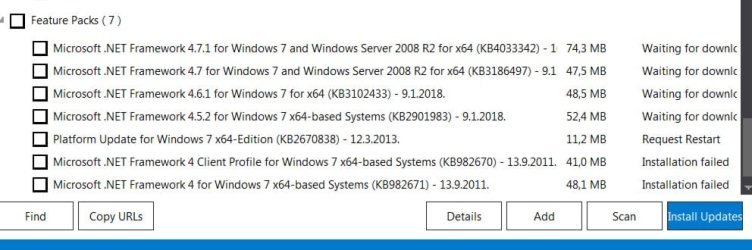
Btw, in the list of all DISM++ updates, half of them are already checked, the rest are not. How should I know which one should I install, only those that are already checked by default, or all of them..?
 

My Computer

Computer type
PC/Desktop
OS
Windows 7 Ultimate x64
CPU
Intel(R) Xeon(R) CPU E3-1231 v3 @ 3.40GHz
Motherboard
ASUSTeK COMPUTER INC. Z97-A Rev 1.xx
Memory
16 GB
Graphics Card(s)
AMD Radeon (TM) R9 390 Series
Sound Card
(1) AMD High Definition Audio Device (2) Realtek High Defi
Hi Steampunk7,

BTW, in the list of all DISM++ updates, half of them are already checked, the rest are not. How should I know which one should I install, only those that are already checked by default, or all of them..?

[6] If any pop-ups appear warning you of any undesirable updates [suspect, Telemetry, known issues], click Cancel and it will skip that one. There will be several of these that will appear so click Cancel to all of them.
[7] It is advisable to run the DISM++ WU a couple of times. To do this, just re-boot and Scan again [from number [4] above].

The pre-ticked updates are what is recommended and are similar to the WU critical and recommended updates. The un-ticked updates are similar to the WU optional updates.

Is there a .NET Framework listed there?

I hope this helps!
 
Last edited:

My Computer

Computer type
Laptop
Computer Manufacturer/Model Number
Fujitsu LIFEBOOK
OS
Win 7 HP SP1 64-bit Vista HB SP2 32-bit Linux Mint 18.3
CPU
Intel(R) Pentium(R) CPU P6200 @ 2.13GHz
Motherboard
FUJITSU FJNBB06
Memory
4.00 GB
Graphics Card(s)
Intel(R) Graphics Media Accelerator HD
Sound Card
[1] Realtek High Definition Audio [2] Intel(R) Display Audio
Screen Resolution
1366 x 768 x 32 bits (4294967296 colors) @ 59 Hz
Hard Drives
TOSHIBA MK5076GSX
Antivirus
AVG FREE
Did you notice the highlights on quite a few of the DISM++ listed updates?
 

My Computer

Computer type
PC/Desktop
Computer Manufacturer/Model Number
HP Desktop & Compaq Laptop
OS
Win 10 x64, Linux Lite, Win 7 x64, BlackArch, & Kali
Hard Drives
Samsung 850 Pro 256Gb,
Hitachi HDD 1Tb,
Crucial MX SSD 250Gb
Segate 3Tb USB 3.0 Ext. Backup HDD
Internet Speed
150Mbps dn, 20Mbps up
Antivirus
Avast Free, Malwarebytes Anti-Exploit & Anti-Ransomware
Browser
Firefox, Chrome, Opera, & VPN
Hi Steampunk7,

Is there a .NET Framework listed there?

I hope this helps!


Yes, several of them. These feature packs and two more among Updates.
 

Attachments

  • c.jpg
    c.jpg
    199.8 KB · Views: 0

My Computer

Computer type
PC/Desktop
OS
Windows 7 Ultimate x64
CPU
Intel(R) Xeon(R) CPU E3-1231 v3 @ 3.40GHz
Motherboard
ASUSTeK COMPUTER INC. Z97-A Rev 1.xx
Memory
16 GB
Graphics Card(s)
AMD Radeon (TM) R9 390 Series
Sound Card
(1) AMD High Definition Audio Device (2) Realtek High Defi
Did you notice the highlights on quite a few of the DISM++ listed updates?


Yes, but those orange highlighted updates I do not install, because I get notified that I don't actually need them.
 

My Computer

Computer type
PC/Desktop
OS
Windows 7 Ultimate x64
CPU
Intel(R) Xeon(R) CPU E3-1231 v3 @ 3.40GHz
Motherboard
ASUSTeK COMPUTER INC. Z97-A Rev 1.xx
Memory
16 GB
Graphics Card(s)
AMD Radeon (TM) R9 390 Series
Sound Card
(1) AMD High Definition Audio Device (2) Realtek High Defi
Back
Top