Can't install sony vegas, probably because of C++ Redistributable

LiTos456

New member
Local time
12:14 PM
Messages
51
Hey guys,
I need help getting my Sony Vegas 8.0 to work. On windows 7 it doesn't want to install... When I try to install it, the Visual C++ 2005 Redistributable wouldn't work. If I skip that part and go on with installing vegas without it, in the end I end up getting dll registering errors, and once its done it says your system wasn't modified and obviously it doesn't work.
Can anyone help me with this? It's frustrating because I really need this program, it's one of the most important programs I got.
Thanks!
 

My Computer My Computer

At a glance

Windows 7 RC
OS
Windows 7 RC
Go to the redistributable folder on the setup disc and install c++ first then try the installation again and hopefully that will sort it.
 

My Computer My Computer

At a glance

Windows 7 Ultimate Vista Ultimate x64Core 2 Duo E8500 3.16Ghz @ 3.8Ghz2x2Gigs Patriot PC2-6400 LLInno3D GeForce GTX260 216 SP
Computer Manufacturer/Model Number
Home Brew
OS
Windows 7 Ultimate Vista Ultimate x64
CPU
Core 2 Duo E8500 3.16Ghz @ 3.8Ghz
Motherboard
eVGA 750i FTW
Memory
2x2Gigs Patriot PC2-6400 LL
Graphics Card(s)
Inno3D GeForce GTX260 216 SP
Monitor(s) Displays
ASUS VW222U 22" 2ms Response time
Screen Resolution
1680x1050
Hard Drives
SATA 150GB
SATA II 250GB
USB IDE 750GB Ext.
PSU
HYTEC 600W & Thermaltake 650W Toughpower Power Exp
Case
Thermaltake Armor LCS (Liquid Cooling System)
Cooling
Liquid Cooling System
Keyboard
Logitech G15 Gaming Keyboard
Mouse
Logitech G9 Gaming Mouse
I got the redistributable to work... But i'm still getting the problem with registering dlls! By the end of installing sony vegas I get the error that module sfppack1.dll cannot be registered. It's really annoying... i tried to google it but theres only like 2 solutions, one of which is way too complicated (well the 2nd part of it)... Does anyone have any tips on this? The problem is that it can't register it's dlls. What should I do?
 

My Computer My Computer

At a glance

Windows 7 RC
OS
Windows 7 RC
It may just be that it is not compatible with Windows 7 yet, unfortunately not everything is, the only thing you can do is wait for someone to find a workaround and send some feedback to Microsoft in case there is something they can do to make it compatible.
 

My Computer My Computer

At a glance

Windows 7 Ultimate Vista Ultimate x64Core 2 Duo E8500 3.16Ghz @ 3.8Ghz2x2Gigs Patriot PC2-6400 LLInno3D GeForce GTX260 216 SP
Computer Manufacturer/Model Number
Home Brew
OS
Windows 7 Ultimate Vista Ultimate x64
CPU
Core 2 Duo E8500 3.16Ghz @ 3.8Ghz
Motherboard
eVGA 750i FTW
Memory
2x2Gigs Patriot PC2-6400 LL
Graphics Card(s)
Inno3D GeForce GTX260 216 SP
Monitor(s) Displays
ASUS VW222U 22" 2ms Response time
Screen Resolution
1680x1050
Hard Drives
SATA 150GB
SATA II 250GB
USB IDE 750GB Ext.
PSU
HYTEC 600W & Thermaltake 650W Toughpower Power Exp
Case
Thermaltake Armor LCS (Liquid Cooling System)
Cooling
Liquid Cooling System
Keyboard
Logitech G15 Gaming Keyboard
Mouse
Logitech G9 Gaming Mouse
Yeah but this issue doesn't only appear on 7, as far as I know. But as I said I didn't find much info on it. Alright then...
 

My Computer My Computer

At a glance

Windows 7 RC
OS
Windows 7 RC
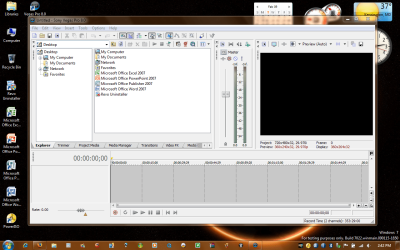
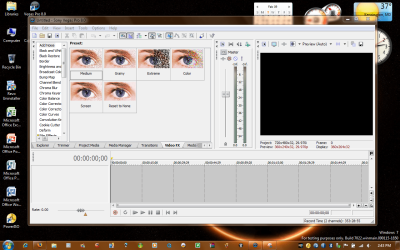
It installed and it's working perfectly on my windows 7022 32 Bit test machine. I right clicked and installed as Admin and let it download Visual C Redistributable automatically.

Here are some screen captures.'
Remember to Run EVERYTHING as an Administrator - EVERYTHING!!!
 

Attachments

  • 1-Vegas 8C Pro.PNG
    1-Vegas 8C Pro.PNG
    167 KB · Views: 955
  • 2-Vegas 8C Pro .PNG
    2-Vegas 8C Pro .PNG
    184 KB · Views: 572

My Computer My Computer

At a glance

windows 7Q93008 Gig
OS
windows 7
CPU
Q9300
Memory
8 Gig
Screen Resolution
1920x1200
Hard Drives
1st 500 gig 2nd 1 TB SATAs
Internet Speed
20 mb FIOS
That's what I ended up thinking but guess what... for some reason, there is no run as administrator option JUST on that setup. Going to properties doesnt help, the administrator box is unchecked and greyed out. I can only run from the actual vegas setup, not the full setup, where it install C++ first. I can run the C++ one first, but it instals it and then tells me it cant find the C++ executable in the temp folder that it apparantly just extracted itself to.
 

My Computer My Computer

At a glance

Windows 7 RC
OS
Windows 7 RC
That's what I ended up thinking but guess what... for some reason, there is no run as administrator option JUST on that setup. Going to properties doesn't help, the administrator box is unchecked and greyed out. I can only run from the actual vegas setup, not the full setup, where it install C++ first. I can run the C++ one first, but it instals it and then tells me it cant find the C++ executable in the temp folder that it aparently just extracted itself to.

ummm, something has to be off as I have been able to install it in Win7 7000 Beta 32 and 64 as well as 7022.


I just install Vegas as admin and IT downloads C++ executable prior to installing Vegas. It then installed C++ executable on its own and once it finished it proceeds to install Vegas. I never had to manually download or install C++ executable. The Vegas installer did that on its own so I did not have to install C++ executable "as admin", only Vegas. Other than doing a clean reinstall of win7 I can't figure out what could be the cause of your problem. It should work as I have done it many times now.

Good luck
 

My Computer My Computer

At a glance

windows 7Q93008 Gig
OS
windows 7
CPU
Q9300
Memory
8 Gig
Screen Resolution
1920x1200
Hard Drives
1st 500 gig 2nd 1 TB SATAs
Internet Speed
20 mb FIOS
Theres the setup.exe which is the full setup, that downloads and installs C++ by itself. This is what I CAN run as admin, but it loses the executable that it downloads later, for some reason. (Could this be some kind of a setting that I have to change?). Then there's vegas80_enu.exe, which is the vegas setup only, without the C++. I supposed setup.exe launched vegas80_enu.exe after it's done with C++. But for some reason I can't run it as adminstrator, there's no option to. This is probably why it fails to register the dlls, because it has no administrative right to do so. Does anybody know how I can force it to run as administrator or something?
 

My Computer My Computer

At a glance

Windows 7 RC
OS
Windows 7 RC
Theres the setup.exe which is the full setup, that downloads and installs C++ by itself.
Then there's vegas80_enu.exe, which is the vegas setup only, without the C++. I supposed setup.exe launched vegas80_enu.exe after it's done with C++.


I only have one Vegas 8.0 setup file which you install with admin rights. That file extracts itself into a folder at Programs / Sony / Setup. It's only there in case you ever have to do a repair to the program at a later date. In any of my previous installation instances I right click my original EXE and run as Admin. It begins to install and detects that it needs C++, at which time it begins to download it, . Once installed it continues without pausing to install Vegas and installs it at programs/sony/vegas. There aren't any other EXEs to install from but the VEGAS 8.0 one.

Have you considered doing a clean install of Windows seven and trying again. I have just restored my test laptop from a saved backup image of WIN 7 Image I set up before Vegas was installed and have just re-installed Vegas once again and it installed as I described with no problems.

Sorry I could not come up with a possible soution for you.

JR
 

My Computer My Computer

At a glance

windows 7Q93008 Gig
OS
windows 7
CPU
Q9300
Memory
8 Gig
Screen Resolution
1920x1200
Hard Drives
1st 500 gig 2nd 1 TB SATAs
Internet Speed
20 mb FIOS
I have the multiple .exes in the sony setup folder. I already used the extractor... but dont you have to go to sony setup manually after it extracts and launch the setup? I really dont want to reinstall windows...
 

My Computer My Computer

At a glance

Windows 7 RC
OS
Windows 7 RC
No you don't have to ever go into the Sony setup folder.

Say you downloaded the Vegas EXE from somewhere, you right click the one and only EXE yo you geu will have and choose Run as administrator. You'll get the UAC prompt ( if you have it active ). WHen you click ALLOW, i t does everything else for you. It should check for the presence of C++. If it does not exist on your machine, it downloads it and installs it. Ones done with C++, it proceeds to the installation of vegas which has already been extracted to the Sony/Setup folder. It will ask whether you want a shortcut on your desktop. You answer with yes or no. Then you are done and can register it any way you please if you get what I mean.

JR
 

My Computer My Computer

At a glance

windows 7Q93008 Gig
OS
windows 7
CPU
Q9300
Memory
8 Gig
Screen Resolution
1920x1200
Hard Drives
1st 500 gig 2nd 1 TB SATAs
Internet Speed
20 mb FIOS
This is unbelievable. I guess sony vegas just hates me for some reason. When I do this, I end up getting the temp error for the C++ executable. How the hell is that possible! It extracts itself and then can't find itself. God, this is terrible. Obviously I can do nothing but cancel, go into the setup folder, and find the vegas only executable (without the c++). But then it doesn't register the dlls.
I wish I could at least register the dlls manually or something. Or force it to start as admin. Sigh.
 

My Computer My Computer

At a glance

Windows 7 RC
OS
Windows 7 RC
Just wanted to chime in to say i have also got no problems installing Vegas 8c on 7077 and 7100 32bit. Didn't have to do anything other than i ran the setup in compatibility mode, just in case something didn't install properly.

Has anyone had any problems with renders under build 7100? Im asking because since i updated to 7100 from 7077 non of my renders will play in HD on Vimeo, only in SD, after uploading them.
Ive tried the same settings on my XP box and they are fine. This is only happening on Vimeo though and the files play fine on my computers. Even when i download the Vimeo conversions they play fine.
Im very confused.
 

My Computer My Computer

At a glance

windows 7 HP 64bitAMD Athlon 64 X2 Dual Core 5600+ 2.80GHz4GBAsus ATI Radeon EAH2600XT HTDP Silent 256MB G...
OS
windows 7 HP 64bit
CPU
AMD Athlon 64 X2 Dual Core 5600+ 2.80GHz
Motherboard
Asus M2N-SLI Deluxe
Memory
4GB
Graphics Card(s)
Asus ATI Radeon EAH2600XT HTDP Silent 256MB GDDR3 HDTV/Dual
Sound Card
M-Audio 24/96
Monitor(s) Displays
DELL 23" widescreen monitor
Screen Resolution
1920x 1080
Hard Drives
3 x Samsung F1 Spinpoint
Case
Antec Quiet Mini Tower Case
Keyboard
Latest slim Apple keyboard
Internet Speed
5MB/s (50mb/s virgin broadband)
I figured it out a long time ago. I downloaded windows installer remover utility and removed all traces of C++ 2005.
 

My Computer My Computer

At a glance

Windows 7 RC
OS
Windows 7 RC
Problems with Sony Vegas install

"By the end of installing sony vegas I get the error that module sfppack1.dll cannot be registered. It's really annoying... i tried to google it but theres only like 2 solutions, one of which is way too complicated (well the 2nd part of it)... Does anyone have any tips on this? The problem is that it can't register it's dlls. "

This quote from the poster is the EXACT problem that I am having. However, it appears you all have some sort of different operating systems. Is this what they call MAC? I just bought a new Dell Studio 17 laptop with Windows Vista 32bit and I was all excited about finally getting to have my Sony Vegas with me everywhere I needed it and BLAH. I'm getting the exact same problem as stated above. It won't install past the module sfppack1.dll. This is the ONLY place I could find so far, after googling frantically, that anyone has even mentioned this problem. By the way, I have the newest version of Sony Vegas also. Its Sony Vegas Movie Studio Platinum Pro 9. Is there anything you can tell me that might help solve this problem? I just wish I could install XP on this thing. I've tried loading as Admin, as Compatibility with Win XP sp2, etc. and it still does it. Ugh. Any help you could give me would be GREATLY appreciated!!

Sincerely,
David:cry:
 

My Computer My Computer

At a glance

Windows Vista sp1 32-bit
OS
Windows Vista sp1 32-bit
1. Download the Windows Installer Cleanup utility.
2. Install it.
3. Launch it. Scroll down and select any "Microsoft Visual C++ 2005 Redistributable" entries you see (should be only one).
4. Select it, and remove it using the utility.
5. Once it is gone, re-extract the vegas setup files through main vegas extracter, and let it automatically launch the setup when it is done. When it tells you to install Visual C++ press install, and it will do the rest. Then it will register the modules and everything will be viola.

I learned this the long, hard, and painful way.

Hope it works for you.
 

My Computer My Computer

At a glance

Windows 7 RC
OS
Windows 7 RC
Hi and thanks for the quick reply.
One quick question. Will this work with my Windows Vista on my laptop? I noticed you all use something I'm not familiar with. Beta, Win 7, etc. Thanks a million.

David
 

My Computer My Computer

At a glance

Windows Vista sp1 32-bit
OS
Windows Vista sp1 32-bit
yes it'll work, it doesn't matter which windows you use.
 

My Computer My Computer

At a glance

Windows 7 RC
OS
Windows 7 RC
Back
Top