
Can't install SP1, CSI payload files missing

Lemnis8

New member
Local time
10:02 AM
Messages
4
First off, this is technically a repost. I am reposting after following the instructions here http://www.sevenforums.com/windows-...4840-windows-update-posting-instructions.html

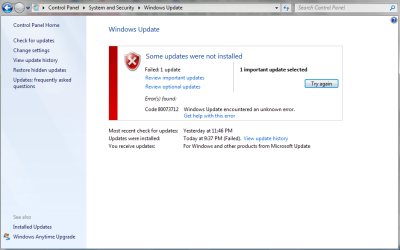
I cannot install windows service pack 1. I attached my error code screenshot. I created a CBS.zip but it was too large to attach (more on that below). After troubleshooting windows update, I completed the following steps:

1. System Update Readiness Tool
I downloaded and installed/ran the appropriate SURT for my system and let it complete.

2. SFC Scan
I opened an elevated command prompt and entered the sfc /scannow command. After it completed, it stated 'Windows found no integrity violations'

3. Windows Update Error Codes
After completing the two above steps, I attempted to install SP1 again. The error code I get is 80073712 as seen in the attached screenshot.

4. Log Collection
I copied the CBS folder from C:\Windows\Logs to my desktop then sent it to a compressed zip folder. When I checked the CheckSUR text, it said I had several CSI payload files missing. From other threads, it seems that I need to obtain these files somehow. I'm not sure what steps to take after this.

My compressed zip CBS folder is too big to attach, approximately 15MB and the limit is 8MB. Is there another way I can upload it here that is acceptable? I also cannot for the life of me locate my original disc to do a repair install. Thanks for any help!
 

Attachments
  • ErrorCode.png
    ErrorCode.png
    34.7 KB · Views: 0

My Computer My Computer

Computer type
Laptop
Computer Manufacturer/Model Number
Dell
OS
Windows 7 Home Premium 32bit
remove the older CBSPersist files from the archive until the compressed size is under the 8MB limit, then upload the file.
 

My Computer My Computer

Computer type
Laptop
Computer Manufacturer/Model Number
Asus K52F or Lenovo B51-80
OS
Win 7 x64 Home Premium (and x86 VirtualBox VM)/Win10
CPU
i3 370M/i7 6500U
Motherboard
Asus/Lenovo
Memory
8GB - finally :)/8GB
Graphics Card(s)
it's an i3, dude!/dual Intel&nVidia
Sound Card
onboard
Monitor(s) Displays
15.6" built-in
Screen Resolution
1366x768/1920x1080
Hard Drives
750GB Seagate internal
Sundry external drives attached to other computers on the local network
1TB SSD on the Lenovo
PSU
n/a
Internet Speed
as much as I can get - usually on a dongle/phone, so <1MB/s
Antivirus
MSE/Defender
Browser
IE11/12/Edge/Chrome/FF(if I must)
Thank you, I removed the older CBSPersist files from the archive and now the zip folder is less than 8MB, I have attached it here.
 

My Computer My Computer

Computer type
Laptop
Computer Manufacturer/Model Number
Dell
OS
Windows 7 Home Premium 32bit
Interesting - the CheckSUR finds only two problems with corrupt/missing files, and SFC finds none, but the SP1 installer finds a number of problems...

Code:
	Line 340753: 2015-10-01 21:37:12, Info                  CSI    000001c4 Hashes for file member \??\C:\Windows\win.ini do not match actual file [l:14{7}]"win.ini" :
	Line 340839: 2015-10-01 21:37:14, Info                  CSI    000001c5 Hashes for file member \??\C:\Windows\Microsoft.NET\Framework\v2.0.50727\CONFIG\machine.config do not match actual file [l:28{14}]"machine.config" :
	Line 341010: 2015-10-01 21:37:17, Info                  CSI    000001c6 Hashes for file member \??\C:\Windows\fonts\cambria.ttc do not match actual file [l:22{11}]"cambria.ttc" :
	Line 341012: 2015-10-01 21:37:17, Info                  CSI    000001c7 Hashes for file member \??\C:\Windows\fonts\cambriab.ttf do not match actual file [l:24{12}]"cambriab.ttf" :
	Line 341014: 2015-10-01 21:37:17, Info                  CSI    000001c8 Hashes for file member \??\C:\Windows\fonts\cambriai.ttf do not match actual file [l:24{12}]"cambriai.ttf" :
	Line 341016: 2015-10-01 21:37:17, Info                  CSI    000001c9 Hashes for file member \??\C:\Windows\fonts\cambriaz.ttf do not match actual file [l:24{12}]"cambriaz.ttf" :
	Line 341162: 2015-10-01 21:37:19, Info                  CSI    000001ca Hashes for file member \??\C:\Windows\System32\Recovery\ReAgent.xml do not match actual file [l:22{11}]"ReAgent.xml" :
	Line 341182: 2015-10-01 21:37:19, Info                  CSI    000001cb Hashes for file member \??\C:\ProgramData\Microsoft\Windows\Start Menu\Programs\Games\Desktop.ini do not match actual file [l:22{11}]"Desktop.ini" :
	Line 341552: 2015-10-01 21:37:28, Info                  CSI    000001cd Hashes for file member \??\C:\ProgramData\Microsoft\Windows\Start Menu\Programs\Accessories\Tablet PC\Desktop.ini do not match actual file [l:22{11}]"Desktop.ini" :

I have to admit that I'm none too certain what exactly these error messages imply, yet.
I'll have to go into the code deeper and see what I can find.

I'll post a fix protocol for the missing payload files later - gotta get to work now.
Code:
Checking Component Store
(f)	CSI Payload File Missing	0x00000000	csrsrv.dll	x86_microsoft-windows-csrsrv_31bf3856ad364e35_6.1.7601.22280_none_cbc86ec01cf9ddde	
(f)	CSI Payload File Missing	0x00000000	csrsrv.dll	x86_microsoft-windows-csrsrv_31bf3856ad364e35_6.1.7601.18113_none_cb8d824703a0c682	

Summary:
Seconds executed: 804
 Found 2 errors
  CSI Payload File Missing Total count: 2
 

My Computer My Computer

Computer type
Laptop
Computer Manufacturer/Model Number
Asus K52F or Lenovo B51-80
OS
Win 7 x64 Home Premium (and x86 VirtualBox VM)/Win10
CPU
i3 370M/i7 6500U
Motherboard
Asus/Lenovo
Memory
8GB - finally :)/8GB
Graphics Card(s)
it's an i3, dude!/dual Intel&nVidia
Sound Card
onboard
Monitor(s) Displays
15.6" built-in
Screen Resolution
1366x768/1920x1080
Hard Drives
750GB Seagate internal
Sundry external drives attached to other computers on the local network
1TB SSD on the Lenovo
PSU
n/a
Internet Speed
as much as I can get - usually on a dongle/phone, so <1MB/s
Antivirus
MSE/Defender
Browser
IE11/12/Edge/Chrome/FF(if I must)
OK - a little checking shows that the versions of the files found by SP1 are actually from SP1 - so obviously, at some point a partial install has happened, but the rollback didn't properly remove the new files which were already in place.
I'm not sure how to proceed with this, but I'll think about it ;)
 

My Computer My Computer

Computer type
Laptop
Computer Manufacturer/Model Number
Asus K52F or Lenovo B51-80
OS
Win 7 x64 Home Premium (and x86 VirtualBox VM)/Win10
CPU
i3 370M/i7 6500U
Motherboard
Asus/Lenovo
Memory
8GB - finally :)/8GB
Graphics Card(s)
it's an i3, dude!/dual Intel&nVidia
Sound Card
onboard
Monitor(s) Displays
15.6" built-in
Screen Resolution
1366x768/1920x1080
Hard Drives
750GB Seagate internal
Sundry external drives attached to other computers on the local network
1TB SSD on the Lenovo
PSU
n/a
Internet Speed
as much as I can get - usually on a dongle/phone, so <1MB/s
Antivirus
MSE/Defender
Browser
IE11/12/Edge/Chrome/FF(if I must)
Thanks for your reply, that's interesting. The install does seem to be successful up until the very end and it cannot complete, so that does seem to be possible that it partially installed somehow.
 

My Computer My Computer

Computer type
Laptop
Computer Manufacturer/Model Number
Dell
OS
Windows 7 Home Premium 32bit
Hmm should I try to uninstall any of the sp1 that partially installed? Also I'm not sure where to get the missing csi payload files and how to put them back in the right way. I'm trying to avoid messing up my whole computer. :confused: Thanks for any suggestions and ideas. Also, a last resort option could be to install a different version of windows, as my friend has their disc. :/
 

My Computer My Computer

Computer type
Laptop
Computer Manufacturer/Model Number
Dell
OS
Windows 7 Home Premium 32bit
Back
Top