cant install windows 7 in the preinstalled windows 8 laptop

sriharizzz

New member
Local time
4:11 AM
Messages
9
isn't it possible to degrade to windows 7???

If not how can I????????
 

My Computer My Computer

At a glance

windows 8 64 bit
OS
windows 8 64 bit
Hello sriharizz am not real sure of what you are trying to do mate . Are you wanting to install 7 over the 8 or have a dual boot?

If you just want the 7 it should just install over the 8 - that will off course remove the 8 completely. The up side is that you will not have the bloat with the new 7 install.

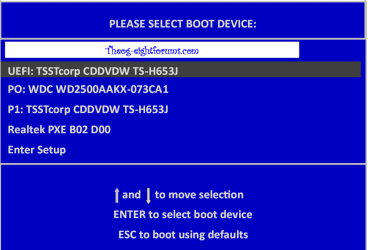
To do that you just need to set the BIOS to boot from the optical drive.

Personally I am staying with 7 until there is a mad rush to 8 for whatever reason.:)
 

My Computer My Computer

At a glance

Desk1 7 Home Prem / Desk2 10 Pro / Main lap A...Desk1 i5 3750K / Laptop i7 GTX 860M / Desk2 i...Desk1 8GB (1866) / Desk2 16GB (1333) / Laptop...Desk 1& 2NVidia GTX 650 & Laptops on board Intel
Computer type
PC/Desktop
Computer Manufacturer/Model Number
Own build (new) Desk1 / Asus ROG Win 7 / Desk2 1st build
OS
Desk1 7 Home Prem / Desk2 10 Pro / Main lap Asus ROG 10 Pro 2 laptop Toshiba 7 Pro Asus P2520 7 & 10
CPU
Desk1 i5 3750K / Laptop i7 GTX 860M / Desk2 i5 2500
Motherboard
Desk1 Asus P877-V / Desk2 Gigabyte H67 UD3H / Laptop ?
Memory
Desk1 8GB (1866) / Desk2 16GB (1333) / Laptop 8Gb DDR3
Graphics Card(s)
Desk 1& 2NVidia GTX 650 & Laptops on board Intel
Sound Card
Desk 1 & 2 -XONAR DG Realtek High Def audio Laptop
Monitor(s) Displays
Desk 1 Benq HD 2450 / Desk2 Philips 24" / Laptop 17.5"
Screen Resolution
1920x1080 D1 & D2 & Laptop 1
Hard Drives
Desk1 Samsung 120GB 830 SSD
Asus ROG 256GB 850 Pro SSD
Desk2 Samsung 840 256 SSD
Toshiba 120GB EVO
PSU
Desk 1 Corsair HX 1050/ Laptop ? / Desk 2 Corsair HX 650
Case
Desk 1 Cooler HAF XM ? Toshiba laptop / Desk2 Coolermaster
Cooling
Fans on all Desk1 -2 Desk2 - all Coolermasters 5 Laptop ?
Keyboard
Desk 1 MS Sidewinder X6 Desk 2 MS Sidewinder X 4
Mouse
Desk 1&2 - Gigabyte MS 900 gamer - laptop - Logitec wireless
Internet Speed
ADSL2+
Other Info
One other Desktop (tester) and spare Toshba laptop both with SSD's
Running Kaspersky 2016 ISS on all machines config'd identically
Logitec audio stereo systems on each machine (x3)
Canon MG5250MFC
Router/modem TP-Link running WPA2SK
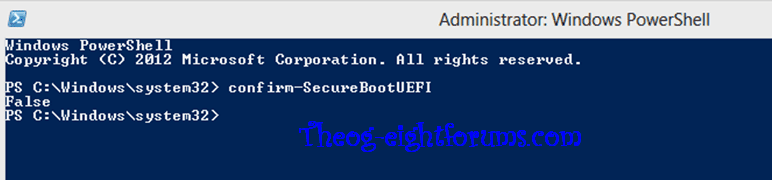
when I tried to install ......it displayed as "SECURE BOOT:IMAGE FAILED TO VERIFY WITH*ACCESS DENIED*

don't know what actually it is...

I tried to format the laptop and wanted to have only windows 7 installed....
 

My Computer My Computer

At a glance

windows 8 64 bit
OS
windows 8 64 bit
Mate I am no expert but I would hazard a guess at that 8 install is protected by some sort of code like a copyright type feature like yo get with DVD's / CDs.

Now one thing I would try as long as you do not want the 8 is to get the drive out hook it up to another machine and erase the disk and format it then install the 7 onto it.

To do that you need either a friends or an old machine of yours if it is a desktop you can just hook the drive into the machine and it will see it as another drive.
The other option is to use a gadget that powers the drive and attaches it to the second machine via USB cable it will be seen as an external drive. If you can do either then it should be quite easy to erase the drive of 8 using the DISKPART function or something like Partition Wizard - wipe drive.

Let us know if you have access to another machine and if you feel confident enough to hook it up to that second machine.

Of course an even easier option is to get another drive (new) set the BIOS to boot form the Opto drive and install the 7. If you can afford it and do not have the need for a lot of drive capacity then an SSD is really the way to go. In any case for extra data you can always use a larger external drive for that if say you picked 120GB SSD..
 

My Computer My Computer

At a glance

Desk1 7 Home Prem / Desk2 10 Pro / Main lap A...Desk1 i5 3750K / Laptop i7 GTX 860M / Desk2 i...Desk1 8GB (1866) / Desk2 16GB (1333) / Laptop...Desk 1& 2NVidia GTX 650 & Laptops on board Intel
Computer type
PC/Desktop
Computer Manufacturer/Model Number
Own build (new) Desk1 / Asus ROG Win 7 / Desk2 1st build
OS
Desk1 7 Home Prem / Desk2 10 Pro / Main lap Asus ROG 10 Pro 2 laptop Toshiba 7 Pro Asus P2520 7 & 10
CPU
Desk1 i5 3750K / Laptop i7 GTX 860M / Desk2 i5 2500
Motherboard
Desk1 Asus P877-V / Desk2 Gigabyte H67 UD3H / Laptop ?
Memory
Desk1 8GB (1866) / Desk2 16GB (1333) / Laptop 8Gb DDR3
Graphics Card(s)
Desk 1& 2NVidia GTX 650 & Laptops on board Intel
Sound Card
Desk 1 & 2 -XONAR DG Realtek High Def audio Laptop
Monitor(s) Displays
Desk 1 Benq HD 2450 / Desk2 Philips 24" / Laptop 17.5"
Screen Resolution
1920x1080 D1 & D2 & Laptop 1
Hard Drives
Desk1 Samsung 120GB 830 SSD
Asus ROG 256GB 850 Pro SSD
Desk2 Samsung 840 256 SSD
Toshiba 120GB EVO
PSU
Desk 1 Corsair HX 1050/ Laptop ? / Desk 2 Corsair HX 650
Case
Desk 1 Cooler HAF XM ? Toshiba laptop / Desk2 Coolermaster
Cooling
Fans on all Desk1 -2 Desk2 - all Coolermasters 5 Laptop ?
Keyboard
Desk 1 MS Sidewinder X6 Desk 2 MS Sidewinder X 4
Mouse
Desk 1&2 - Gigabyte MS 900 gamer - laptop - Logitec wireless
Internet Speed
ADSL2+
Other Info
One other Desktop (tester) and spare Toshba laptop both with SSD's
Running Kaspersky 2016 ISS on all machines config'd identically
Logitec audio stereo systems on each machine (x3)
Canon MG5250MFC
Router/modem TP-Link running WPA2SK
Bypassing UEFI to Install Win7 normally to an MBR HD

Make your Recovery disks and save a System image as a secondary backup. Back up your files, unplug all other HD's and peripherals,

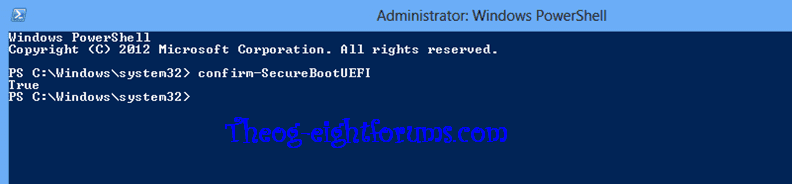
Boot into BIOS setup, if this is a new Win8 PC look for a setting to disable Secure Boot. Then enable Legacy BIOS or Compatibility Support Module (CSM). This should remove any EFI Boot Disk from BIOS Boot order. Set DVD drive first to boot, HDD second. Then set SATA controller to AHCI. Save changes and Exit.

Then boot into installer DVD or flash stick burned or written using tool and latest ISO for your licensed OS version here.

At first installer screen Press Shift + F10 to open a Command Box, type:

DISKPART
LIST DISK
SEL DIS 0 (after confirming Windows 7 target HD #)
CLEAN
CONVERT MBR
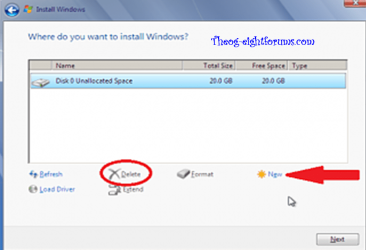
CREATE PARTITION PRIMARY SIZE=102400 (for 100gb partition, adjust as desired)
FORMAT FS=NTFS LABEL="WINDOWS 7"
ACTIVE
EXIT
EXIT

Next click Install Now to Clean Install Windows 7 to the partition you created. If it fails then report back at which step and the verbatim error message.

In addition read over these steps to understand the tools and methods which work best to get and maintain a perfect Clean Reinstall - Factory OEM Windows 7. The steps are the same for retail.

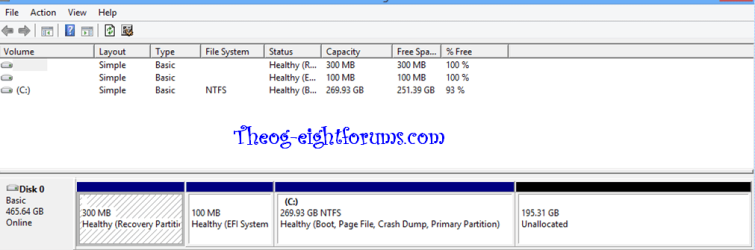
The purpose of creating the partition above is to wipe the HD and define an Active partition which resolves most install failures. Afterwards you can adjust the OS partition size in Disk Mgmt, create other partitions as desired.

 
Last edited:
Thanks Greg I knew you has something somewhere but couldn't fins a way of finding it. One I'll have to save in docs (for ref):)

John
 

My Computer My Computer

At a glance

Desk1 7 Home Prem / Desk2 10 Pro / Main lap A...Desk1 i5 3750K / Laptop i7 GTX 860M / Desk2 i...Desk1 8GB (1866) / Desk2 16GB (1333) / Laptop...Desk 1& 2NVidia GTX 650 & Laptops on board Intel
Computer type
PC/Desktop
Computer Manufacturer/Model Number
Own build (new) Desk1 / Asus ROG Win 7 / Desk2 1st build
OS
Desk1 7 Home Prem / Desk2 10 Pro / Main lap Asus ROG 10 Pro 2 laptop Toshiba 7 Pro Asus P2520 7 & 10
CPU
Desk1 i5 3750K / Laptop i7 GTX 860M / Desk2 i5 2500
Motherboard
Desk1 Asus P877-V / Desk2 Gigabyte H67 UD3H / Laptop ?
Memory
Desk1 8GB (1866) / Desk2 16GB (1333) / Laptop 8Gb DDR3
Graphics Card(s)
Desk 1& 2NVidia GTX 650 & Laptops on board Intel
Sound Card
Desk 1 & 2 -XONAR DG Realtek High Def audio Laptop
Monitor(s) Displays
Desk 1 Benq HD 2450 / Desk2 Philips 24" / Laptop 17.5"
Screen Resolution
1920x1080 D1 & D2 & Laptop 1
Hard Drives
Desk1 Samsung 120GB 830 SSD
Asus ROG 256GB 850 Pro SSD
Desk2 Samsung 840 256 SSD
Toshiba 120GB EVO
PSU
Desk 1 Corsair HX 1050/ Laptop ? / Desk 2 Corsair HX 650
Case
Desk 1 Cooler HAF XM ? Toshiba laptop / Desk2 Coolermaster
Cooling
Fans on all Desk1 -2 Desk2 - all Coolermasters 5 Laptop ?
Keyboard
Desk 1 MS Sidewinder X6 Desk 2 MS Sidewinder X 4
Mouse
Desk 1&2 - Gigabyte MS 900 gamer - laptop - Logitec wireless
Internet Speed
ADSL2+
Other Info
One other Desktop (tester) and spare Toshba laptop both with SSD's
Running Kaspersky 2016 ISS on all machines config'd identically
Logitec audio stereo systems on each machine (x3)
Canon MG5250MFC
Router/modem TP-Link running WPA2SK
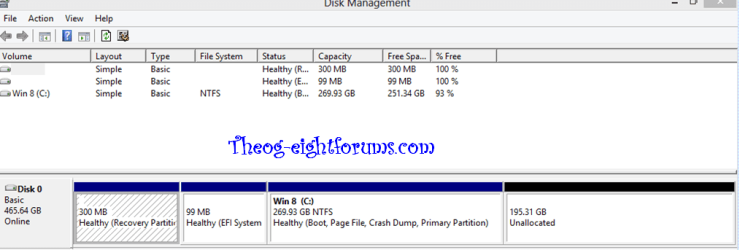
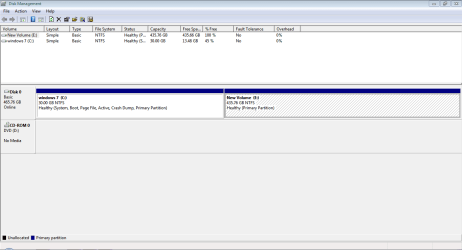
thankyou very much gregrocker......it worked well now my pc is on windows 7.....But sir i have allocated 30 GB for the windows 7.....and in the my computer i can see only the 30 GB local disk sir.....i cant find remaining capacity of my 500GB hard disk.....please help me sir.......
 

My Computer My Computer

At a glance

windows 8 64 bit
OS
windows 8 64 bit
If you only have 30gb partition you must have typed a smaller number in during the Diskpart commands than what was suggested? That's OK we can help fix it.

Please post back a screenshot of your maximized Disk Management drive map and listings:

1. Type Disk Management in Start Search box.
2. Open Disk Mgmt. window and maximize it.
3. Type Snipping Tool in Start Search box.
4. Open Snipping Tool, choose Rectangular Snip, click New, draw a box around full drive map and all listings.
5, Save Snip, attach using paper clip in Reply Box.
 
thanku greg.....i got my invisible space by the disk management............thank u very much for every thing u rock man.........
 

My Computer My Computer

At a glance

windows 8 64 bit
OS
windows 8 64 bit
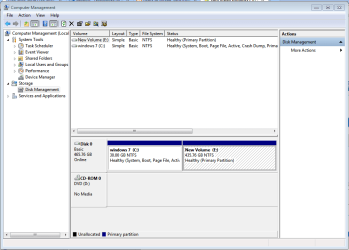
Did you extend the 30gb partition as shown here? Partition or Volume - Extend

It would still be good to see the Disk Mgmt screenshot.

Can you also tell us which exact steps were used to bypass EFI if you can recall? Were any significantly different than I wrote in the steps?

This information will help others. THis was our first test case for bypassing Secure Boot to install another OS. It will become a very important resource on the internet.

Please also let us know how performance goes as you set it up and afterwards.
 
Please post a screenshot of Disk Management, window maximized amd columns/panes adjusted to reveal maximum info.

Edit: never mind, I see it's already been requested. As Greg mentions, though, it would be good to post it even though you seem to be fixed up.
 

My Computer My Computer

At a glance

Windows 7 Ultimate x64
OS
Windows 7 Ultimate x64
Capture.PNG

i dint find many which u said
1.i have said dvd hdd in boot priority
2.disabled secure bot
3.in the secure boot option i dont remember the name but there were 3 options for efi,for xp and wind 7,for both efi and windows 7.....i have kept windows7 and xp option(name was something starting with cs and all....)
4.followed your steps i.e shift+F10 and followed every thing....
5.Finally got the windows 7
 

My Computer My Computer

At a glance

windows 8 64 bit
OS
windows 8 64 bit
1.uefi os
2.csm os
3.uefi and csm os

These are the suboptions in the secure boot option
 

My Computer My Computer

At a glance

windows 8 64 bit
OS
windows 8 64 bit

My Computer My Computer

At a glance

ME/XP/Vista/Win7
OS
ME/XP/Vista/Win7

My Computer My Computer

At a glance

ME/XP/Vista/Win7
OS
ME/XP/Vista/Win7
So I would not call it a BIOS lock then, but a protective feature which is adjustable in BIOS.

This has been softened considerably from what was originally announced, probably because of uproar and sensitivity to how courts have ruled in the past when OEM's tried to lock down their BIOS - a property infringement.
 
Back
Top